• Check out the results of the Techtree Contest #19!
  • Listen to a special audio message from Bill Roper to the Hive Workshop community (Bill is a former Vice President of Blizzard Entertainment, Producer, Designer, Musician, Voice Actor) 🔗Click here to hear his message!
  • Read Evilhog's interview with Gregory Alper, the original composer of the music for WarCraft: Orcs & Humans 🔗Click here to read the full interview.
  • Create a void inspired texture for Warcraft 3 and enter Hive's 34th Texturing Contest: Void! Click here to enter!
  • The Hive's 22nd Icon Contest: Creep Abilities is now concluded, time to vote for your favourite set of icons! Click here to vote!

Self-fix for JNGP on Patch 1.28

The reason JNGP does not work out of the box on patch 1.28 is that the CD keys have been removed from the MPQ files. So, when the world editor can't find the TFT cd key it assumes you only have ROC installed and loads that editor instead.

To fix this you must:
  1. Download font.zip and extract the "roc.font" folder and rename it to "font".
  2. Go to your 1.28 installation folder, and open "War3.mpq" with a MPQ Editor.
  3. Import the "font" folder that you extracted earlier to the root of the MPQ and close it.
  4. Repeat for the "tft.font" folder and "War3x.mpq"..
This will load up the TFT editor when launching JNGP.
 
Last edited:
I edited the thread title from 'Hotfix' to 'Self-fix' to avoid confusion because the term hotfix is being used to refer to Blizzard fixing the issues for 1.28. Anyhow, great thread for the meantime if anyone needs to use JNGP in 1.28 right now. Note that the self-fix may or may not be necessary anymore depending on a fix that could come from Blizzard.
 
Last edited:
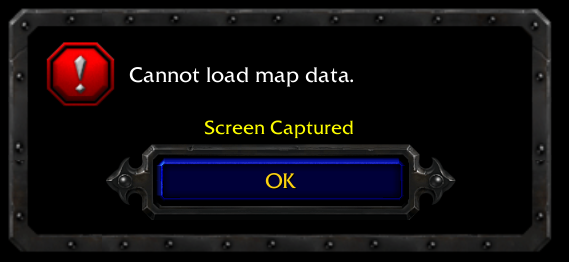
well, the JNGP starts, but when I try test map i get this:
oSr3Dxv.png
 
Do you have a recommended procedure for creating a downgraded copy of wc3 so I can get my 1.27b fonts file from it? I already patched my main install.
 
I googled for some keys and installed with those. Attached.
 

Attachments

The reason JNGP does not work out of the box on patch 1.28 is that the CD keys have been removed from the MPQ files. So, when the world editor can't find the TFT cd key it assumes you only have ROC installed and loads that editor instead.

To fix this you must:
  1. Download font.zip and extract the "roc.font" folder and rename it to "font".
  2. Go to your 1.28 installation folder, and open "War3.mpq" with a MPQ Editor.
  3. Import the "font" folder that you extracted earlier to the root of the MPQ and close it.
  4. Repeat for the "tft.font" folder and "War3x.mpq"..
This will load up the TFT editor when launching JNGP.

You are the man! This works 110% fixed it for me instantly, i'd +rep but already have on you lol
 
Although this method works, i highly doubt that the change of the key location is moved anytime soon, since they more or less split tge game from the user-specific data (and thus, the data migration). So i wanted to ask if soneone is currently active working on JNGP to make it compatible again. (Dont know if this is already too offtopic, you can tell me the place to go with this if it is)
 
Doesn't work for me... tried with both my original keys and the ones in this thread (was smart enough to export the font folders before i updated). I import them into the MPQ within the "font\" directory, using WinMPQ. Do i need to restart the computer or something?

EDIT: Turns out it only works when you don't run NewGen WE.exe as administrator.
 
Last edited:
I tried out 1.28.1 on my old laptop despite all these claims of painful changes in order to use Battle.net with a friend. For me, it's been working OK except for one big issue:

When the editor makes the command line call to start the game to test a map, it is using the string
Code:
"C:\Program Files (x86)\Warcraft III\war3.exe" -loadfile c:\program files (x86)\warcraft iii\Maps\Test\WorldEditTestMap.w3m

but in fact we know as developers this is wrong, since the string should be quoted as an argument to load file, like this:

Code:
"C:\Program Files (x86)\Warcraft III\war3.exe" -loadfile "c:\program files (x86)\warcraft iii\Maps\Test\WorldEditTestMap.w3m"

So because of this bug in the editor I cannot test any maps on this computer now and it always simply shows a black screen. Is this some corruption issue in my installation, or is this the same for everyone?
 
I tried out 1.28.1 on my old laptop despite all these claims of painful changes in order to use Battle.net with a friend. For me, it's been working OK except for one big issue:

When the editor makes the command line call to start the game to test a map, it is using the string
Code:
"C:\Program Files (x86)\Warcraft III\war3.exe" -loadfile c:\program files (x86)\warcraft iii\Maps\Test\WorldEditTestMap.w3m

but in fact we know as developers this is wrong, since the string should be quoted as an argument to load file, like this:

Code:
"C:\Program Files (x86)\Warcraft III\war3.exe" -loadfile "c:\program files (x86)\warcraft iii\Maps\Test\WorldEditTestMap.w3m"

So because of this bug in the editor I cannot test any maps on this computer now and it always simply shows a black screen. Is this some corruption issue in my installation, or is this the same for everyone?
This only would be a problem with special characters path names.

Whay they need to fix is to use the path itself, (actually use the %UserProfile%/Documents/Warcraft III/Maps path)
 
The reason JNGP does not work out of the box on patch 1.28 is that the CD keys have been removed from the MPQ files. So, when the world editor can't find the TFT cd key it assumes you only have ROC installed and loads that editor instead.

To fix this you must:
  1. Download font.zip and extract the "roc.font" folder and rename it to "font".
  2. Go to your 1.28 installation folder, and open "War3.mpq" with a MPQ Editor.
  3. Import the "font" folder that you extracted earlier to the root of the MPQ and close it.
  4. Repeat for the "tft.font" folder and "War3x.mpq"..
This will load up the TFT editor when launching JNGP.


I have the font file with both 'font' and 'tft.font' however im not sure where to put them in MPQ, i tried just 'Adding file' but that didnt work, any advice welcome
 
Hey, I don't get how am I supposed to put the folder file in the root of the MPQ, what do you mean by the root and how can I put the folder file? I only have the option of uploading files not folders.
 
Hey, I don't get how am I supposed to put the folder file in the root of the MPQ, what do you mean by the root and how can I put the folder file? I only have the option of uploading files not folders.

I am having this same problem, using the MPQ editor provided in OP link. Would another MPQ editor be a better choice? I will attempt to create my own folder called "Font" and place these files within. Be back with conclusion

-edit: I have tried to create new folder and place files in, as well as drag and drop entire folder, following OP instructions. JNGP will still load with ROC impression. Dang it. Someone who has had success, please help!

-edit2: Missed the crucial step of changing roc.font and tft.font to just "font" before dragging and dropping folder. JNGP successfully back to TFT display. Hope this helps anyone else who missed that step!
 
Last edited:
For any1 still interested in using JNGP instead of WEX, I fixed Wurstpack(which is based on jngp) for 1.28.5 by creating a compatability copy of the wc3 installation.
Your original install will stay untouched. The only drawback is that you need another 1GB of space.
Additionally the map needs to be copied into the documents folder upon testing in editor.
It's not 100% ready to be published, but you can try it out via this link: http://peeeq.de/hudson/job/Wurst/ws/downloads/wurstpack_complete.zip

Of course this requires a valid java installation on your system

Just extract the archieve and run WurstWE.exe - a dialog should pop up asking you to fix your installation.
Feel free to test and tell me how it works.
 
Last edited:
Back
Top