
• Check out the results of the Techtree Contest #19!
  • Listen to a special audio message from Bill Roper to the Hive Workshop community (Bill is a former Vice President of Blizzard Entertainment, Producer, Designer, Musician, Voice Actor) 🔗Click here to hear his message!
  • Read Evilhog's interview with Gregory Alper, the original composer of the music for WarCraft: Orcs & Humans 🔗Click here to read the full interview.
  • Create a void inspired texture for Warcraft 3 and enter Hive's 34th Texturing Contest: Void! Click here to enter!
  • The Hive's 22nd Icon Contest: Creep Abilities is now concluded, time to vote for your favourite set of icons! Click here to vote!

Hive's 2D Manipulation Workshop

Edit:

@dell
The Kel'thuzad.

Why his face is green?
i made my own alternative.


btnhkelthuzad-png.241268
disbtnhkelthuzad-png.241248
 
Last edited by a moderator:
hey boys me again again i need icons for these models
 

Attachments

Oh, woah, didn't check this thread for Edits.
@Kyrbi0
For the Mesmerize, I haven't been working on it for awhile since there were others I've been doing, but I'll update it now. Oh and for the Crawl, if you want to, then sure. ... Here's the Mesmerize btw, I've taken a look with the Headhunter and Witch Doctor icons and did some changes with the nose
Ooh, much better. Thanks!

Edge45 said:
@Kyrbi0
Lol, the crawl seemed to already be good enough. I can't think of anything to add it anymore.
Lol, if you say so. Looking at Burrow & Submerge it needs some kind of "splash" of mobile materials, though I'm not sure quite what/how to do it.
 
@dell : Here you go. I didn't create an icon for the Green Warlord, has an awful face wrap. Maybe ask other members here.

BTNBanditMilitia.png BTNGilnesBarracks.png BTNHumanMilitia.png BTNDwarvenKingsHammerGuard.png BTNHeroCrusader.png
 

Attachments

Last edited:
hey people me again sorry for the triple post i need one icon for these models
 

Attachments

Attachments

  • BTNOrcWarlord.png
    BTNOrcWarlord.png
    12 KB · Views: 94
  • BTNHeroCrusader.png
    BTNHeroCrusader.png
    11.6 KB · Views: 105
  • BTNGilnesBarracks.png
    BTNGilnesBarracks.png
    11.4 KB · Views: 91
  • BTNDwarvenHammerGuard.png
    BTNDwarvenHammerGuard.png
    11.9 KB · Views: 86
  • Dell'sReqPartial.rar
    Dell'sReqPartial.rar
    78 KB · Views: 84
@Edge45 : Yeah, Sorry though. I didn't notify you.

@dell : Here you go.

BTNCamilia.png BTNDwarvenFarSeer.png BTNDwarvenRider.png BTNImperialCaptain.png BTNNEArchmage.png BTNNEWarlock.png
 

Attachments

good job with the mammoth quest guys. you guys are awesome.
 
Hello!

I'm making a map that would utilize Naga Ui made by viiva, but sadly the texture set is a bit incomplete, so...
Could anyone make (or point me towards it if it has already been done):

1. Naga Cinematic Border texture - this is something I'd need the most.
2. Main Menu/Log/Quest tab borders

I need something that would work well with these resources:
https://www.hiveworkshop.com/threads/humanuitile01-blp.121508/#resource-39939
https://www.hiveworkshop.com/threads/humanuitile02-blp.121509/#resource-39940
https://www.hiveworkshop.com/threads/humanuitile03-blp.121510/#resource-39941
https://www.hiveworkshop.com/threads/humanuitile04-blp.121511/#resource-39942
https://www.hiveworkshop.com/threads/humanuitile-inventorycover-blp.121512/#resource-39943
https://www.hiveworkshop.com/threads/humanuitile-timeindicatorframe-blp.121513/#resource-39944

The race I'm overwriting are the Night Elves, simply because the buttons and backgrounds seem to fit best with the custom UI. All I really need is to change the leaf-y borders of the cinematic mode/menus to fit the naga theme a bit more.

Of course, I will +rep anyone who helps me out here :)
 
Hello!

I'm making a map that would utilize Naga Ui made by viiva, but sadly the texture set is a bit incomplete, so...
Could anyone make (or point me towards it if it has already been done):

1. Naga Cinematic Border texture - this is something I'd need the most.
2. Main Menu/Log/Quest tab borders

I need something that would work well with these resources:
https://www.hiveworkshop.com/threads/humanuitile01-blp.121508/#resource-39939
https://www.hiveworkshop.com/threads/humanuitile02-blp.121509/#resource-39940
https://www.hiveworkshop.com/threads/humanuitile03-blp.121510/#resource-39941
https://www.hiveworkshop.com/threads/humanuitile04-blp.121511/#resource-39942
https://www.hiveworkshop.com/threads/humanuitile-inventorycover-blp.121512/#resource-39943
https://www.hiveworkshop.com/threads/humanuitile-timeindicatorframe-blp.121513/#resource-39944

The race I'm overwriting are the Night Elves, simply because the buttons and backgrounds seem to fit best with the custom UI. All I really need is to change the leaf-y borders of the cinematic mode/menus to fit the naga theme a bit more.

Of course, I will +rep anyone who helps me out here :)


I'll put a try on yours.
 
@MasterBlaster

Well I've finished yours along with the needed ones.
BUT there was a problem while testing, the cinematic borders along with some modified console stuff do not work in cinematic mode (via Cinematic Mode On for all Players trigger function, though I have not tested Letterbox mode), there were only thin black lines and a disabled (grey) backround.

The problem is not from the textures (I think) but from Warcraft itself, it seems it doesn't overwrite the consoles, menus, borders and tabs, I am not sure about this, but I did test a recolored cinematic borders of the night elf, tested it and confirmed that it still did not overwrite and left with the same result as above.

Sorry, I don't know how to fix this. Here are the textures btw. Only the Quest/Menu/etc button works.
 

Attachments

  • nightelf-console-buttonstates2.png
    nightelf-console-buttonstates2.png
    12.8 KB · Views: 122
  • nightelf-options-button-background.png
    nightelf-options-button-background.png
    66.3 KB · Views: 100
  • nightelf-options-menu-border.png
    nightelf-options-menu-border.png
    35 KB · Views: 110
  • nightelf-cinematic-border.png
    nightelf-cinematic-border.png
    26.3 KB · Views: 81
  • ConsolesNaga.rar
    ConsolesNaga.rar
    291.2 KB · Views: 72

Attachments

Last edited by a moderator:
@MasterBlaster

Well I've finished yours along with the needed ones.
BUT there was a problem while testing, the cinematic borders along with some modified console stuff do not work in cinematic mode (via Cinematic Mode On for all Players trigger function, though I have not tested Letterbox mode), there were only thin black lines and a disabled (grey) backround.

The problem is not from the textures (I think) but from Warcraft itself, it seems it doesn't overwrite the consoles, menus, borders and tabs, I am not sure about this, but I did test a recolored cinematic borders of the night elf, tested it and confirmed that it still did not overwrite and left with the same result as above.

Sorry, I don't know how to fix this. Here are the textures btw. Only the Quest/Menu/etc button works.
Thank you so much anyway!

I'll try to make it work, but if it doesn't - would you mind me asking around about this? And if someone knows how to fix it, potentially editing your work if needed?
 
Thank you so much anyway!

I'll try to make it work, but if it doesn't - would you mind me asking around about this? And if someone knows how to fix it, potentially editing your work if needed?

You're free to do whatever it is needed as long as you give credits to the workshop.
Goodluck :)


====
I'll finish off dell's request, (I feel like there was already an icon for that dwarf but I can't seem to remember it clearly)
 
Last edited:
You're free to do whatever it is needed as long as you give credits to the workshop.
Goodluck :)
I will :)

I did some testing and it's really weird - it indeed does what you said, but...

I've tried using some other UI for reference - Sin'dorei UI (https://www.hiveworkshop.com/threads/ui.191401/ - post #2, first one on the list), imported the cinematic border, options menu background and options menu borders and somehow it managed to overwrite the default UI.
 
So I guess it was from the texture then, could be the Alpha channel (the transparency) , I don't know how that happen since I created the alphas by copying the layout and fill them.
I'll try to rework with it, but don't count on me, there might be others who know. If you know what the problem is with that texture then let me know.
 
OFF-TOPIC: It's quite sad that the founder of this group has left, We could really need some Election on who'll take over this Workshop xP
 
I'm extremely grateful for your help anyway, Edge45! From what I've seen, your work looks insanely cool and it probably took quite a bit to make, so thank you again! :)

---

I don't know anything about creating UI, so I can't really tell you what the problem with the texture is - but if I happen to stumble on an anwer, I'll surely let you know :)

For now, I have tried the Sin'dorei UI and the Firefox UI - and both work, so I guess that it's something about the texture and not the editor. I have no clue what it is, though... Perhaps it's the alpha chanel thing you speak of, I remember reading somewhere that it might cause textures to not be displayed.

---

If you'd be willing to have another crack at it - I can absolutely wait until you have the time to do so, before I cause a ruckus over this :)
 
I'm extremely grateful for your help anyway, Edge45! From what I've seen, your work looks insanely cool and it probably took quite a bit to make, so thank you again! :)

---

I don't know anything about creating UI, so I can't really tell you what the problem with the texture is - but if I happen to stumble on an anwer, I'll surely let you know :)

For now, I have tried the Sin'dorei UI and the Firefox UI - and both work, so I guess that it's something about the texture and not the editor. I have no clue what it is, though... Perhaps it's the alpha chanel thing you speak of, I remember reading somewhere that it might cause textures to not be displayed.

---

If you'd be willing to have another crack at it - I can absolutely wait until you have the time to do so, before I cause a ruckus over this :)

Alright then, I'm trying to see how the Sindorei UI really works.

===
OFF-TOPIC: It's quite sad that the founder of this group has left, We could really need some Election on who'll take over this Workshop xP

We'll have to know what the others think, but I don't really think it needs an owner, just a manager.

===
@dell

Here's the two icons; Dwarven Warrior and Human Archer.
 

Attachments

  • BTNDwarvenWarrior.png
    BTNDwarvenWarrior.png
    11.9 KB · Views: 77
  • BTNHumanArcher.png
    BTNHumanArcher.png
    12.3 KB · Views: 59
  • DellAnotherReqX.rar
    DellAnotherReqX.rar
    41.2 KB · Views: 77
Hey, Edge - I don't want to bother you, but did you learn anything interesting about the Naga UI? :)
It's on hold for the moment while I'm gathering all the requested resources here. I'll see if I can work on it this day.

Edit
@MasterBlaster

I'm glad to inform you that I found the problem, it was my converter Warcraft3Viewer, from .tga to .blp. I tried using other converters and it worked.
Though, I have to rework on the borders since there were a lot of mistakes :P and misplacements, but I should be able to fix it :D
 
Last edited:
I don't know what to say without sounding weird, but hell...

Man, that's awesome. And you are such a totally amazing person! I'm so super grateful for your time and effort, man! If you ever happen to be in Poland, I owe you a beer or an orange juice :) Thank you!

If you have other work, do it - I can totally wait now that I know you have found the problem :)
 
Now that I see this, I want an Orc skin for the NE Huntress. :D
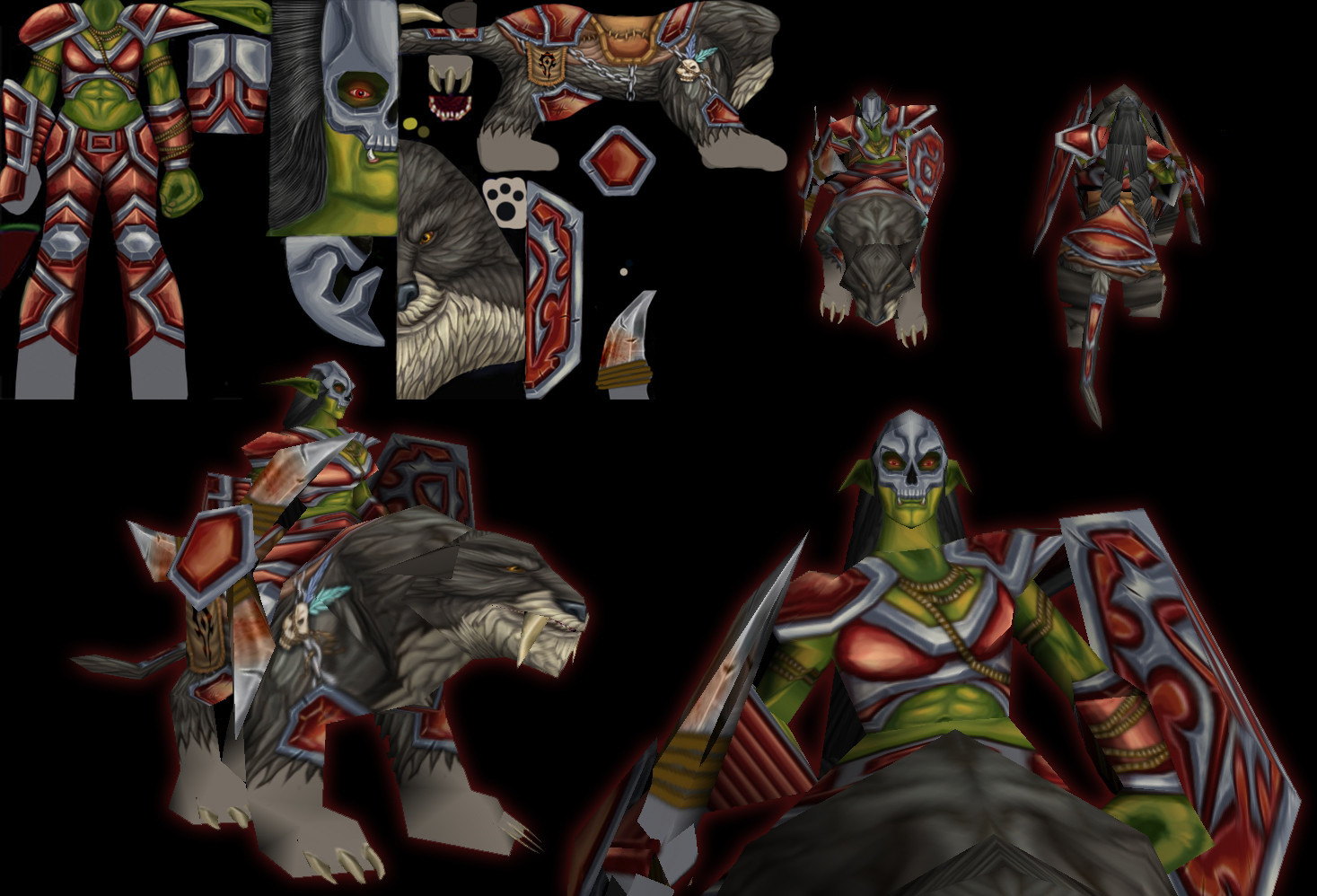
i found one that someone made long time ago. it's still a wip, though i have a finished version that i done by myself. not that hard to finish something that only need little work to be done.


hVugMVB.jpg
 
Back
Top