• Listen to a special audio message from Bill Roper to the Hive Workshop community (Bill is a former Vice President of Blizzard Entertainment, Producer, Designer, Musician, Voice Actor) 🔗Click here to hear his message!
  • Read Evilhog's interview with Gregory Alper, the original composer of the music for WarCraft: Orcs & Humans 🔗Click here to read the full interview.
  • The Hive's 22nd Icon Contest: Creep Abilities is now concluded, time to vote for your favourite set of icons! Click here to vote!
  • ✅ The POLL for Hive's Texturing Contest #34 is OPEN! Vote for the TOP 3 SKINS! 🔗Click here to cast your vote!
  • ✅ The POLL for Hive's Techtree Contest #20 is OPEN! Vote for the TOP 3 FACTIONS! 🔗Click here to cast your vote!

NeoDex 2.7 Wc3 Modeling Kit for 3dsmax & GMAX

I got 3dsMax9 and its work. I believe its only my problem on 3dsmax2013

I noticed that the importer happens to bug if you set certain controllers to default. For instance, if you make ON/Off to default for visibility controllers then the importer will mess up heavily.

If you want to fix max 2013, reset 3ds max's configuration by deleting the .enu file.
 
So i tried to use IK Chain to animated my model, most of them are working pretty good except for a minor thing (i followed your tutorial): The Bone_Root doesnt work properly when the model is exported, lets say it doesnt work like its supposed to in 3ds max.

Its Z axis is 63 and its working fine, the foots are on the ground:

attachment.php


Its Z axiz turns to 54 and it makes my model go down alittle bit under the ground:

attachment.php


I changed the Z axis to 64, now it looks pretty fine:

attachment.php


That must be all for now :pgrin:
 

Attachments

  • 1.JPG
    1.JPG
    88.2 KB · Views: 568
  • 2.JPG
    2.JPG
    65.6 KB · Views: 565
  • 3.JPG
    3.JPG
    56.9 KB · Views: 541
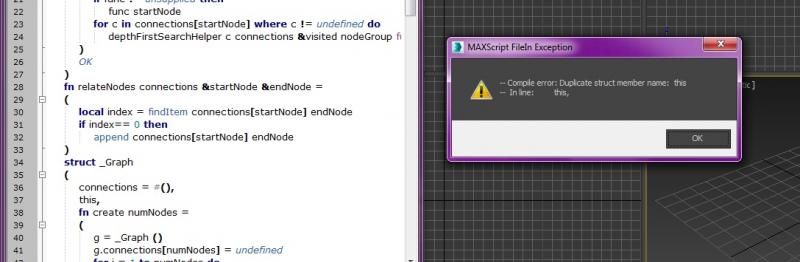
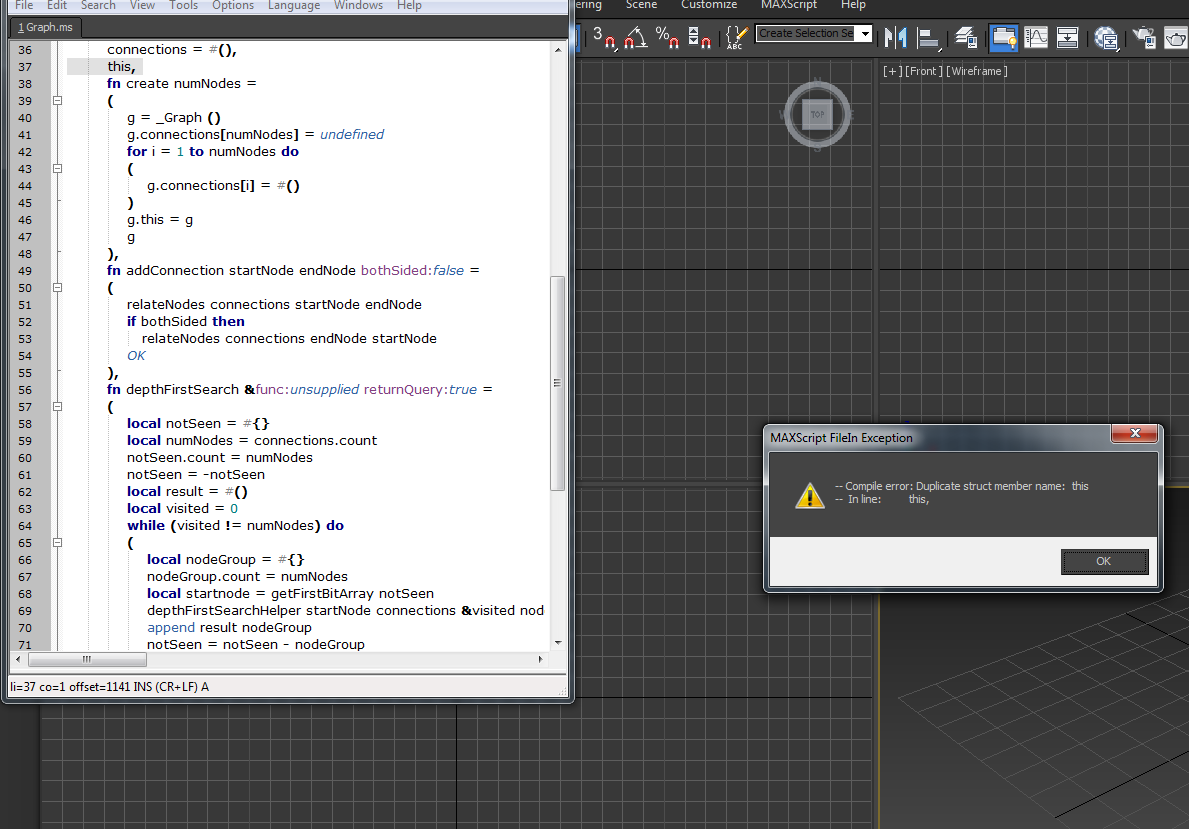
Error in 3dsMax 2015

I'm receiving the following error when trying to run the installer script in 2015:
This is showings Graph.ms as the error pops, btw
Saw a previous post mentioning something along these lines popping up in Graph.ms and another script, and a reply from you regarding a note that references this for 2014+, but couldn't find any such note. Thanks for taking the time to read this, can't wait to use NeoDex and see what I can do :D
grapherror.jpg


Edit: Solved, nevermind me, found the solution on p36, accidentally skipped back to 35 when looking for it. :)
 
So i tested M2 importer with my 3ds max 2010 and nothing happened.I opened the listener and there was writing:
D:\Documents and Settings\FLORIN\Local Settings\Application Data\Autodesk\3dsMax\2010 - 32bit\enu\plugcfg\m2import.ini not found! Using default settings...
Can you help me pls???
 
So i tested M2 importer with my 3ds max 2010 and nothing happened.I opened the listener and there was writing:
D:\Documents and Settings\FLORIN\Local Settings\Application Data\Autodesk\3dsMax\2010 - 32bit\enu\plugcfg\m2import.ini not found! Using default settings...
Can you help me pls???

You should see it on maxscript utilities. In a dropdown menu.
 
Error?

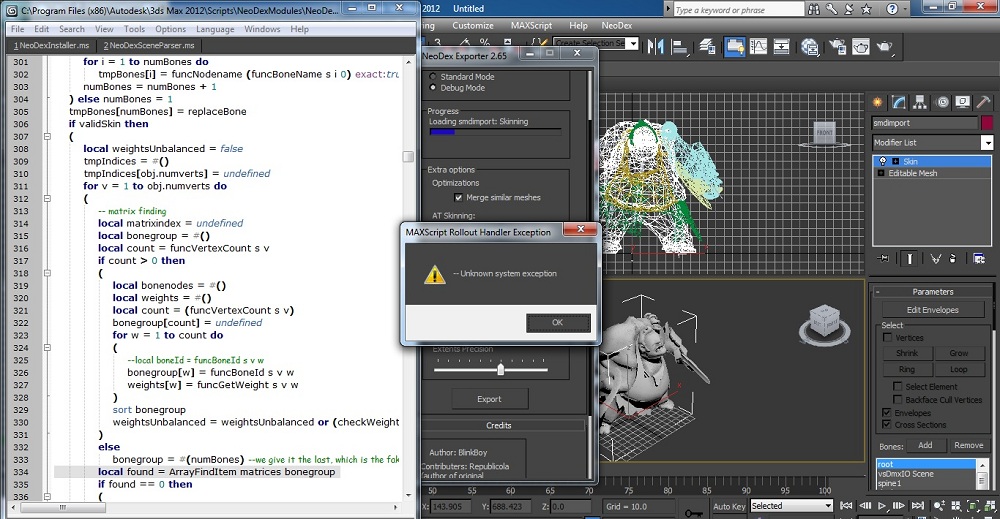
I've been getting this error since i switch 2010 to 2012 64 bit version
I used 0.78b in exporting and works well in 2010 32bit version
but the latest 2.65 on 2012 64 bit version always got error on 2012
i did the same thing on 2010 but works well
i don't think i make a mistake on install neodex
 

Attachments

  • 1.jpg
    1.jpg
    766.1 KB · Views: 222
well i switched to 32 bit still got the error. i'm still new in 3ds max so i don't know how to send the log but what i got is here

EFs1bi4.jpg
 
cant export vertexcolor animation (change color)
 

Attachments

  • cantusecolor.jpg
    cantusecolor.jpg
    71.4 KB · Views: 232
  • cantusecolor2.jpg
    cantusecolor2.jpg
    26.4 KB · Views: 171
I post Reply on you another post..
https://www.hiveworkshop.com/forums...it-sc2-models-m3-xml-xml-m3-converter-259521/

"please tell me
how can I animation UV .
neodex can't export it. even can't fix it use WME(cant save file).

This is Arthas Frostmourne glow.
I think you can understand what I'm meaning. "

"I think here is the problem: WME /mango‘s tool can’t save “ TVertexAnimId 0,”
Neodex can‘t export UV Animation。
vertex color , I think neodex can't change RGB value" 255 255 255"to "1,1,1"
I try to change controller of RGB,but no use
Hope you can Fix this!man! "


ok,.. can you post picture how to "animate the u offset and v offset on bitmaps. "
in 3dmax5 ,I Animate modifier [UVW maping] 's Gizmo, art tools can export it.
but this way can't work with Neodex.


And Wc3 Vertex color ,which controller can work, I have tryed ereryone I can find in max2010……
 

Attachments

  • 镜头2.gif
    镜头2.gif
    673.3 KB · Views: 224
  • arthasstand1gaoqin.gif
    arthasstand1gaoqin.gif
    1.9 MB · Views: 224
I think the peroblem is

the warcraft material can't Animate in Curve Editor..

so Can't set loop Animation too,“GlobalSequence”....

But I find standard material can do this and Neodex can auto export standard material to warcraft material.
..
so only need to change materail type in mango's Editor.
 

Attachments

  • animateUVwarcraft.jpg
    animateUVwarcraft.jpg
    206.3 KB · Views: 309
Last edited:
Hi!I was trying to import a M2 model into 3ds max 2010 and i am getting the error in the photo from attachment(its a Warlords of Draenor model)
I have put the model in the attachment too in case you want to look at it yourself.(I dont want the model to have textures)
Please Help!!Thanks!
<<Please check the other thread
https://www.hiveworkshop.com/forums...-mdlx-toolkit-gmax-3ds-max-239059/index2.html
to look at the image because i cannot upload here>>
Thanks again!!
 
Hi,genius man, can you fix event objects part script?
the event objects note is all delayed。(when mdx import )
I need fix the note everytime when I made A model used Warcraft base model。

I cant find where to fix the code,

strangely, the bllizard particle/spray is always right time(notes is right)。

attachment.php


attachment.php


attachment.php
 

Attachments

  • eventnote1.jpg
    eventnote1.jpg
    44 KB · Views: 449
  • eventnote2.jpg
    eventnote2.jpg
    4.4 KB · Views: 374
  • eventnote3.jpg
    eventnote3.jpg
    7.3 KB · Views: 429
attachment.php


and how to fix this tool

“Add start and ending keys xxxx---------”

this only add start keys, cant add ending keys。
 

Attachments

  • animationtoolbug.jpg
    animationtoolbug.jpg
    9.5 KB · Views: 397
fn EventProcess obj =
(
local keys
if hasNoteTracks obj then
(
local track = getNoteTrack obj 1
keys = #()
for k in track.keys do append keys k.time
if (keys.count == 0) then keys = undefined
)
keys
 
it adds start and end keys only on position, rotation and scale.

using it should avoid your models from bugging out.

making the event notes correctly cost me lots of time.(I think can do it by script)

Import Warcraft III model and fix the event objects time,the notes are all wrong.
------------------------>
then i find the truth is that :when model imported , the animation sequence is Changed the start and end keys, not the event notes.
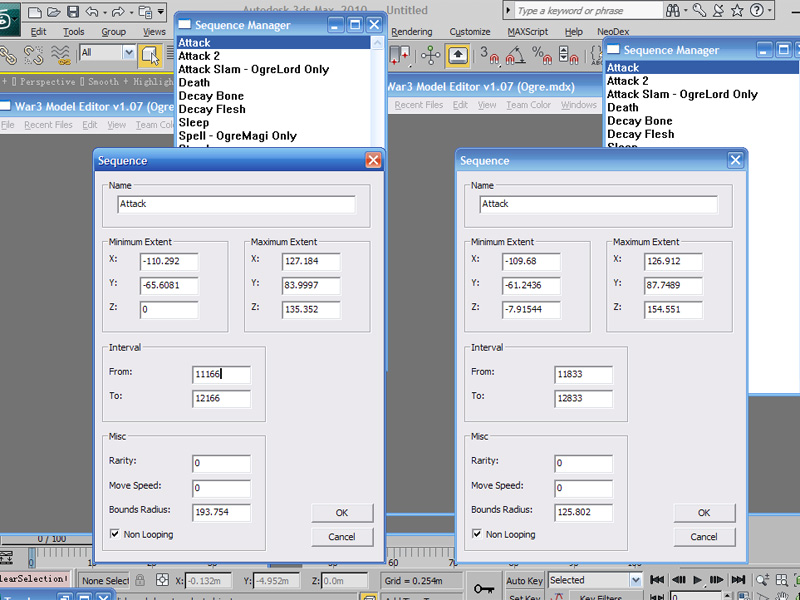
attachment.php

BlizParticle can change with the sequence change, and export correctly,
event notes just import and export warcraft model value,
then it seems like they are all delayed.
---

can you fix the event obj import ?

model exported sequence:
Attack
11166
12166

Attack 2
12833
13833

Attack Slam - OgreLord Only
14500
15700

death
18700
20700
……
-------------
the Warcraft III model sequence:
Attack
11833 D-value:666.6666
12833

Attack 2
13133 D-value:300
14133

Attack Slam - OgreLord Only
16000 D-value:1500
17200

death
21867
23867 D-value:3167

……


--------------
 

Attachments

  • sequence1.jpg
    sequence1.jpg
    187 KB · Views: 436
making the event notes correctly cost me lots of time.(I think can do it by script)

Import Warcraft III model and fix the event objects time,the notes are all wrong.
------------------------>
then i find the truth is that :when model imported , the animation sequence is Changed the start and end keys, not the event notes.
attachment.php

BlizParticle can change with the sequence change, and export correctly,
event notes just import and export warcraft model value,
then it seems like they are all delayed.
---

can you fix the event obj import ?

model exported sequence:
Attack
11166
12166

Attack 2
12833
13833

Attack Slam - OgreLord Only
14500
15700

death
18700
20700
……
-------------
the Warcraft III model sequence:
Attack
11833 D-value:666.6666
12833

Attack 2
13133 D-value:300
14133

Attack Slam - OgreLord Only
16000 D-value:1500
17200

death
21867
23867 D-value:3167

……


--------------

sure. i'll try to fix it.
 
1:the billboarded cant use,and fix it is really hard!

don't export
the code:

[billboarded,]

must creat a bone to fix it!and fix it in mdl ,

2:
the collision box cant use too!

becasuse this:

CollisionShape "CollisionBox01" {
ObjectId 1,
Box,
Vertices 2 {
{ 50.735222, -33.309505, 0.000000 },
{ -50.735222, 33.309505, 163.122574 },
}
}
==================》need change it to
{ -50.735222, -33.309505, 0.000000 },
{ 50.735222, 33.309505, 163.122574 },
warcraft cant read 50 ,-33.0 -50,33,163 I dont know why ,
 
ok...I know, billboad should set to bone.

It's different from max5 (in art tools set it to mesh ) And you didnt post that .

sorry .
And how collision box can fix//..
 
I don't know if I told you this, but the standard cooldown model can not be imported:
UI\Feedback\Cooldown\UI-Cooldown-Indicator.mdx

This is the error:
*** -- Unknown property: "count" in undefined ***
 
The latest version is great. I haven't had a chance to really use Neodex for a couple years now, and I finally got a good excuse to update yesterday. The new importer is fantastic. It's much easier to move things in and out of Max now. I'm amazed how so long into Warcraft 3's life span we're still getting new things like this and Retera's Matrix Eater.
 
” Retera's Matrix Eater.“

what' do you mean about "” Retera's Matrix Eater.“

Another Max script? or warcraft Tool?
 
The latest version is great. I haven't had a chance to really use Neodex for a couple years now, and I finally got a good excuse to update yesterday. The new importer is fantastic. It's much easier to move things in and out of Max now. I'm amazed how so long into Warcraft 3's life span we're still getting new things like this and Retera's Matrix Eater.

” Retera's Matrix Eater.“

what' do you mean about "” Retera's Matrix Eater.“

Another Max script? or warcraft Tool?
 
” Retera's Matrix Eater.“

what' do you mean about "” Retera's Matrix Eater.“

Another Max script? or warcraft Tool?

This one. The last couple years have made things so much more convenient, especially for animation. With Matrix Eater I can transfer animation on a per bone basis and with the updates to NeoDex, I can bring it into Max and quickly export it out without it creating a ton of errors upon importing that need to be corrected.
 
hmn, can't find what's wrong with that model.

anyways editing it would be pretty hard. UI models are extremely small.
Very small indeed, but upscaling and downscaling afterwards is easy.

It uses a texture animation based on rotation, that's quite special. No idea whether that's the problem though.

I attached a .mdl version of the model for you in hope that you can solve it. Magos' can open it but it doesn't show the texture rotation correctly.
 

Attachments

Very small indeed, but upscaling and downscaling afterwards is easy.

It uses a texture animation based on rotation, that's quite special. No idea whether that's the problem though.

I attached a .mdl version of the model for you in hope that you can solve it. Magos' can open it but it doesn't show the texture rotation correctly.

now that you mention it, neodex does not support tvertex rotation or scaling. That atleast tells me something important.
 
Back
Top