
Community
Projects
Maps
Tutorials
Gallery
Support Us
Install the app
How to install the app on iOS
Follow along with the video below to see how to install our site as a web app on your home screen.
Note: This feature may not be available in some browsers.
-
Listen to a special audio message from Bill Roper to the Hive Workshop community (Bill is a former Vice President of Blizzard Entertainment, Producer, Designer, Musician, Voice Actor) 🔗Click here to hear his message!
-
Read Evilhog's interview with Gregory Alper, the original composer of the music for WarCraft: Orcs & Humans 🔗Click here to read the full interview.
-
The Hive's 22nd Icon Contest: Creep Abilities is now concluded, time to vote for your favourite set of icons! Click here to vote!
-
✅ The POLL for Hive's Texturing Contest #34 is OPEN! Vote for the TOP 3 SKINS! 🔗Click here to cast your vote!
-
✅ The POLL for Hive's Techtree Contest #20 is OPEN! Vote for the TOP 3 FACTIONS! 🔗Click here to cast your vote!
You are using an out of date browser. It may not display this or other websites correctly.
You should upgrade or use an alternative browser.
You should upgrade or use an alternative browser.
Hive's Simple Edit Resources Thread


- Joined
- Sep 19, 2011
- Messages
- 2,119

ILH
Model Reviewer
- Joined
- May 8, 2012
- Messages
- 1,602
Description
Screenshot
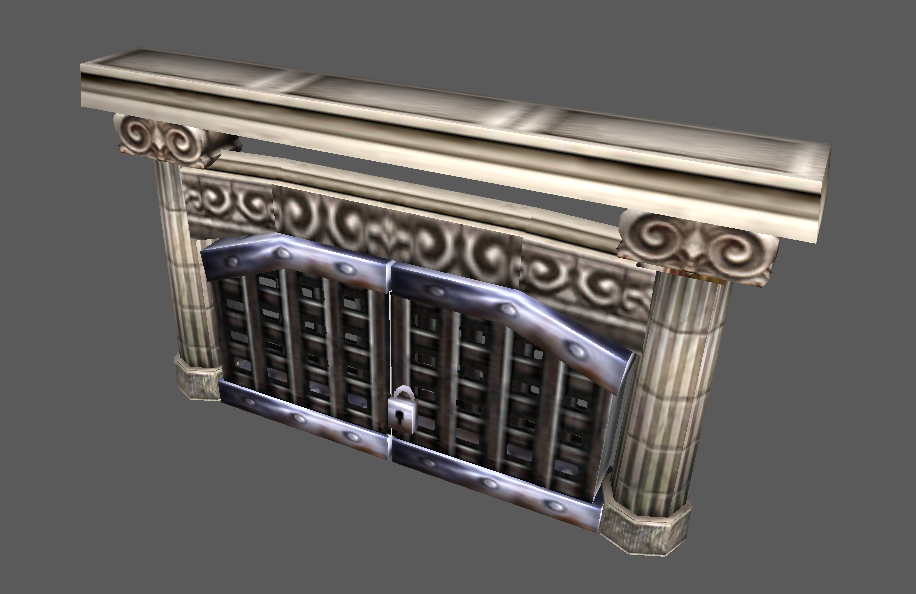
City Gate
| Description: | Just a little mix between city doodads. |
| Resource Type: | Model |
| Filesize: | 35 kb |
| Credits: | ILH |
| Path: | - |

Description
Screenshot
City Ruins Golem
| Description: | A golem made of city rubbles. |
| Resource Type: | Model |
| Filesize: | 89 kb |
| Credits: | ILH |
| Path: | - |

Attachments
Last edited:
- Joined
- Sep 19, 2011
- Messages
- 2,119
I'd delete that spell\attack 2 animation coz his arm is not realy moving all that much in it. I mean, he has his other arm working very well, and not that trash golem operating with a single arm while having both is a bad thing

- Joined
- May 15, 2013
- Messages
- 3,781

Heh, that's some desperate attempt 
ILH
Model Reviewer
- Joined
- May 8, 2012
- Messages
- 1,602
Maybe I'll just let it as it is, the golem could just throw that column part as a spellI'd delete that spell\attack 2 animation coz his arm is not realy moving all that much in it. I mean, he has his other arm working very well, and not that trash golem operating with a single arm while having both is a bad thing

ikr ;-;Heh, that's some desperate attempt
Attachments


- Joined
- Jul 29, 2008
- Messages
- 10,251


^
??? ?
??? ?
- Joined
- May 15, 2013
- Messages
- 3,781
^
??? ??? ( :" dudes?)
??? ??? ( :" dudes?)

- Joined
- Mar 9, 2012
- Messages
- 1,557

Paladin with teamcolor weapon shaft
Mountain King with teamcolor weapon shaft
Orc Fortress fixed Teamcolor
Crypt Texture edit
Paladin with teamcolor weapon shaft
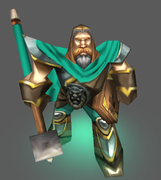
| Description: | Exactly what it says in the title + tc'ed his trousers too. |
| Resource Type: | Model |
| Filesize: | small enough |
| Credits: | Blizzard, Ujimasa Hojo |
| Path: | - |
Mountain King with teamcolor weapon shaft
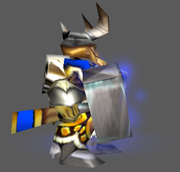
| Description: | Exactly what it says in the title. |
| Resource Type: | Model |
| Filesize: | small enough |
| Credits: | Blizzard, Ujimasa Hojo |
| Path: | - |
Orc Fortress fixed Teamcolor
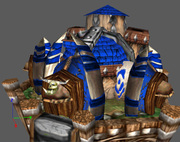
| Description: | Blizz forgot to add ReplaceableTexture ID 1 for an material, causing teamcolored ribbons on decorative bones to turn black upon upgrading to tier3. |
| Resource Type: | Model |
| Filesize: | small enough |
| Credits: | Blizzard |
| Path: | - |
Crypt Texture edit

| Description: | Tried this upon noticing Altar of Darkness texture similarity to Crypt's texture. |
| Resource Type: | Skin |
| Filesize: | small enough |
| Credits: | Blizzard |
| Path: | Buildings\Undead\Crypt\NewCreepyScaryCrypt.blp |
Attachments
Last edited:

- Joined
- May 9, 2009
- Messages
- 735
Definition of simple edit.Paladin with teamcolor weapon shaft
Mountain King with teamcolor weapon shaft
Orc Fortress fixed Teamcolor
Paladin with teamcolor weapon shaft
Description: Exactly what it says in the title + tc'ed his trousers too.
Resource Type: Model
Filesize: small enough
Credits: Blizzard, Ujimasa Hojo
Path: -
Mountain King with teamcolor weapon shaft
Description: Exactly what it says in the title.
Resource Type: Model
Filesize: small enough
Credits: Blizzard, Ujimasa Hojo
Path: -
Orc Fortress fixed Teamcolor
Description: Blizz forgot to add ReplaceableTexture ID 1 for an material, causing teamcolored ribbons on decorative bones to turn black upon upgrading to tier3.
Resource Type: Model
Filesize: small enough
Credits: Blizzard
Path: -
- Joined
- Sep 19, 2011
- Messages
- 2,119


- Joined
- Sep 6, 2015
- Messages
- 576
I have one model, but I think it is too simple even for this thread.
I wanted to create a high-range melee unit, and I saw that Crypt Lord had a possibly unused animation Spell Throw, where he attacks with his horn and elongates it. So, I basically renamed his attack animations to something random, renamed his Spell Throw animation to Attack, increased the length of his model's horn and removed the hero glow. And, voilà, I created a Nerubian Impaler.
I recommend setting "Combat - Attack 1 - Range" of the unit using this model to 250, or you can increase the unit size if you want longer attack range. This unit will be able to attack from behind the regular melee units with its high range (and will not take a melee attacking spot) and fill the gap between the ranged units and melee units, when they are attacking. As far as I know, the only other high-range melee unit present in the game is the Mountain Giant equipped with a War Club, with its moderate 250 range. Furthermore, Nerubian Impaler even has such an attack animation that it can melee-attack air units from the ground at close range. To do this, set "Combat - Attack 2 - Range" to 0.
The Nerubian Impaler model pack contains the Normal (purple), Dried and Regular (with in-game textures) versions of the model, and the icon for the Dried version. For the Mummified Crypt Lord skin, go here.
Edit 1: Reduced the model size to 70% of its former size, removed the team-coloured shoulder and body pads and wings, recoloured the shell texture, and made some other minor tweaks to the model.
Edit 2 (Aug 5, 2016 CET):
- This is now a Nerubian Impaler Pack - it contains the Normal (purple), Dried and Regular (with in-game textures) versions of the model and the Spiked Carapace spike models which suit it
- The pack contains the Regular version which uses in-game textures for less file size
- The normal Spiked Carapace spikes didn't suit the model, so the pack contains the smaller versions which suit it
- Removed the unnecessary and redundant model parts, textures, materials and geosets, fixing the model's look and animation look, and reducing the file size
- Fixed the height of the model and its parts, fixing the model's look and animation look, and making it not float
- Optimized the model, linearized its animations and reduced its file size
- Fixed the position of the Spiked Carapace attachment points and of the weapon attachment point
- Reduced the breadth of the model's shoulders
- The portrait models now use the correct skin paths and will suit the unit models/skins
- Changed the internal name of the model to NerubianImpaler and changed the name of the old Attack, Attack - 2 and Attack Alternate animations to Spell Throw, Spell Throw - 2 and Spell Throw Alternate
Edit 3 (Aug 6, 2016 CET):
- Added the icon for the Dried skin version/Mummified Crypt Lord to the pack (also added it to the other post)
Edit 4 (Aug 7, 2016 CET):
- Fixed the animations completely
- Deleted more redundant bones, reducing the file size even more
- Reduced further the breadth of the shoulders
- Fixed the UV mapping of the texture (the screenshots aren't updated)
- Removed the Spiked Carapace ability spike models from the pack, because they are no longer needed
Nerubian Impaler Pack


I wanted to create a high-range melee unit, and I saw that Crypt Lord had a possibly unused animation Spell Throw, where he attacks with his horn and elongates it. So, I basically renamed his attack animations to something random, renamed his Spell Throw animation to Attack, increased the length of his model's horn and removed the hero glow. And, voilà, I created a Nerubian Impaler.
I recommend setting "Combat - Attack 1 - Range" of the unit using this model to 250, or you can increase the unit size if you want longer attack range. This unit will be able to attack from behind the regular melee units with its high range (and will not take a melee attacking spot) and fill the gap between the ranged units and melee units, when they are attacking. As far as I know, the only other high-range melee unit present in the game is the Mountain Giant equipped with a War Club, with its moderate 250 range. Furthermore, Nerubian Impaler even has such an attack animation that it can melee-attack air units from the ground at close range. To do this, set "Combat - Attack 2 - Range" to 0.
The Nerubian Impaler model pack contains the Normal (purple), Dried and Regular (with in-game textures) versions of the model, and the icon for the Dried version. For the Mummified Crypt Lord skin, go here.
Edit 1: Reduced the model size to 70% of its former size, removed the team-coloured shoulder and body pads and wings, recoloured the shell texture, and made some other minor tweaks to the model.
Edit 2 (Aug 5, 2016 CET):
- This is now a Nerubian Impaler Pack - it contains the Normal (purple), Dried and Regular (with in-game textures) versions of the model and the Spiked Carapace spike models which suit it
- The pack contains the Regular version which uses in-game textures for less file size
- The normal Spiked Carapace spikes didn't suit the model, so the pack contains the smaller versions which suit it
- Removed the unnecessary and redundant model parts, textures, materials and geosets, fixing the model's look and animation look, and reducing the file size
- Fixed the height of the model and its parts, fixing the model's look and animation look, and making it not float
- Optimized the model, linearized its animations and reduced its file size
- Fixed the position of the Spiked Carapace attachment points and of the weapon attachment point
- Reduced the breadth of the model's shoulders
- The portrait models now use the correct skin paths and will suit the unit models/skins
- Changed the internal name of the model to NerubianImpaler and changed the name of the old Attack, Attack - 2 and Attack Alternate animations to Spell Throw, Spell Throw - 2 and Spell Throw Alternate
Edit 3 (Aug 6, 2016 CET):
- Added the icon for the Dried skin version/Mummified Crypt Lord to the pack (also added it to the other post)
Edit 4 (Aug 7, 2016 CET):
- Fixed the animations completely
- Deleted more redundant bones, reducing the file size even more
- Reduced further the breadth of the shoulders
- Fixed the UV mapping of the texture (the screenshots aren't updated)
- Removed the Spiked Carapace ability spike models from the pack, because they are no longer needed
Nerubian Impaler Pack
Screenshots
Nerubian Impaler Pack
| Description: | Long-range melee ground attacker, close-range melee air attacker unit. The pack contains Normal, Dried and Regular versions, and the icon for the Dried version. For Mummified Crypt Lord, go here. |
| Resource Type: | Models, Skins, Icon |
| Filesize: | 172/118/54/17 KB |
| Credits: | Made by Blizzard Entertainment, edited by Alok |
Attachments
Last edited:
- Joined
- Jul 29, 2008
- Messages
- 10,251
You know, I really like & don't like this all at the same time.I have one model, but I think it is too simple even for this thread.
I wanted to create a high-range melee unit, and I saw that Crypt Lord had a possibly unused animation Spell Throw, where he attacks with his horn and elongates it. So, I basically renamed his attack animations to something random, renamed his Spell Throw animation to Attack, increased the length of his model's horn and removed the hero glow. And, voilà, I created a Nerubian Impaler.
I recommend using "Art - Scaling Value" of the unit using this model to 0.7 and "Combat - Attack # - Range" to 250, or leave the scaling at 1 and change the attack range to 375, if you want it to attack from farther away. This unit will be able to attack from behind the regular melee units (and will not take a melee attacking spot) and fill the gap between ranged and melee units, when they are attacking. As far as I know, the only other high-range melee unit present in the game is the Mountain Giant equipped with a War Club, with its moderate 250 range.
Nerubian Impaler
Screenshots
Nerubian Impaler
Description: Long-range melee unit.
Resource Type: Model
Filesize: 167 KB
Credits: Made by Blizzard Entertainment, edited by Alok
On the one hand, I love when someone takes the time to delve into the little-known/used mysteries of certain models, and doing some model-editing to make an interesting variant really takes that to the next level.
I also really like people coming up with interesting unit-types (i.e. long-ranged melee), and filling out other races (i.e. Nerubian).
What I have a problem with is it's just a little too simple; at least, the rest of the body is. It really is just a Crypt Lord with the Hero Glow removed & the horn elongated. It could really use some other model edits to make it look like a different Nerubian (perhaps less of a beetle).
That, and the horn looks super-long. :< Like, even for Warcraft proportions it might be too much, lol.
Now, I totally get that that might be too much work for you; I understand. But those are my thoughts.
~~~
(hey, speaking of "little-used stuff", perhaps something could be made of the Crypt Lord's "Burrow" animation; perhaps a mix between the Terran Siege Tank & the Zerg Sunken Colony (burrows/roots, then becomes a 'tower' with an underground super-spike))
- Joined
- Sep 6, 2015
- Messages
- 576
I wanted to change more stuff, but the problem is I have so little knowledge in modelling, that everything I do ruins the model, and, as far as I could see, there is no Undo option in Warcraft 3 Model Editor, which sucks. But I guess I could tinker with the mesh and move points around to see how it would look, or even remove some parts, or change the texture.
I agree that the horn is too long when the model is attacking, I wanted to change that too, perhaps with keeping the horn the same size as in the scaling 1.0, but reduce the size of the rest of the model to 0.7. I wanted to do that, but when I do the "Scaling" in the model editor, no matter what I write, it ruins the model completely. Perhaps, I can try that with "Translating" one by one part of the model.
And, when it comes to burrow, I wanted to make a request for someone to create a "Burrow Move" animation, basically to just add some dust around the burrow animation while the unit is moving underground.
I agree that the horn is too long when the model is attacking, I wanted to change that too, perhaps with keeping the horn the same size as in the scaling 1.0, but reduce the size of the rest of the model to 0.7. I wanted to do that, but when I do the "Scaling" in the model editor, no matter what I write, it ruins the model completely. Perhaps, I can try that with "Translating" one by one part of the model.
And, when it comes to burrow, I wanted to make a request for someone to create a "Burrow Move" animation, basically to just add some dust around the burrow animation while the unit is moving underground.
- Joined
- May 15, 2013
- Messages
- 3,781
I wanted to change that too, perhaps with keeping the horn the same size as in the scaling 1.0, but reduce the size of the rest of the model to 0.7. I wanted to do that, but when I do the "Scaling" in the model editor, no matter what I write, it ruins the model completely.
I wouldn't use War3 Model Editor's scaling, translation and rotation if I were you. It uses numbers and pivot points, which is rather confusing and you have to use gueses if you don't know how it works.
If you want to edit its shape or rather called vertices, you can try Mdlvis (for me), there are also other tools too.
- Joined
- Sep 6, 2015
- Messages
- 576
Ah, yes, it is much easier.
- Joined
- Jul 29, 2008
- Messages
- 10,251
Dude, you're using Magos for this? No way man; MDLvis all the way. It's even got an undo function & loads more functionality on the side (viewing exactly which geosets you want, from whichever angle, textured or untextured). Might have some issues but it's overall da bomb.
The kind of changes I'm thinking of would, of course/unfortunately be involved; reshaping the big 'beetle shells', removing/replacing/reworking the big Team Color 'wings', changing the legs, probably the big claw arms too... But yeah, I understand if it's too much. Honestly it's probably too much for me. : )
The kind of changes I'm thinking of would, of course/unfortunately be involved; reshaping the big 'beetle shells', removing/replacing/reworking the big Team Color 'wings', changing the legs, probably the big claw arms too... But yeah, I understand if it's too much. Honestly it's probably too much for me. : )
- Joined
- Sep 6, 2015
- Messages
- 576
I'll see what I can do.
- Joined
- Sep 6, 2015
- Messages
- 576
I've updated the model. I may make some further updates in the future, though.
By the way, can we post custom pathing maps for buildings and doodads in this thread, or should another thread be made for them? When I say pathing maps I mean this: Custom Pathing Maps
They can be very useful to utilize some special aspects of certain buildings and doodads, like allowing units to climb or teleport on top of them, like this:

Here's the custom pathing map I made for that Tree Bridge (Horizontal) in the attachment, in case someone needs it:
By the way, can we post custom pathing maps for buildings and doodads in this thread, or should another thread be made for them? When I say pathing maps I mean this: Custom Pathing Maps
They can be very useful to utilize some special aspects of certain buildings and doodads, like allowing units to climb or teleport on top of them, like this:
Here's the custom pathing map I made for that Tree Bridge (Horizontal) in the attachment, in case someone needs it:
Attachments
- Joined
- Sep 6, 2015
- Messages
- 576
Dried Nerubian
Screenshot
Dried Nerubian
| Description: | An alternative skin for my Nerubian Impaler model. |
| Resource Type: | Skin |
| Filesize: | 118 KB |
| Credits: | Made by Blizzard Entertainment, edited by Alok |
| Path: | HeroCryptLord.blp |
Mummified Crypt Lord
Screenshots
Mummified Crypt Lord
| Description: | A skin for the Crypt Lord/Anub'arak hero model. |
| Resource Type: | Skin |
| Filesize: | 127 KB |
| Credits: | Made by Blizzard Entertainment, edited by Alok |
| Path: | Textures\HeroCryptLord.blp |
BTNDriedNerubian
Screenshot
BTNDriedNerubian
| Description: | The icon for my Dried Nerubian and Mummified Crypt Lord skins. |
| Resource Type: | Icon |
| Filesize: | 17 KB |
| Credits: | Made by Blizzard Entertainment, edited by Alok |
Attachments
Last edited:
- Joined
- Jul 29, 2008
- Messages
- 10,251
That's real interesting.
- Joined
- Sep 6, 2015
- Messages
- 576
Uruk-hai Pikeman Edit
An edited version of Fingolfin's Uruk-hai Pikeman model, with the pike extended (recommend unit attack range is 250), the "Weapon" attachment point position changed, and the "Stand Defend" animation added (to use this animation give your unit the Defend ability), so it can act like phalanxes do.
Here's the icon for the model: BTNUruk-haiPikeman
Uruk-hai Pikeman

Red Uruk-hai Pike Upgrade Glow
The red Uruk-hai pike glow model made from the troll berserk weapon glow which can be attached to the "Weapon" attachment point after the weapon upgrade has been researched, just like in BFME.
Red Uruk-hai Pike Upgrade Glow
Sentinel Statue Base/Living Sentinel Statue
If you want to make a statue come to life, this is the base of the Sentinel Statue (Statue Guardian of Aszune) which is left when the statue comes to life and the living sentinel statue skin for the Huntress unit.
How to use:
- Import the texture "Sentinel.blp" to Textures\Sentinel.blp (it will change the skin of all Huntresses, though there are ways to circumvent this)
- Change the model of a destructible to the normal Sentinel Statue model (you can't use the doodad, because it can't be replaced via a trigger)
- Copy that destructible, set the model of the copy to this custom "SentinelStatueBase" model and set its pathing map to NONE
- Place the Sentinel Statue destructible that uses the normal model on your map
- Make a trigger that replaces that Sentinel Statue with the Statue Base and a Huntress at once when the conditions you want are met, and edit it however you want (you can play the "Stand Alternate" animation of the destructible for some time before the transformation for glowing effect)
I will update this post if I make any other statue bases from other statue models with this mechanic.
Sentinel Statue Base/Living Sentinel Statue

An edited version of Fingolfin's Uruk-hai Pikeman model, with the pike extended (recommend unit attack range is 250), the "Weapon" attachment point position changed, and the "Stand Defend" animation added (to use this animation give your unit the Defend ability), so it can act like phalanxes do.
Here's the icon for the model: BTNUruk-haiPikeman
Uruk-hai Pikeman
Screenshot
Uruk-hai Pikeman
| Description: | Uruk-hai Pikeman with extended pike and Stand Defend animation. |
| Resource Type: | Model |
| Filesize: | 58 KB |
| Credits: | Made by Fingolfin, edited by Alok |
Red Uruk-hai Pike Upgrade Glow
The red Uruk-hai pike glow model made from the troll berserk weapon glow which can be attached to the "Weapon" attachment point after the weapon upgrade has been researched, just like in BFME.
Red Uruk-hai Pike Upgrade Glow
Screenshot
Red Uruk-hai Pike Upgrade Glow
| Description: | Red Uruk-hai pike upgrade glow. |
| Resource Type: | Model |
| Filesize: | 2 KB |
| Credits: | Made by Blizzard Entertainment, edited by Alok |
Sentinel Statue Base/Living Sentinel Statue
If you want to make a statue come to life, this is the base of the Sentinel Statue (Statue Guardian of Aszune) which is left when the statue comes to life and the living sentinel statue skin for the Huntress unit.
How to use:
- Import the texture "Sentinel.blp" to Textures\Sentinel.blp (it will change the skin of all Huntresses, though there are ways to circumvent this)
- Change the model of a destructible to the normal Sentinel Statue model (you can't use the doodad, because it can't be replaced via a trigger)
- Copy that destructible, set the model of the copy to this custom "SentinelStatueBase" model and set its pathing map to NONE
- Place the Sentinel Statue destructible that uses the normal model on your map
- Make a trigger that replaces that Sentinel Statue with the Statue Base and a Huntress at once when the conditions you want are met, and edit it however you want (you can play the "Stand Alternate" animation of the destructible for some time before the transformation for glowing effect)
I will update this post if I make any other statue bases from other statue models with this mechanic.
Sentinel Statue Base/Living Sentinel Statue
Screenshot
Sentinel Statue Base/Living Sentinel Statue
| Description: | The base of the Sentinel Statue which is left when the statue comes to life and the skin of the living statue. |
| Resource Type: | Model |
| Filesize: | 21 KB |
| Credits: | Made by Blizzard Entertainment, edited by Alok |
Attachments
Last edited:

- Joined
- Sep 6, 2015
- Messages
- 576
Thanks.


- Joined
- Nov 12, 2007
- Messages
- 2,338


Very cool man! Good work.

- Joined
- Jun 20, 2013
- Messages
- 775
Updated Hawkstrider Cavalry, added the dust particle for Walk animations, and corrected a bad asignation of bones in the Elenai footmans, so the dress is not visible under the Hawkstrider chest.
Hawkstrider Cavalry
Hawkstrider Cavalry
ILH
Model Reviewer
- Joined
- May 8, 2012
- Messages
- 1,602
Description
Screenshot
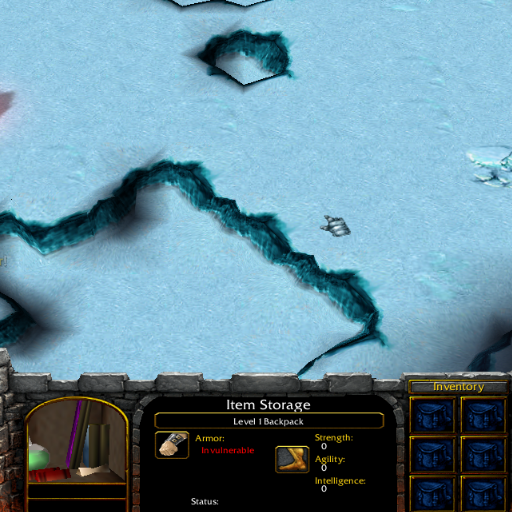
Backpack Portrait
| Description: | Stuff from my canceled RPG Project. |
| Resource Type: | Model |
| Filesize: | 36 kb |
| Credits: | Would be appreciated. |
| Path: | Use a blank file as your unit model. (Use the portrait path with "_Portrait" deleted) |
Attachments
- Joined
- Sep 6, 2015
- Messages
- 576
Heated Nerubian Ziggurat
Screenshots
Heated Nerubian Ziggurat
| Description: | Heated nerubian ziggurat. |
| Resource Type: | Model, Skin |
| Filesize: | 19 KB |
| Credits: | Blizzard Entertainment, Ujimasa Hojo, Alok |
| Path: | OrangeCrystal.blp |
Clean Water Pipe
Screenshots
Clean Water Pipe
| Description: | Clean/icy water pipe. |
| Resource Type: | Model, Skin |
| Filesize: | 8 KB |
| Credits: | Blizzard Entertainment, Alok |
| Path: | Cleanwater.blp |
Wall Flame Grates
Screenshots
Wall Flame Grates
| Description: | Wall flame grates. |
| Resource Type: | Models |
| Filesize: | 3/3 KB |
| Credits: | Blizzard Entertainment, Alok |
Attachments

- Joined
- Jul 28, 2014
- Messages
- 1,080
Nice models !!!
- Joined
- Sep 6, 2015
- Messages
- 576
Thank you.
- Joined
- Jul 29, 2008
- Messages
- 10,251
"Heated Ziggurat"? I don't get it... And what's with the fire-grate doodad spewing fire all over it, obscuring it?
- Joined
- Sep 6, 2015
- Messages
- 576
The Wall Flame Grate spews Fire Trap Side on the Nerubian Ziggurat, heating it, and making its crystal turn from being frozen (light blue), like it usually is, to being incandescent (orange), making the ziggurat spew balls of fire instead of the usual frost attacks. Thus the name Heated Nerubian Ziggurat.

- Joined
- Sep 6, 2015
- Messages
- 576
Blue Shimmering Portal
Screenshots
Blue Shimmering Portal
| Description: | Blue shimmering portal. |
| Resource Type: | Model, Skins |
| Filesize: | 21 KB |
| Credits: | Blizzard Entertainment, Alok |
| Paths: | Purple_Glow.blp Purple_Star.blp |
BTNFlamingArrows
Screenshots
BTNFlamingArrows
| Description: | Auto-cast, passive, attack type and caster upgrade versions of the hidden icon Flaming Arrows. Here's info about this and the path of the normal icon: List of Hidden Material Within the World Editor. |
| Resource Type: | Icon |
| Filesize: | 6/5/4/4/5/5 KB |
| Credits: | Blizzard Entertainment, Alok |
| Paths: | ReplaceableTextures\PassiveButtons\PASFlamingArrows.blp ReplaceableTextures\CommandButtonsDisabled\DISPASFlamingArrows.blp ReplaceableTextures\CommandButtons\ATCFlamingArrows.blp ReplaceableTextures\CommandButtonsDisabled\DISATCFlamingArrows.blp ReplaceableTextures\CommandButtons\UPGFlamingArrows.blp ReplaceableTextures\ATTFlamingArrows.blp |
Attachments
Last edited:
- Joined
- Jul 29, 2008
- Messages
- 10,251
I 100% do not understand why Blizzard
went with
 instead of
 .
.
went with
- Joined
- Sep 6, 2015
- Messages
- 576
I guess they wanted to go with something more original, so they replaced "flaming" arrows with "searing" ones, and they changed the icon and the model to something more original too. There is also a model for the flaming arrow hidden in the World Editor too.
- Joined
- Jul 29, 2008
- Messages
- 10,251
So change the name. But the icon works either way.
- Joined
- Sep 6, 2015
- Messages
- 576
I couldn't recolour that purple-glowing rim no matter what I tried. It glows from blue to purple and back. If someone knows how to do that, tell me.no offense but that portal still looks purple too me.
- Joined
- Jul 29, 2008
- Messages
- 10,251
Geoset Animation?
- Joined
- Sep 6, 2015
- Messages
- 576
Yes, it was, the colour was coded into it. However, now I have another problem. When I change the Geoset Animation colour, the model doesn't appear in-game any more. I tried changing it to different colours and also changing its interpolation type, but nothing works. Any change that is made to the geoset animation stops the model from appearing in-game.

- Joined
- May 29, 2013
- Messages
- 1,573
That glowing rim has a geoset animation with animated color; the color of that geoset gradually changes between different shades of purple in a global sequence that has a duration of 1.5 seconds. I guess you just got confused when you saw the color is animated, and didn't know how to make it change between shades of blue.Yes, it was, the colour was coded into it. However, now I have another problem. When I change the Geoset Animation colour, the model doesn't appear in-game any more. I tried changing it to different colours and also changing its interpolation type, but nothing works. Any change that is made to the geoset animation stops the model from appearing in-game.
I could change it without any problems, and it works in game. And for goodness' sake, you really don't need to use any custom textures for something this simple. Maybe I should properly recolor it to other colors (green, yellow, red) and upload all of them together.
Last edited:
Similar threads


- Replies
- 4
- Views
- 2K
