• Check out the results of the Techtree Contest #19!
  • Listen to a special audio message from Bill Roper to the Hive Workshop community (Bill is a former Vice President of Blizzard Entertainment, Producer, Designer, Musician, Voice Actor) 🔗Click here to hear his message!
  • Read Evilhog's interview with Gregory Alper, the original composer of the music for WarCraft: Orcs & Humans 🔗Click here to read the full interview.
  • Create a void inspired texture for Warcraft 3 and enter Hive's 34th Texturing Contest: Void! Click here to enter!
  • The Hive's 22nd Icon Contest: Creep Abilities is now concluded, time to vote for your favourite set of icons! Click here to vote!

How does the game organize Object Editor data?

Status
Not open for further replies.
After many tests with JNGP, I came to the conclusion that the object editor organizes it based off the unit ID you copied from, followed by the name. I've spent the past week or so organizing all my towers in my map with this method, and it has been working perfectly fine until now ...


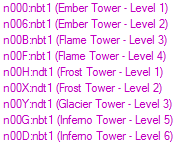
Object Editor Screenshot
0O9Yg9e.png
As you can see, I made all the Fire Towers off the unit id nbt1, and all the cold towers ndt1. The Ice towers should be listed AFTER Fire Towers because d obviously comes after b, but why are they over Inferno Tower Level 5 & 6?
 
"Ember Tower"
"Flame Tower"
"Frost Tower"
"Glacier Tower"
"Inferno Tower"

E comes before all others followed by F, then G and finally I.
Flame Tower is above Frost Tower because Fl is before FR.
It is alphabetical sorted by the name of the unit... not by the unit type id.

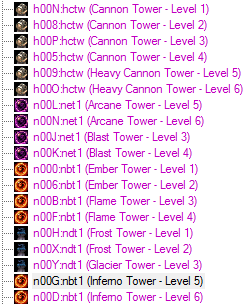
Hmmm... could you explain this then? D:


Object Editor Data
NXQALtI.png
 
@KILLCIDE
I can give you exactly the same screenshot from my editor... if I would want to.
When you edit the name of an object, it doesnt update its position in that list yet.
So if you created a lot of objects and then editted their name all together, then you get that result.
There are probably more ways to get that result but this is just the first thing that comes up in my mind.

But as LordDz mentioned, [ctrl] + [t] or View -> Sort Objects By Name will both re-organize the list of objects.

I dont know if you can sort it by object id though.
 
" I've spent the past week or so organizing all my towers in my map with this method,"
Sounds like you want them organised, and having them being listed by alphabetic order (by name) is a way of doing that.
 
@KILLCIDE
I can give you exactly the same screenshot from my editor... if I would want to.
When you edit the name of an object, it doesnt update its position in that list yet.
So if you created a lot of objects and then editted their name all together, then you get that result.
There are probably more ways to get that result but this is just the first thing that comes up in my mind.

But as LordDz mentioned, [ctrl] + [t] or View -> Sort Objects By Name will both re-organize the list of objects.

I dont know if you can sort it by object id though.

You have to restart editor for it to take effect.

" I've spent the past week or so organizing all my towers in my map with this method,"
Sounds like you want them organised, and having them being listed by alphabetic order (by name) is a way of doing that.

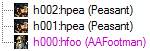
Well my efforts were to just try to get them sorted by id. If I won't be able to do what I want to do, then thats okay (: but in the end, I do want to figure out how they get organized by the editor. Take a look at this example


Object Editor Data
d12Qi3C.png
 
I'm thinking it might be:
first letter of unit id (basically depends on race copied from)
alphabetical order

I have noticed things like this as well. I am not sure exactly the cause, but I know that in my abilities list, it is like:
Hero abilities that I made into regular abilities in alphabetical order
Regular abilities in alphabetical order

They are grouped by something that is either hardcoded or has to do with their ID in some way, and then sorted alphabetically.

If they were sorted by ID and then name, all alphabetically, id would take priority over everything and they'd basically be in order that they were created, unless you make units with lower IDs (requires deleting or purposely making units with higher IDs first).
 
Here is what I did:

I was terraining Stuff, like Oak (1), Oak (2)...
I Basically had Oak (1-3) from the Beginning, and I DIDN'T USE JNGP.

How I CnPed Them:

I Selected Oak (1) in the List.
Copied it.
Selected Oak (1) Again.
Pasted.
The New Oak (1) appears On Top of the old Oak (1).

Did the Same as for Oak (1) and It Appeared "Under" old Oak (2).
Did the Same as for Oak (2) and It Appeared "Under" old Oak (3).


I checked Raw Id's and And Found this:

D00T:BPca (New Oak 1)
D00H:BPca (Old Oak 1)
D00I:BPca (Old Oak 2)
D00U:BPca (New Oak 2)
D00J:BPca (Old Oak 3)
D00V:BPca (New Oak 3)


PS: Tests were with Birch (1-3), but I'm sure that Doesn't make a Difference.
 
Here is what I did:

I was terraining Stuff, like Oak (1), Oak (2)...
I Basically had Oak (1-3) from the Beginning, and I DIDN'T USE JNGP.

How I CnPed Them:

I Selected Oak (1) in the List.
Copied it.
Selected Oak (1) Again.
Pasted.
The New Oak (1) appears On Top of the old Oak (1).

Did the Same as for Oak (1) and It Appeared "Under" old Oak (2).
Did the Same as for Oak (2) and It Appeared "Under" old Oak (3).


I checked Raw Id's and And Found this:

D00T:BPca (New Oak 1)
D00H:BPca (Old Oak 1)
D00I:BPca (Old Oak 2)
D00U:BPca (New Oak 2)
D00J:BPca (Old Oak 3)
D00V:BPca (New Oak 3)


PS: Tests were with Birch (1-3), but I'm sure that Doesn't make a Difference.

Ahh okay (: that makese sense. Thank you!
 
... I know what CnP means. I was asking for a more detailed explanation of "...how you CnP them." It is a rather vague statement.

I think it's mostly what unit you copied in the first place since you keep a similar ID (based on race).
 
And here I was, thinking that the original question is about the data format.
Fun fact - Custom objects often do carry the ID of the base object on every field, even though it appears to be useless.

Maybe because this happens without it? This definitely seems like what could go wrong if it didn't keep track of what data the spell is actually suppose to have.
 
I don't think this is it. The data format is like this:
BaseID:NewID
Field:Value
Field:Value
...

However, when copying an already custom object it sometimes puts the NewID of that object in front of every field. Yet, it makes no difference or it would probably break something.
 
Status
Not open for further replies.
Back
Top