• Check out the results of the Techtree Contest #19!
  • Listen to a special audio message from Bill Roper to the Hive Workshop community (Bill is a former Vice President of Blizzard Entertainment, Producer, Designer, Musician, Voice Actor) 🔗Click here to hear his message!
  • Read Evilhog's interview with Gregory Alper, the original composer of the music for WarCraft: Orcs & Humans 🔗Click here to read the full interview.
  • Create a void inspired texture for Warcraft 3 and enter Hive's 34th Texturing Contest: Void! Click here to enter!
  • The Hive's 22nd Icon Contest: Creep Abilities is now concluded, time to vote for your favourite set of icons! Click here to vote!

WarTransfer 0.9beta

This bundle is marked as pending. It has not been reviewed by a staff member yet.
WarTransfer is a tool that takes data from one source map and transfers it to any number of other map files. It's designed for altered melees to transfer their content to many different terrain maps, but it might be useful for others as well.

What it transfers:
  • Object Data
  • Triggers and Scripts
  • Custom "Game Interface" Settings
  • Gameplay Constants
  • Asset Imports
  • Sounds
  • ...and more!

What this does NOT do:
  • Transfer terrain
  • Merge data
  • Work with LUA maps (sorry)
This project is currently in beta, there will likely be bugs. Please make sure to report them here. No worries, though: The source and destination maps are copied and remain untouched.

This project is open source. The git page can be found here: GitHub

This project requires Ladik's MPQ Editor to work. It is included in the bundle.

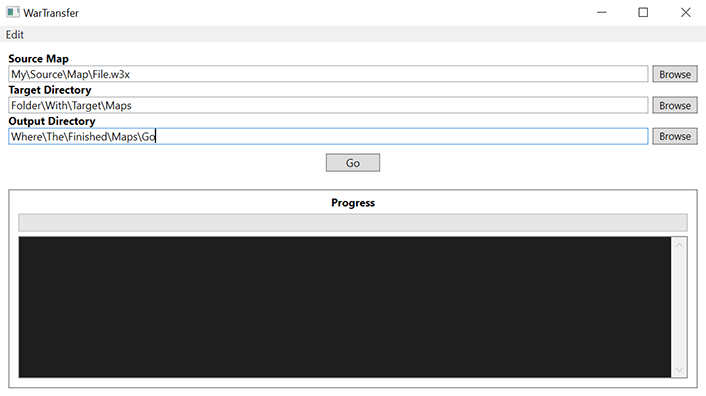
334684-5d46d1dc1a9f768f0dae779a3514599c.png


Source Map: Path to the map that contains all the data to be transferred.
Target Directory: Path to a folder that contains all the maps you want the data transferred to (can also include the source map if you like).
Ouput Directory: Path to the folder where the resulting maps will be created.

Click "Go!"
Previews
Contents

WarTransfer 0.9beta (Binary)

It was about time someone made a tool like that.
However, I have a few remarks:

  • I expected the app to allow to choose which components to transfer. Why dont you put some checkboxes for that?
  • the input textboxes are a bit confusing. 1) Get source map file, 2) then get map files in which you transfer, 3) then select output directory fin which the modified copies of maps will be generated. At least rename the labels to make it clearer
  • the textboxes are not read-only. Make them read-only to prevent eventual exceptions
  • Dark mode?
 
It was about time someone made a tool like that.
However, I have a few remarks:

  • I expected the app to allow to choose which components to transfer. Why dont you put some checkboxes for that?
  • the input textboxes are a bit confusing. 1) Get source map file, 2) then get map files in which you transfer, 3) then select output directory fin which the modified copies of maps will be generated. At least rename the labels to make it clearer
  • the textboxes are not read-only. Make them read-only to prevent eventual exceptions
  • Dark mode?
1. I could do this at some point, though what are the use cases?
2. What names do you suggest?
3. They are purposely read/write for copy pasta
4. Unless this is easy to do with WPF I doubt I’d add this
 
1. I could do this at some point.
2. What names do you suggest?
3. They are purposely read/write for copy pasta
4. Unless this is easy to do with WPF I doubt I’d add this
2. Source map -> source map, source directory (transfer to files), target directory (generate copies in)
3. You can add buttons "paste" and "copy and still have the textboes read only
4. Of course it's easy. My apps are WPF, I know
 
1755619238768.png


As for myself I got this error, don't mind the first one, its the second error I am hinting at. If you want to test yourself, I attached the maps in a zip:
(Terrain.w3x is the one I want to take data from, I know I can't transfer Terrain, its just named that - then this into BaseMap.w3x).
 
I haven't tested this tool yet, but sadly, it's only compatible with the latest version.

The main reason is that it relies a lot on the updated "war3map.w3i", which includes the camera zoom options.

In order for that tool to work, the map must be saved with the current version's World Editor. However, be warned that it's an irreversible thing; you can no longer open your saved map using older versions of WE. Also, you have to make sure JassHelper and vJass enabled with this version, or else the map won't be playable due to the broken triggers.

Really useful tool, but only the latest Reforged patch as a requirement for this tool makes me annoyed. I have several modified melee maps made with 1.26 patch, and wanted to add some stuffs (like the campaign-based heroes and race mod you had) on my own.

Where are you getting this information from? It doesn't "rely" on the camera zoom options - it handles them, but they aren't required.

In theory the tool could work for older versions, but it would require me to have an older version of wc3 to test with as well as knowledge of the older formats. Not out of the question, but also not something I'm that willing to commit time to unless there's huge demand for it.

With regards to JassHelper/vJass, can you explain what you're seeing that is breaking the map? You said you haven't tested it yet, how do you know it breaks the map without JassHelper/vJass? Unless I'm missing something, those are purely editor tools, and shouldn't affect the playability of the map (vJass just compiles to plain Jass, and JassHelper mostly just performs validation at save time).

Work-work! :grin:

Big thank you, man! You saved me a hundred hours!

But can I ask, should I have the last version of Warcraft? I tested to run 1.29 and it isn't work.
Send me your 1.29 source and destination map and I can see if it's an easy fix or not
 
Where are you getting this information from? It doesn't "rely" on the camera zoom options - it handles them, but they aren't required.

In theory the tool could work for older versions, but it would require me to have an older version of wc3 to test with as well as knowledge of the older formats. Not out of the question, but also not something I'm that willing to commit time to unless there's huge demand for it.

With regards to JassHelper/vJass, can you explain what you're seeing that is breaking the map? You said you haven't tested it yet, how do you know it breaks the map without JassHelper/vJass? Unless I'm missing something, those are purely editor tools, and shouldn't affect the playability of the map (vJass just compiles to plain Jass, and JassHelper mostly just performs validation at save time).
Ok thanks. I'll keep that thing in mind. Sorry for small mistakes. Even porting maps on 1.27 and 1.31 still works with this tool.
 
I think I know the answer. I use SharpCraft editor that contains unstandard functions. :confused:2
Both SharpCraft and JNGP are outdated. But you can still apply those unstandard trigger functions if you are using the regular editor that comes with the latest Battle.net patch. Just make sure you have both JassHelper and vJass enabled with your standard editor from the current version of Reforged.

Other than that, I don't know about using SharpCraft since I'm currently stuck with JNGP on 1.26/1.27.
 
I don't know anything about custom editors, but if you send me the map files (source + one destination file) I can debug and see what the issue is.
Oh my god! Sounds interested! Thank you!

My map: #1 MCH
Destination map (where I want to transfer my data): #2 GnollWood

The problem: the map is not available in game after transfer.

UPD

The problem: the map is not available in game after transfer.
Destination map is not visible on 1.29. But I tried on 1.31 and looks it work fine. If I find some problems - I'll let you know.

UPD

Yeah, I found one issue when try to work with big maps (24 players). Units have issues with pathing.


#3 maps for 24 players, default
#4 same map for 24 players, but after transfer, with buggies (can't attach for some reason, but I think you will easy recreate this map)

Normal size maps are work correct.
 

Attachments

Last edited:
I noticed on your github page the project is built on .NET framework 4.7 and it got me curious:
  • Are you aware that I maintain the C# library War3Net? GitHub - Drake53/War3Net: A .NET implementation of Warcraft III related libraries.
  • If you were already aware of this library, you're probably not using it because it targets .NET5+ and is therefore incompatible. Would it be helpful if I added .NET standard 2.0 support? That way you don't have to reinvent the wheel for parsing the file formats like war3map.w3i

I tried adding .NET standard to my libraries before but got stuck on the JASS library, which uses the C# 9 language feature 'covariant return types' and also depends on a parsing library which requires .NET 5+ (or .NET 7+ in the latest version). The package which contains war3map file parsing support currently depends on the JASS library, so I'd have to remove that dependency before I can add a .NET standard 2.0 target. I just want to make sure you'd be willing to use it before I make any breaking changes to accomodate a .NET framework project.
 
Oh my god! Sounds interested! Thank you!

My map: #1 MCH
Destination map (where I want to transfer my data): #2 GnollWood

The problem: the map is not available in game after transfer.

UPD


Destination map is not visible on 1.29. But I tried on 1.31 and looks it work fine. If I find some problems - I'll let you know.

UPD

Yeah, I found one issue when try to work with big maps (24 players). Units have issues with pathing.

View attachment 554506

#3 maps for 24 players, default
#4 same map for 24 players, but after transfer, with buggies (can't attach for some reason, but I think you will easy recreate this map)

Normal size maps are work correct.
I have run into this issue before, myself. Believe it or not, it has nothing to do with this tool, but instead has to do with a lot of large regions being created (usually, from "unit enters region" triggers). I won't go into detail, that's outside of the scope of this thread, but it's a solvable problem.

I noticed on your github page the project is built on .NET framework 4.7 and it got me curious:
  • Are you aware that I maintain the C# library War3Net? GitHub - Drake53/War3Net: A .NET implementation of Warcraft III related libraries.
  • If you were already aware of this library, you're probably not using it because it targets .NET5+ and is therefore incompatible. Would it be helpful if I added .NET standard 2.0 support? That way you don't have to reinvent the wheel for parsing the file formats like war3map.w3i

I tried adding .NET standard to my libraries before but got stuck on the JASS library, which uses the C# 9 language feature 'covariant return types' and also depends on a parsing library which requires .NET 5+ (or .NET 7+ in the latest version). The package which contains war3map file parsing support currently depends on the JASS library, so I'd have to remove that dependency before I can add a .NET standard 2.0 target. I just want to make sure you'd be willing to use it before I make any breaking changes to accomodate a .NET framework project.
I was not aware, seems handy. I don't really have too many issues adjusting the project for compatibility, it's more a matter of time and motivation. As of right now, I probably wouldn't switch to a library just because it would cause more work than it saves. However, if I end up adding any large features, I will keep it in mind.

1762688213159-png.554508


I have issues with some maps. What does it mean? Attached them. Source map in this post.
I'll have to check up on this one.
 
I'll have to check up on this one.
Thank you. I tested these maps and there was nothing unusual about them.

I have run into this issue before, myself. Believe it or not, it has nothing to do with this tool, but instead has to do with a lot of large regions being created (usually, from "unit enters region" triggers). I won't go into detail, that's outside of the scope of this thread, but it's a solvable problem.
Thanks! It makes sense. I'll think about how to avoid this event.

UPD

It works!

-----

Will you support 1.26a maps transfer in the future?

--

Can you add interface settings transfer?

---

Some maps contain regions. These maps return this error and don't work:

1771413859745.png


I tested different variations to find the reason of this bug about block CreateRegions. I deleted everything from my source map, and the bug stayed. So I take default melee map as input, so this is absolutely clean, and the bug is stayed.

So the error becomes if you're using any map with regions in input. For example, you can test (12) Ice Crown standard map and try to transfer its data. And you will see this error.

What interesting, it's worked since past year, and in 2026 something broken and the tool start to return this CreateRegion error. You didn't change anything in this tool, right?
 

Attachments

Last edited:
Thank you. I tested these maps and there was nothing unusual about them.


Thanks! It makes sense. I'll think about how to avoid this event.

UPD

It works!

-----

Will you support 1.26a maps transfer in the future?

--

Can you add interface settings transfer?

---

Some maps contain regions. These maps return this error and don't work:

View attachment 575593

I tested different variations to find the reason of this bug about block CreateRegions. I deleted everything from my source map, and the bug stayed. So I take default melee map as input, so this is absolutely clean, and the bug is stayed.

So the error becomes if you're using any map with regions in input. For example, you can test (12) Ice Crown standard map and try to transfer its data. And you will see this error.

What interesting, it's worked since past year, and in 2026 something broken and the tool start to return this CreateRegion error. You didn't change anything in this tool, right?
This may have something to do with the fact that a lot of the default melee maps are set to lua mode, which isn't supported in this tool right now. Try opening the destination map, Scenario -> Map Options, Set Script Language to JASS and save a custom file. Then try to transfer to that map.

In the future, I can have a better error message for lua conversion failures.
 
My game version is 1.29. I transfer my maps and then play on 1.31, because they don't run on 1.29.

Also, I'm using Sharpcraft, that contains custom functions.

But if any of transferred maps contains no triggers, it's still returns error because of regions of input map. I tested on 1.31 clean warcraft and nothing changes.

Perhaps the tool trying to transfer regions? This option is False on settings. But maybe it's broken?

And why this error started a month ago? It's strange, because previously everything worked correct. How is it possible? I tried download actual version but nothing changes.

Maybe it's because I tried to install different variations of the game and it's broken? I tried to change language of 1.31, and maybe it's broke something...
 
Last edited:
This seems to be a desired feature, but it's quite a challenge. It's not really something I'm planning on doing, unfortunately.
Is that because some data/triggers might conflict with each other? If so, i think users should fix those problems for themselves.
 
Is that because some data/triggers might conflict with each other? If so, i think users should fix those problems for themselves.
It's not that simple, unfortunately. Every object has its own unique ID (fourCC code, like 'hfoo') that is used for referencing across triggers, object fields, unit preplacement, etc. Many users just let the WE pick this value randomly, which means many of their objects will be using the same IDs. This feature requires a full diffing engine - a tool that detects differences between two objects with the same ID and gives the user in depth options about how to merge or separate them, then apply separations across the two files, updating reference codes across triggers, map placements, object data, etc.

It's not impossible, but it's a big task
 
It's not that simple, unfortunately. Every object has its own unique ID (fourCC code, like 'hfoo') that is used for referencing across triggers, object fields, unit preplacement, etc. Many users just let the WE pick this value randomly, which means many of their objects will be using the same IDs. This feature requires a full diffing engine - a tool that detects differences between two objects with the same ID and gives the user in depth options about how to merge or separate them, then apply separations across the two files, updating reference codes across triggers, map placements, object data, etc.

It's not impossible, but it's a big task
Yeah that really seems like a/the current Holy Grail of modding, like "combining animations" was before RMS
 
Back
Top