
-
Listen to a special audio message from Bill Roper to the Hive Workshop community (Bill is a former Vice President of Blizzard Entertainment, Producer, Designer, Musician, Voice Actor) 🔗Click here to hear his message!
-
Read Evilhog's interview with Gregory Alper, the original composer of the music for WarCraft: Orcs & Humans 🔗Click here to read the full interview.
-
The Hive's 22nd Icon Contest: Creep Abilities is now concluded, time to vote for your favourite set of icons! Click here to vote!
-
✅ The POLL for Hive's Texturing Contest #34 is OPEN! Vote for the TOP 3 SKINS! 🔗Click here to cast your vote!
-
✅ The POLL for Hive's Techtree Contest #20 is OPEN! Vote for the TOP 3 FACTIONS! 🔗Click here to cast your vote!
BLP Editor : Preview, edit, and batch export v0.1.7

- Author(s)
- Carlos.X
- Size
- 4.63 MB
- Rating
- Downloads
- 91
- Created
- Jun 6, 2026
- Updated
- Jun 9, 2026
- Resources
- 1
- State
 Pending
This bundle is marked as pending. It has not been reviewed by a staff member yet.


CarlosDevHelper - is my personal daily development toolkit.
View:
Current Feature:
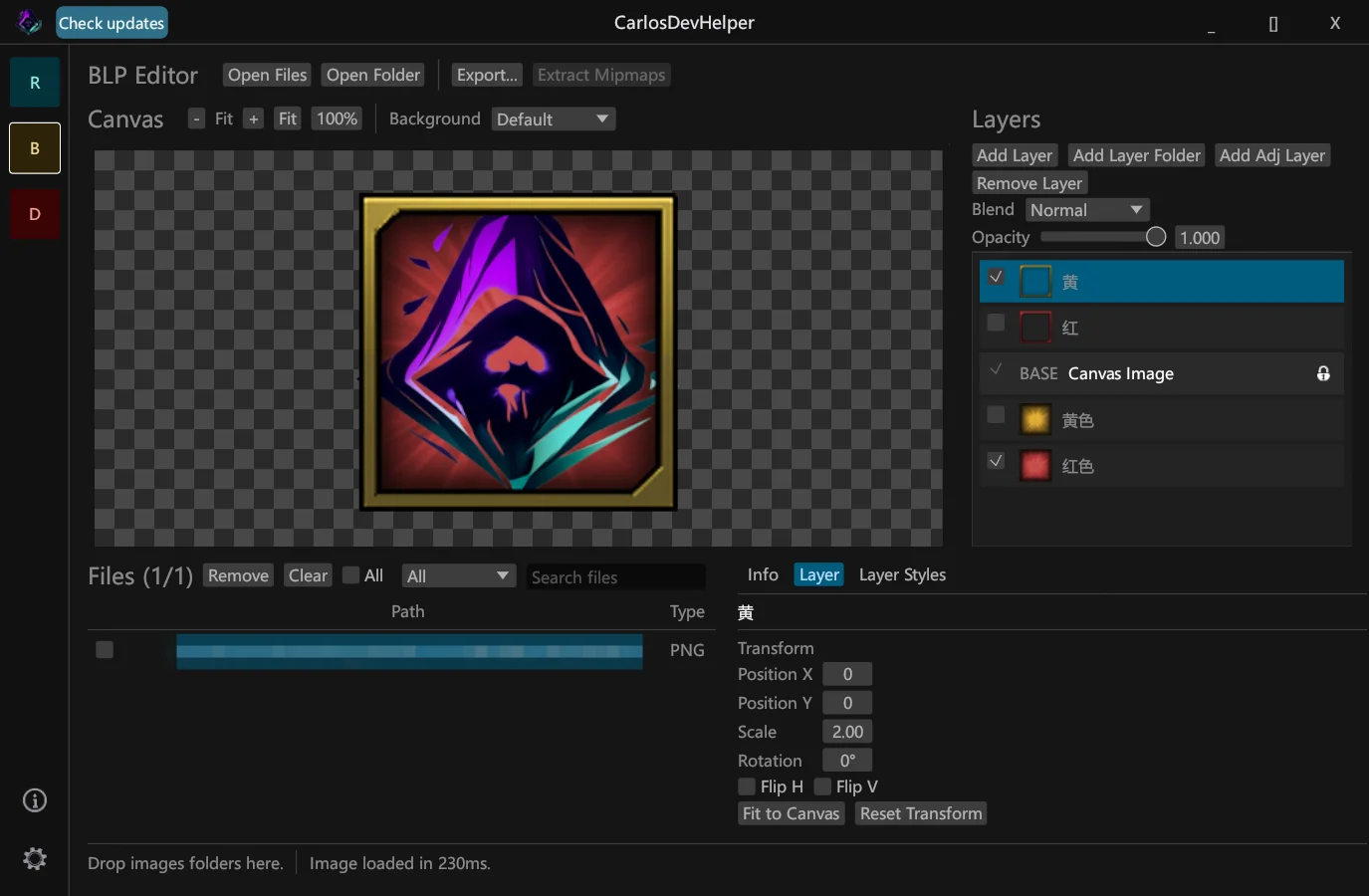
BLP Editor
- BLP Preview: Open .blp files with file picker, folder import, drag-and-drop preview, and a searchable file list.
- Image Export: Export BLP files to .png, .jpg, and .blp from the GUI.
- CLI Tools: Includes commands for BLP info, PNG export, image import, and batch PNG export.
- Batch Layer Workflow: Build one border or overlay layer stack, apply it to multiple source images, and export them together.
- Layer Editing: Supports drag sorting, double-click rename, opacity control, blend modes, and converting the canvas image into an editable layer.
- Layer Style Presets: Save the current layer stack as a reusable .dat preset with embedded layer assets.
- Layer Importing: Add multiple layer files at once or import supported images from a folder.
- Mipmap Support: Generate mipmaps during export and extract mipmaps to PNG files.
- Image Size Handling: Warns about non-power-of-two dimensions and supports auto-resize, keep original size, or reject mode.
- Canvas Options: Switch between default, dark, and light canvas backgrounds.
- Reliability Improvements: Improved responsiveness while previewing, editing, and exporting layered images.
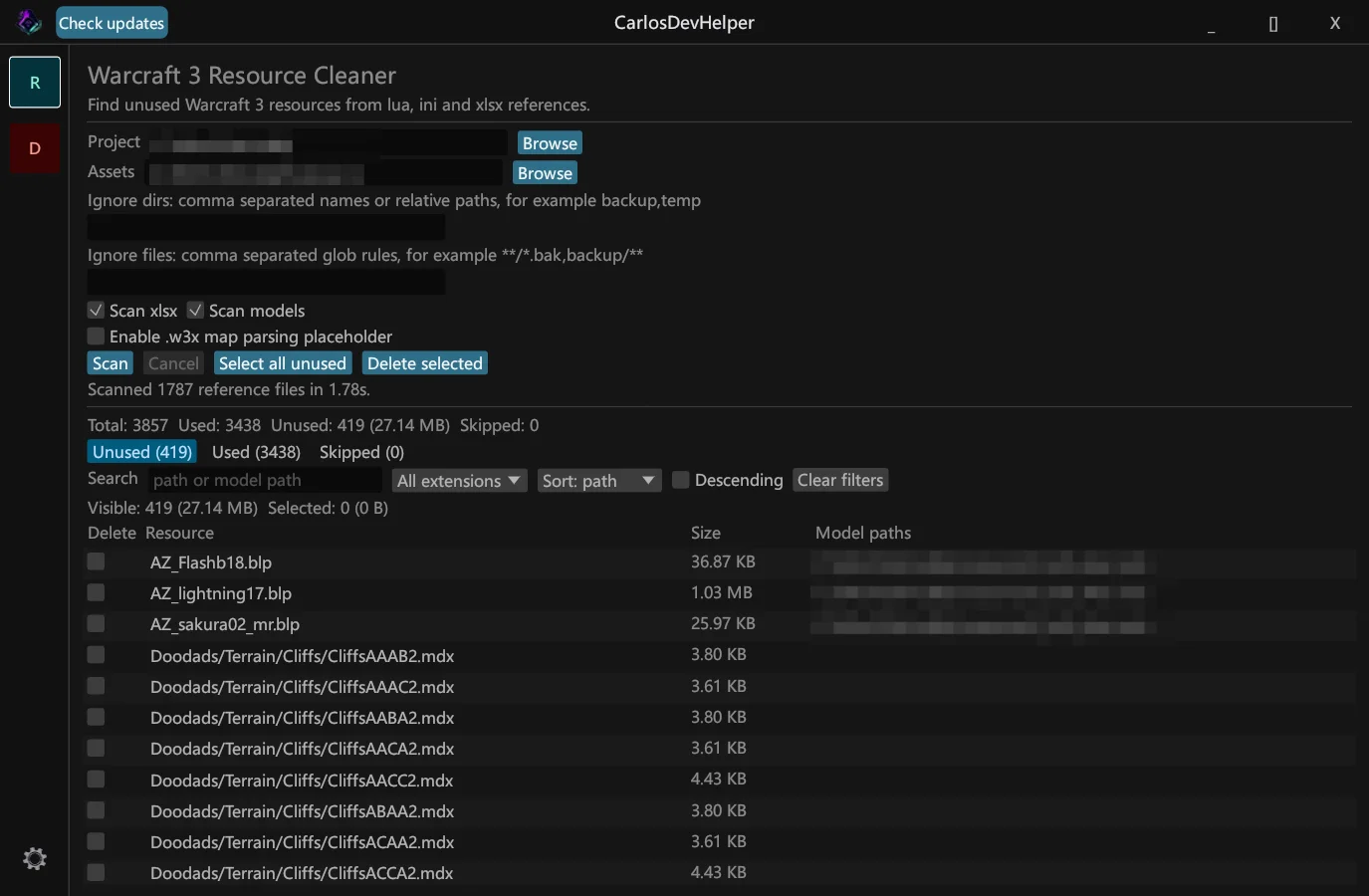
Resource Cleaner
- Scans project folders to find unused resources
- Supports .blp, .tga, and .mdx assets
- Checks references from .lua, .ini, .xlsx, .mdl, and .mdx files
- Detects texture dependencies inside Warcraft III model files
- Displays resources as Used, Unused, and Skipped
- Supports search, extension filtering, and sorting
- Supports ignored directories, ignored file patterns, ignored path prefixes, and resource whitelist
- Supports optional backup before deleting unused files
- Includes safe deletion confirmation
- Detects local Warcraft III MPQ files and treats matching override assets as used
- Provides both desktop GUI and command-line usage
- Supports English and Simplified Chinese UI
## v0.1.7
## v0.1.6
## v0.1.5
## v0.1.4
## v0.1.3
- Switched cross-repository publishing to GitHub CLI release creation.
## v0.1.2
- Fixed GitHub Release token wiring for cross-repository publishing.
## v0.1.1
## v0.1.0
- Added BLP Editor canvas navigation with mouse-wheel zoom, pan, fit-to-view, reset-to-100%, and toolbar zoom controls.
- Added layer transforms for position, scale, rotation, and horizontal/vertical flip, with preview, export, and Layer Styles support.
- Added Photoshop-style Adjustment Layers with Black & White and Tint Color modes, including Red, Green, and Blue channel weights for Black & White.
- Improved transformed layer quality and responsiveness while editing scale, rotation, and position.
- Changed imported layer defaults so
scale = 1keeps the layer at its native image size centered on the canvas. - Added Fit to Canvas for transformed layers so a native-size layer can be quickly scaled to the current canvas.
- Moved common BLP file actions into the main toolbar so Open Files, Open Folder, Export, and Extract Mipmaps are faster to reach.
- Added direct layer import by dragging source images from the Files panel or File Explorer into the Layers list.
- Added Resource Cleaner context-menu actions to send used or unused resources directly to BLP Editor Files or as BLP Editor Layers.
- Added a download source setting with GitHub/Gitee choices; Chinese system locales default to Gitee for easier access in China.
- Improved TGA image loading for BLP Editor imports and previews.
- Refined the locked Canvas Image row icon for a cleaner Layers list appearance.
## v0.1.6
- Added a unified BLP Editor layer stack for batch workflows: build one border/overlay stack, apply it to multiple source images, and export them together.
- Added layer editing tools: drag sorting, double-click rename, opacity, blend modes, and converting the Canvas Image into an editable layer.
- Added Layer Styles so the current layer stack can be saved as a reusable
.datpreset, including embedded layer assets, for later preview and export workflows. - Improved layer importing with multi-file Add Layer support and a new Add Layer Folder action for importing supported images from a folder.
- Fixed BLP export target handling so BLP source files can be exported back to BLP without losing the expected
.blpoutput path. - Improved BLP Editor responsiveness and reliability while previewing, editing, and exporting layered images.
## v0.1.5
- Added BLP Editor as a new GUI feature with file picker, folder import, drag-and-drop preview, and searchable file list.
- Added BLP CLI commands for info, PNG export, image import, and batch PNG export.
- Added BLP, PNG, and JPEG export from the GUI, with configurable JPEG quality and mipmap generation.
- Added mipmap extraction to PNG files and clickable mipmap preview in the Info tab.
- Added switchable canvas backgrounds: default, dark, and light.
- Added BLP file warnings and filters for non-power-of-two image dimensions.
- Added Resource Cleaner warnings for used and unused BLP files with non-power-of-two dimensions.
- Added BLP export options to auto-resize, keep original size, or reject non-power-of-two image dimensions.
- Improved the BLP Editor layout with a cleaner preview canvas, Files menu, file actions, search, select-all, and a focused Info tab.
## v0.1.4
- Added MPQ override detection for Resource Cleaner: assets whose relative paths match local Warcraft III MPQ entries are treated as used.
- Optimized MPQ override matching by indexing only MPQ paths under first-level roots present in the project assets.
- Updated primary action and folder selection buttons to the new teal style.
- Injected the default public update-check URL into secure release builds.
## v0.1.3
- Switched cross-repository publishing to GitHub CLI release creation.
## v0.1.2
- Fixed GitHub Release token wiring for cross-repository publishing.
## v0.1.1
- Fixed cross-repository GitHub Release publishing.
- Updated release workflow to pass the releases repository token explicitly.
- Enabled Node.js 24 for JavaScript GitHub Actions.
## v0.1.0
- Added Warcraft 3 Resource Cleaner.
- Added used, unused and skipped resource views.
- Added safe permanent delete flow with optional backup.
- Added settings persistence.
- Added multilingual UI support.
- Added update checking foundation.
- Added Data Sync Monitor placeholder.
Previews

Contents


