


We will fix it in next version. For now, you could change or delete the problematic ids (maybe by Lni) to avoid crashes. Problematic ids are `.A0O`, `.B02`, `.e06`, and `.n02`. As you see, the first char of them is `.`.Well, even when I dont check any optimization on slk, map crashes on load when trying it.
Community
Projects
Maps
Tutorials
Gallery
Support Us
Install the app
How to install the app on iOS
Follow along with the video below to see how to install our site as a web app on your home screen.
Note: This feature may not be available in some browsers.
-
Listen to a special audio message from Bill Roper to the Hive Workshop community (Bill is a former Vice President of Blizzard Entertainment, Producer, Designer, Musician, Voice Actor) 🔗Click here to hear his message!
-
Read Evilhog's interview with Gregory Alper, the original composer of the music for WarCraft: Orcs & Humans 🔗Click here to read the full interview.
-
The Hive's 22nd Icon Contest: Creep Abilities is now concluded, time to vote for your favourite set of icons! Click here to vote!
-
✅ The POLL for Hive's Texturing Contest #34 is OPEN! Vote for the TOP 3 SKINS! 🔗Click here to cast your vote!
-
✅ The POLL for Hive's Techtree Contest #20 is OPEN! Vote for the TOP 3 FACTIONS! 🔗Click here to cast your vote!
You are using an out of date browser. It may not display this or other websites correctly.
You should upgrade or use an alternative browser.
You should upgrade or use an alternative browser.
W3x2Lni v2.7.2

- Author(s)
- actboy168
- Tags
- Windows, MPQ Management, Object Data
- Size
- 4.92 MB
- Rating
-
(24 ratings)
- Downloads
- 8885
- Created
- Apr 27, 2018
- Updated
- Jul 21, 2020
- Resources
- 1
- State
 Approved
This bundle is marked as recommended. It works and satisfies the submission rules.
W3x2Lni is a wc3 map management tool. It helps you to manage your maps when developing or publishing.We defined 3 formats for a wc3 map, and w3x2Lni allows you to convert your maps amongst these 3 formats which are `Lni`, `Obj` and `Slk`.
> Lni
`Lni` is a VCS (like git, svn) friendly format. It looks like a directory. Most binary files in w3x will be converted into plain text files (yes! human-readable) by w3x2Lni which will also organize and categorize these text files.
> Obj
`Obj` is a wc3-readable and WE-readable format. If you want to open your map with WE, convert your map into this format.
> Slk
`Slk` is only readable by wc3 and should be used for final distribution. W3x2Lni enables multiple optimization for this format, including:
* Objects converted to slk
* Removed unreferenced objects
* Removed WE-only files
* Inlined WTS strings
* Compressed mdx
* Removed comments and unncessary white spaces in the script
* obfuscated variable and function name
W3x2Lni comes with war3 1.27.1 English data files. But it may not meet everyone's needs, you can use `w2l mpq <war3_path>` to extract data files.
For more information see the documentation.
W3x2Lni is a open source project.We welcome any pull request, e.g. improving the English text or writing English documents.
> Lni
`Lni` is a VCS (like git, svn) friendly format. It looks like a directory. Most binary files in w3x will be converted into plain text files (yes! human-readable) by w3x2Lni which will also organize and categorize these text files.
> Obj
`Obj` is a wc3-readable and WE-readable format. If you want to open your map with WE, convert your map into this format.
> Slk
`Slk` is only readable by wc3 and should be used for final distribution. W3x2Lni enables multiple optimization for this format, including:
* Objects converted to slk
* Removed unreferenced objects
* Removed WE-only files
* Inlined WTS strings
* Compressed mdx
* Removed comments and unncessary white spaces in the script
* obfuscated variable and function name
W3x2Lni comes with war3 1.27.1 English data files. But it may not meet everyone's needs, you can use `w2l mpq <war3_path>` to extract data files.
For more information see the documentation.
W3x2Lni is a open source project.We welcome any pull request, e.g. improving the English text or writing English documents.
Reviews

The tool works as one would expect. The UI is nice and to the point. Only thing I am missing is a back button wen you have chosen a conversion mode.
You also cannot scroll horizontally when viewing the log when converting to Lni.
I am looking...

- Joined
- Apr 14, 2016
- Messages
- 398
Oh, that actually makes more sense, than what I've thought and suggested, sorry for assuming wrong. It would be real nice to support any types of ids, although I don't think IDs like this are good, but to each his own. Thank you for paying attention!We will fix it in next version. For now, you could change or delete the problematic ids (maybe by Lni) to avoid crashes. Problematic ids are `.A0O`, `.B02`, `.e06`, and `.n02`. As you see, the first char of them is `.`.


- Joined
- Sep 25, 2017
- Messages
- 56
We will fix it in next version. For now, you could change or delete the problematic ids (maybe by Lni) to avoid crashes. Problematic ids are `.A0O`, `.B02`, `.e06`, and `.n02`. As you see, the first char of them is `.`.
I see, thanks for checking. Looking forward to next version ^^
- Joined
- Sep 25, 2017
- Messages
- 56
Oh, that actually makes more sense, than what I've thought and suggested, sorry for assuming wrong. It would be real nice to support any types of ids, although I don't think IDs like this are good, but to each his own. Thank you for paying attention!
I am just the translator of the map, so not much I can do about them D:
Version 2.4.0 has released. It has fixed your problem.I see, thanks for checking. Looking forward to next version ^^
Version 2.4.0 has released. It has fixed your problem.Well, if you fill the map from 0 with files, they are added to (listfile), but the tool still thinks that some of them are missing, even though they are not, my mistake. I thought it was actually missing them, turns out it thinks it does, but it does not.
Meaning it does all it has, which is amazing. Actually, i should post a screenshot:
View attachment 299826
Version 2.4.0 has released. It has fixed your problem.when i convert to obj, i get weird error messages about abilities.
==========================
Invalid object data (7)
==========================
Ability ANdo - [datad]: [1]: 5
Ability ANia - [dataa]: [1]: 1.0 [2]: 2.0
Ability ANia - [datab]: [1]: 30.0 [2]: 45.0
Ability ANia - [datac]: [1]: 90.0 [2]: 90.0
Ability ANia - [datad]: [1]: 15.0 [2]: 22.0
Ability ANia - [datae]: [1]: 180.0 [2]: 180.0
Ability ANia - [dataf]: [1]: 0.2 [2]: 0.2
.... ANdo is not even changed. And i have no idea what the fields in ANia are. I don't recognize those values.
- Joined
- Sep 25, 2017
- Messages
- 56
Version 2.4.0 has released. It has fixed your problem.
Impressive, map loading has gone from 40s with using 2 optimizers together to just 25s using yours ^^. Will require more testing, but everything seems to be working fine

- Joined
- Aug 18, 2009
- Messages
- 4,100

Seeing that the Doodads.slk causes problems, another optimization would be to just kick game-non-relevant attributes like name, pathing map, rotation, casts shadow. The static and intangible nature of doodads makes them possess a lot of those. They should not cause a spike ingame either, as each of them is placed at map init. If you are funny, you could even try to simulate doodads with some other wc3 entity.
Last edited:

- Joined
- May 1, 2012
- Messages
- 95
Seeing that the Doodads.slk causes problems, another optimization would be to just kick game-non-relevant attributes like name, pathing map, rotation, casts shadow. The static and intangible nature of doodads makes them possess a lot of those. They should not cause a spike ingame either, as each of them is placed at map init. If you are funny, you could even try to simulate doodads with some other wc3 entity.
The attributes that are not needed in the game have been deleted in slk mode. If you find out what w2l is missing, please let me know.
- Joined
- Aug 18, 2009
- Messages
- 4,100
The attributes that are not needed in the game have been deleted in slk mode. If you find out what w2l is missing, please let me know.
I haven't been using the tool yet, it's not listed in the description above. What would also be a practical idea would be the conversion of pathing blockers to raw terrain pathing because a lot of people have them unnecessarily as the default destructables although that's more a mistake on their part. Also resources like textures, models, sounds could be preloaded.
- Joined
- May 1, 2012
- Messages
- 95
I haven't been using the tool yet, it's not listed in the description above. What would also be a practical idea would be the conversion of pathing blockers to raw terrain pathing because a lot of people have them unnecessarily as the default destructables although that's more a mistake on their part. Also resources like textures, models, sounds could be preloaded.
It seems that this is not a lossless conversion, and I don't think there will be much improvement in this optimization.
- Joined
- Aug 18, 2009
- Messages
- 4,100
It seems that this is not a lossless conversion, and I don't think there will be much improvement in this optimization.
Of course, it's not. But then again we try to guess what the user might want. Default blockers show up in destructable enumerations, you may kill them by accident, they do not count as terrain pathing and take resources needlessly. Basically, the only reason to have them as destructables is if you want to delete them ingame/spawn more, which could however also be achieved by code.
Tried your tool for a bit. It ships with (chinese) default data, which ended up in the map I converted. Are you supposed to replace the data folder with your desired version? For consecutive cells in SLKs it's not necessary to state the new coordinates, the cursor jumps by one after every cell data record. I cannot confirm that unnecessary object attributes would be removed, the dood slk output still contained fields like "defScale", "Name" or the minimap indicator configs. Some of your files/paths are strangely in lowercase.
edit: The w2l.exe is the command line variant. The names are confusing to be frank. You can read the wc3 path in Windows from the Registry by default, the libs for it are already contained.
Last edited:
I think that in Slk mode, side effects should be avoided as far as possible.Of course, it's not. But then again we try to guess what the user might want. Default blockers show up in destructable enumerations, you may kill them by accident, they do not count as terrain pathing and take resources needlessly. Basically, the only reason to have them as destructables is if you want to delete them ingame/spawn more, which could however also be achieved by code.
It's our mistake, we will replace it to English version later.Tried your tool for a bit. It ships with (chinese) default data, which ended up in the map I converted.
Thank you, I will see.For consecutive cells in SLKs it's not necessary to state the new coordinates, the cursor jumps by one after every cell data record. I cannot confirm that unnecessary object attributes would be removed, the dood slk output still contained fields like "defScale", "Name" or the minimap indicator configs.
The paths case should be keep as much as possible, please provide more detailed information.Some of your files/paths are strangely in lowercase.
It seems a good idea.You can read the wc3 path in Windows from the Registry by default, the libs for it are already contained.
- Joined
- May 1, 2012
- Messages
- 95
Tried your tool for a bit. It ships with (chinese) default data, which ended up in the map I converted.
This is my fault. I mistakenly released the Chinese version. Now it should be an English version, you can try again.
- Joined
- May 1, 2012
- Messages
- 95
Some of your files/paths are strangely in lowercase.
Both mpq and windows file systems are case insensitive.

- Joined
- May 1, 2012
- Messages
- 95
W3x2Lni has been embedded in YDWE long time ago.Glad to see a new update of it.
In contrast, I'd like to look forward to the update of YDWE. Is it possible to embed it into YDWE?
- Joined
- May 1, 2012
- Messages
- 95
For consecutive cells in SLKs it's not necessary to state the new coordinates, the cursor jumps by one after every cell data record.
I don't know what you mean. Can you give me an example?
- Joined
- Aug 18, 2009
- Messages
- 4,100
I don't know what you mean. Can you give me an example?
No, I was wrong. The cursor stays at the previous location.
I was under the impression that
Code:
C;X1;K0
C;X2;K1
equals
Code:
C;X1;K0
C;K1
but apparently
Code:
C;X1;K0
C;K1
equals
Code:
C;X1;K1- Joined
- Aug 18, 2009
- Messages
- 4,100
I have seen, next to default, you exported the Custom_V1 dataset path. Can you tell me when the game uses what path? It depends on both dataset int in w3i and the melee flag (from w3i or map header?).
- Joined
- May 1, 2012
- Messages
- 95
I have seen, next to default, you exported the Custom_V1 dataset path. Can you tell me when the game uses what path? It depends on both dataset int in w3i and the melee flag (from w3i or map header?).
It depends on two values in w3i.
sumneko/w3x2lni
- Joined
- Aug 18, 2009
- Messages
- 4,100
So the standard files under Units\ and suchlike are not selected in either case? Although I think it will fall back on those if some file is missing. I have seen "NotUsed" slks. Also how is the V0, V1, ... extension chosen?
edit: Your jass optimization tries to obfuscate the identifiers. I have applied it to a map which already did something like that. The identifiers clashed (in my case I observed a variable and a function having the same name). The map could not start.
Last edited:
- Joined
- May 1, 2012
- Messages
- 95
So the standard files under Units\ and suchlike are not selected in either case? Although I think it will fall back on those if some file is missing. I have seen "NotUsed" slks. Also how is the V0, V1, ... extension chosen?
V0 means ROC, and V1 means TFT. Custom means custom maps, using the lowest version data such as TFT is 1.17, Melee means the battle map, using the highest version of the data. Also obvious is that the data in the root directory is MeleeV1, so you can only see three directories, CustomV0, CustomV1, and MeleeV0. W2l does not support ROC, so only the root directory and CustomV1 are required.
edit: Your jass optimization tries to obfuscate the identifiers. I have applied it to a map which already did something like that. The identifiers clashed (in my case I observed a variable and a function having the same name). The map could not start.
Function name is also an identifier.
If you find any bug with jass optimization, please show me your war3map.j, thank you!edit: Your jass optimization tries to obfuscate the identifiers. I have applied it to a map which already did something like that. The identifiers clashed (in my case I observed a variable and a function having the same name). The map could not start.

- Joined
- May 1, 2012
- Messages
- 95
I'm getting the following error when I'm converting my map to SLK format:
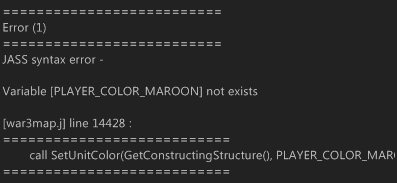
This probably has something to do with the 24 player dynamic. It doesn't know the color maroon apparently.
You are converting a 1.29+ map, so you need to use the correct data file.
- Joined
- May 1, 2012
- Messages
- 95
Ah I see, I was told that this was v1.30 compatible
It is compatible with 1.29. I don't know if 1.30 is OK, because I haven't tested it yet.
You need the correct data file. If you don't know what I am talking about, please read the instructions at the top.

The tool works as one would expect. The UI is nice and to the point. Only thing I am missing is a back button wen you have chosen a conversion mode.
You also cannot scroll horizontally when viewing the log when converting to Lni.

I am looking forward to your future work!
You also cannot scroll horizontally when viewing the log when converting to Lni.
I am looking forward to your future work!

- Joined
- Feb 14, 2018
- Messages
- 33
slk2obj has a bug.some map which use widgetizer they change the "placeable in editor" to false.silk object does convert it to true but your tool doesnt
- Joined
- May 1, 2012
- Messages
- 95
slk2obj has a bug.some map which use widgetizer they change the "placeable in editor" to false.silk object does convert it to true but your tool doesnt
I don't understand what you mean. Why do you think change is the right behavior?
- Joined
- May 1, 2012
- Messages
- 95
The tool works as one would expect. The UI is nice and to the point. Only thing I am missing is a back button wen you have chosen a conversion mode.
You also cannot scroll horizontally when viewing the log when converting to Lni.
I am looking forward to your future work!
You are right, the Log GUI is not complete. Currently you can open the log file to view it.
- Joined
- Feb 14, 2018
- Messages
- 33
- Joined
- Feb 14, 2018
- Messages
- 33
may take long time to open because of its huge number of objects
- Joined
- Feb 14, 2018
- Messages
- 33
one more thing I think u should add this feature to your tool,the objects reducer.not the slks but the object one
- Joined
- May 1, 2012
- Messages
- 95
Ill send u two example map
One does has objects appeaered in tool pallete ( the no bug map )
One doesnt ( your tool created map )
W2l is not a slk decryption tool, it does not and does not intend to provide inverse operations for other slk tools. For slk to obj, w2l will respect any data on the intput map without any modifications. So the intput map has any wrong data, missing data, w2l will also make the output map the same.
If w2l does not respect the input map data, please let me know. Similarly, w2l does not do things that do not respect the input map data.
- Joined
- Feb 14, 2018
- Messages
- 33
not the author but the map protector did that
Just drag another map in.Only thing I am missing is a back button wen you have chosen a conversion mode.
For now, you counld find the report at log/report.log.You also cannot scroll horizontally when viewing the log when converting to Lni.
- Joined
- May 1, 2012
- Messages
- 95
not the author but the map protector did that
I remind you again that w3x2lni is not a tool for decrypting maps.
- Joined
- Feb 14, 2018
- Messages
- 33
I've tried with my map,the protector removed "placeable in editor".I dont mean this is a map deprotector but some map which the author lost their original data,may want that fix.
- Joined
- May 1, 2012
- Messages
- 95
I've tried with my map,the protector removed "placeable in editor".I dont mean this is a map deprotector but some map which the author lost their original data,may want that fix.
This isn't a problem that w2l will solve.
- Joined
- Feb 14, 2018
- Messages
- 33
ok.I fixed it by hand
This tool is like a dream come true! But unfortunately, I ran into an issue when converting the LNI folder back to OBJ.
The converter throws out a single error "Save WTG failed - bad argument #1 to 'pack' (number expected, got nil)". Then, the resulting .w3x file has no more triggers.
This happens with any source map containing triggers, even the default new map. I'm using version 2.4.3, and wc3 1.30. Any ideas?
The converter throws out a single error "Save WTG failed - bad argument #1 to 'pack' (number expected, got nil)". Then, the resulting .w3x file has no more triggers.
This happens with any source map containing triggers, even the default new map. I'm using version 2.4.3, and wc3 1.30. Any ideas?
This tool is like a dream come true! But unfortunately, I ran into an issue when converting the LNI folder back to OBJ.
The converter throws out a single error "Save WTG failed - bad argument #1 to 'pack' (number expected, got nil)". Then, the resulting .w3x file has no more triggers.
This happens with any source map containing triggers, even the default new map. I'm using version 2.4.3, and wc3 1.30. Any ideas?
Im sorry this tool did not test in WC3 1.30. Would you please show me your map, and I will try to fix it.

- Joined
- Jun 12, 2010
- Messages
- 413

This tool is like a dream come true! But unfortunately, I ran into an issue when converting the LNI folder back to OBJ.
The converter throws out a single error "Save WTG failed - bad argument #1 to 'pack' (number expected, got nil)". Then, the resulting .w3x file has no more triggers.
This happens with any source map containing triggers, even the default new map. I'm using version 2.4.3, and wc3 1.30. Any ideas?
I'm having the same issue on patch 1.29.2 :S
I'm having the same issue on patch 1.29.2 :S
Please send me your lni map, thank you!
- Joined
- Jun 12, 2010
- Messages
- 413
Alright, I've tested the bug a bit more, and attached all the steps and results in a zip file.
The bug is a little more complicated - triggers are still there at first in OBJ, but any change in WE will overwrite them.
I'll try to be clear - here are the reproduction steps:
The bug is a little more complicated - triggers are still there at first in OBJ, but any change in WE will overwrite them.
I'll try to be clear - here are the reproduction steps:
- Created a map "singletriggermap.w3x", where there is a single trigger that shows some text at start.
- Converted to LNI.
- Converted LNI back to OBJ. This is where the tool outputs error message "Save WTG failed - bad argument #1 to 'pack' (number expected, got nil)". If you open this OBJ in wc3, triggers still work. However, if you open it in World Editor, you won't see any triggers in Trigger Editor - editor just doesn't know about them. If you don't make any changes and click "test map" in Editor, triggers will still work in wc3.
- Now with this OBJ opened in World Editor, make a single change, any change (like create a new unit type, place a tree...), then save the map again. This new map has now lost all the triggers, even if you test it in wc3.
- "singletriggermap_original.w3x" ... step 1. the original map made in WE
- folder "singletriggermap" ... step 2. your LNI folder
- "singletriggermap_2lni_2obj.w3x" ... step 3. map created from LNI folder back to OBJ
- "singletriggermap_2lni_2obj_thenchanged.w3x" ... step 4. the previous map, changed in WE and saved again
Attachments
This tool is like a dream come true! But unfortunately, I ran into an issue when converting the LNI folder back to OBJ.
The converter throws out a single error "Save WTG failed - bad argument #1 to 'pack' (number expected, got nil)". Then, the resulting .w3x file has no more triggers.
This happens with any source map containing triggers, even the default new map. I'm using version 2.4.3, and wc3 1.30. Any ideas?
I'm having the same issue on patch 1.29.2 :S
Im sorry this Bug has been 3 months. Because it only appears in the English version, I never found it.
Similar threads


- Replies
- 2
- Views
- 3K


- Locked
- Replies
- 0
- Views
- 1K

- Replies
- 10
- Views
- 3K


