• Listen to a special audio message from Bill Roper to the Hive Workshop community (Bill is a former Vice President of Blizzard Entertainment, Producer, Designer, Musician, Voice Actor) 🔗Click here to hear his message!
  • Read Evilhog's interview with Gregory Alper, the original composer of the music for WarCraft: Orcs & Humans 🔗Click here to read the full interview.
  • The Hive's 22nd Icon Contest: Creep Abilities is now concluded, time to vote for your favourite set of icons! Click here to vote!
  • ✅ The POLL for Hive's Texturing Contest #34 is OPEN! Vote for the TOP 3 SKINS! 🔗Click here to cast your vote!
  • ✅ The POLL for Hive's Techtree Contest #20 is OPEN! Vote for the TOP 3 FACTIONS! 🔗Click here to cast your vote!

Neodex 4.6 Reforged Edition

Hello everybody,

It has been a while since someone last updated this script — but here I am!

Supported versions of the script

3ds Max 2022 – 2027

Due to some code changes in 3ds Max, the Sequence Manager no longer supports versions older than 3ds Max 2022.

Link to the original NeoDex:
NeoDex 2.65 MDLX Toolkit for Gmax / 3ds Max

Link to Neodex 2.7
NeoDex 2.7 Wc3 Modeling Kit for 3dsmax & GMAX

I managed to find someone who was able to update it, so here are the updates that have been made over the years.

4.0 Changes.
It is with great pleasure that I announce that NeoDex now supports Reforged. Happy modding!


Credits:

Author:
BlinkBoy / Fernando A. Sahmkow

Updaters:
Jaccouille / Blinkoon / Bensen

Contributors:
Republicola (creator of the old Dexporter), Igni (Biped support and various fixes)

Beta Testers:
Adiktuz, BallisticTerrain, Manoo, skrab, Talavaj

Blp Libary used for the nativ blp plugin thanks to BlinkBoy / Fernando A. Sahmkow for his help!

2.8:

by Jaccouille
  • Fixed a bug that the script is useable in max 2017 and higer
  • Fixed a bug in the Sequence Manager
  • added a new Feature under the Animation Tool Tab, which allows you to export the List of animation name as Text File and import the Animation name as Text File
  • Fixed a bug in the animation tool Section, that the first button creates Start and End frames

by Blinkoon(BlinkBoy)
  • Updated the Script that it can be used up to Max 2024
  • He fixed the Neodex Samples
  • Fixed that models with camera imports correctly again
  • Models without geosets weren't loading and models with animated color

by Bensen
  • Upgraded the Script to max 2025 and newer Versions (in the Future
  • 06.02.25 Fixed a bug when you export a model without ParticleEmitter2 it will still create a key and this lead to this bug here

2.9

by Bensen:
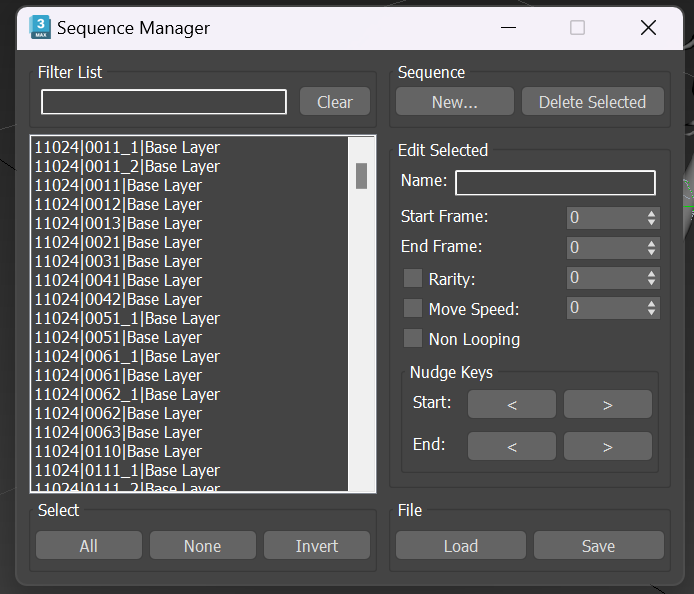
Sequence Manager 2.0


Update 04.10.24
  • Fixed a bug where selected Animation Sequences would not delete correctly. Instead the animations above would get deleted

update 06.02.25
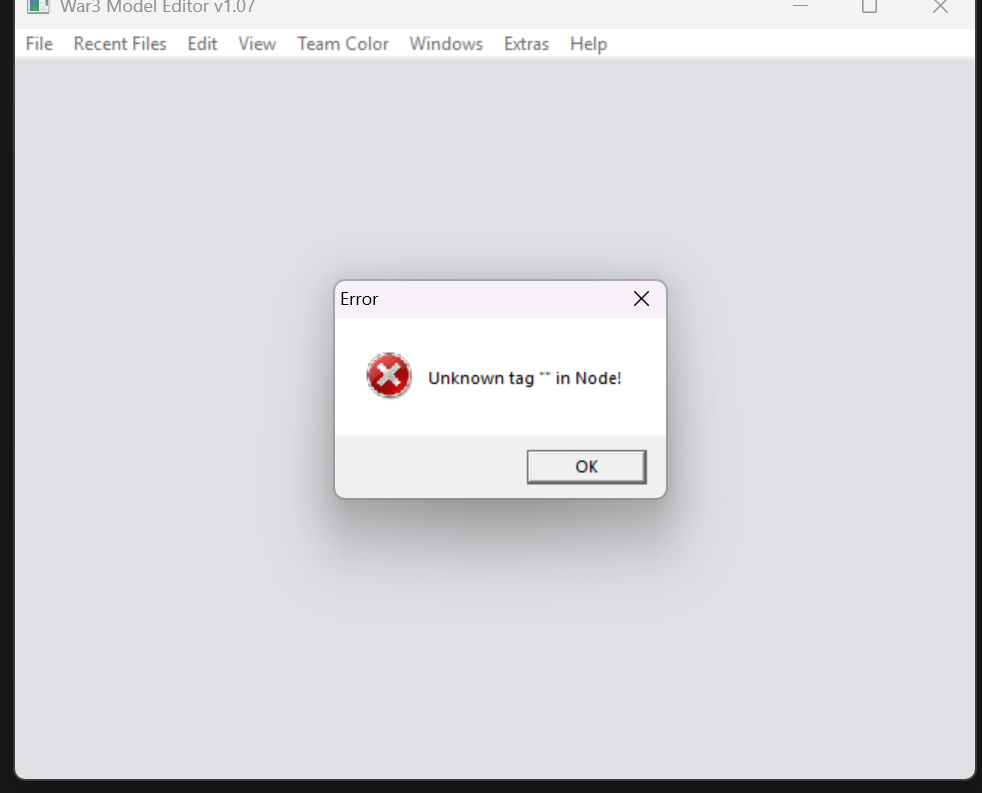
  • Fixed a bug where a key was created when exporting a model without a ParticleEmitter2, which caused this issue.


291119-05976b2d0e02ae85ff51345cb283586f.png


Filter List:
Filter your animations

Select All:
Select all animations which are visible in the Sequencer

None:
unselect all animations which are visible in the Sequencer

Invert:
invert the List of selected animations

New...
opens a new Window which allows you to create a new Animation

Delete Selected:
Delete animation Notes only

Nudge Keys:

Start: < > Move the first Animation Note key one frame up or down

End: < > Move the last Animation Note Key one frame up or down

Mostly used for the models which are imported with the twilacs Blender script

File:

Load: Load an animation List

Save Save an animation List

Video with all the Information:


# NeoDex 3.0 — Release Notes
Warcraft III Model Toolkit for Autodesk 3ds Max
Release Date: March 2026 | Developers: DennisH, Benjamin Schiefer
Supported: 3ds Max 2022–2026 (64-bit)
---
## 🚀 New Features
### Installation & Workflow
  • New installer system — Simple batch installer that copies files to %APPDATA%\Autodesk\ApplicationPlugins. No admin rights needed, easy updates.
  • Old version uninstaller — Automatically detects and removes NeoDex 2.x installations from all 3ds Max versions (2011–2025).
  • Remember export directory — The exporter remembers your last export path and filename. No more navigating folders every time.
  • Open folder after export — New option to automatically open the output folder after exporting a model.
  • Export settings memory — Your export settings are saved between sessions.
### Plugins & Editors
  • Completely rewritten Material plugin — Full support for all Warcraft III material options including texture wrapping, opacity, SortPrimsNearZ/FarZ, and all material flags. Thanks to LxXDinjin for contributions.
  • Light plugin — Full import and export support for Warcraft III lights with color and attenuation animation. By LxXDinjin.
  • Blitz Particle 2 plugin — New scripted plugin with full import/export for Particle Emitter 2 objects. By LxXDinjin.
  • Blitz Particle 1 plugin — Added to import and export pipeline with correct value handling. By LxXDinjin.
  • Collision Shapes plugin — New plugin for editing collision boxes and spheres. By LxXDinjin.
  • Ribbon Emitter plugin — New scripted plugin for Ribbon Emitters. By LxXDinjin.
  • Vertex Color plugin — New modifier for editing geoset animation properties including color and DropShadow.
  • Attachment Point plugin — New scripted plugin for Warcraft III attachment points with dropdown-based name selection.
  • Event Note plugin — New scripted plugin for Warcraft III event objects (sound, footprint, splat, etc.).
  • BLP texture support — Materials now load BLP files directly. TGA conversion is no longer required. Subdirectory texture search included.
### Tools
  • Visibility Tool — Create and edit visibility animations with None, Linear, Bezier, and TCB interpolation.
  • Object Manipulation Tool — Transform and adjust Warcraft III object properties.
  • Sequence Manager upgrade — Animation presets with configurable lengths (10–60 frames), duplicate function, ignore checkbox for excluding animations from export, overlap protection. Min/max animation range expanded from 1–2 to 10–60.
  • Sanity Checker — Continuously improved exporter sanity checker that validates bones, materials, and scene setup before export.
  • Global Sequence Manager — Dedicated tool for managing global sequences.
  • Grid & Dummy Creator — Quickly create helper grids and dummy objects.
  • Skin Changer — Reassign skin data for Warcraft III models.
  • Team Color Manager — Edit team color regions.
  • Node Manager — Manage scene nodes and hierarchy.
  • Auto Attachment Points — Generate attachment points automatically by scanning bone names. Thanks to Bensen.
  • FBX Animation Saver — Export animations to FBX format.
### Import & Export
  • Camera import support — Import static and animated cameras including roll animation.
  • Camera roll (KCRL) export — Camera roll animations are now correctly exported to MDX and MDL.
  • Biped export support — Export Biped rigs with bone attachment without errors.
  • IK Constraint rig export — Correctly export IK-constrained rigs without child bone flipping.
  • Link Constraint support — Import and export of Link Constraints.
  • Texture animation rotation & scaling — Full import and export support for rotation and scaling in texture animations.
  • WC3 helpers import as Point Helpers — Imported helper objects now use the native 3ds Max Point Helper type.
  • Material fix presets — Configurable presets for the material fixer in the exporter.
  • Billboard settings — Restored billboard configuration in the export pipeline.
  • Import models without keyframe animation — Models with only texture animations (no bone keyframes) can now be imported.
  • Import models without sequences — Models that contain no sequences can now be imported without errors.
  • Export texture animation with different controllers — Texture animations using various controller types are now exported correctly.
---
## ⚡ Improvements
### Performance
  • Faster model import — Optimized import functions, especially for models with many vertices.
  • Faster model export — Optimized export functions for large models.
  • Optimized scene monitor — Runs once instead of every second. Stops automatically after closing the exporter.
### Code Quality
  • Full refactor to structs — Entire codebase restructured into MAXScript structs for maintainability.
  • Removed language changer — Simplified codebase, now more developer-friendly.
  • Removed legacy Gmax functions — Cleaned up unused code paths.
  • Cleaned debug functions — Removed old debug output from importer and exporter.
  • Sequence Manager migrated to Custom Attributes — Sequences now stored as CAs instead of NoteTracks. Legacy NoteTrack scenes still supported.
### Import Behavior
  • Smarter layer creation — Layers are only created when needed. No more empty Light layers for models without lights. Bones and Helpers are now imported to separate layers.
  • Material fix improved — Now converts invalid materials to Warcraft III Material instead of Standard Material.
### UI
  • Redesigned export window — Cleaner layout with new settings rollout.
  • Updated credits
---
## 🐛 Bug Fixes
### Critical Fixes
  • Hermite rotation tangent preservation — Fixed a lossy import/export roundtrip where Hermite rotation tangents were lost during TCB conversion. Original keys are now stored in AppData and restored on export when unmodified.
  • Recursive controller conversion — Fixed a bug where RotationType recursively called fixRotationTCB, causing Linear rotation bones to be incorrectly exported as Hermite with wrong tangents.
  • Sequence boundary twitching — Fixed animation jitter at sequence boundaries after Hermite-to-TCB conversion. Tension=50 is now applied at boundary keyframes.
  • Particle 1 KPES mapped to wrong field — KPES (speed) animation was imported into lifespan instead of initVelocity, corrupting both fields.
  • Duplicate KPES tag in MDX export — Both lifespan and initVelocity were written with the same KPES tag, creating invalid MDX files. Lifespan is now always static.
  • SortPrimsFarZ always enabled on export — The flag was always set because integer 1 was treated as truthy. Fixed with proper boolean conversion.
  • Sub-skeleton export — Fixed child bone movement conversion with correct handling of root/main bone scale.
  • UV map destruction on export — Fixed a critical bug where UV maps were completely destroyed after exporting.
### Material & Texture
  • SortPrimsNearZ support added — Bit 3 (0x08) was never read or written. "Near to Far" sorting now works correctly.
  • Texture animation frame visibility — Imported texture animations now display frames correctly in the viewport.
  • Texture animation saved in .max files — Fixed a bug where texture animations were lost when saving and reopening a Max file.
  • Texture animation playback rate — Fixed incorrect avgT calculation that caused textures to cycle too fast after import.
  • Global Sequence duration — Fixed off-by-one error that cut off the last texture's display time.
  • Texture animation interpolation type — Changed from NonInterp to Linear, fixing textures that would hold the last frame instead of cycling.
  • Opacity IFL sync — Fixed white flickering artifacts caused by opacity texture playing out of sync with diffuse texture.
  • IFL path in UI — The sequence frame folder path is now correctly shown in the material UI after import.
  • Material Opacity Texture frames — Frames are now set correctly during preprocessing.
  • Color import/export — Fixed red and blue channels being swapped. Thanks to ghostheroine.
  • Color and Alpha Material import — Fixed wrong or default data being imported when not necessary.
  • Chinese Max material fix — Fixed textures disappearing when opening English files in the Chinese version of 3ds Max.
  • Material column/row naming — Fixed column labeled as "Cows" and row/column names being swapped.
  • Variation spinner — Fixed default value mismatch and incorrect update on import.
  • Material plugin translation — Fixed missing translation strings in the WC3 Material plugin.
  • IFI file path error — Fixed an error when trying to open the path for .ifi files.
  • Replace ID import — Fixed texture animation import when replace ID is 0 or 2.
### Animation
  • Visibility import — Fixed incorrect visibility import for meshes, Particles 2, and models in general. Frames are now set correctly.
  • Rotation Hermite tangents — Fixed incorrect export values for in/out tangents that caused still animations to move.
  • Position/Rotation/Scaling export — Fixed inconsistent export results depending on whether position or rotation keys existed at the time of scaling.
  • Position key export — Fixed incorrect position keys, especially with Bezier controllers.
  • ScaleKey division by zero — Fixed crash when exporting models with XYZ-type scale keys. Scale values are now clamped to a minimum of 0.001 to prevent invisible geometry.
  • Scaling bug — Fixed a general scaling bug affecting model export.
  • Child bone scaling — Fixed scaling bug for child bones and texture animation preprocessing.
  • Animation notes import — Fixed looping and non-looping being switched on import.
  • Animation notes export — Fixed export when no note key existed.
  • Animation controller fix — Fixed controllers for Cameras and Biped.
  • Global animation import — Fixed visibility animations not processing globally during import.
  • Global animation Bezier/Hermite — Fixed global animation bug with Bezier and Hermite bones.
  • Sequence boundary key assignment — Keys on boundaries between sequences are now assigned to the following sequence.
  • Pre-process start key value — When a sequence has no key at its start frame, the value of the first available key is now used instead of the rest pose.
  • Inter-sequence gap keys — Camera animation keys between sequences are no longer discarded during import.
  • Camera roll import/export — Fixed KCRL animation that was silently lost because getPropertyController #roll doesn't work for Target Cameras.
  • Hermite position tangent preservation — Original asymmetric Hermite tangents for cameras are now stored and restored correctly.
### Particles & Emitters
  • Particle 2 visibility spinner — Fixed visibility spinner not working after import.
  • Particle 2 rotation without frames — Fixed rotation being lost on export when no keyframes existed.
  • Particle export modes — Fixed modes not being imported/exported correctly.
  • Default/Line emitter flags — Fixed incorrect emitter type flags in import and export.
  • LineEmitter always enabled in MDL — Fixed truthy integer check that always wrote the LineEmitter flag.
  • TailDecayUVAnim wrong data — Fixed export reading lifespan tail values instead of decay tail values.
  • Duplicate Particle 1 on import — Fixed import creating both a plugin object and a point helper.
### Ribbon Emitters
- Material properties not synced after import — UI showed default values and changing any property would overwrite correctly imported data. Fixed with proper material-to-plugin sync.
### Collision Shapes
  • Box coordinate transform — Fixed inverted X/Y signs in coordinate conversion causing mirrored/offset boxes after export.
  • Collision box width/length — Fixed width and length values being swapped during import and export.
  • Collision sphere coordinates — Fixed X and Y values being switched.
  • Collision box negative sign — Fixed wrong side placement causing incorrect in-game collision.
### Geoset Animations
  • DropShadow never exported — The DropShadow checkbox had no effect on export. Now properly read from the plugin.
  • DropShadow/UsesColor not set on import — Both properties now correctly set on the modifier after import.
  • Flag corruption on roundtrip — Fixed != undefined checks that incorrectly set flags when values were false.
### Attachment Points
  • Visibility, OutPath, and AttachmentId not imported — These three properties were completely ignored during import. Now correctly handled.
  • Custom AttachmentId discarded on export — The writer used auto-increment instead of the user-set ID.
  • Multi-word name parsing — Fixed parser failing on names with both add1 and add2 components.
  • Destructive name mutation — Fixed export permanently stripping the "Obj:" prefix from node names.
### Event Objects
  • Destructive name mutation — Fixed export permanently altering event object names in the scene.
  • Event note export — Fixed export when no note key existed.
### Lights
  • Light export — Fixed the long-standing light export bug. Thanks to ghostheroine.
  • Static light animation export — Fixed MDX light export for static animations.
### Sequence Manager
  • Empty animation notes — Automatically detects and removes empty or single-name note keys.
  • Overlap protection — Animations can no longer overlap in the timeline.
  • CA migration — LoadSequences now reads from Custom Attributes. SaveSequences writes only to CAs.
  • IFL global sequence duration — Fixed off-by-one in checkIFLForGlobalSeq.
### Exporter
  • MDL geoset export — Fixed geoset data in MDL export.
  • Shared skin modifier — Fixed incorrect export when one skin modifier was shared across multiple meshes.
  • Duplicate bone names — Fixed bones being deleted because lookup used names instead of IDs.
  • MDL Particle 2 export — Fixed MDL export bug that caused crashes in MAGOS Model Editor.
### Other
  • Visibility Keyer copy & paste — Fixed a bug in the copy and paste function of the Visibility Keyer.
  • TCB Bones import — Fixed linear objects causing errors when continuity = 0.0.
  • Missing texture import — Fixed error when importing models referencing textures that cannot be found.
  • Sanity checker — Fixed wrong behavior and a critical bug where bones were not recognized correctly.
---
## 🙏 Credits
### Developers
  • DennisH — Lead developer
  • Benjamin Schiefer — Developer
### Plugin Development
- LxXDinjin — Material plugin, Light plugin, Blitz Particle 1 & 2 plugins, Ribbon Emitter plugin, Collision Shapes plugin
### Contributors
- Bensen — Attachment point auto-generation, Sequence Manager safety features
### Testing
  • ghostheroine — Tester, light export fix, color import/export fix
  • gluma — Tester
---
## ⬆️ Upgrading from NeoDex 2.x
1. Run uninstall_old_neodex.bat as Administrator to remove the old installation
2. Run install.bat to install NeoDex 3.0
3. Restart 3ds Max
The new version installs to %APPDATA%\Autodesk\ApplicationPlugins and no longer modifies your 3ds Max program directory.

🚀 New Features​


Warcraft 3 Reforged MDX v1200 Import Support​


Complete import pipeline for Warcraft 3 Reforged models alongside existing Classic v800 support.


  • NeoDexReaderReforge1200.ms — Dedicated v1200 chunk reader with Reforged-specific data structures.
  • Popcorn.ms — Wc3CornEmitter helper plugin for Popcorn FX particle emitters (CORN chunk).
  • FaceFX.ms — Wc3FaceFX helper plugin for facial animation targets (FAFX chunk).

Warcraft 3 Reforged MDX v1200 Export Support​


Full export support for Warcraft 3 Reforged MDX v1200 format. All changes are behind if version == 1200 guards — v800 export remains unchanged.


Dual-Version Importer UI​


  • Version-aware import dialog: automatically detects v800 (Classic) or v1200 (Reforged) and shows the appropriate UI.
  • Reforged dialog includes additional checkboxes for Corn Emitters and FaceFX import.
  • Both dialogs share the same import pipeline with version-specific code paths.

Dual-Version Exporter UI​


  • New "Format Version" radio button (Classic v800 / Reforged v1200) in the export dialog below "Model Name".
  • Export version persisted in INI file between sessions.

Reforged PBR Material System​


  • Multi-texture material support: Diffuse, Normal, ORM (Occlusion/Roughness/Metallic), Emissive, Environment maps.
  • Texture binding table parsing for per-layer texture slot assignments.
  • Extended texture format support: .dds, .tif, .png in addition to existing .blp/.tga.
  • PBR rollout UI in Wc3Material plugin with Fresnel Color controls.
  • Export writes Fresnel data (EmissiveGain, FresnelColor RGB, FresnelOpacity, FresnelTeamColor) and Texture Binding Table with ShaderFlag.

Reforged-Specific Chunk Support (Import & Export)​


  • CORN — Popcorn FX emitter import/export with path, color, speed, emission rate, life span parameters.
  • FAFX — FaceFX facial animation target import/export.
  • BPOS — Bind Pose matrices (4×3 row-major format with MDX↔Max coordinate conversion).
  • SKIN — Per-vertex skin weights (4 bones + 4 weights per vertex).
  • TANG — Tangent vectors computed via Lengyel/Gram-Schmidt algorithm.
  • CAMS — Camera import for v1200 format.
  • KMTE — Emissive gain animation keyframes for material layers.
  • KPPE — Emission rate animation keyframes for Popcorn emitters.

LOD Layer Separation (v1200)​


  • Geosets now separated into named layers (LOD0, LOD1, LOD2, etc.) based on selectionGroup field, with lower LODs hidden by default.

Shared Sequence Support for Reforged Models​


Reforged models can have multiple sequences sharing the same time range (alias sequences). Previously these were either skipped during import or had their keyframe data corrupted. The toolkit now handles shared sequences through a complete round-trip:


  • Import: Each shared sequence receives its own unique keyframe range with correctly copied animation data. A tracking tag links aliases back to their master sequence.
  • Scene: The Sequence Manager displays alias sequences with a [Shared] prefix showing which master they belong to. Editing the name, start frame, or end frame breaks the link, converting it to an independent sequence.
  • Export: Alias sequences with intact links are collapsed back onto the master sequence's time range, reproducing the original MDX structure. Before collapsing, the exporter validates that keyframe data still matches the master. If a user has modified the animation on an alias, the link is automatically broken and the sequence keeps its own range.

Popcorn Emission Rate Animation (KPPE)​


Full animation pipeline for KPPE (animated emission rate) on Popcorn emitters. Previously, KPPE data was discarded on import and emission rate was always exported as a static value. The reader now stores it as a ParameterValue, the rebuilder applies it as a keyframed controller, the scene parser reads it back with animation keys, the relinker remaps keys to export ranges, and both MDX and MDL writers output the KPPE animation track.


MDL Export Support for All Reforged v1200 Features​


The MDL writer previously only output v800 format. It now writes all v1200-specific data:


  • Materials: ShaderTypeId, PBR texture bindings (NormalTextureID, ORMTextureID, EmissiveTextureID, TeamColorTextureID, ReflectionsTextureID), Fresnel data (EmissiveGain, FresnelColor, FresnelOpacity, FresnelTeamColor).
  • Geosets: Tangents section, SkinWeights section, empty VertexGroup for SKIN models, LevelOfDetail, Name (LOD name).
  • Objects: Helpers written as Bone blocks (merged into bones like the MDX writer). Popcorn emitters with emission rate animation, visibility, flags, and all static properties. FaceFX targets.
  • Structure: Version stored for conditional v1200 output. NumParticleEmittersPopcorn in header. Corn emitter pivots included in PivotPoints section. BPOS is intentionally not written as it does not exist in MDL format — the game reconstructs bind poses from bone transforms at frame 0.


⚡ Improvements​


Export Pipeline​


  • Tangent computation — New computeTangents function using Lengyel/Gram-Schmidt algorithm, MaxScript-compatible without continue.
  • SKIN data generation — Captures raw skin data per vertex (top 4 bones + weights as bytes, normalized to 0–255).
  • ObjId remapping — Converts SKIN bone indices to ObjIds for correct bone referencing.
  • Vertex mapping — processUnwrapSimplified, processUnwrapStandard, and processNoUnwrap now return origVertMap as 6th element.
  • v1200 bone/helper handling — Helpers are appended at the end of the BONE chunk (geosetId=-1) instead of a separate HELP chunk.
  • Sequential bone list — MTGC/MATS use sequential bone list at v1200 so SKIN BoneId = MATS index = ObjId.
  • CORN in hierarchy — CORN emitters included in hierarchy sorting and ObjId assignment, pivots included in pivot point writer.

Utility Functions​


  • IsPopcornEmitter and IsFaceFX — New global wrapper functions for class detection.


🐛 Bug Fixes​


Critical Import Fixes​


  • Event keys in timeline gaps lost during import (v800 + v1200) — Event objects whose keys fall between sequences (in timeline gaps) are silently dropped during import. On re-export they appear as empty helpers instead of EventObjects. The key distribution logic discards any key that doesn't fall inside a sequence range. Added a second pass that detects unassigned gap keys and remaps them proportionally into the compressed new gap, covering keys between consecutive sequences, before the first sequence, and after the last sequence.
  • Animation Keyframe Loss (v1200) — ~90% of animation sequences showed static identity poses on import. convertSequences produced an unsorted OldSequences array; the forward-only cursor in getKeysOnSequences skipped keyframes when sequences were out of order. Fixed by adding sort-by-start-time before keyframe extraction.
  • Bone Hierarchy Mislink — CORN Reader (v1200) — Spine bones were incorrectly parented to Hero_Glow particle emitter instead of pelvis/root bone. A missing readMDXLong() call in the CORN chunk reader caused a 4-byte offset, resulting in objId collision. Fixed by adding the missing call for the inclusive size field.
  • Per-Vertex Skin Weights (v1200) — v1200 models used v800 equal-weight matrix group skinning instead of actual per-vertex weights. SKIN chunk data was parsed but never applied. Fixed with a new Reforged skinning path in applySkinning using flat bone index mapping from SKIN chunk data.

Import Fixes​


  • MDX Reader crashes on KMTE animation tag (v1200) — The v1200 material layer reader did not recognize the KMTE animation tag (emissive gain keyframes). Models with KMTE data after the standard KMTA alpha animation lost sync with the file stream, causing "Expected LAYS" errors on the next material. Added KMTE support to the layer animation loop and a safety seek to the end of each layer to prevent future unknown tags from causing the same issue.
  • CORN reader crashes on KPPE animation tag (v1200) — The Popcorn emitter reader did not recognize the KPPE animation tag (emission rate keyframes). Models with KPPE data broke out of the animation loop without consuming the bytes, producing garbage names and crashing with "Unable to convert: undefined to type: Point3". Added KPPE support to the animation loop, element boundary tracking, and a safety seek at the end of each element.
  • Shared animation sequences lose keyframe data (v1200) — Reforged models can have multiple sequences sharing the same time range. The keyframe distribution function used a forward-only cursor that advanced past the range after the first sequence. All subsequent sequences with the same range received zero keys. The cursor now resets when it encounters a sequence with the same or earlier start time as the previous one.
  • Bind Pose Reader (v1200) — BPOS chunk was read as 3×Point4 instead of the correct 4×3 row-major format. Fixed to output native Max matrix3 values with proper MDX→Max coordinate transformation.
  • Material Texture Loading (v1200) — All materials appeared empty/white after import. Texture finder only searched for .blp/.tga while Reforged uses .dds/.tif/.png. Also fixed double-extension bug in fallback logic and off-by-one error in binding table slot 0 override.
  • Particle Emitter 2 — ParticleType Conversion (v1200) — "Unable to convert: #tail to type: Integer" error during import. v1200 reader stores particleType as MAXScript name values while the plugin expects integer. Fixed with case statement converting name values to integer.
  • Corn Emitter Parameter Assignment — "Unknown property: 'type' in 1.0" error during corn emitter creation. createCornEmitter passed raw float values to applyFloatParameter which expects ParameterValue structs. Fixed with direct property assignments.
  • CORN Emitter Color doubled on import (v1200) — Color values for Popcorn emitters were multiplied by 255 twice — once during import and again when creating the emitter in the scene, resulting in values of 65025 instead of 255. Removed the second multiplication.
  • Map Channel Allocation (v1200) — Mesh creation failed on Reforged models with multiple UV sets. Fixed map channel allocation in createMeshWc3 for multi-UV vertex data.
  • Collision Shape Positioning (v1200) — Collision boxes appeared at wrong positions because v1200 collision shapes use pivot-relative vertex coordinates but pivot offset was not applied. Fixed by adding pivot position to collision shape vertices.
  • Loop / NonLooping Flag Inversion (v800 + v1200) — Looping animations played once, non-looping animations looped. Corrected flag interpretation across 6 functions in 5 files.

Export Fixes​


  • Incorrect finger rotation export for IK-constrained bones — Bones whose parent has an Orientation_Constraint or LookAt_Constraint (typically finger bones under IK hands) were exported with incorrect rotation. The old code skipped the parent offset entirely, exporting a world-space rotation delta instead of a local-space rotation delta. Replaced with a matrix decomposition approach that computes the true local rotation by multiplying the bone's world transform by the inverse of its parent's world transform. Only affects bones whose direct parent has a constraint in a rotation_list controller.
  • Helpers not written to BONE chunk on first export (v1200) — this.helpersList = model.helpers was assigned after writeBones() was called in writeMDXFile. Since writeBones() reads this.helpersList to write helpers into the BONE chunk for v1200, the list was always empty on first export. On second export it contained stale data from the previous run. Moved the assignment before any write calls. No impact on v800.
  • No "get" function for OK — continue keyword not supported in MaxScript. Fixed computeTangents to use nested if blocks instead.
  • Array reference bug — copy instead of deepCopy for arrays. Fixed with deepCopy tmpRawSkin[v] in LoadGeoset.
  • Model invisible — Alpha 0.01 (1.0/100). Alpha division now only applied at v800.
  • Model invisible (2) — ShaderFlag=0 instead of 1. Fixed to ShaderFlag=1 when PBR bindings > 1.
  • T-Pose / broken skinning — MATS written as multi-bone groups (v800 style). Fixed to sequential ObjId list [0..N-1] at v1200.
  • T-Pose (2) — SKIN BoneIds != MATS index. Fixed with sequential MATS so SKIN BoneId = index = ObjId.
  • Separate HELP chunk — v1200 has no HELP chunk; helpers must go in BONE. Fixed to write helpers in writeBones and skip writeHelpers at v1200.
  • Popcorn emitter visibility not preserved during round-trip (v1200) — Popcorn (CORN) emitter visibility animation was read from the MDX file correctly but never written to the 3ds Max scene on import. On export, the visibility was never read from the scene object. All Popcorn visibility data was silently lost. Added visibility import to the scene rebuilder and visibility export to the scene parser.
  • Popcorn AnimVisibilityGuide flags corrupted during round-trip (v1200) — The flag string "Always=off, Stand Work 1=on" was parsed incorrectly using simple substring matching, so "Always=off" was interpreted as Always=true. Custom animation names were silently discarded. The import now correctly parses =on/=off values. The original flag string is preserved in a new rawFlags field and reused during export. Checkbox changes clear the stored string so it rebuilds from booleans.
  • Geometry optimization destroys skin weights (v1200) — When geometry optimization was enabled, the per-vertex SKIN data (bone indices and weights) was not remapped during vertex merging and was silently dropped. The MDX writer then wrote the model without a SKIN chunk, resulting in broken bone weights in-game. The optimizer now remaps skin data using the same index mapping as vertices and matrix indices.
  • Reforged textures lose WrapWidth/WrapHeight flags on export (v1200) — PBR texture slots (Normal, ORM, Emissive, Environment Map, Team Color) were registered with hardcoded false for both wrap flags. The original model had WrapWidth and WrapHeight enabled but after round-trip only the diffuse texture retained them. The export now reads wrap flags from the material layer and passes them through to all PBR texture registrations.
  • Reforged diffuse texture path corrupted on export (v1200) — The diffuse texture path changed from forward slashes to backslashes and from .tif to .blp during round-trip because the path was reconstructed through GetImageFile and getFilenamePath. A new origDiffusePath field stores the original path string from the MDX file and the export uses it directly for v1200, preserving the exact path and file extension.
  • Collision shape vertices shifted on Reforged export (v1200) — Collision shape vertices in MDX are local to the node pivot. On import, the pivot offset was correctly added. On export, the world-space coordinates were written directly without subtracting the pivot back out, causing a double offset. The export now subtracts the pivot for v1200 models before coordinate conversion.
  • Particle Emitter 2 creates ghost texture entry (v800) — When a Particle2 emitter had a texture with a local file path (e.g. "C:\Users...\BloodWhiteSmall.tga"), the export combined it with the prefix producing an invalid path. This was registered as a separate texture entry alongside the correct one. The fix extracts only the filename from the stored path before combining it with the prefix.
  • Shared sequence export produces duplicate keys (v1200) — Alias sequences (e.g. "Stand Second" sharing frames with "Stand First") had their animation keys collected multiple times during export, once for each alias pointing to the same master. This caused duplicate keys, wrong rotation values, and visible jumps during playback. The export now filters out aliases and only collects keys from master sequences. The SEQS chunk still contains all sequences including aliases.
  • CORN Emitter Alpha Animation lost on round-trip (v1200) — The alpha animation track (KPPA) was read into the same field as visibility (KPPV). When both existed, visibility overwrote alpha completely. A new separate field was added for alpha animation throughout the entire pipeline — reader, scene builder, export struct, scene parser, MDX writer, and MDL writer. Additionally, the old import/export scaling bug (multiplying/dividing by 100) was cleaned up since both the plugin and MDX use a 0–1 range, with backward compatibility for scenes saved with the old scaling.
  • CORN Emitter Node Flags lost on export (v1200) — The node type flag for Popcorn emitters was not defined in the writer. The original flag 0x00001000 (particle emitter type) was exported as 0x00000000. Added the correct type ID.
  • Geoset Names lost on v1200 export — Geoset names (e.g. "human_arthas_rig_cin:main_geo") were used to name the mesh during import but the original string was not stored. On export, all geoset names were empty. The original name is now saved as a user property on the mesh and read back during export.
  • BoundsRadius calculated incorrectly for off-center models (v800 + v1200) — BoundsRadius was calculated as the distance from the world origin to the farthest bounding box corner. WC3 expects the half-diagonal of the bounding box. For models centered at the origin both formulas give the same result, but for off-center models the value was wrong. Replaced with the half-diagonal calculation.
  • Sequence extents not preserved in fallback export path (v800 + v1200) — When sequences are loaded via the fallback path (Custom Attributes instead of SequenceManager), stored extents were ignored and always set to undefined. This triggered recalculation that produced smaller extents than the original (e.g. ±2500 reduced to ±458), breaking in-game selection and causing culling issues. Added extents parsing from stored data in the fallback path, matching the logic in the primary path.
  • Stored extents override fresh calculation on export (v800 + v1200) — Exporting a model directly from the scene used stale stored extents instead of scanning the actual geometry. Removed the guard so extents are always recalculated from the scene at export time.

Optimizer & Utility Fixes​


  • areAnimDataEqual returns undefined for mismatched key counts — When two AnimationData objects had the same type and globalSequenceId but different key counts, the function fell through without returning a value. This caused a "logical-and requires BooleanClass" crash in optimizeTvertexAnimations. Added else false after the key count check.

Animation Fixes​


  • GlobalSequence Rotation destroyed on import (v800 + v1200) — Bones and emitters with rotation on a GlobalSequence (looping idle animation) had boundary keys inserted at every sequence start/end frame. A bone with 5 keys looping over 1500ms received extra keys at incorrect times with near-identity values, destroying the animation and creating a second spurious GlobalSequence. The boundary key insertion now skips objects whose rotation runs on a GlobalSequence.
  • GlobalSequence Hermite Rotation values changed on export (v800 + v1200) — Original Hermite rotation keys are stored as metadata on the mesh for lossless round-trip export. However, this storage only ran for regular sequence objects — GlobalSequence objects were skipped. On export, the system fell back to resampling from the TCB controller, producing different values. The metadata storage now runs for all objects including those on GlobalSequences.
  • Particle Emitter 2 Rotation values changed on export (v800 + v1200) — A rotation correction was applied to all Particle Emitter 2 objects during export. When the original Hermite keys were available from stored metadata, the values were already correct and the correction made them wrong. The correction is now skipped when stored original keys are available and only applied as a fallback when keys are sampled from the controller.

Material & Texture Fixes​


  • BLP Decoder — TGA written with top-left origin instead of bottom-left — TGA files generated by the BLP decoder used top-left origin (0x28) while standard TGA uses bottom-left origin (0x08). This caused UV coordinate mismatches between diffuse and opacity maps in 3ds Max. Fixed SaveTGA to write bottom-left origin and flip rows. Also added alpha-awareness: BLPs without alpha data now produce 24-bit TGAs instead of 32-bit with fully opaque alpha, improving viewport display for additive blend modes.
  • generateOpacity breaks animated textures — The function was refactored to create a separate Bitmaptexture for the opacity map instead of reusing the diffuse texture object. This broke animated textures (IFL / UV scroll) because the opacity copy had no UV animation controllers — the diffuse scrolled while the opacity stayed static, causing black areas to remain visible. Reverted to the original approach of sharing the same texture object for both diffuse and opacity, with a safety check for missing bitmaps.

🚀New Features​


Undockable Rollouts​


All rollouts in the NeoDex Manager can now be undocked into standalone windows and docked back. Users can detach individual tool panels to use them side by side or on a second monitor. An Undock/Dock button has been added to every rollout — undocking removes it from the Manager floater and opens it as a resizable dialog. Closing the window or clicking Dock returns it to its original position. Button text and tooltips are localized in all six languages.


Language Changer​


Added a language changer to NeoDex, allowing users to switch the interface language.


🐛 Bug Fixes​


Critical Fixes​


  • Biped rotation reference read at slider time instead of frame 0 — The reference rotation and parent reference in RotationKeysBiped were read at the current time slider position instead of frame 0. When the slider was not at frame 0, all biped bone rotations exported as identity quaternions, losing all orientation data. Fixed to read all reference rotations at frame 0.
  • MDL Writer crash on Reforged v1200 models — The helpersList property was used in writeBones for v1200 export but never declared as a struct member, causing a crash and producing 0-byte MDL output. Added the missing property declaration.

Biped Export Fixes​


  • Biped position reference read at slider time instead of frame 0 — The reference position for the root bone was read at the current slider time, causing position offsets that depend on slider position at export time. Fixed to read the reference position and parent values at frame 0.
  • Biped IK solutions lost between keyframes — Rotation was only sampled at the bone's own keyframe times. Biped calculates leg rotations via an IK solver between keys, but WC3 interpolates with Hermite/Linear. When the root bone moved between leg keys, the feet didn't compensate and slid through the floor. Added smart-sampling — collect key times from the entire parent chain up to root, plus insert intermediate samples every 2 frames.
  • Biped pivot read at slider time instead of frame 0 — The pivot point for Biped bones in LoadMDLObject was read at the current slider time instead of the rest position at frame 0, shifting all bone positions. Fixed to read the pivot at frame 0.
  • Hybrid bone position axes swapped by correctionQuat — The correction quaternion multiplied the parent's rotation onto position values that were already in parent-local-space. For Biped parents with a 90° T-pose rotation, this double-applied the rotation, causing axes to swap (e.g. forward motion becomes sideways motion). Fixed by skipping the correction quaternion when the parent is a Biped object.
  • Hybrid bone rotation ignores Biped parent T-pose offset — Rotation was computed relative to the Biped parent's local coordinate system, which includes the T-pose orientation. But in the MDX file, the Biped parent's frame 0 rotation is exported as identity. The rotation delta was therefore in a coordinate system that doesn't exist in the MDX, causing a ~90° offset. Fixed by applying a T-pose correction that transforms the rotation delta from Biped-local-space into MDX-space.

Import Fixes​


  • Reforged v1200 imports all bones as Helpers — Every bone was classified as a Helper because geosetId is always -1 in v1200 (SKIN chunk handles mapping). Now uses the node type flag (bit 0x100) from the MDX header instead. Verified correct for both v1100 and v1200.
  • Import crash on models with empty texture slots (TextureID -1) — The WC3 format uses TextureID -1 for material layers with no texture. The reader converted this to index 0, causing an array out-of-bounds crash because MaxScript arrays are 1-based. Invalid indices are now set to undefined instead of crashing.
  • Follow-up crash in SceneRebuilder after TextureID -1 fix — After the TransformTextures fix sets invalid texture references to undefined, the SceneRebuilder tried to read properties on undefined. Layers where the texture reference is undefined are now skipped.

Export Fixes​


  • Link Constraint Export produces no keyframes — Bones with a Link Constraint following an animated target exported with no animation. Dense sampling only activated on target switches, so single-target setups got only start/end keys. Dense sampling now always runs for Link Constrained bones.
  • Animated Particle2 rotation export broken — Animated BlizzParticle2 objects with a rest rotation (e.g. facing forward instead of up) exported with wrong rotation or no rotation at all. The fix creates a temporary copy of the particle, sets frame 0 to identity on the copy, re-samples the rotation, and deletes the copy. The original scene is never modified. Special handling for TCB controllers to avoid destroying interpolation.
  • Texture rotation animation (W_Angle) broken — A 360° linear texture rotation exported as only ~6° of movement. Caused by double degree-to-radian conversion and by quaternion SLERP taking the shortest path for large rotations. Fixed the conversion and added automatic intermediate keys every 120° so full rotations export correctly.
  • MDL Header writes NumEvents with CollisionShapes count — The header wrote the collision shapes count as the events count. The actual events count and NumCollisionShapes were never written. Fixed to write both counts from their correct sources.

UI Fixes​


  • Sequence Manager crashes when creating new sequence — The "New Sequence" dialog crashed when changing the start or end frame spinner. The handlers were accidentally copied from the Edit Selected section and referenced controls that don't exist in the dialog. Replaced with simple validation logic.

Visual Fixes​


  • RibbonGenerateMesh position never updated — The position tracking variable was declared but never assigned after vertex generation. The duplicate-position check always evaluated true, generating degenerate overlapping quads for stationary ribbons. Added the missing position assignment. Stationary ribbon reduced from 20 vertices / 18 faces to 2 vertices / 0 faces.

🚀 New Features​


Undockable Rollouts​


All tool panels in the NeoDex Manager can now be undocked into standalone floating windows and docked back. This allows working with multiple tools side by side or on a second monitor. An Undock/Dock button has been added to every rollout. Closing the window or clicking Dock returns the panel to its original position. Fully localized in all six languages.


MPQ Archive Support (Classic v800)​


NeoDex can now read textures and models directly from Warcraft III MPQ archives. Supported formats include .mpq, .w3mod, .w3x, .w3m, and .mix. Full encryption support is included. The C# helper DLL is auto-compiled on first use with no external dependencies. Compatible with 3ds Max 2022–2026.


MPQ Texture Search​


When textures are not found locally, NeoDex can now automatically search MPQ archives as a fallback. Search order: local folder → subfolders → MPQ archives → fallback path. BLP textures are extracted from MPQ and converted to TGA automatically. Results are cached to avoid redundant extraction. Can be enabled or disabled via a checkbox in the Classic importer rollout.


MPQ Model Browser​


Browse and search all MDX models inside MPQ archives with live filtering across 2,000+ models. Double-click or use the import button to extract and import directly. Accessible via the "Browse MPQ" button in the importer load dialog.


Settings — MPQ Directory​


New "MPQ Archives (Classic v800)" section in NeoDex Settings. Browse for the Warcraft III game data folder with a status indicator showing whether MPQ files were found. The path is saved persistently across sessions.


CASC Archive Support (Reforged v1200)​


NeoDex can now import models directly from Warcraft III Reforged game files. No more manual extraction with external tools — browse, select, import.


CASC Model Browser​


Shows all ~7,300 MDX models from the Reforged game archive. HD and SD variants are clearly labeled, with search and All/SD/HD filtering. Initializes in under one second.


CASC Texture Handling​


DDS textures (Reforged HD) are extracted and applied automatically. BLP textures (Classic SD) are converted to TGA as before. When the CASC texture checkbox is enabled, missing textures are searched in the game archive.


Settings — CASC Directory​


New "CASC Archives (Reforged v1200)" section in NeoDex Settings. Select the Warcraft III Reforged installation folder. Path is saved and remembered between sessions.


Improved Importer Load Dialog​


Redesigned layout with labeled sections, "Custom import" and "Import from game files" separators, and full-width buttons for better usability.


Playback Rate Spinner for IFL Textures​


The Playback Rate of IFL textures was previously only set internally and never visible in the plugin UI. A new spinner has been added to the SEQ Anim(Many) panel that displays and allows editing the current playback rate in real time. Global Sequences update automatically when the value changes.


W Offset Parameter (3rd UV Component)​


Added a new animatable W Offset parameter to the Warcraft 3 material plugin with a UI spinner. The third UV translation component is now preserved through import and export and can be edited in the Material Editor and Curve Editor.


🐛 Bug Fixes​


Animation & Export​


  • Link Constraint export produces no keyframes — Bones with a Link Constraint following an animated target were exported with no animation. Dense sampling now always runs for Link Constrained bones.
  • Reforged v1200 imports all bones as Helpers — Importing Reforged v1200 models classified every bone as a Helper. Now uses the node type flag from the MDX header instead.
  • Animated Particle2 rotation export broken — Animated BlizzParticle2 objects with a rest rotation exported with wrong rotation or no rotation at all. The fix creates a temporary copy for re-sampling without modifying the original scene. Special handling for TCB controllers to avoid destroying interpolation.
  • Texture rotation animation (W_Angle) broken — A 360° linear texture rotation exported as only ~6° of movement. Fixed a double degree-to-radian conversion and added automatic intermediate keys every 120° so full rotations export correctly.
  • Biped rotation reference read at wrong time — The reference rotation for Biped bones was read at the current slider position instead of frame 0. When the slider was not at frame 0, all Biped bone rotations exported as identity quaternions, losing all orientation data.
  • Biped position reference read at wrong time — The reference position for the root bone was read at the current slider time, causing position offsets depending on slider position at export time.
  • Biped IK solutions lost between keyframes — Rotation was only sampled at the bone's own keyframe times. Biped IK-solved rotations between keys were not captured, causing feet to slide through the floor. Now uses smart-sampling from the entire parent chain plus intermediate samples every 2 frames.
  • Biped pivot read at wrong time — The pivot point for Biped bones was read at the current slider time instead of the rest position at frame 0, shifting all bone positions.
  • Hybrid bone position axes swapped — The correction quaternion double-applied the parent's rotation for Biped parents, causing axes to swap (e.g. forward motion became sideways motion).
  • Hybrid bone rotation ignores Biped parent T-pose offset — Rotation was computed relative to the Biped parent's local coordinate system including the T-pose orientation, causing a ~90° offset on cape and cloth bones.
  • Biped with Dummy/Bone parent — 90° rotation export bug — Models with a Biped parented under a rotated Dummy or Bone were exported rotated 90° in the wrong direction. Added dedicated handling for this case.
  • Biped with Dummy/Bone parent — position axis mismatch — Position animation was exported on the wrong axis (e.g. moving up resulted in moving backward).
  • Biped with Dummy/Bone parent — rotation axis mismatch — Rotation was mirrored (e.g. turning left resulted in turning right).
  • Link Constraint objects — wrong pivot position — Objects with a Link Constraint were exported displaced from the model because the local offset was used instead of the actual world position.
  • Children of Link Constrained parents — wrong base rotation — Helpers, bones, dummies, and particles parented under a Link Constrained object were exported with incorrect base orientation.
  • PE2 rotation Global Sequence fix — Particle Emitter 2 nodes with constant rotation on Global Sequences now export their rotation correctly. Previously the rotation was lost.
  • PE2 rotation fix skip — The PE2 rotation fix no longer modifies constant rotation animations. Only actually animated rotations are processed.
  • IFL texture playback speed — Fixed playback speed of IFL textures not being preserved when making them shorter or longer.
  • Time conversion rounding fix — Fixed frame-to-millisecond conversion losing 1ms on certain values (e.g. 667ms became 666ms). All time conversions now round correctly.

Extents Calculation​


  • Zero extents on high precision settings — When Extents Precision was set to high values (8–10), the extent calculation could produce all-zero min/max values for short animation sequences. The internal step size became zero, causing the calculation loop to never execute. Added a safety clamp to ensure the step size is always at least 1.
  • Extents Calculation type setting ignored — The "Animation Dependent / Global" radio button in the exporter had no effect. The wrong setting was being passed internally, so the exporter always used Animation Dependent regardless of the user's choice. Both options now work as intended.

Materials & Textures​


  • Additive transparency in viewport — Additive textures (glow effects on black background) were displayed as solid black or white surfaces in the viewport. Fixed opacity type, base colors, and tiling for correct transparent glow display. No impact on export.
  • Additive/Modulate FilterMode fix — Corrected viewport opacity type mapping for Additive (now uses additive blending with self-illumination) and Modulate (now uses filter/multiply) filter modes.
  • Team Color viewport display — Team Color was not showing correctly in the viewport. Now uses a Mix map with separate alpha copy for proper WC3 compositing. Mesh stays fully opaque.
  • Team Color composite flatten — 2-layer Team Color + Texture composites are flattened to a single Warcraft 3 material on import for correct viewport display. Non-TC multi-layer materials still use the Composite Material path.
  • Team Color export split — Flattened TC materials are split back into 2 layers on export for correct WC3 MDX structure. All layer fields are explicitly initialized to prevent errors.
  • BLP Unicode path fix — BLP files in folders with Chinese, Russian, or other non-ASCII characters are now correctly converted. Files are copied to an ASCII-safe temp path before processing.
  • Texture search improvements — Textures are now found more reliably. The original MDX relative path is tried first, subdirectories are searched recursively, and a faster file search is used.
  • Texture wrap flag fix — Wrap flags (WrapWidth/WrapHeight) were incorrectly set to true on all textures during import. The material plugin handler was overwriting correct values with defaults. Wrap flags are now re-applied from the original MDX data after texture assignment. Also fixes texture deduplication creating duplicate entries for the same texture with different wrap flags.
  • Material preview set to Box — After import, materials are now displayed as cubes in the Material Editor instead of spheres, which is more useful for Warcraft 3 materials with glow and particle effects.

Import & Export Pipeline​


  • Import crash on models with empty texture slots — The WC3 format uses a special value for material layers with no texture. This caused an array out-of-bounds crash during import. Invalid indices are now handled gracefully.
  • Follow-up crash after empty texture slot fix — After the previous fix set invalid texture references to undefined, the scene rebuilder tried to read properties on undefined values. Layers with undefined textures are now skipped.
  • Relinker bounds check — Added a safety check for out-of-range texture animation indices. Prevents crashes on malformed models and falls back to the first available entry with a warning.
  • Batch BLP conversion — All BLP files in the model directory are now converted in parallel (up to 8 simultaneous processes) before import starts, significantly reducing import time.
  • Global Sequence boundary key fix — Visibility and Layer Alpha animations on Global Sequences no longer get incorrect sequence boundary keys inserted during import. This fixes wrong Global Sequence durations appearing after export.

UI & Tools​


  • Sequence Manager crash when creating new sequence — The "New Sequence" dialog crashed when changing the start or end frame spinner. Replaced broken handlers with simple validation logic.
  • Sequence ignore filter not working before opening Sequence Manager — Sequences marked as "ignored" were still exported if the Sequence Manager UI had not been opened at least once in the current session. The ignore list is now loaded automatically before export.

Rendering & Viewport​


  • Ribbon emitter mesh generation — The position tracking variable in ribbon mesh generation was never updated, causing the duplicate-position check to always pass. Stationary ribbons generated degenerate overlapping geometry instead of a clean mesh.

MDL Output​


  • MDL header writes wrong event count — The header wrote the collision shapes count as the events count. The actual events count and collision shapes count were never written. Both now write from their correct sources.
  • MDL writer crash on Reforged v1200 models — A required property was used but never declared, causing a crash that produced 0-byte MDL output for Reforged models.

NeoDex 4.3 Update​


Native BLP Texture Support​


NeoDex now includes a native BLP Bitmap I/O plugin for 3ds Max. BLP textures are loaded and displayed directly inside 3ds Max — no more waiting for external conversion tools. Open BLP files like any other image format: assign them as textures, view them in the viewport, and see them in the material preview.


This works across the entire pipeline:


  • Import: BLP textures from your model folder are loaded directly without conversion to TGA
  • MPQ Archives: Textures extracted from MPQ are used as BLP directly
  • CASC Archives: Classic BLP textures from Reforged game files are loaded natively
  • Material Preview: The material editor thumbnail displays BLP textures without any intermediate steps
  • Viewport: BLP textures are shown in the viewport in real time

The plugin is fully self-contained — no additional DLLs or tools required. A separate build is included for each supported Max version. Installations without the native plugin automatically fall back to the previous WhiteoutTexCLI conversion method, so nothing breaks.


3ds Max 2027 Support​


NeoDex now fully supports 3ds Max 2027. All scripts, plugins, and native components are compatible out of the box.


Event Object Plugin Overhaul​


The Event Object plugin has been completely redesigned for easier use:


  • Dual Dropdown System: Two linked dropdown lists replace the old text input. Select the event type first (Footprint, Blood Splat, Uber Splat, Sound, Spawn Object), then pick from all available codes with human-readable descriptions pulled from the official Warcraft III Art Tools Documentation.
  • Auto-Detection: When you select an existing event object in the scene, both dropdowns automatically match the object's current settings.
  • Localized: All descriptions are available in six languages (English, Chinese, German, Russian, Japanese, Korean) and switch automatically.

Reforged PBR Texture Maps — Drag & Drop​


The Normal Map, ORM Map, Emissive Map, and Environment Map slots in the Reforged material section now support drag and drop from the Material Editor. Clicking a slot opens the standard Material/Map Browser — just like any other material in Max.


Bug Fixes​


  • Biped rotation export with animated non-Biped parent — Fixed incorrect rotation when a Biped is parented to an animated Dummy or Bone.
  • Mesh faces disappearing on export with mirrored UVs — Fixed half the mesh becoming invisible due to reversed winding order when mirrored UVs were present.
  • Reforged material layout — The Diffuse Texture label in the Reforged section was hidden behind the group header. Fixed.
  • Localization — Fixed German text appearing in the English material editor.

Other Changes​


  • New Warcraft Material banner image in the material editor
  • Updated installer and uninstaller for native BLP plugin folders
  • Added BLP Texture I/O credits in the About dialog

Installation:

1. Run uninstall_old_neodex.bat as Administrator to remove the old installation
2. Run install.bat to install NeoDex 4.3
3. Restart 3ds Max
The new version installs to %APPDATA%\Autodesk\ApplicationPlugins and no longer modifies your 3ds Max program directory.


Support me:

If you find any bug, or you have a suggestion for a new feature.
Write it down in the comments or send me a PM on discord:

Discord Server for Neodex Development

Discord Server Wc3 Animations
Previews
Contents

Neodex 2.8 for 2016 - 2021 (Binary)

Neodex 2.9 for Max 2022 - 2024 (Binary)

NeoDex 2.9 for Max 2025 (Binary)

Neodex 3.2 for Max 2022 - 2026 (Binary)

NeoDex_Toolkit_v4.6 (Binary)

Reviews
eejin
A really useful tool for modeling. One small improvement could be to upload the files as .zip instead of .rar as it is a more generic format. Keep up the good work!
Any permission from the author to update/upload?
Shouldn't the others be set as authors as well? What is/are your specific contribution(s) to this?
added the Credits. The Credits are also inside the Rar Files
TBH. havent asked the Author to update/upload, i think Blinkoon is one of the original devs and he had no problems updating it by himself and i dont think anyone has something against if i let it update by someone. The tool is open Source and i want to keep it open source of everyone
 
Any permission from the author to update/upload?
Shouldn't the others be set as authors as well? What is/are your specific contribution(s) to this?
I have spoken with him. I plan to resubmit it myself once we have fixed more bugs and updated it further.

I'm also studying adding a proper software license (this is important as people will get automatic permission) and uploading to github. I feel a release needs a bit more things such as updating the old plugins. More specifically, the Warcraft 3 material plugin. I feel there is a need to adapt the current stuffs for plans to incorporate Wc3 Reforged formats.
 
Last edited:
I have spoken with him. I plan to resubmit it myself once we have fixed more bugs and updated it further.

I'm also studying adding a proper software license (this is important as people will get automatic permission) and uploading to github. I feel a release needs a bit more things such as updating the old plugins. More specifically, the Warcraft 3 material plugin. I feel there is a need to adapt the current stuffs for plans to incorporate Wc3 Reforged formats.
Regarding Reforged formats, in case you didn't know, @Taylor Mouse made some scripts a few years ago : GitHub - TaylorMouse/warcraft_III_reforged_tools
 
Why does my neodex have no Sequence Manager?
3ds max 2024
So i asked the Guy who wrote the new sequence manager and he gave me a quick fix for it, because he will rework the installation file.
So we dont have to have different Files for differet versions, its one file later, which scans which max version do you have.

and here is the fix for adding the sequence manager

go to:
Screenshot 2024-10-04 101617.png

you can find under menus the Neodex Menu
Screenshot 2024-10-04 101726.png

Open up the Menu
Screen.png

now search under Category for Neodex
screen 2.png and drag and drop it to the list on the right side screen 3.png and now its installed screen 4.png
 
So i asked the Guy who wrote the new sequence manager and he gave me a quick fix for it, because he will rework the installation file.
So we dont have to have different Files for differet versions, its one file later, which scans which max version do you have.

and here is the fix for adding the sequence manager

go to:
View attachment 490769

you can find under menus the Neodex Menu
View attachment 490770

Open up the Menu
View attachment 490771

now search under Category for Neodex
View attachment 490772 and drag and drop it to the list on the right side View attachment 490773 and now its installed View attachment 490774
Thank you, my problem has been solved
 

Attachments

  • a.png
    a.png
    3.7 KB · Views: 92
hey so I've been getting this problem when exporting models with neodex. I could never find a solution and I don't know where to post about it, so I'll just post it here

essentially the vertexes seemed to be attached to random bones. pre-export model has normal skinning


I had this bug in neodex 2.7 3ds max 2014 and now neodex 2.9 3ds max 2016

I am importing a model pre-skinned in mdlvis and make no skinning changes in 3ds max
 

Attachments

  • kal.jpg
    kal.jpg
    266.2 KB · Views: 110
hey so I've been getting this problem when exporting models with neodex. I could never find a solution and I don't know where to post about it, so I'll just post it here

essentially the vertexes seemed to be attached to random bones. pre-export model has normal skinning


I had this bug in neodex 2.7 3ds max 2014 and now neodex 2.9 3ds max 2016

I am importing a model pre-skinned in mdlvis and make no skinning changes in 3ds max
can you send me the model with discord and than i can take a look at the problem
 
hey so I've been getting this problem when exporting models with neodex. I could never find a solution and I don't know where to post about it, so I'll just post it here

essentially the vertexes seemed to be attached to random bones. pre-export model has normal skinning


I had this bug in neodex 2.7 3ds max 2014 and now neodex 2.9 3ds max 2016

I am importing a model pre-skinned in mdlvis and make no skinning changes in 3ds max
just that everyone knows, the Bug got fixed. We dont know why, but in max 2014 you cannot export it correctly. It worked in 2016. i would recommend using newer Max versions. 22-25
 
I have spoken with him. I plan to resubmit it myself once we have fixed more bugs and updated it further.

I'm also studying adding a proper software license (this is important as people will get automatic permission) and uploading to github. I feel a release needs a bit more things such as updating the old plugins. More specifically, the Warcraft 3 material plugin. I feel there is a need to adapt the current stuffs for plans to incorporate Wc3 Reforged formats.
I want to ask how to contact you. I have done a lot of assistance to improve this script myself, but I have been unable to contact you. I hope we can collaborate and communicate about some updates to this script, as well as existing known bugs!
 
I want to ask how to contact you. I have done a lot of assistance to improve this script myself, but I have been unable to contact you. I hope we can collaborate and communicate about some updates to this script, as well as existing known bugs!
hey you can contact me on Discord and i can add you to the Neodex Development Group. he is also in there

username: dennish
 
There has been an issue with the export before. If the FBX animation is exported incorrectly, it results in foot sliding, meaning the animation has foot sliding. Even if the FBX export doesn't have foot sliding, exporting it as MDX will result in foot sliding. Can you fix this?
 
There has been an issue with the export before. If the FBX animation is exported incorrectly, it results in foot sliding, meaning the animation has foot sliding. Even if the FBX export doesn't have foot sliding, exporting it as MDX will result in foot sliding. Can you fix this?
can you dm me on discord? so i can take a look about the problem
username: dennish
 
exciting news. With the help of Retera and Chatgpt, we were able to fix this bug here.
You can download the upgraded Versions now and this bug is gone.
Thanks! Retera

and enjoy the newest bug fix. You may have to uninstall and reinstall neodex. for the Version from 2016 - 2024. So use run the uninstall script and run the install script.
 

Attachments

  • bug.png
    bug.png
    64.6 KB · Views: 91
A very good Warcraft plugin, it would be even better if it could fix the rotation and scaling of UV animations that cannot be exported
 
Back
Top