

- Joined
- May 26, 2022
- Messages
- 32
Follow along with the video below to see how to install our site as a web app on your home screen.
Note: This feature may not be available in some browsers.

 www.hiveworkshop.com
www.hiveworkshop.com
www.hiveworkshop.com
The texture wrapping of the model is very terrible. The advice is to use the base from JiokGreetings Hivers! I have 2 simple edit request
1.) First Request Can anyone replace the head of the Pikeman bandit with the head pf the bandit captain?. Basically replacing the horns with wings.
2.) Second Request Can anyone Make a spearman version of the pikeman bandit. Basically this will replace the pike/halberd of the pikeman bandit to a spear similar to the spearman model. This second request is just making bandit version of the spearman model.
Note Please Include the Portraits.
Thank you so much!!!
 www.hiveworkshop.com
 ?
?


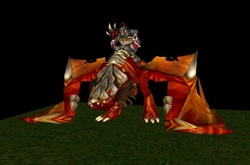
ThanksProtodrakes without rider, added additional plates on the back, and two simple reskins.


The green version reminds me very much of the Sahrotaar dragon from The Elder Scrolls V: Skyrim.Protodrakes without rider, added additional plates on the back, and two simple reskins.


 www.hiveworkshop.com
how about a demonic verison?Giant Bat / Gargoyle
Edit of the old Hearth of the Storms mod fell bat model, using in-game textures, and also added a version using 67_Chrome's darkwing skin.
Credits to the HoS team, 67_Chrome and the Hiveworkshop
View attachment 458797 View attachment 458798

Hello guys i have a request can someone add decay animation to this model remove a hero glow basicle make a standard unit from hero thanks in advance
HeroAbomination
A hero abomination model for the Modeling Contest #25 Projectile Launch: X: 49 Y: 108 Z: 104 This model's animations do not display properly in the Hive's model viewer. Keywords: hero, abomination, undead

 www.hiveworkshop.com
add tusks to which versionHello, can anyone add tusks of Tauer's Zul'jin model and thanks in advance.
Zul'jin
Here he is at last. Took me a while to finish this one. Not my best model evah, but I'm pretty satisfied with the result. Some parts of the texture are better than others, but I'm quite pleased with the animations. Don't even bother complaining about filesize, this guy has a buttload of...
All of the threeadd tusks to which version
do you just put them all in a map together and do this?All of the three

do you just put them all in a map together and do this?
View attachment 492542
 No its for Campaign purpose.

How's this?Hello everyone. I have a texturing request: to recolor the Doomguard's armor to match Kil'jaeden's texture, similar to how the original Doomguard's armor matches with Eredar. Also, if possible, to recolor the Doomguard's skin to a palette similar to the DiabloCar skin below.
Thanks! It's almost perfect, my only nitpick is to change armor's "yellow'ish" tone (not sure if it's the right word).How's this?
First time ever editing a skin, I didn't add the green texture to the shoulder pad since I wasn't sure how the transparency on it works, but I can if needed.
Edit: added the shoulder pad texture
I assume you mean the color of the trim on the armor?Thanks! It's almost perfect, my only nitpick is to change armor's "yellow'ish" tone (not sure if it's the right word).
Perfect, thanks for the help. I made a TC version if somebody wants it.I assume you mean the color of the trim on the armor?
Here's another version:


I made a custom aura target model for Thorns Aura, but it shows up way too soft in game. I would appreciate it greatly if someone could increase the opacity of the texture, or otherwise make it so that it's visible and noticeable in game.
I did, yes. And thank you, it is far more visible now as you can see. Is this just something that happens with the program sometimes, or is there a way to avoid it? Because I tried checking the 'No Depth Test' box on my first model, which I saw that yours had, and it didn't make a difference.I assume you used War3 Model Editor? It happens more often than not that it messes up the alpha and uses a random value instead of 1, should be better now

It works! Thank you! +rep (I still don't know how that rep thing works)Try with this one, pretty sure it's because the bone was billboarded. I removed the no depth test as well to see if that changes anything, I didn't realize it was enabled previously, I never use it
As per the alpha problem, I've noticed it happening a lot of the time when you assign a color to a geoset animation in WC3ME, even if you set it to 1 it would change it randomly, so a hacky workaround is to save it like so
View attachment 499308
My thanks! However the smoke is visible during the stand animation, and the building falling is basically an instant disappearance in game despite looking fine and gradual in the model editor.An attempt has been made
Cheers, the dust is no longer a problem! I was using a scout tower as a test unit so I left it as the default. In my last test I changed it to 1 second and you can see the result in the video, I still got the instant disappearance. The full animation still plays in the model editor, but in the world editor it's (second video)I fixed the dust visibility, as for the disappearance, what value did you put in this row?
View attachment 500211
The animation should be 1s long
Perfect! Thank you so much.Welp here's yet another version, did a quick test and it seems to play the anim fine this time
Hi, could someone please pin her hair to her chest so it doesn't move out of place during animations?
Thanks!Here have a look


Some gnoll edits, just edited the head and some little bits, nothing too fancy, already have portrait included:
View attachment 507281View attachment 507282View attachment 507283View attachment 507284


