
Community
Projects
Maps
Tutorials
Gallery
Support Us
Install the app
How to install the app on iOS
Follow along with the video below to see how to install our site as a web app on your home screen.
Note: This feature may not be available in some browsers.
-
Listen to a special audio message from Bill Roper to the Hive Workshop community (Bill is a former Vice President of Blizzard Entertainment, Producer, Designer, Musician, Voice Actor) 🔗Click here to hear his message!
-
Read Evilhog's interview with Gregory Alper, the original composer of the music for WarCraft: Orcs & Humans 🔗Click here to read the full interview.
-
The Hive's 22nd Icon Contest: Creep Abilities is now concluded, time to vote for your favourite set of icons! Click here to vote!
-
✅ The POLL for Hive's Texturing Contest #34 is OPEN! Vote for the TOP 3 SKINS! 🔗Click here to cast your vote!
-
✅ The POLL for Hive's Techtree Contest #20 is OPEN! Vote for the TOP 3 FACTIONS! 🔗Click here to cast your vote!
You are using an out of date browser. It may not display this or other websites correctly.
You should upgrade or use an alternative browser.
You should upgrade or use an alternative browser.
Codeless Save and Load (Multiplayer) - v3.0.1

- Author(s)
- TriggerHappy
- Tags
- System, GUI / Triggers, JASS, vJASS
- Size
- 257.96 KB
- Rating
-
(12 ratings)
- Downloads
- 9304
- Created
- Apr 30, 2016
- Updated
- Dec 4, 2019
- Resources
- 2
- State
 Approved
This bundle is marked as high quality. It exceeds standards and is highly desirable.


Information
If you've ever wanted to transfer progress between multiplayer maps, you probably needed to type in a long code.
That is no longer needed with this system. This will allow you to read save data from your WC3 folder and sync it to all other players in the map.
The demo map features:
* This system is intended for GUI users.
Installation
To import the system, all you have to do is copy the trigger folders over to your map and save it.
Screenshots


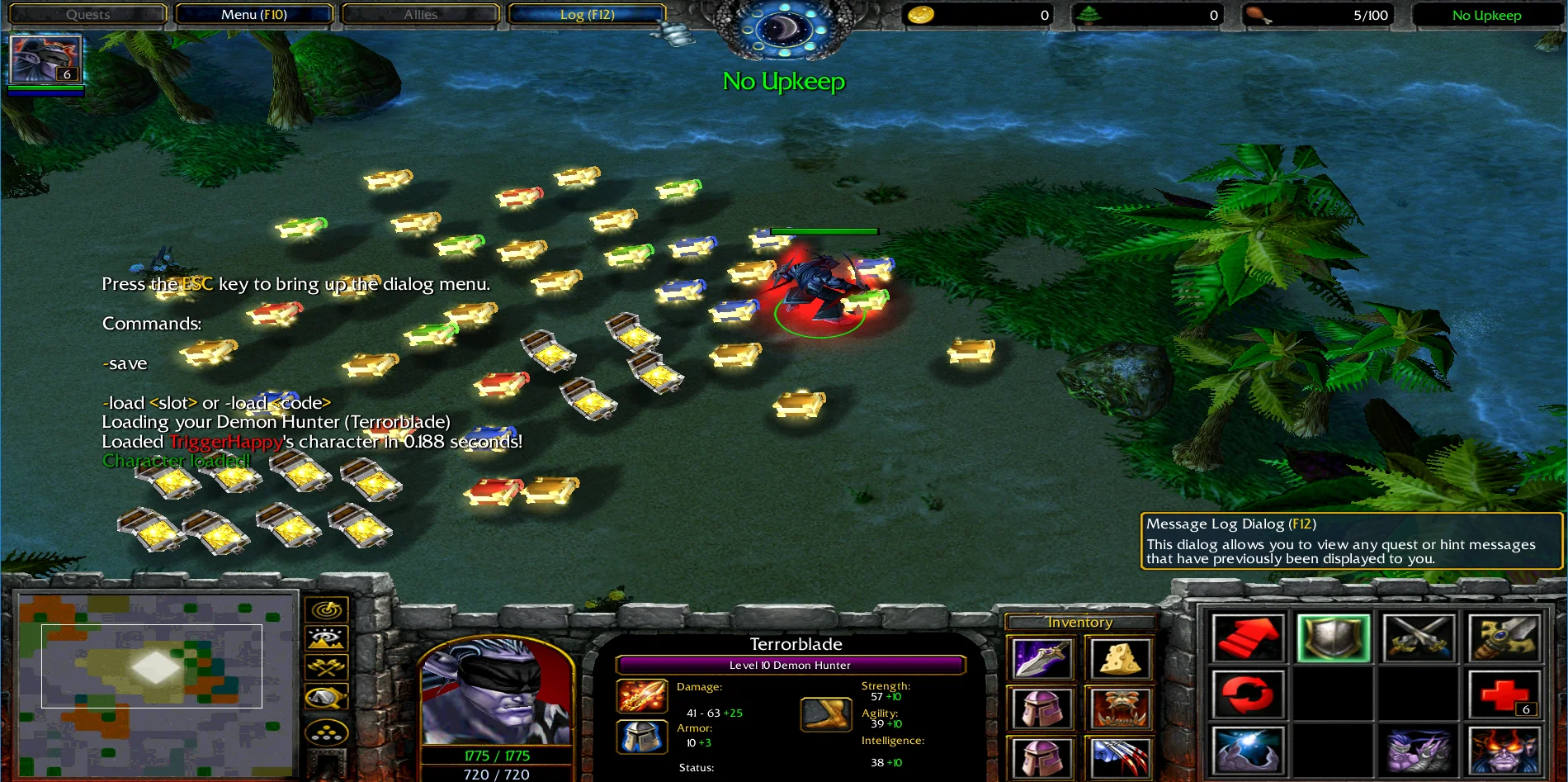
Credits
Pipedream (optimal save system)
If you've ever wanted to transfer progress between multiplayer maps, you probably needed to type in a long code.
That is no longer needed with this system. This will allow you to read save data from your WC3 folder and sync it to all other players in the map.
The demo map features:
- Load without typing anything
- Save Hero
- Level/XP
- Items
- Abilities
- Hero Name
- 5 Save Slots
* This system is intended for GUI users.
Installation
To import the system, all you have to do is copy the trigger folders over to your map and save it.
Screenshots
Credits
Pipedream (optimal save system)
Previews


Contents
Codeless Save & Load v1.3.9 (Map)

- Author
- TriggerHappy
- Filename
- Codeless Save Load v1.3.9.w3x
- Suggested players
- Any
- Players
- 11
- Required game
- Warcraft 3
- Recommended version
- 1.24a - 1.28c
- Dimensions
- 20x20 (32x32)
- Size
- 107.36 KB
- Uploaded
- Aug 27, 2017
- Updated
- Never
Codeless Save & Load v3.0.1 (Map)


- Author
- TriggerHappy
- Filename
- Codeless Save Load v3.0.1.w3x
- Suggested players
- Any
- Players
- 12
- Required game
- Warcraft 3
- Recommended version
- 1.19 - 1.21b
- Dimensions
- 20x20 (32x32)
- Size
- 150.61 KB
- Uploaded
- Dec 4, 2019
- Updated
- Never
Reviews

Promoted to HQ because it would have gotten it if it were a thing back then :psmile:
High Quality


- Joined
- May 7, 2008
- Messages
- 346
A bit of a random post from me, however I would very much like if this system was operational.
I've tried numerous of times to make this work but to no avail.
Has anyone had success with the mentioned things above?
I've tried numerous of times to make this work but to no avail.
- I've set the Aerial Shackle to 2 and it's thing to ''!'' but that didn't affect it one bit.
- I'm simply trying to store Integer data, such as: Wins / Losses, MMR, win rate and basic stuff like that.
Has anyone had success with the mentioned things above?

- Joined
- Jul 9, 2008
- Messages
- 1,449
Battle for Lordaeron (Lordaeron WoW)
Currently looking into this. Looks like this is a known bug on the blizzard forums with Preloaded filesHello guys, is there a solution to the problem that the list of characters to load does not update during the game.
Example: When I save my level 5 hero in slot 2 and he goes up to level 6 or higher and saves in slot 2 again and uses a hero pick up system he returns to the level of the first time I saved in slot 5 and not level 10, but if I create the map again and load space 2 it returns to level 10.

BUG: Preload files are being cache’d
Among other things, yes. Just a few files being cached this way has serious consequences for a lot of things. Think about everything from AI breaking in some specific circumstances, to user preferences not saving instantly in W3Champions, even LegionTD scores being buggy and some more, all of...
 us.forums.blizzard.com

- Joined
- Jun 26, 2020
- Messages
- 1,973
I don't think so, because that bug was solved in the 1.35 versionCurrently looking into this. Looks like this is a known bug on the blizzard forums with Preloaded files
BUG: Preload files are being cache’d
Among other things, yes. Just a few files being cached this way has serious consequences for a lot of things. Think about everything from AI breaking in some specific circumstances, to user preferences not saving instantly in W3Champions, even LegionTD scores being buggy and some more, all of...

- Joined
- Oct 17, 2012
- Messages
- 947
The Sundering of Worlds
We will need more information, such as how you are saving and loading the data. I am not sure you are aware that you have to load data in the reverse order that you saved the data in.A bit of a random post from me, however I would very much like if this system was operational.
I've tried numerous of times to make this work but to no avail.
- I've set the Aerial Shackle to 2 and it's thing to ''!'' but that didn't affect it one bit.
- I'm simply trying to store Integer data, such as: Wins / Losses, MMR, win rate and basic stuff like that.
Has anyone had success with the mentioned things above?
- Joined
- May 7, 2008
- Messages
- 346
We will need more information, such as how you are saving and loading the data. I am not sure you are aware that you have to load data in the reverse order that you saved the data in.
Yep, I've tried every possible way that I could think of to load it but I just couldn't get it to work.
Maybe that's just me, if someone else had success with save / load data such as: Real Values, Integer Values, Gold, Lumber - feel free to let me know or share your version of map so we can see what are you doing correctly

- Joined
- Jul 9, 2008
- Messages
- 1,449
Battle for Lordaeron (Lordaeron WoW)
Apparently not in this case. If you test out the save/load feature in the example map it can write/save the contents multiple times, but only loads what what was first initially read by the Preloader no matter how many times you write to the files.I don't think so, because that bug was solved in the 1.35 version
Preloader() seems to read the file contents only once and then must cache them somewhere
Have tried to look for an error in the code but haven't been able to find any therefore I assume the aggressive caching isn't fully fixed on Blizzard's end.
Edit: To give more context yes the aggressive caching was mostly fixed for most errors it was causing in-game but I think in this case when it comes to the Preloader(file) function it still seems to only return whatever it first preloaded, effectively breaking subsequent save and loads. If you have a map where this save/load feature works correctly that'd be greatly appreciated.
Last edited:
- Joined
- Jul 9, 2008
- Messages
- 1,449
Battle for Lordaeron (Lordaeron WoW)
Found a fix!
Using backup files we can save our current character on these backup files along with the main file. Then by storing the current number of the backup per slot in udg_NumberOfSaves[playerNumber*12+slot] we can load our character's progress without restarting the map by loading the most recent backup file. Each time the map is re-loaded udg_NumberOfSaves is reset, however since we still save our character to the mainfile the game still knows what our current character's progress is. The backup files are then overwritten from the last game as new saves are made in the current one.
TL: DR;
Save, Load, and Delete via the GUI dialog now all work correctly, regardless of caching.
See changes in
Using backup files we can save our current character on these backup files along with the main file. Then by storing the current number of the backup per slot in udg_NumberOfSaves[playerNumber*12+slot] we can load our character's progress without restarting the map by loading the most recent backup file. Each time the map is re-loaded udg_NumberOfSaves is reset, however since we still save our character to the mainfile the game still knows what our current character's progress is. The backup files are then overwritten from the last game as new saves are made in the current one.
TL: DR;
Save, Load, and Delete via the GUI dialog now all work correctly, regardless of caching.
See changes in
- SampleDialogSystem,
- SaveHelperLib,
- SaveFile
Attachments
Last edited:

One question is how do I disable it for a moment so that the hero doesn't save in the same slot?Found a fix!
Using backup files we can save our current character on these backup files along with the main file. Then by storing the current number of the backup per slot in udg_NumberOfSaves[playerNumber*12+slot] we can load our character's progress without restarting the map by loading the most recent backup file. Each time the map is re-loaded udg_NumberOfSaves is reset, however since we still save our character to the mainfile the game still knows what our current character's progress is. The backup files are then overwritten from the last game as new saves are made in the current one.
TL: DR;
Save, Load, and Delete via the GUI dialog now all work correctly, regardless of caching.
See changes in
- SampleDialogSystem,
- SaveHelperLib,
- SaveFile
Example: My game has the -repick command that allows you to choose another hero, but even the new hero saves in the old one's slot.
Another question is what command saves the hero in a slot of my choice.
Example: I don't want to give the player the choice of saving the same hero in a different slot, as already happens, but it only causes problems when the player tries to change heroes and play with another with the -Repick command.
Last edited:
- Joined
- Jul 9, 2008
- Messages
- 1,449
Battle for Lordaeron (Lordaeron WoW)
One question is how do I disable it for a moment so that the hero doesn't save in the same slot?
Example: My game has the -repick command that allows you to choose another hero, but even the new hero saves in the old one's slot.
Another question is what command saves the hero in a slot of my choice.
Example: I don't want to give the player the choice of saving the same hero in a different slot, as already happens, but it only causes problems when the player tries to change heroes and play with another with the -Repick command.
So I had a similar challenge with my map. The specifics of your repick system will depend on how you've implemented it. But I made a version of the save and load map with a button to create a new character. Look at the code for this button and implement a call to your repick code there.
Attachments
Man, it was really good!So I had a similar challenge with my map. The specifics of your repick system will depend on how you've implemented it. But I made a version of the save and load map with a button to create a new character. Look at the code for this button and implement a call to your repick code there.
You can place this New Character button at the bottom after Delete Character. Because it is dangerous to press it accidentally.
What if it's possible to make the New Character button perform a choice trigger?
Example: I want to press the New Character button and run my Repick system and release the option to save in another slot.
- Joined
- Jul 9, 2008
- Messages
- 1,449
Battle for Lordaeron (Lordaeron WoW)

- Joined
- Dec 16, 2017
- Messages
- 437
Hi guys, i am trying to save charges of the items, courier with items and charges, stash with items and charges but it seems to fail somewhere..the save is fine, on the notepad everything seems good, items order and everything, but when i load, some items drop on the ground that were supposed to be in stash, stash get's loaded even if it wasn't saved and hero items get's messed up, a few replaced with others i didn't have..and also i would like to save spell power from chopinski systems, or it should be fine just on items? I was thinking to add things like talents or "perma upgrades" that would give spell power but no wonder on how to save it..

Antares
Spell Reviewer
- Joined
- Dec 13, 2009
- Messages
- 1,107
Promoted to HQ because it would have gotten it if it were a thing back then 
High Quality
High Quality

- Joined
- Jun 11, 2018
- Messages
- 272
Can you tell me how you solved it? I have the same issue. It says I have to enable local files, but I have it enabled in the Registry Editor.i have figured it out

Download the version that DarkePacific posted above.Can you tell me how you solved it? I have the same issue. It says I have to enable local files, but I have it enabled in the Registry Editor.
- Joined
- Jun 11, 2018
- Messages
- 272
Sadly it doesn't seem to be any diffrent. I still have the issue where it says that I need to enable local files. :/Download the version that DarkePacific posted above.
- Joined
- Jun 26, 2020
- Messages
- 1,973
After some test I made lately, it seems that the created code has a limit because if is long enough it won't load properly.
How big are the variables being saved? The maximum value I noticed is 99,999; greater than that, it will work at some point.After some test I made lately, it seems that the created code has a limit because if is long enough it won't load properly.
- Joined
- Jun 26, 2020
- Messages
- 1,973
In my case I didn't do that, what I did is saving an string using the same logic, I saved each character by converting it to its ASCII value because the system only works with integers.How big are the variables being saved? The maximum value I noticed is 99,999; greater than that, it will work at some point.
Here I explain a bit more the thing: [Solved] - Save system is not working
Last edited:

- Joined
- Jun 18, 2011
- Messages
- 168
I noticed you changed a lot of the libraries since I used it back when his PlayerUtils was version 1.28. Now you have it as 1.29 and apparently saving in a much different method. So does this mean it is now more multiplayer compatible? TriggerHappy told me a couple years ago I shouldn't use this (I didn't listen, I'm still using it because I have other causes for desyncs in my map already). Curious if changing to your version will help with that, though.Someone asked for the New Character button to be moved to the bottom, and another person asked for the items to be loaded in the exact order they were saved. Here's a version where these changes have been made.
I believe it can help you, I use this version of DarkePacific and it is doing well in multiplayer.I noticed you changed a lot of the libraries since I used it back when his PlayerUtils was version 1.28. Now you have it as 1.29 and apparently saving in a much different method. So does this mean it is now more multiplayer compatible? TriggerHappy told me a couple years ago I shouldn't use this (I didn't listen, I'm still using it because I have other causes for desyncs in my map already). Curious if changing to your version will help with that, though.
- Joined
- Dec 16, 2017
- Messages
- 437
Hi guys
I've managed to add more buttons to the "Dialog System", but into what i added new, it doesn't save/load anything, it just shows the name of the hero that was supposed to be loaded from there, and how can you add new pages to have more save slot room?
And also, how can you disable the dialog system for a player once he loads once or lets say, twice?
I've managed to add more buttons to the "Dialog System", but into what i added new, it doesn't save/load anything, it just shows the name of the hero that was supposed to be loaded from there, and how can you add new pages to have more save slot room?
And also, how can you disable the dialog system for a player once he loads once or lets say, twice?
- Joined
- Jun 18, 2011
- Messages
- 168
Got the updates working. Finally found that I hadn't been saving the unit as SavePlayerHero when it's picked. I fixed it by declaring it when the hero is chosen. Can't remember why I didn't need that using the previous version of this.I believe it can help you, I use this version of DarkePacific and it is doing well in multiplayer.
@DarkePacific Thank you for your contributions on this as well. I plan to make a separate inventory system one day, so that change is massive for me to quickly loop a bunch of items in! The New Character button was a great idea as well and something people requested from me a lot. It does create some discourse in my map as some structures are tied to the hero you choose/intially load, but I don't think its too immersion breaking or problematic, so I think I'll keep it!
I don't allow more than one load in my game, so the epic thing you did to allow loading without restarting doesn't effect me much. Still, you get to see that the file is actually there now. Idk if that was you or already there, but that does make things a lot better for people to see the system working, so thank you again if that was you.
And also, how can you disable the dialog system for a player once he loads once or lets say, twice?
Just put the part of your loading actions that create the hero and set the SavePlayerHero variable in an if/then/else statement set some integer variable eg. Load_integer to 0 by default and Load_integer + 1 when their hero is loaded then have the if statement say if Load_integer = 2 then it displays "Can only load twice", and under else put your create character and set variable stuff.
Not sure about your new buttons, but all I could see would be needing to edit the Dialog box trigger a couple different places. I could be wrong.
Last edited:

- Joined
- Mar 18, 2020
- Messages
- 6
Hello
Are there any ports that allow someone to decode the save file outside of the game? I want to allow players to submit their save data to an online leaderboard but will need a script to decode their save code. I figure not but would be a boon if this was possible.
Thanks
Are there any ports that allow someone to decode the save file outside of the game? I want to allow players to submit their save data to an online leaderboard but will need a script to decode their save code. I figure not but would be a boon if this was possible.
Thanks
- Joined
- Jun 26, 2020
- Messages
- 1,973
This specific encoder uses W3 natives, so the answer is no, you will need another encoder that is portable for that.Hello
Are there any ports that allow someone to decode the save file outside of the game? I want to allow players to submit their save data to an online leaderboard but will need a script to decode their save code. I figure not but would be a boon if this was possible.
Thanks
I just want to add my solution to a few problems I experienced with this system.
It turns out that even though I set Amls to have 2 levels with "1" in the Tooltip - Normal field, it still completely failed and would not load any saved heroes. By setting "private constant boolean BACKWARDS_COMPATABILITY" in 'File IO' to false, this system started working.
In my map, I currently use your typical walk into region to pick hero system. This is the custom script I used to make the created unit savable:
call SaveHelper.SetUserHero(User[GetOwningPlayer(GetLastCreatedUnit())], GetLastCreatedUnit())
I hope this helps anybody struggling with this system.
It turns out that even though I set Amls to have 2 levels with "1" in the Tooltip - Normal field, it still completely failed and would not load any saved heroes. By setting "private constant boolean BACKWARDS_COMPATABILITY" in 'File IO' to false, this system started working.
In my map, I currently use your typical walk into region to pick hero system. This is the custom script I used to make the created unit savable:
call SaveHelper.SetUserHero(User[GetOwningPlayer(GetLastCreatedUnit())], GetLastCreatedUnit())
I hope this helps anybody struggling with this system.

- Joined
- Jun 8, 2020
- Messages
- 29
Guys did some one used this system on Reforged? while saving on reforged, lots of errors.
I belive it is due to map saved through original world editor (reforged). Before i used Jass New Gen Pack.
Did some one tried to use JNGP for Reforged?
I belive it is due to map saved through original world editor (reforged). Before i used Jass New Gen Pack.
Did some one tried to use JNGP for Reforged?
Last edited:
Hey Ouro, yep - currently running with only a few issues (can't delete character slot via menu).Guys did some one used this system on Reforged? while saving on reforged, lots of errors.
What kind of errors are you getting?
- Joined
- Oct 17, 2012
- Messages
- 947
The Sundering of Worlds
On Reforged, do you have vJASS and JassHelper enabled?Guys did some one used this system on Reforged? while saving on reforged, lots of errors.
I belive it is due to map saved through original world editor (reforged). Before i used Jass New Gen Pack.
Did some one tried to use JNGP for Reforged?

- Joined
- Jun 1, 2009
- Messages
- 137
Hi! I've got a question about the system limitations.
What is the maximum value of the stored integer? How many integers can be stored at all?
The tutorial says:
What is the maximum value of the stored integer? How many integers can be stored at all?
The tutorial says:
-
 Set VariableSet SaveItemTypeMax = 999
-
 -------- Note: Changing max values can cause a code wipe --------
The maximum value I noticed is 99,999
- Joined
- Jul 9, 2008
- Messages
- 1,449
Battle for Lordaeron (Lordaeron WoW)
A JASS integer can hold values from –2,147,483,648 up to 2,147,483,647 (signed 32-bit).Hi! I've got a question about the system limitations.
What is the maximum value of the stored integer? How many integers can be stored at all?
The tutorial says:
but on the other hand, Productor have mentioned
In practice, though, we usually cap at safer ranges because of encoding/decoding and code-length issues. That’s why you’ll see people recommend something like 99,999 as a practical ceiling. Anything bigger explodes the length of your savecode string.
That SaveItemTypeMax = 999 line is not a hard engine limit, it’s just the maximum index your particular system is configured to use.
If you raise it, you can technically store thousands of integers, but you’ll pay for it in code length and stability.
So the short answer is:
- Max single integer: you can safely go up to ~99,999, though the absolute engine max is 2.1 billion.
- Max integers stored: depends on how long you want your savecodes to be. Most systems keep it under ~1,000 entries to avoid bloated codes.
- Joined
- Jun 1, 2009
- Messages
- 137
Thanks! So, one variable with 99999 max value is not a reason why it becomes a mess in multiplayer.A JASS integer can hold values from –2,147,483,648 up to 2,147,483,647 (signed 32-bit).
In practice, though, we usually cap at safer ranges because of encoding/decoding and code-length issues. That’s why you’ll see people recommend something like 99,999 as a practical ceiling. Anything bigger explodes the length of your savecode string.
That SaveItemTypeMax = 999 line is not a hard engine limit, it’s just the maximum index your particular system is configured to use.
If you raise it, you can technically store thousands of integers, but you’ll pay for it in code length and stability.
So the short answer is:
- Max single integer: you can safely go up to ~99,999, though the absolute engine max is 2.1 billion.
- Max integers stored: depends on how long you want your savecodes to be. Most systems keep it under ~1,000 entries to avoid bloated codes.
I've tried to modify your updated version to fit my map, but it keeps showing me an error "save file not found". Probably, because for some reason, it creates the file named "SaveSlot_Manual" instead of "SaveSlot_1". Can't find the code that does this file name corruption so far.
All I need is to save like 20 integers with 99 max value, and one integer with 99999 max value.
I thought that 99999 one is messing things up, and was not sure should I save it as 2 different integers with 999 limit.
By the way, did this break for anybody else since last patch? I had this working, was saving/loading heroes a treat and didn't change anything on my map. Now all of a sudden, you can save load in the same session but it doesn't work from session to session. Cheers.
- Joined
- Aug 28, 2025
- Messages
- 27
Help me please I am trying to do the simplest thing using this system but I don't know how to do it. I just want a player that finishes my map to be able to play a character next game that is normally locked. So when the user plays again, he can just enter a code, then he will be able to select that character if he wishes (no saving items/stats/units or anything like that, just the player entering a code and a boolean turning true I guess). How do I do that using this (very complicated for me since I am not used to coding) system?. Can someone explain to me which triggers/functions do I have to keep from this system and which can I delete, then guide me on how to do the rest? This should be as simple as turning a boolean to true but for me its not that simple.
Last edited:

Uncle
Warcraft Moderator
- Joined
- Aug 10, 2018
- Messages
- 8,351

This codeless system is pretty much abandoned.Help me please I am trying to do the simplest thing using this system but I don't know how to do it. I just want a player that finishes my map to be able to play a character next game that is normally locked. So when the user plays again, he can just enter a code, then he will be able to select that character if he wishes (no saving items/stats/units or anything like that, just the player entering a code and a boolean turning true I guess). How do I do that using this (very complicated for me since I am not used to coding) system?. Can someone explain to me which triggers/functions do I have to keep from this system and which can I delete, then guide me on how to do the rest? This should be as simple as turning a boolean to true but for me its not that simple.
I attached a save/load system that you can use that's designed for GUI users. Note that I haven't tested it enough to confirm that it's bug free, perhaps you can test it out for me. The map has two examples and a ton of notes explaining how to use it. It's a modified version of this other system, so credit where credit is due: Maxou Save Load
Edit: Attached a (maybe) fixed version, but Maxou made a GUI implementation that is likely far better than this.
Attachments
Last edited:

- Joined
- Mar 16, 2008
- Messages
- 1,033
There's a decent example of an automatic implementation of this system in my Defense of Felwood map.
- Joined
- Aug 28, 2025
- Messages
- 27
Thanks a lot! I will try implementing this into my map and give credit!This codeless system is pretty much abandoned.
I attached a save/load system you can use that's designed for GUI users. Note that I haven't tested it enough to confirm that it's bug free, perhaps you can test it out for me. The map has two examples and a ton of notes explaining how to use it. It's a modified version of this other system, so credit where credit is due: Maxou Save Load
- Joined
- Aug 28, 2025
- Messages
- 27
Unfortunately it either dosen't work for me or I am missing something. I copied everything into my map but the message differs. I attached the message it shows on my map(With tooltip missing and without the preload message) compared to the message it shows on the original map. Also when I tried it online it didn't work showing a message like: "player name sync 1/2" and it kept spamming this message. And at the end, a last message appeared that the files could not be loaded or something like that.This codeless system is pretty much abandoned.
I attached a save/load system that you can use that's designed for GUI users. Note that I haven't tested it enough to confirm that it's bug free, perhaps you can test it out for me. The map has two examples and a ton of notes explaining how to use it. It's a modified version of this other system, so credit where credit is due: Maxou Save Load
Attachments


- Joined
- Jul 2, 2014
- Messages
- 72
Unfortunately it either dosen't work for me or I am missing something. I copied everything into my map but the message differs. I attached the message it shows on my map(With tooltip missing and without the preload message) compared to the message it shows on the original map. Also when I tried it online it didn't work showing a message like: "player name sync 1/2" and it kept spamming this message. And at the end, a last message appeared that the files could not be loaded or something like that.
Bumping in, can you share anything about the code/implementation you tried ?
You're using the GUI version from Uncle or the raw vJass version ?
Uncle
Warcraft Moderator
- Joined
- Aug 10, 2018
- Messages
- 8,351
Looks like you forgot to import the save abilities. They're in the Object Editor. Make sure you use the same Rawcode pattern I used, or if you use your own Rawcodes, because those are taken, then ensure that you follow the same +1-per-ability pattern and inform the system of these changes in the system script.Unfortunately it either dosen't work for me or I am missing something. I copied everything into my map but the message differs. I attached the message it shows on my map(With tooltip missing and without the preload message) compared to the message it shows on the original map. Also when I tried it online it didn't work showing a message like: "player name sync 1/2" and it kept spamming this message. And at the end, a last message appeared that the files could not be loaded or something like that.
- Joined
- Jul 2, 2014
- Messages
- 72
Uncle
Warcraft Moderator
- Joined
- Aug 10, 2018
- Messages
- 8,351
Those abilities are how you can save data to the local Preload file and achieve a codeless setup.@Uncle is there a reason you added these abilities ? afaik the FileIO from TH is storing the current string, loading up the payload into it and replacing it with the original content all at once, I don't think you need these abilities in the end
You can't directly read/write just any old string from a Preload file, these files are meant to be used to call official Blizzard API (it would be a huge security risk otherwise). So we instead read/write to unused Ability Tooltips by exploiting the BlzGetAbilityTooltip() function. It's very hacky but it allows you to read/write whatever text you want.
- Joined
- Jul 2, 2014
- Messages
- 72
Yeah I know that, but using base game abilities is easier isn't it ? I'm using those for the updated codeless version of my system, creating custom abilities with custom rawcodes -- except to make life easier looping from Z000 to Z0XX -- is just an unnecessary overhead, unless I'm missing something but so far it seems to be working.
Uncle
Warcraft Moderator
- Joined
- Aug 10, 2018
- Messages
- 8,351
Not all abilities work, so I went with a guaranteed design by utilizing copies of an ability that I knew worked. It's definitely a bit more annoying to setup, but you could just copy and paste one of the abilities into your map, and then copy that copy and follow the pattern yourself. That way you don't have to jump between two maps, ten times.Yeah I know that, but using base game abilities is easier isn't it ? I'm using those for the updated codeless version of my system, creating custom abilities with custom rawcodes -- except to make life easier looping from Z000 to Z0XX -- is just an unnecessary overhead, unless I'm missing something but so far it seems to be working.
Edit: Also, wouldn't it overwrite the tooltip for those default abilities? I think that was another concern, I didn't want to interfere with the player's map.
Last edited:
- Joined
- Jul 2, 2014
- Messages
- 72
No it wouldn't as it stores the initial state, loads the preloads, and restore the ability to its initial state -- if there's any I don't think I've encountered them so far, I've been extending the setup to 55 abilities, tho' for safety : which ability are you certain works ? I'll copy/paste that one to make sure it works without any lurking bug.
Uncle
Warcraft Moderator
- Joined
- Aug 10, 2018
- Messages
- 8,351
Aerial Shackles works, that's what this system uses as the first ability. I have a big list of working abilities somewhere, at one point I had a setup that could use 400+ of them which I was using for a different save/load system.No it wouldn't as it stores the initial state, loads the preloads, and restore the ability to its initial state -- if there's any I don't think I've encountered them so far, I've been extending the setup to 55 abilities, tho' for safety : which ability are you certain works ? I'll copy/paste that one to make sure it works without any lurking bug.
- Joined
- Aug 28, 2025
- Messages
- 27
Looks like you forgot to import the save abilities. They're in the Object Editor. Make sure you use the same Rawcode pattern I used, or if you use your own Rawcodes, because those are taken, then ensure that you follow the same +1-per-ability pattern and inform the system of these changes in the system script
Those abilities are how you can save data to the local Preload file and achieve a codeless setup.
You can't directly read/write just any old string from a Preload file, these files are meant to be used to call official Blizzard API (it would be a huge security risk otherwise). So we instead read/write to unused Ability Tooltips by exploiting the BlzGetAbilityTooltip() function. It's very hacky but it allows you to read/write whatever text you wa
This is it, I haven't copied those abilities in the object editor. I had no idea they existed. Will report back once I get to test it again.Looks like you forgot to import the save abilities. They're in the Object Editor. Make sure you use the same Rawcode pattern I used, or if you use your own Rawcodes, because those are taken, then ensure that you follow the same +1-per-ability pattern and inform the system of these changes in the system script.
Uncle
Warcraft Moderator
- Joined
- Aug 10, 2018
- Messages
- 8,351
Sorry, I forgot to mention that, as well as the configurable section of the "SaveLoad" map script where you can define some important settings.This is it, I haven't copied those abilities in the object editor. I had no idea they existed. Will report back once I get to test it again.
It's wise to check the Object Editor after downloading a system like this, there's almost always some missing link in there.
Last edited:
Similar threads


- Replies
- 2
- Views
- 360
- Replies
- 0
- Views
- 1K

- Replies
- 6
- Views
- 2K


- Replies
- 6
- Views
- 2K