• Listen to a special audio message from Bill Roper to the Hive Workshop community (Bill is a former Vice President of Blizzard Entertainment, Producer, Designer, Musician, Voice Actor) 🔗Click here to hear his message!
  • Read Evilhog's interview with Gregory Alper, the original composer of the music for WarCraft: Orcs & Humans 🔗Click here to read the full interview.
  • The Hive's 22nd Icon Contest: Creep Abilities is now concluded, time to vote for your favourite set of icons! Click here to vote!
  • ✅ The POLL for Hive's Texturing Contest #34 is OPEN! Vote for the TOP 3 SKINS! 🔗Click here to cast your vote!
  • ✅ The POLL for Hive's Techtree Contest #20 is OPEN! Vote for the TOP 3 FACTIONS! 🔗Click here to cast your vote!

[General] World Editor UI too small on new PC

Status
Not open for further replies.
Level 12
Joined
Jun 27, 2010
Messages
638
Hey guys,

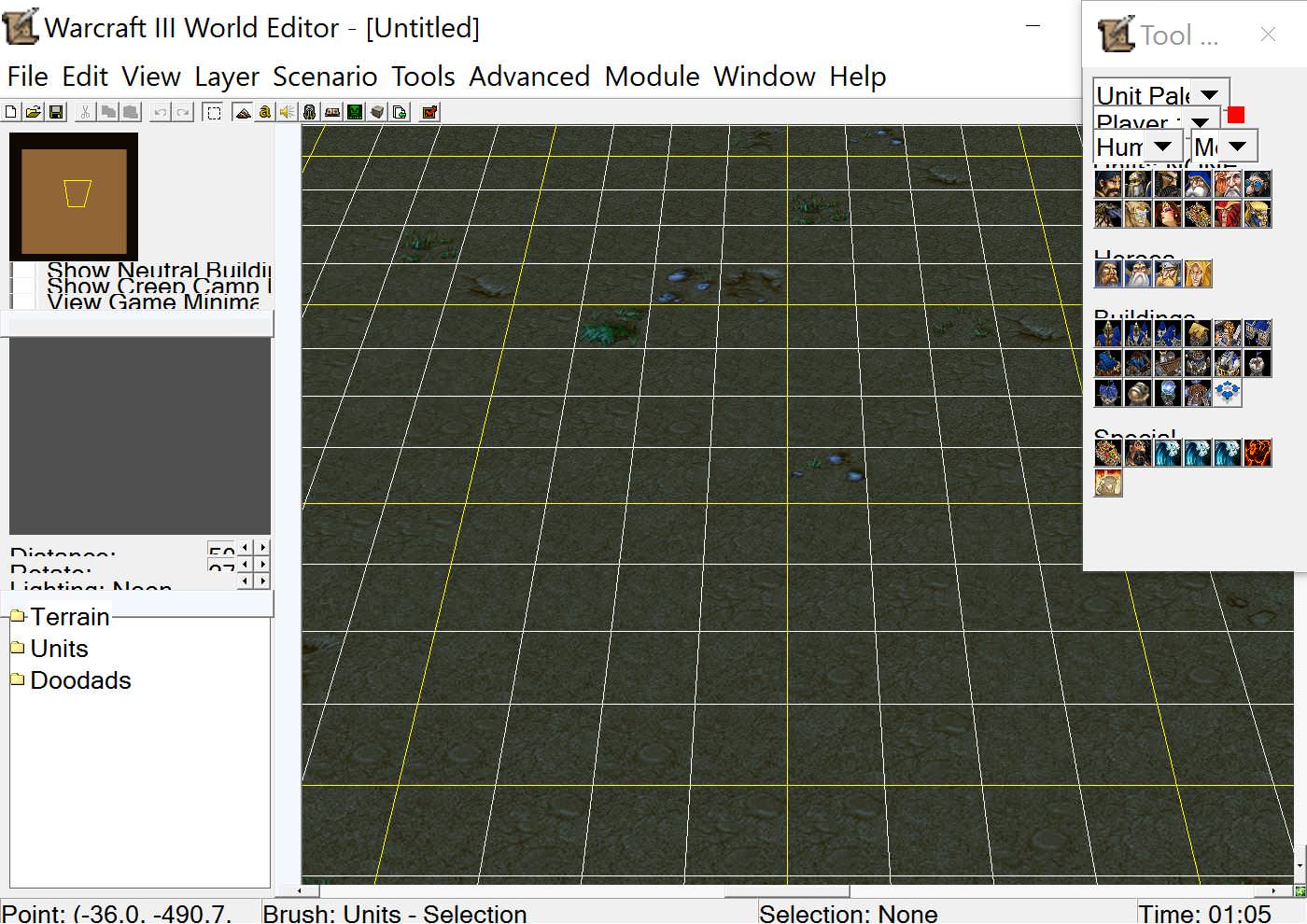
I got a new laptop and downloaded WC3 on it, and when I went on the editor for the first time the UI is extremely small I can't even see what I'm clicking. It's just too smol. >:(

Here's a pic of the problem:

26395vm.jpg


Anyone able to lend a hand on how to fix this issue?
 
You can resize windows like the tool palette and the sidebar, but I'm not sure why the icons seem to be 1/2 size.

Is your screen resolution unusual in any way? Ridiculously huge/etc.

Yeah, 3840 x 2160. I figured it had to do with the resolution, but I don't know how to resize everything. All the buttons and drop-downs are stacked on top of each other; it's so cluttered
 
All I can suggest is temporarily reducing your screen resolution when opening the editor. There may be some fancy tools out there that will upscale programs for better visibility, but that's just a guess.
 
All I can suggest is temporarily reducing your screen resolution when opening the editor. There may be some fancy tools out there that will upscale programs for better visibility, but that's just a guess.

How would I go about reducing my resolution? I'm on Windows 10
 
lower down resolution to like 1600x900 it should work fine at such
A more correct resolution is 1440*1080, with black bars at the side. For him, full scale of that would be 2880*2160.

However none of this should matter for World Edit as that is not designed for a certain resolution. I am guessing there is a logic bug with scaling.
 
A more correct resolution is 1440*1080, with black bars at the side. For him, full scale of that would be 2880*2160.

However none of this should matter for World Edit as that is not designed for a certain resolution. I am guessing there is a logic bug with scaling.
I just set my scaling to 150%

It works with WE perfectly, I am using my native 1080p resolution and everything in WE is scaled, including icons.

Are you sure you have the latest updates?

I scaled the resolution down to 1440:1080 then increased the text scaling to 150% and it looks like this


f45539x.jpg
 
SOLUTION:

For Windows 10: Go to the World Editor application and right click and create a shortcut to it on your desktop

Right click the shortcut and goto Compatibility Settings

Under "Settings" at the bottom, check mark "Override high DPI scaling behavior" and select "Scaling Performed by" SYSTEM

fix.png


Now it should work:)

I messed with other settings but this is the only one that fixed it
 
Status
Not open for further replies.
Back
Top