• Check out the results of the Techtree Contest #19!
  • Listen to a special audio message from Bill Roper to the Hive Workshop community (Bill is a former Vice President of Blizzard Entertainment, Producer, Designer, Musician, Voice Actor) 🔗Click here to hear his message!
  • Read Evilhog's interview with Gregory Alper, the original composer of the music for WarCraft: Orcs & Humans 🔗Click here to read the full interview.
  • Create a void inspired texture for Warcraft 3 and enter Hive's 34th Texturing Contest: Void! Click here to enter!
  • The Hive's 22nd Icon Contest: Creep Abilities is now concluded, time to vote for your favourite set of icons! Click here to vote!

[Import] Tree Models

Status
Not open for further replies.
Level 4
Joined
Jan 23, 2014
Messages
53
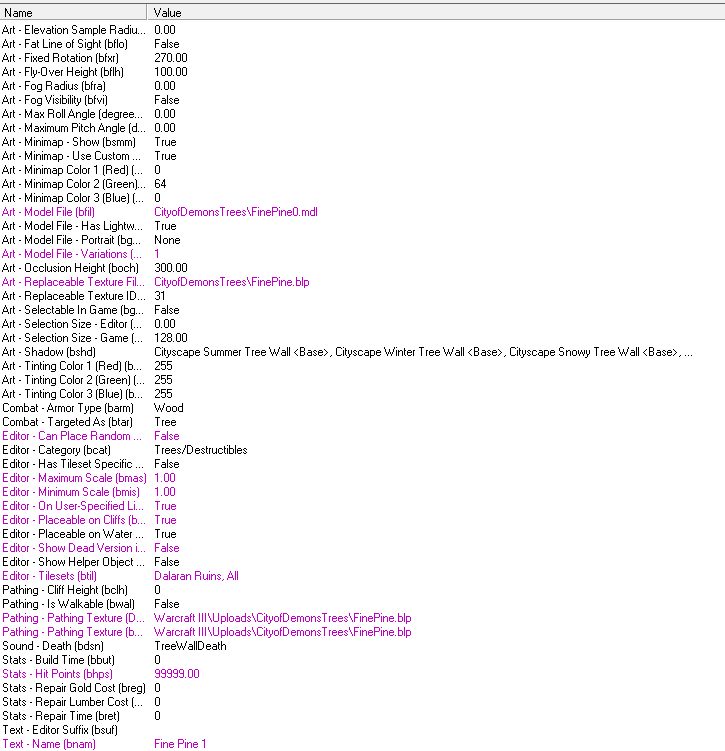
So I saw the beautiful trees from Fingolfin https://www.hiveworkshop.com/forums/models-530/pine-variation-1-a-246873/?prev=c%3D16%26t%3D4%26r%3D20%26d%3Dlist%26page%3D2 and I noticed that no matter what I do, the trees won't appear. Here's the Custom Destructable i've created.
e7d4b1c4b8b11712cf564839bb447f42.png


Any ideas of how to help?
 
Still no dice. Here's the newest update.

772e28b235c3bf7fa50ed689fa623a1c.png


@Robert, Yep. I have downloaded the model Tickles gave me, along with the model I linked in the beginning.
 
I assumed you were putting it into an MPQ or folder within your Warcraft III directory. If you are, try removing Warcraft III\ from the beginning of the texture path.

If the texture exists in the map's imports, you'll just need to simplify the texture path to FinePine.blp without anything in front of it and use Fingolfin's original model. Then a replaceable texture won't be needed.
 
Well, I figure I might as well show the Import menu. It'll make this easier to discuss when you can see what's there and whats wrong. I've only done trees so far, so it'll make it easy.

4c6f1affcbbb96824bcebbf54c461094.png
 
Any specific reason you're using CityofDemonTrees\ in the beginning of the file paths? You can remove CityofDemonTrees\ from the beginning of the BLP file paths and stick with all of the original models for them to work.

The model I uploaded was only because I thought you wanted to use a replaceable texture, so you can ignore it.

Just in case there's anymore confusion, you can check these out:
Importing Models
Texture Paths on a Destructible
 
Status
Not open for further replies.
Back
Top