
Histenchist
H
Histenchist
Jump Tutorial
This is a tutorial on how to create a Jump ability (gui)
Step 1:
First of all create an ability based on "Channel", call it Jump.
These are the options i changed:
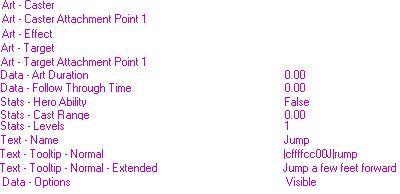
Step 2:
Now go to the trigger editor. Create a trigger and name it "Jump Move". Now create a variable called jumper (unit)
Set it to initially off
Step 3:
Create a new trigger called jump.
It should look like this:
It should look like this:
After you learned this it should be pretty easy to create more advanced jump systems.
This is a tutorial on how to create a Jump ability (gui)
Step 1:
First of all create an ability based on "Channel", call it Jump.
These are the options i changed:
Step 2:
Now go to the trigger editor. Create a trigger and name it "Jump Move". Now create a variable called jumper (unit)
Set it to initially off
-
 Jump Move
-

 Events
-


 Time - Every 0.17 seconds of game time
-
-

 Conditions
-

 Actions
-

 Unit - Move jumper instantly to ((Position of jumper) offset by 8.00 towards (Facing of jumper) degrees)
-
-
Step 3:
Create a new trigger called jump.
It should look like this:
-
Jump
-
Events
-
Unit - A unit Starts the effect of an ability
-
-
Conditions
-
 (Ability being cast) Equal to Jump
-
-
Actions
-
 Set jumper = (Triggering unit)
-
Unit - Pause jumper
-
Unit - Add Crow Form to jumper
-
Unit - Turn collision for jumper Off
-
Unit - Remove Crow Form from jumper
-
 Animation - Change jumper flying height to 400.00 at 1000.00
-
 Trigger - Turn on Jump Move <gen>
-
 Wait 1.00 seconds
-
Trigger - Run Jump Turn Off <gen> (ignoring conditions)
-
-
It should look like this:
-
Jump Turn Off
-
Events
-
Conditions
-
Actions
-
Animation - Change jumper flying height to 0.00 at 1000.00
-
Unit - Turn collision for jumper On
-
Unit - Unpause jumper
-
Wait 0.50 seconds
-
Trigger - Turn off Jump Move <gen>
-
-
After you learned this it should be pretty easy to create more advanced jump systems.
Attachments

Last edited by a moderator:


