• Check out the results of the Techtree Contest #19!
  • Listen to a special audio message from Bill Roper to the Hive Workshop community (Bill is a former Vice President of Blizzard Entertainment, Producer, Designer, Musician, Voice Actor) 🔗Click here to hear his message!
  • Read Evilhog's interview with Gregory Alper, the original composer of the music for WarCraft: Orcs & Humans 🔗Click here to read the full interview.
  • Create a void inspired texture for Warcraft 3 and enter Hive's 34th Texturing Contest: Void! Click here to enter!
  • The Hive's 22nd Icon Contest: Creep Abilities is now concluded, time to vote for your favourite set of icons! Click here to vote!

Changing Loading Bar Text

Level 7
Joined
Sep 19, 2007
Messages
81
Loading Bar Text Guide


This is a quick guide on how to change the text in the loading bar. By default its set as "L O A D I N G", "Press any key to continue" and finally "Waiting for other players".
Because the map has to load before these changes can be made, the L O A D I N G will not change until players play another game.

1. Open notepad, or any other word processing program.
2. Copy and paste the following:
Code:
[FrameDef]
LOADING_LOADING=Text Here
LOADING_PRESS_A_KEY=Text Here
LOADING_WAITING_FOR_PLAYERS=Text Here
3. Replace "Text Here" with your own text. By default, the text is centered.
4. Save the file as "war3mapSkin.txt". (Note the capital S - it's important)
5. Import to your map and make the custom file path "war3mapSkin.txt".
6. Enjoy!

232323232%7Ffp5364%3B%3Enu%3D3389%3E6%3C6%3E%3A%3C%3A%3EWSNRCG%3D3239%3A4368765%3Anu0mrj


Any questions or comments relating this guide should be forwarded to [email protected] or my in box on the hive.
 
Last edited by a moderator:
Rather than doing EITHER methods, I would open the war3mapSkin.txt using an MPQ editor, such as MPQMaster, or MPQEditor, etc, open the war3mapSkin.txt, and put this under [FrameDef] -

LOADING_LOADING=YARR-HARR, FIDDLE-DEE, BEING A PIRATE
LOADING_PRESS_A_KEY=IS ALRIGHT TO BE! DO WHAT YOU WANT, BECAUSE
LOADING_WAITING_FOR_PLAYERS=A PIRATE IS FREE: YOU ARE A PIRATE.

You still have to fiddle with Third Party programs, but it is better than using Unlimited that can destroy your map.
 
Thank you...this trick is verry nice...it makes the map diffrent from most maps
 
I have though noticed a bug with the system. After saving game with the text file your game interface custom settings get messed up but it should be easy to fix since after saving and reopening editor if you remove the text file the new text actually stays in the loading screen and after that you need to edit the custom interface again.
 
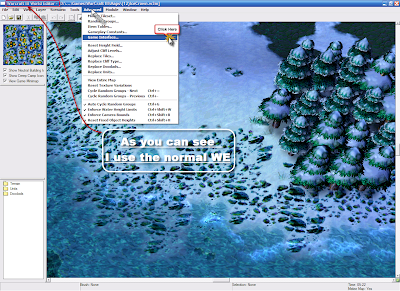
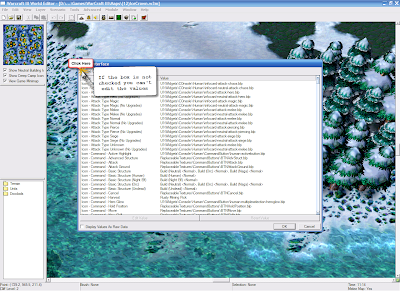
is there a game interface on ROC?

or is that something exclusively for TFT.

i looked all over the advanced command tab and cant find it!
 
is there a game interface on ROC?

or is that something exclusively for TFT.

i looked all over the advanced command tab and cant find it!

if you have any interest in making warcraft 3 maps its pretty much a necessity to get the expansion pack anyways. it will open up the world editor to so much. and no i don't *think* their is a game interface in ROC.
 
to clarify i do have TFT, but i lost the disk and the computer it was installed on crashed...
so i am stuck editing on ROC... which sucks.

its not like i am going to buy ANOTHER FTF, i already bought 3 copies of ROC and 2 FTFs over the years. (i just always wind up losing those pesky disks)
 
Back
Top