

- Joined
- Dec 31, 2007
- Messages
- 780
ok... ive been having one problem the whole last month that prevented me from realising my version of "Sacred War Revolution" a map based on "Saint Seiya" of AoS type...
My problem was basicly Sounds...
i imported sounds in mp3 and wav... changed bit rates... and every single thing you may think (different programs and triggers...)
The thing is that i discovered the final solution to my problem.. and here it is...
If you import a sound and want to use it like a sound and not a music... you have to do the usual thing that this https://www.hiveworkshop.com/forums/showthread.php?t=39234&highlight=sound and this https://www.hiveworkshop.com/forums/showthread.php?t=31249 tutorials mention...
but... this way.. your sounds are gonna be heard all over the map... and sometimes you dont want that...
the way to solve this problem is so stupid that i feel like an @*// saying it...
you have to flag the sound variable as 3D... after this check the box that says "Stop when out of range"
and after doing that place in minimum range 750 (this way it worked for me... you may try diferent ones) [[yes.. i searched hive forum for this solution.. but couldnt find it.. :S]]
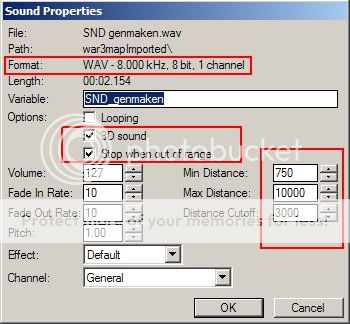
srry for posting this here.. is that i dont know where to place it... but this issue may be a headache for somebody thats the reason i make this topic...
thx a lot guys for the ideas you gave me ^^
My problem was basicly Sounds...
i imported sounds in mp3 and wav... changed bit rates... and every single thing you may think (different programs and triggers...)
The thing is that i discovered the final solution to my problem.. and here it is...
If you import a sound and want to use it like a sound and not a music... you have to do the usual thing that this https://www.hiveworkshop.com/forums/showthread.php?t=39234&highlight=sound and this https://www.hiveworkshop.com/forums/showthread.php?t=31249 tutorials mention...
but... this way.. your sounds are gonna be heard all over the map... and sometimes you dont want that...
the way to solve this problem is so stupid that i feel like an @*// saying it...
you have to flag the sound variable as 3D... after this check the box that says "Stop when out of range"
and after doing that place in minimum range 750 (this way it worked for me... you may try diferent ones) [[yes.. i searched hive forum for this solution.. but couldnt find it.. :S]]
srry for posting this here.. is that i dont know where to place it... but this issue may be a headache for somebody thats the reason i make this topic...
thx a lot guys for the ideas you gave me ^^
Last edited:


