• Check out the results of the Techtree Contest #19!
  • Listen to a special audio message from Bill Roper to the Hive Workshop community (Bill is a former Vice President of Blizzard Entertainment, Producer, Designer, Musician, Voice Actor) 🔗Click here to hear his message!
  • Read Evilhog's interview with Gregory Alper, the original composer of the music for WarCraft: Orcs & Humans 🔗Click here to read the full interview.
  • Create a void inspired texture for Warcraft 3 and enter Hive's 34th Texturing Contest: Void! Click here to enter!
  • The Hive's 22nd Icon Contest: Creep Abilities is now concluded, time to vote for your favourite set of icons! Click here to vote!

3DS/OBJ to MDX converter 1.2

a converter that does obj or 3ds to mdx
Contents

3DS/OBJ to MDX converter 1.2 (Binary)

You cant give it a 1/5 for crashing. because it doesnt crash for everyone :-p :twisted:
 
These posts are old but annways, You can BUy max 4 but i dont suggest you do you should get max 8 which is what i use and ALL MAX's can Export as .3ds so your just a fool, and gmax iam almost certain Can export .obj you guys should read up this stuff before making a fool of yourself.
 
Can u Great a tool to Convert *.one to *.mdx & *.mdl :?: .
 
ok i have tryed all i can to get 3D Studio Max 8.0 but all cost Some money :cry:
 
Personally I was tired of making models in blender and then converting them to GMax just to use the Dexporter tool that took forever to use. 4/5! Nice Tool and works great.
it would be a 5/5 but when I converted from .3ds to .mdx it didnt convert the texture (which may be hard to code). This can be solved by converting .mdx -> .mdl, changing the .mdl into a .txt, changing the texture name to whatever you want, changing .txt to .mdl, and converting .mdl to .mdx. Favorite tool by far.
(Changing the texture name so it works[below])
Textures 1 {
Bitmap {
Image "Textures\CityStructures.blp",
}
}
Materials 1 {
Material {
Layer {
FilterMode Transparent,
TwoSided,
static TextureID 0,
}
}
}
from that to this...
Textures 1 {
Bitmap {
Image "YOUR TXT FILE PATH HERE EX: war3mapImported\example.blp",
ReplaceableId 0,
}
}
Materials 1 {
Material {
Layer {
FilterMode none,
static TextureID 0,
}
}
}
 
Last edited by a moderator:
just cant seem to get it to work, ive tryed everything. downloaded it 6 times,restarted the computer twice and using diffrent models
but it still just crashes on convert :cry:

cut the last one, i just used obj instead of 3ds. thx man\woman
 
Last edited by a moderator:
obj doesnt work unless its exported from milkshape I believe is what the help file says.
(Although I seem to get an error after using this tool when saving a converted file with war3 model editor. The way I fixed it was converting it to mdl and back again not in the model editor :D)
 
When Im gona find a new warking 3DS Im gona post it , it seams the old 1 its not working for a long time
 
Last edited by a moderator:
Blender, save to .obj, convert with this to .mdx, roflcopter at those who spend money. Also, I had problems using this to convert .3ds but not .obj, just sayin'.
 
I've tried using it and.... Neither obj or 3ds work in this converting. Maybe it is different version (For me 3ds max 2009 but his is 8)

In obj > mdl : Can Convert but my model is changed into sth causing my WE crash.
In 3ds > mdl : Nothing happen in converting... Nothing at all.

I will not rate as my and his is different version.
 
Supposedly 3D Object Converter will do it, but I won't know until I transfer it to my other comp. Personally I'm not a modeler, just a spriter and coder. I've played around with GMax when I had SC2, but that was a couple of years ago. So I can't be mush more help than this.

If someone wants to beat me to the punch, Google it. It's been long enough since the thread was started for there to be more stuff out there.
 
2/5 because it's the only converter I know of. 3ds files worked on 2 out of 3 models which is great, 1 crash.
Textures needed to be vertically flipped but they work, also great.
Problem is they dont open in War3ModelEditor or work in WC3 without further processing so I'm having trouble thinking of who this tool will benefit. People who can't import OBJ or 3DS files to their program but can open half-broken MDX files? Not sure a program like that exists. I tried converting the mdx to mdl with another program but it wigged out and turned the 42kb mdx to a 1.2gb mdl. Tried MDX squisher, didn't crash but didn't fix. I can't speak on animations but I imagine they wouldn't work. It's clearly converting them to MDX but not in a way that WC3 etc can recognize.

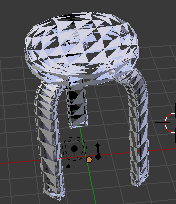
It "works" for OBJ in WC3 and War3Editor but every model I try ends up with broken geometry like this
image.png

Can be fixed with some autofilling but it's tedious and doesn't apply to the texture so textures effectively don't work this way.
I'm no expert but the OBJ converter part isn't a viable option for me either. Good attempt and if improved can be extremely useful.
I use Blender so all non-wc3 tests were done in Blender.
 
Back
Top