
Community
Projects
Maps
Tutorials
Gallery
Support Us
Install the app
How to install the app on iOS
Follow along with the video below to see how to install our site as a web app on your home screen.
Note: This feature may not be available in some browsers.
-
Listen to a special audio message from Bill Roper to the Hive Workshop community (Bill is a former Vice President of Blizzard Entertainment, Producer, Designer, Musician, Voice Actor) 🔗Click here to hear his message!
-
Read Evilhog's interview with Gregory Alper, the original composer of the music for WarCraft: Orcs & Humans 🔗Click here to read the full interview.
-
The Hive's 22nd Icon Contest: Creep Abilities is now concluded, time to vote for your favourite set of icons! Click here to vote!
-
✅ The POLL for Hive's Texturing Contest #34 is OPEN! Vote for the TOP 3 SKINS! 🔗Click here to cast your vote!
-
✅ The POLL for Hive's Techtree Contest #20 is OPEN! Vote for the TOP 3 FACTIONS! 🔗Click here to cast your vote!
You are using an out of date browser. It may not display this or other websites correctly.
You should upgrade or use an alternative browser.
You should upgrade or use an alternative browser.
Thrall

- Author(s)
- GAQ
- Size
- 3.59 MB
- Rating
-
(8 ratings)
- Downloads
- 374
- Created
- Apr 22, 2026
- Updated
- Apr 23, 2026
- Resources
- 1
- State
 Awaiting update
This bundle is marked as awaiting update. A staff member has requested changes to it before it can be approved.


The model and animation are all created by me.
Ingame textures.
Possesses the transformation form of Ghost Wolf and special weapon attachment point.
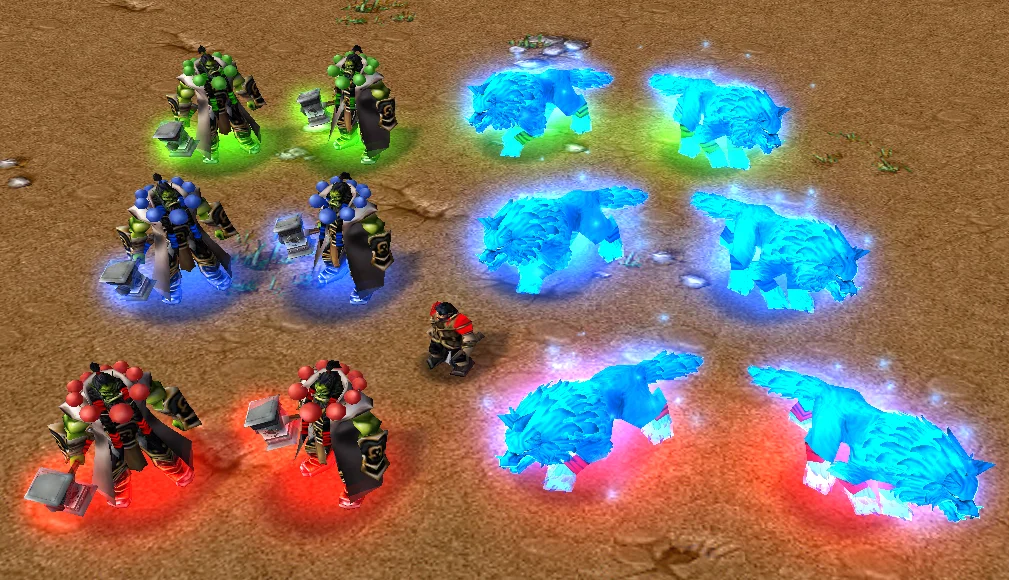
Ingame textures.
Possesses the transformation form of Ghost Wolf and special weapon attachment point.
Contents
ThrallByQTLfhs (Model)
View in
3D
- Included textures
- 0
- Polygons
- 3,818
- Filename
- ThrallByQTLfhs.mdx
- Size
- 3.59 MB
- Sanity check
- 1 14 155748
- Uploaded
- Apr 22, 2026
- Updated
- Apr 23, 2026
Reviews

Review: optimize the model - in geoset animation 48 the order of keyframes in not fully in proper order by Track number. 2. remove all unnecessary keyframes (15000+!)
Review accepted by Footman16


- Joined
- Dec 3, 2020
- Messages
- 1,254
Nice, the little details of his eyes during some animations are insanely cool

deepstrasz
Map Reviewer
- Joined
- Jun 4, 2009
- Messages
- 22,352
Wolf's not too spirit for me but nothing that can't be changed with a little transparency. Love the pear neck armour xD

- Joined
- Oct 11, 2021
- Messages
- 263
Legacy of the Dwarves
Lots of detail and care put into this; it's one of the most complete models I've seen in a long time. Its morphing is smooth and eye-catching, and the wolf design is very striking. Great work, without a doubt.


- Joined
- Nov 21, 2013
- Messages
- 231
This is absolutely fantastic! I hate to even put forward a suggestion for more given the sheer quantity of animations, but do you think it would be possible to include a birth animation for the spirit wolf form so that it could also be used to replace the summoned spirit wolves for farseers/Thrall?

- Joined
- Jul 5, 2013
- Messages
- 238
I was never a fan of the anal beads, makes him look more like a monk than a shaman, but wonderful work on the model. What i love the most about this is that you preserved his hair, cause Thrall looked so bad with his bald head in Warlords of Draenor.


- Joined
- Jun 11, 2022
- Messages
- 288
I think I can make separate spirit wolf from this Thrall as a summon, if GAQ allows it of course. @GAQ, may I do it? Super great model by the way, waited paitently for it's release. Very clever use of orc time indicator texture for doomhammer's wolf head symbol.This is absolutely fantastic! I hate to even put forward a suggestion for more given the sheer quantity of animations, but do you think it would be possible to include a birth animation for the spirit wolf form so that it could also be used to replace the summoned spirit wolves for farseers/Thrall?

- Joined
- May 11, 2021
- Messages
- 71
This is absolutely fantastic! I hate to even put forward a suggestion for more given the sheer quantity of animations, but do you think it would be possible to include a birth animation for the spirit wolf form so that it could also be used to replace the summoned spirit wolves for farseers/Thrall?
Next, I will create individual wolf models, including Wolf, Spirit Wolf, Fire Wolf, Fel Wolf, and Void Wolf, just like in Warlords of Draenor.I think I can make separate spirit wolf from this Thrall as a summon, if GAQ allows it of course. @GAQ, may I do it? Super great model by the way, waited paitently for it's release. Very clever use of orc time indicator texture for doomhammer's wolf head symbol.
- Joined
- Nov 21, 2013
- Messages
- 231
Something worth noting is that the face is VERY bright, which is a bit straining on the eyes and also obscures a bit of the detail. Might be worth slightly toning down a bit of the glow, something closer to the vfx brightness and distribution of the phoenix perhaps?
Attachments

- Joined
- May 11, 2021
- Messages
- 71
This seems to be a display issue with War3R. I added a single-sided inward-facing polygon to its face to create a glowing outline, but War3R appears to be causing the inward-facing texture to illuminate its face.Something worth noting is that the face is VERY bright, which is a bit straining on the eyes and also obscures a bit of the detail. Might be worth slightly toning down a bit of the glow, something closer to the vfx brightness and distribution of the phoenix perhaps?
You can try removing those stroked polygons, deleting the polygon animation, or reducing its visibility to adapt to the rendering of War3R.Something worth noting is that the face is VERY bright, which is a bit straining on the eyes and also obscures a bit of the detail. Might be worth slightly toning down a bit of the glow, something closer to the vfx brightness and distribution of the phoenix perhaps?
- Joined
- Nov 21, 2013
- Messages
- 231
That's extra annoying since I have all the reforged settings turned off TwT
Thanks for the tips though!
Thanks for the tips though!

- Joined
- May 11, 2021
- Messages
- 71
I created it based on this artistic concept image.can you make the bald version too?
Update: Fixed the display error of the hammer texture orientation.
Thank Lefroit (https://www.hiveworkshop.com/members/lefroit.303125/) for his suggestion.


- Joined
- Nov 8, 2017
- Messages
- 184
I was never a big fan of the trench coat/monk beads era for Thrall, personally, but I love the animations, the ghost wolf form, and the detail you managed to put into his face using just in-game textures. Very impressive!

- Joined
- Jul 9, 2008
- Messages
- 1,450
Battle for Lordaeron (Lordaeron WoW)
Is there any way you could make the ghost wolf a separate model?
- Joined
- Nov 21, 2013
- Messages
- 231
Is there any way you could make the ghost wolf a separate model?
Next, I will create individual wolf models, including Wolf, Spirit Wolf, Fire Wolf, Fel Wolf, and Void Wolf, just like in Warlords of Draenor.

- Joined
- Jun 27, 2010
- Messages
- 4,242


