• Listen to a special audio message from Bill Roper to the Hive Workshop community (Bill is a former Vice President of Blizzard Entertainment, Producer, Designer, Musician, Voice Actor) 🔗Click here to hear his message!
  • Read Evilhog's interview with Gregory Alper, the original composer of the music for WarCraft: Orcs & Humans 🔗Click here to read the full interview.
  • The Hive's 22nd Icon Contest: Creep Abilities is now concluded, time to vote for your favourite set of icons! Click here to vote!
  • ✅ The POLL for Hive's Texturing Contest #34 is OPEN! Vote for the TOP 3 SKINS! 🔗Click here to cast your vote!
  • ✅ The POLL for Hive's Techtree Contest #20 is OPEN! Vote for the TOP 3 FACTIONS! 🔗Click here to cast your vote!

Reset Height fields & adjust cliff levels

Status
Not open for further replies.
Level 11
Joined
Dec 31, 2007
Messages
780
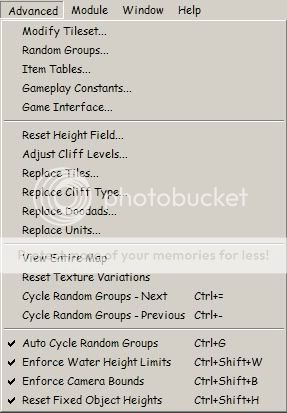
How do this 2 options work? Reset height fields and adjust cliff levels

Dibujo-5.jpg
 
Reset Height Field: Randomizes terrain elevation (uses ''Noise'' height tool over whole map).

You can also edit ''smoothness'' of raised terrain and Variation. Less Variation = Lesser number of ''small hills''

Adjust Cliff Level: Raises/lowers cliff level in entire map (for example: -2 will decrease cliff level on entire map by 2).
 
If I have understood you well,

Your ramps don't look good, or can't be placed.
I recommend you this: Do not use Blizzard's cliffs, use rise/lower tool. With Jass NewGen Pack, you can use raise tool without any limits.

When you rise/lower your cliffs, just terrain them with specific tile (for example, Ashenvale Rock). In JNGP, you can customize tile pathability. More info here.
 
Status
Not open for further replies.
Back
Top