- Joined
- Aug 17, 2007
- Messages
- 12
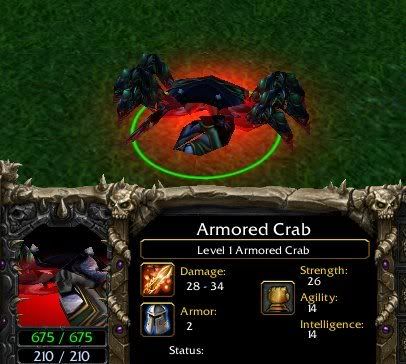
Hi there guys, today i made in my free-time changes to the existing model of the SpiderCrab, i extracted the model from war3x.mpq, i applyed different texture with War3ModelEditor 1.02 and added TeamGlow......
 I wanted to make a Hero called "ArmoredCrab". I already have a map so i imported the texture and the model /ArmoredCrab.mdx + ArmoredCrab.blp note that i am smart and the texture and model work perfect when i replaced the "used texture" by the model with the new one and the modelviewer opens it, np/ PROBLEM IS: when i import both texture + model then i make a custom hero, i set the model to the imported BUT IT SAYS UNABLE TO OPEN MODEL FILE......then i change the pathnames - instead of wc3mapimported i make Units\Creeps\ArmoredCrab\ArmoredCrab.mdx and same .blp...... and still after i save and reload the map same problem.....maybe a different pathname is needed....please help//\\/\//\///\
 my e-mail is: http://[email protected]
I wanted to make a Hero called "ArmoredCrab". I already have a map so i imported the texture and the model /ArmoredCrab.mdx + ArmoredCrab.blp note that i am smart and the texture and model work perfect when i replaced the "used texture" by the model with the new one and the modelviewer opens it, np/ PROBLEM IS: when i import both texture + model then i make a custom hero, i set the model to the imported BUT IT SAYS UNABLE TO OPEN MODEL FILE......then i change the pathnames - instead of wc3mapimported i make Units\Creeps\ArmoredCrab\ArmoredCrab.mdx and same .blp...... and still after i save and reload the map same problem.....maybe a different pathname is needed....please help//\\/\//\///\ my e-mail is: http://[email protected]