• Listen to a special audio message from Bill Roper to the Hive Workshop community (Bill is a former Vice President of Blizzard Entertainment, Producer, Designer, Musician, Voice Actor) 🔗Click here to hear his message!
  • Read Evilhog's interview with Gregory Alper, the original composer of the music for WarCraft: Orcs & Humans 🔗Click here to read the full interview.
  • The Hive's 22nd Icon Contest: Creep Abilities is now concluded, time to vote for your favourite set of icons! Click here to vote!
  • ✅ The POLL for Hive's Texturing Contest #34 is OPEN! Vote for the TOP 3 SKINS! 🔗Click here to cast your vote!
  • ✅ The POLL for Hive's Techtree Contest #20 is OPEN! Vote for the TOP 3 FACTIONS! 🔗Click here to cast your vote!

Game Interface - changing whatever minimap icon/image/model this is

Status
Not open for further replies.
Level 6
Joined
Mar 17, 2012
Messages
105
aV8yczA.png


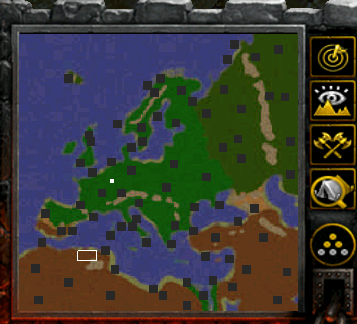
My minimap is dotted with these ugly grey squares, which are the neutral buildings I've placed on the map. They are based off of Gold Mines, and the following fields were edited:

Abilities
Ground texture
Model file
Scaling
Selection scale
Shadow texture
AI Placement Radius
Pathing map
Name

What is the name of these grey squares in the Game Interface? I'd like to edit them to be smaller, but I can't find them anywhere. Thanks!
 
I am not sure if you can make them smaller or not. I know there is a "hide minimap icon" field somewhere in the stats section. You could put a neutral, dummy unit on top of them all and it should show up smaller.
 
Status
Not open for further replies.
Back
Top