• Check out the results of the Techtree Contest #19!
  • Listen to a special audio message from Bill Roper to the Hive Workshop community (Bill is a former Vice President of Blizzard Entertainment, Producer, Designer, Musician, Voice Actor) 🔗Click here to hear his message!
  • Read Evilhog's interview with Gregory Alper, the original composer of the music for WarCraft: Orcs & Humans 🔗Click here to read the full interview.
  • Create a void inspired texture for Warcraft 3 and enter Hive's 34th Texturing Contest: Void! Click here to enter!
  • The Hive's 22nd Icon Contest: Creep Abilities is now concluded, time to vote for your favourite set of icons! Click here to vote!

Flying units move weird over cliffs.

Status
Not open for further replies.
Level 24
Joined
Aug 1, 2013
Messages
4,658
Hi all.

I am making a missile system and came to this weird thing.

I set flying height of the missile to (Flying height of missile + (difference between Z of new and old location) + vertical speed)
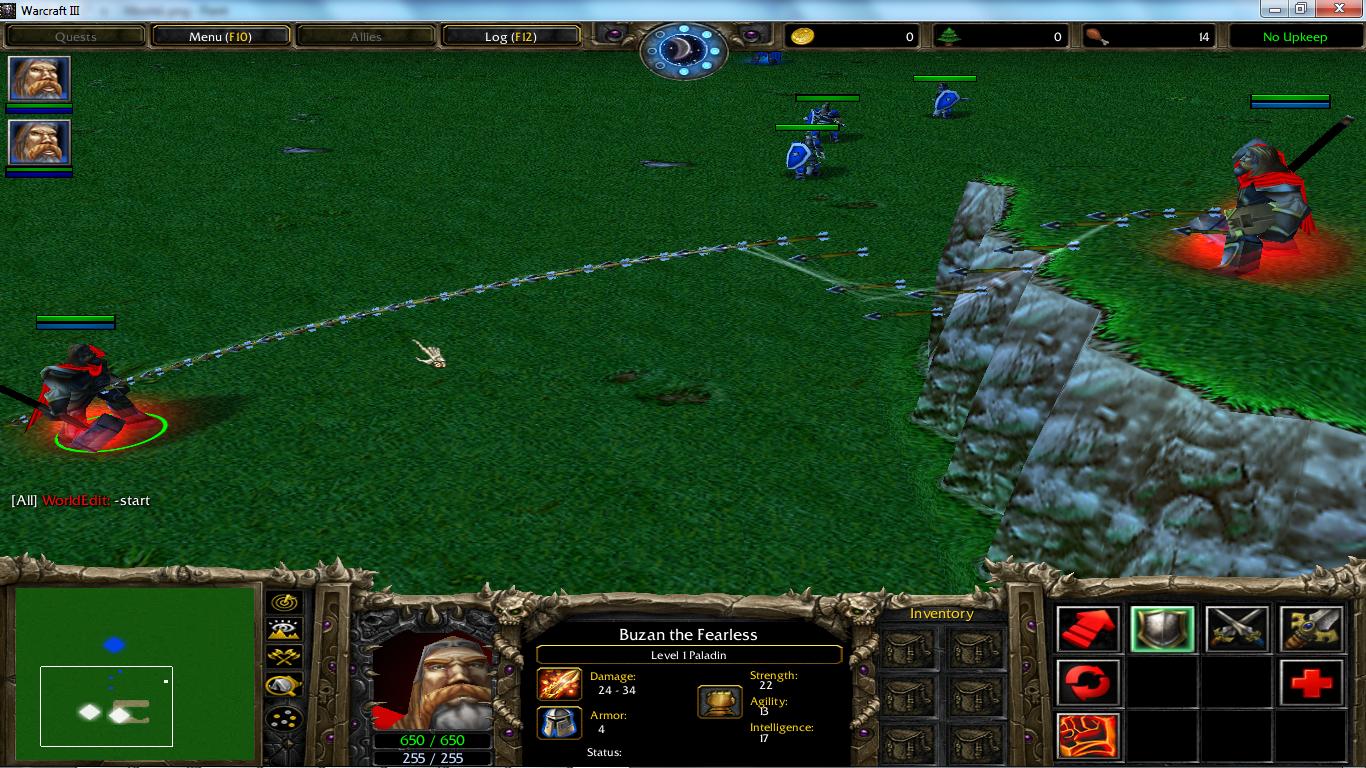
But when I tested it on cliffs... well...
XLf5cih.jpg
The missile has the proper height after the cliff but when it is over the cliff, the height is lower.
How is that happening?

Also is that a common problem and is it ever solved?
 
I have this problem a very long time ago (the 1st map i ever made but not finished) and managed to solve it. But I forgot how it works, here is the copy of the unprotected map (it is full of bugs and debug command such as global blink).

Just Select Daryl Dixon Hero because he initially has the crossbow item and Learn the global Blink. Test it in cliffs and Study how it works especially this trigger code.

  • Custom script: set udg_arrowHeight=GetLocationZ(udg_arrowMovement)
  • Animation - Change (Picked Unit) flying height to (128*(Real(arrowTerrainCasLocLvl[arrowCusVal]) - 2) + arrowChangeHeightGravity - arrowHeight at 0.00
PS: I was a noob back then at triggering Spells thats why I discontinued the development of that map because it is full of bugs, leaks and inefficient triggering.
 

Attachments

I have this problem a very long time ago (the 1st map i ever made but not finished) and managed to solve it. But I forgot how it works, here is the copy of the unprotected map (it is full of bugs and debug command such as global blink).

Just Select Daryl Dixon Hero because he initially has the crossbow item and Learn the global Blink. Test it in cliffs and Study how it works especially this trigger code.
Will take a look. Thanks already ;)

(Flying height of missile + (difference between Z of new and old location) + vertical speed)
->
(Flying height of missile - (difference between Z of new and old location) + vertical speed)

Depends

Difference between new and old can be (new - old) or (old - new)
Still difference ;)
I in fact do "+ (old-new)"
JASS:
set height = GetUnitFlyHeight(udg_CMS_Param_Missile)
        set height = height + v_v*0.03
        set height = height + (GetLocationZ(oldLocation) - GetLocationZ(newLocation))
        if height < 0 then
            set udg_CMS_Param_Destroy = true
        endif
        call SetUnitFlyHeight(udg_CMS_Param_Missile, height, 999)
 
@rulerofiron99
hmm... I have the same settings as you (except I use None as type) but all types do the same, with the exception of flying... that one raises and drops instead of drops and raises.

@latent Heat
I cant see where you move the arrow.

In the Abilities trigger category, look for Arrow Move trigger. Have you tested it and does it meet your requirements?
 
Make sure your units maximum pitch and roll are at 0 (though that's probably not it).

You should set Art-elevation - Sample Points to 1 and "Art - Elevation - sample radius" to 0.

Also, make sure the unit is paused so it doesn't try to move on its own (though that's probably not it either.
 
Make sure your units maximum pitch and roll are at 0 (though that's probably not it).

You should set Art-elevation - Sample Points to 1 and "Art - Elevation - sample radius" to 0.

Also, make sure the unit is paused so it doesn't try to move on its own (though that's probably not it either.

none worked... though that pause thing is pretty good to remember.

My dummies all have 0 in almost every value.
 
  • Custom script: set udg_arrowHeight=GetLocationZ(udg_arrowMovement)
  • Animation - Change (Picked Unit) flying height to (128*(Real(arrowTerrainCasLocLvl[arrowCusVal]) - 2) + arrowChangeHeightGravity - arrowHeight at 0.00

Well... as you can see in my map... I change the height of the missile accordingly to the exact LocationZ of the position on the map.
It includes cliffs, ramps and height smooths.
But you change the height of the missile at 0.00 and I did it at 999.00
That was the difference.
 
Excellent, glad you got it solved. I'm not the best with the world editor, but I have a lot of experience with missile systems (see my Battle for Tatooine map). Changing unit's height at speed "0" makes it instant, so I always use that. Also, the game registers the unit's current height as the target height you gave it. So if you said, "Change unit's height to 100 at speed 50" the game would immediately register it's height at 100 even if it doesn't look that way.

The only other problem I get continually is that when I create a new unit they often respond to terrain and collision and sometimes don't show up right where I want them. It helps to create them offcamera somewhere, remove collision with triggers, then move them exactly where you want them to be.
 
Status
Not open for further replies.
Back
Top