Follow along with the video below to see how to install our site as a web app on your home screen.
Note: This feature may not be available in some browsers.
Listen to a special audio message from Bill Roper to the Hive Workshop community (Bill is a former Vice President of Blizzard Entertainment, Producer, Designer, Musician, Voice Actor) 🔗Click here to hear his message!
Ladies and gentlemen , I present to you the merger between the lands of Warcraft and Discordia...
THE EMOJI CHAT SYSTEM
Have you ever wanted to Pog at your teamates play? Perhaps LUL at his failure? Or simply dropping a naughty little Trollface after commiting a play so bad god had to awert his gaze?
Well now, YOU CAN! Image emojis and stickers of any variety, punch them in, and your players can express all their desired emotions in chat just like they do on our favourite social app
(Disclaimer: The author of this system is aware that people are unpredictable individuals or downright devious freaks. The author of this system does not take any responsibility for the inevitable NSFW imagery that will be added to maps by developers using this system. The author of this system, however, recognizes that it's based and poggers and really funny to do that, however, the author of this system would like to remain unbanned on Battle.net and The Hive Workshop , so for that reason, the author of this system must pretend that he condones this behavior.)
UPDATE: The system has been updated to support somewhat well working Gif emojis.
These emojis are .mdl/.mdx model files of sprites that need a corresponding .blp file to play properly.
In order to make your own, you need to export the .mdx file in my map and change it's texture to your desired gif as well as it's hook. Because the system is designed to handle that specific size (Sprites don't like to listen to FrameSize, and force their own size), i heavily recommend not changing the size of the actual model, only it's texture and lightning. A full comprehensive guide on how to edit this model to create your own Sprites can be found here:
(The guide is unfortunately in french, but your browser should be able to translate it)
On top of that, several nifty changes and optimizations have been made.
Here are all the possible guides on how to import and setup this system for people who are not that jass savvy:
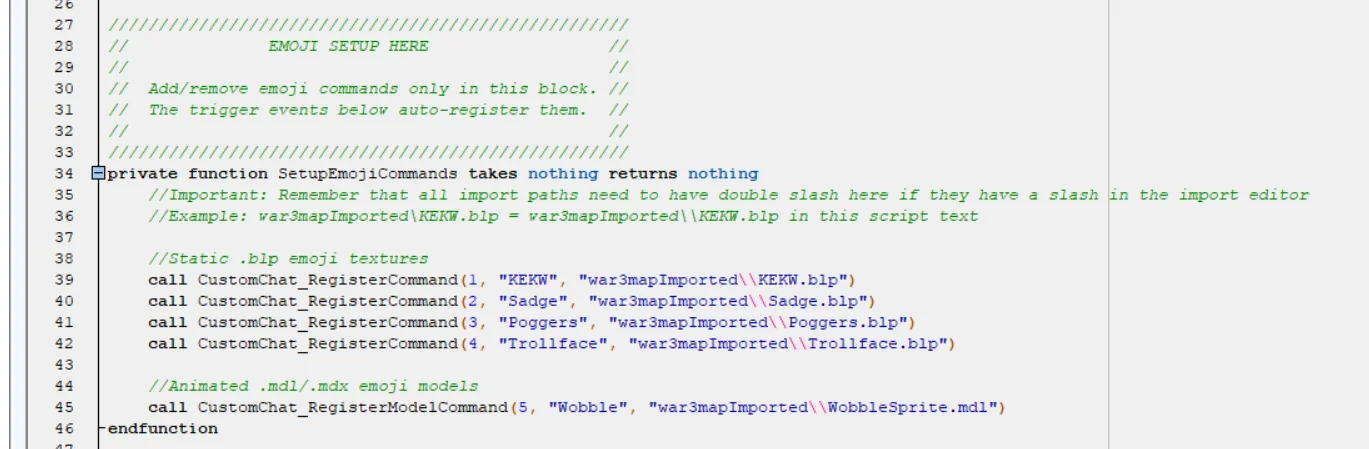
This block here handles the registering of emojis. Simply copy paste this command line over and over and write what exact message should be turned into an Emoji. It can be found in the Noctiss_ChatSetupEmojis codeblock. call CustomChat_RegisterCommand(1, "KEKW", "war3mapImported\\KEKW.blp") This particular command is very simple to customize to your own needs. Simply replace the number "1" with the next unused number. In this case, since i have set up 5 emojis in the demo, the next unused number would be 6.
After that, in the first quotation marks " " insert the text that triggers the Emoji. After that, the import path of your imported .blp, .dds, .tga or .mdl/.mdx
That's it, you are done. The system will now recognize that Chat message and turn it into an image / sprite.
Importing this system is as easy as it gets. Simply copy these 2 Code triggers, and Paste them into your map. You are done, the system does not need any variables or hooks, everything sets up itself with code-defined variables.
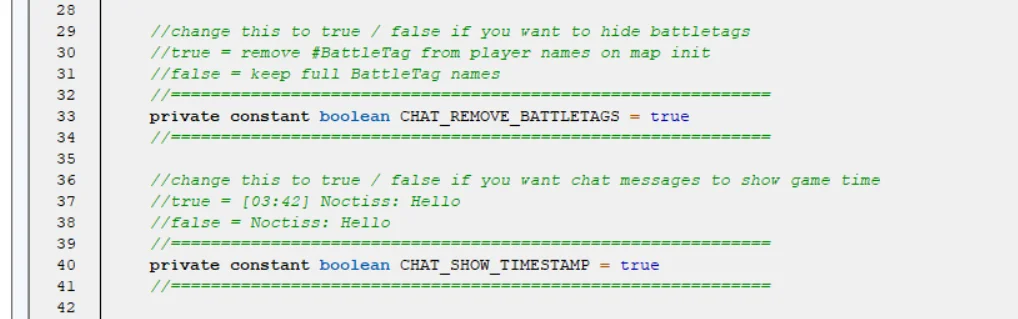
The Updated system features 2 new functions. Timestamp which shows how long into the game the message was posted, and removed #BattleTag, so that the players name appears without it. Both of these 2 features are turned on by default, so if you simply copy paste, you will have them. But if you want to disable either of these, simply turn one of these 2 conditions from = True to = False.
Thank you for checking out my First ever posted System. I know it probably lacks some features or has some issues, i still have limited knowledge of Jass, but i was happy how it turned out and i wanted to share it with you guys. Enjoy and please give credit if you use this.
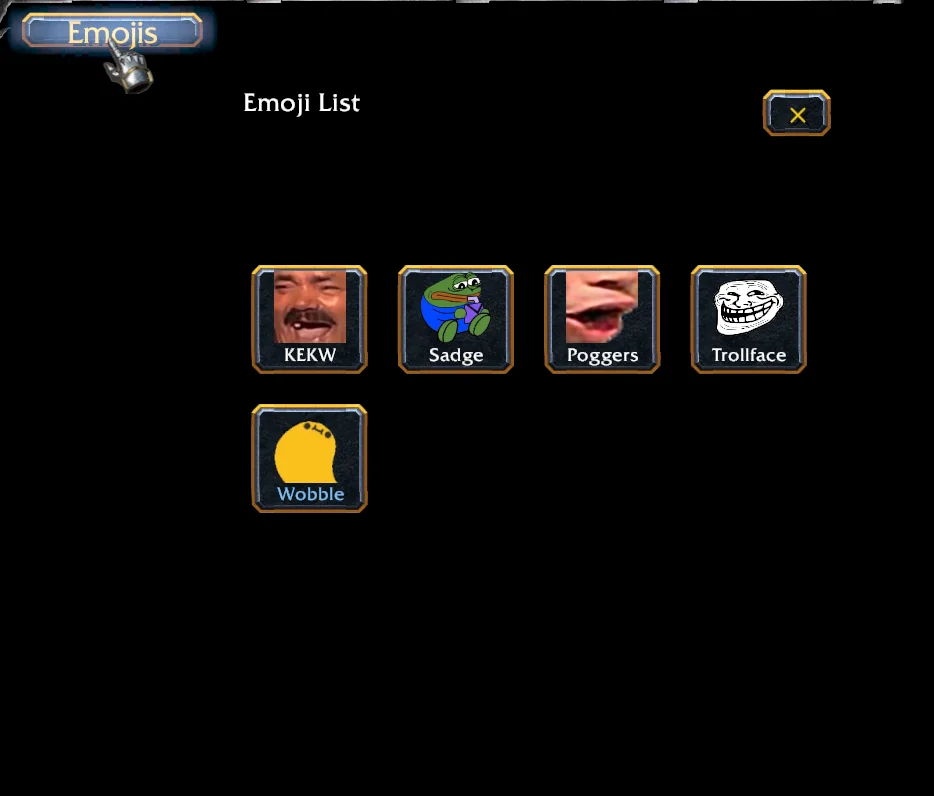
UPDATE #2: The latest and likely final update i will do to this system for now, a comprehensive Emoji list opened with a button. The emojis are inside with their String, and pressing them will automatically send them in chat.
Huge thanks to Tasyen, the king of Frames for all his useful systems he created. This particular framework was created by gutting his TasItemStop system (Lite version specifically) and changing it into a button framework. The system is thus named TasEmojiList in my triggers, because he saved me a lot of work, and honestly i don't think i even could make this on my own yet. I wasn't able to figure out the search bar for example, so that feature is not a part of the emoji list, but i think that can be overlooked for now. Maybe in the future.
Here is how you setup the buttons in the TasEmojiList
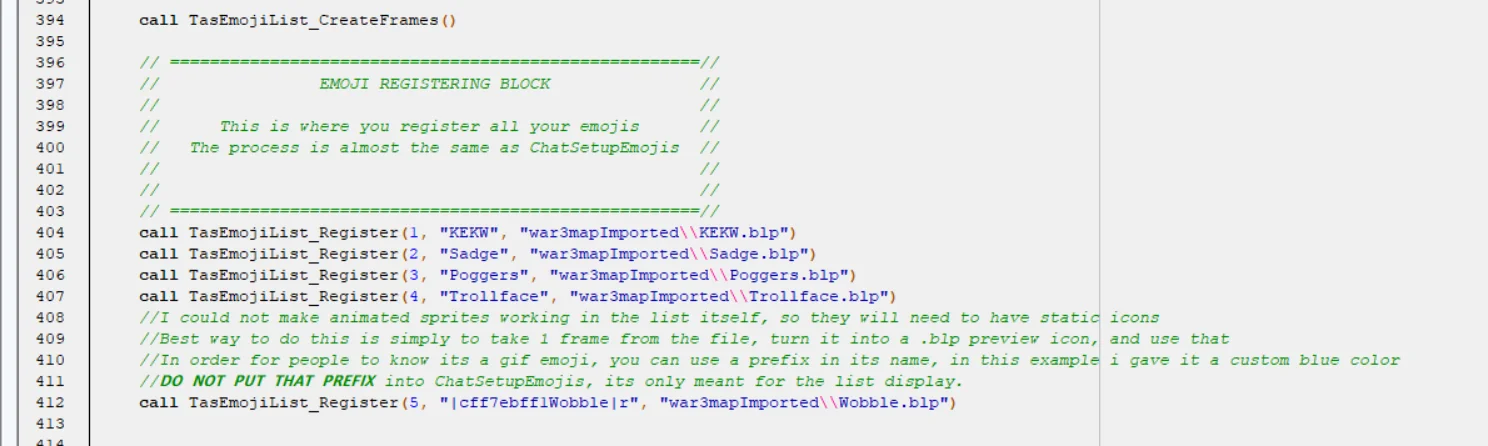
Scroll all the way to the bottom of the code, and find this:
Almost identical to the register system of the Emoji System itself.
Simply copy paste that 1 command again and again, and make sure the emojis match the number they have in your Noctiss_ChatSetupEmoji script
omg thank u Daffa. What a throwback, last time you commented on my thing was 2 years ago when you told me about why it was lacking, and i didnt know how to use GUI indexer... and now 2 years later, you are 5/5 rating my Chat system... oh the journey
Yes and no. Frames are images, a gif is a compacted imagefile playing multiple frames.
as i explained to a person on discord, this right here is a wobbling head emoji. Maybe you saw it before.
This thing alone is a 15 FPS emoji, and it consists of 15 images.
The way this would be doable to import into the system is by turning each of those into a blp, naming them something like Wobble(1), Wobble(2), Wobble(3), etc
and then have a Loop i = i + 1 and call FrameSetTexture to war3imported\\Wobble(i).blp
The system updates itself every 0.05 seconds in order to create the fading frames effect and time the lifespan of the messages, which translates to about a 20FPS rate. By adjustment, creating a 15 FPS emoji like this wobble is very possible in theory. Might have to hash it since the emoji frames move but we need to keep updating their respective textures in real time as they get pushed up by new chat messages, but thats not the problem
The main problem is: Importing
Importing these files will be ultra cancerous. That is why i didnt really opt for gif yet, but i might give it a try to see if its worth the cancer importing process
The main problem is: Importing
Importing these files will be ultra cancerous. That is why i didnt really opt for gif yet, but i might give it a try to see if its worth the cancer importing process
Hi! I took 66 Steam profile picture border animations from the Steam Shop and turned them into Warcraft 3 models to use it as Sprite type Frames. Some quirks about my models: -Steam's original resolution is 224 pixel. I tried to make a reasonable concession between file size and quality. -My...
Hi! I took 66 Steam profile picture border animations from the Steam Shop and turned them into Warcraft 3 models to use it as Sprite type Frames. Some quirks about my models: -Steam's original resolution is 224 pixel. I tried to make a reasonable concession between file size and quality. -My...
Hi! I took 66 Steam profile picture border animations from the Steam Shop and turned them into Warcraft 3 models to use it as Sprite type Frames. Some quirks about my models: -Steam's original resolution is 224 pixel. I tried to make a reasonable concession between file size and quality. -My...
Frames are bad for it, but there is a frame type i forgot about, called SPRITE frame, which works for stuff like Autocast effect and stuff. Goated suggestion to use models that are basically gifs interchanging texture allowed me to make it work
This site uses cookies to help personalise content, tailor your experience and to keep you logged in if you register.
By continuing to use this site, you are consenting to our use of cookies.


 Pending

 THE EMOJI CHAT SYSTEM