• Check out the results of the Techtree Contest #19!
  • Listen to a special audio message from Bill Roper to the Hive Workshop community (Bill is a former Vice President of Blizzard Entertainment, Producer, Designer, Musician, Voice Actor) 🔗Click here to hear his message!
  • Read Evilhog's interview with Gregory Alper, the original composer of the music for WarCraft: Orcs & Humans 🔗Click here to read the full interview.
  • Create a void inspired texture for Warcraft 3 and enter Hive's 34th Texturing Contest: Void! Click here to enter!
  • The Hive's 22nd Icon Contest: Creep Abilities is now concluded, time to vote for your favourite set of icons! Click here to vote!

Adding New Soundsets (And Not Replacing Them!)

Level 11
Joined
Aug 31, 2011
Messages
293
This uh... 'tutorial' expands on this, essentially!

Is it possible to create NEW Sound Sets? - Wc3C.net

CASC viewer
Casc Storages - Main page

SLK editor
War3Slk Edit version 1.05

So usually in discussions and stuff I see people say that you should always replace soundsets instead of adding new ones which is.... Well it's definitely true in most situations, but if you're not too afraid of experimentation, or are already using Local files (explained a bit here):
!! Allow Local Files - General Discussion

...Or maybe you're using custom MPQs (i doubt anyone's using custom CASC files, those are just a hindrance.), point is, if you're okay with something extra this is a viable alternative, maybe you could import everything into the map and separate the 'unitacksounds.slk' file into Local file use or something, weird way to go about it sure, but you never know.

Might also potentially work by creating a new "War3Mod.mpq" folder into your Warcraft III folder without local files and putting files into that, but haven't tested that.

Remember, of course, to back things up, especially when playing around with things like this!

Anyways! Starting off with a bit of a preface, then I'll go into grabbing the files and going ahead with it, this is mostly a simple task.

Screenshot showing that this would indeed add a new sound set into World Editor~
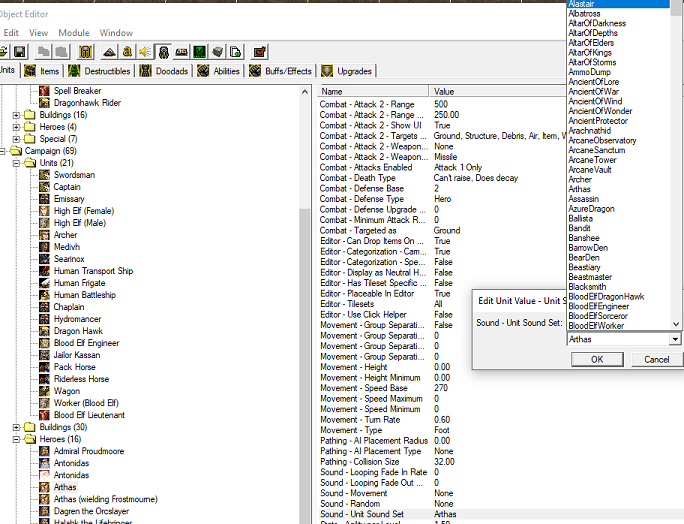
And a video thing with this in action

Of course you could just think this was done for show and maybe the Wendigo sounds were replaced for this example or something, seeing it done yourself is probably the best thing for it, so let's get on with it.

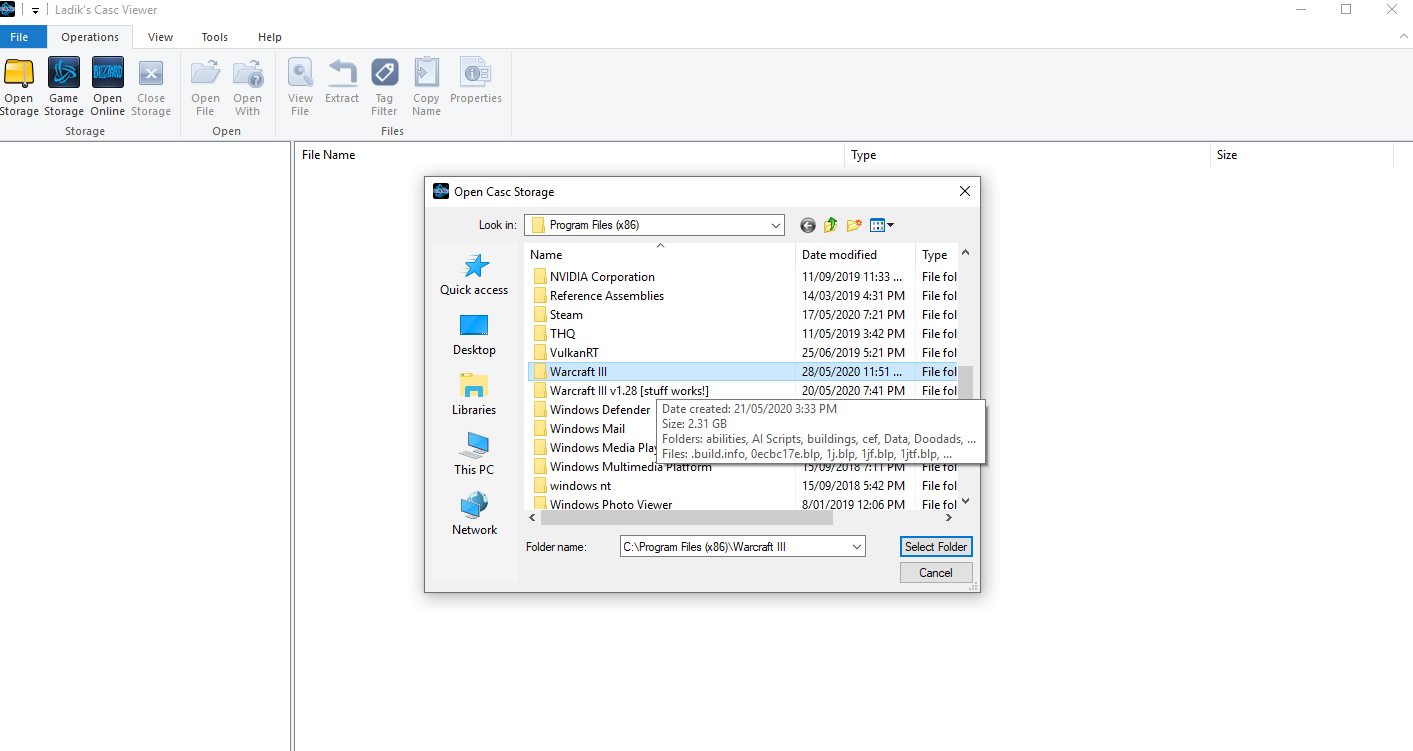
First off, you'll want to 'unitacksounds.slk' file itself, here I'm on patch 1.31 (even though you see 1.28 there shush just roll with it) so I need to use the CASC Viewer, if you're also doing so just Select Folder here.
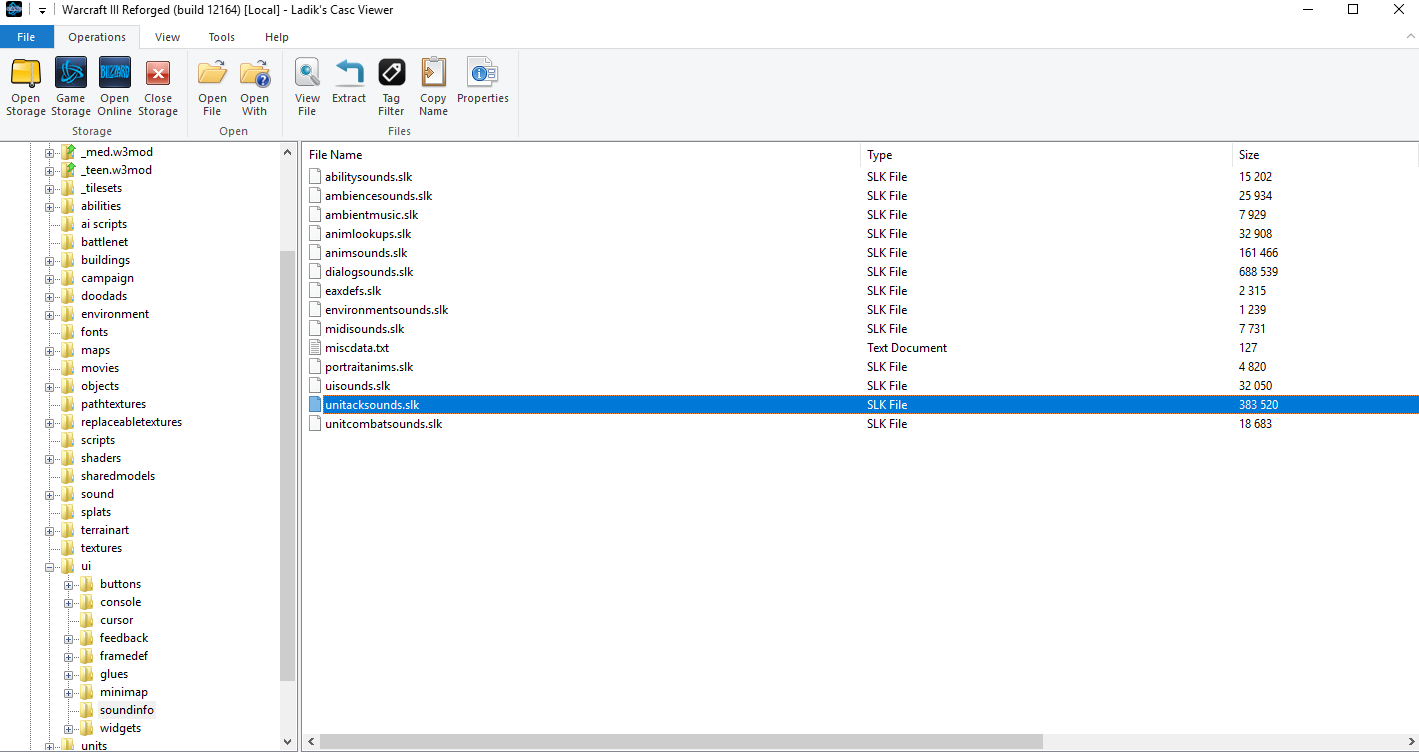
You're looking for the necessary file right here-- if you are extracting via MPQ instead it would still be around the same subfolder (UI/SoundInfo/UnitAckSounds.slk) but instead you'll want to open the 'War3Patch.mpq' MPQ, it will be the one with the Goblin Alchemist and Fire Lord assets
Now that you've got it, open it with the SLK editor I linked a bit ago, after that go to 'Edit>New group' and you'll see 'Enter an ID' pop-up, just name it whatever you want to name the soundset+Sound state (Pissed, What, Yes-- that stuff) aaand you're good to go for that, now do the same for the rest of the states needed, I already have a folder of voice stuff I'm going to be use as a reference for what states are actually used, so I suggest you have all the sounds you want to use all set as well.
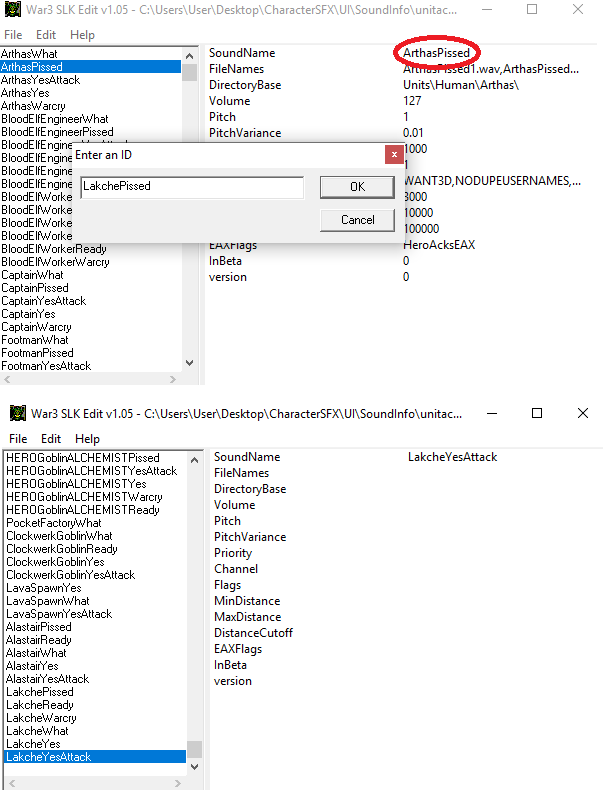
You'll see we're only creating the groups and not actually tying them to their actual sounds or yet, that'll be done in a bit. The game also ties all of these soundsets and their states into a neat bow properly, so don't worry about that.

Next up, close the file from the SLK program, and open it in a text editor, I'm just going to use Notepad, scroll to the bottom to where your new things are aaand... Empty! But we already knew that, so what happens from here is to just copy from something that isn't empty, then replace and fill in with the new info, simple! (Only copy/paste the C;X2 > C;X15 lines over eachother, the lines above are used for the proper ID we set earlier.)
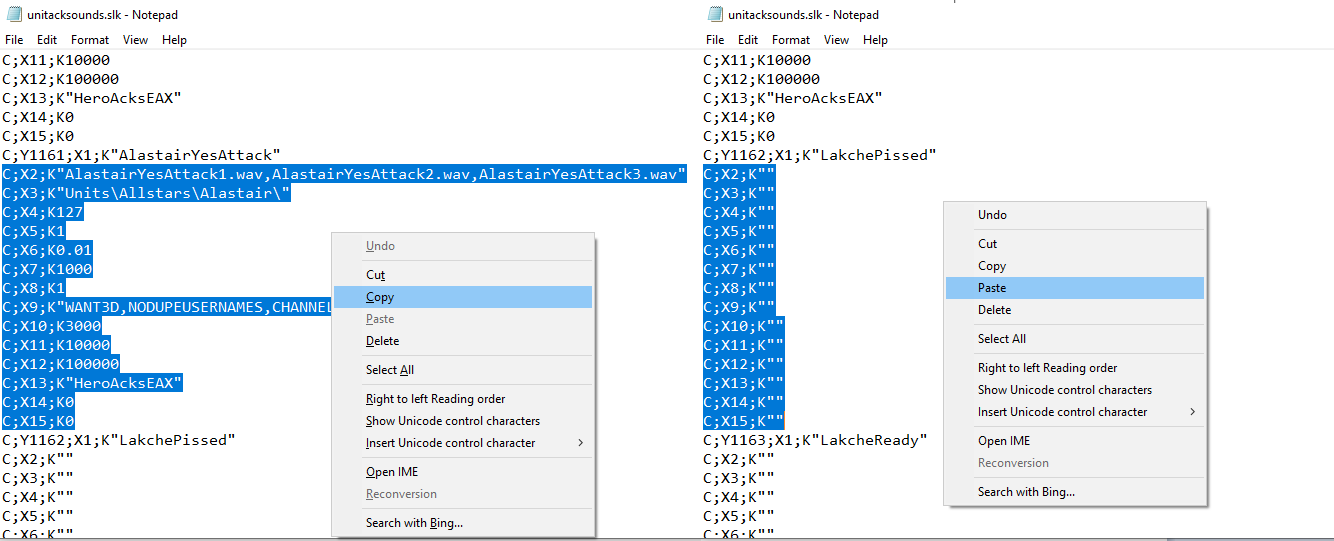
Now you change all of the text to whatever you need to for your new soundset, as well as changing the source it's read from "Units\Allstars\Alastair\" here, something like Illidan would be "Units\NightElf\Illidan\" instead. You can indeed add more if you need to lines if needed (there may be a limit but I don't know if there is), just add more commas and write for more filenames
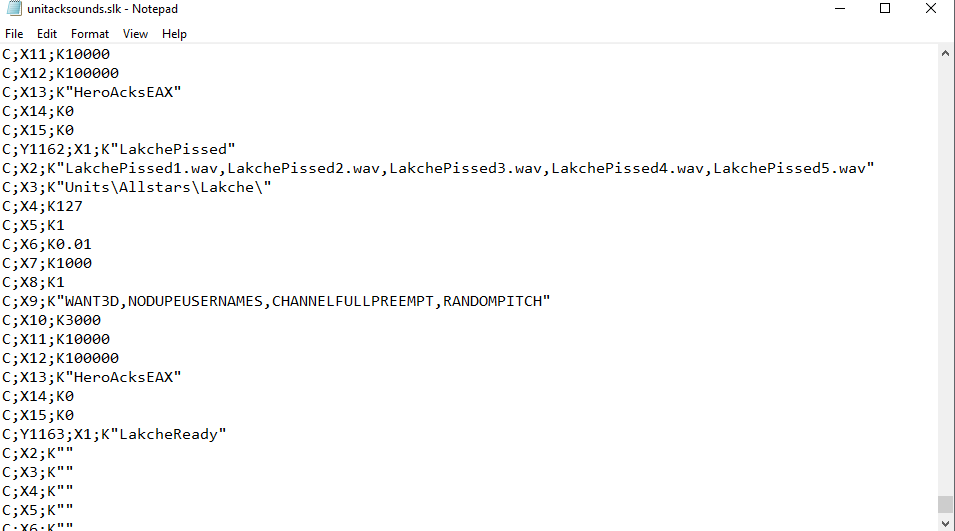
And there you have it, repeat for the rest of your sound states (if you have any, might just be a building), save it, place it wherever you are using it along with the appropriate filepath (UI/SoundInfo/UnitAckSounds.slk) open up your editor aaaand it should be there in the Object Editor, you can also check them out in the Sound Editor if you'd like.
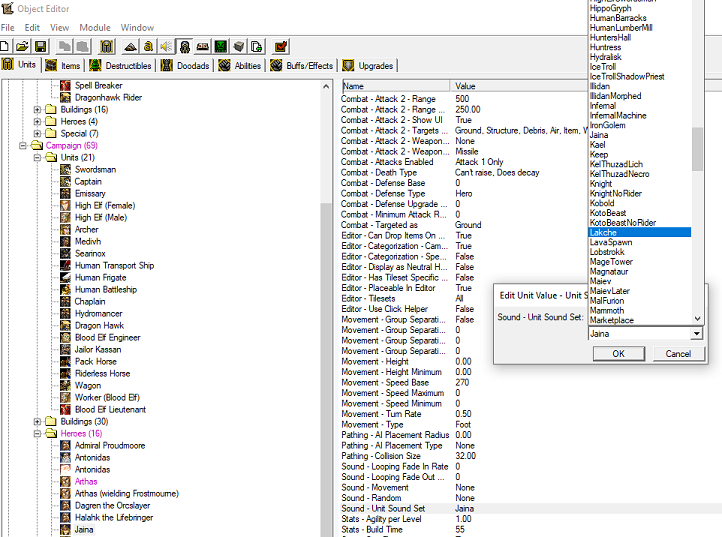
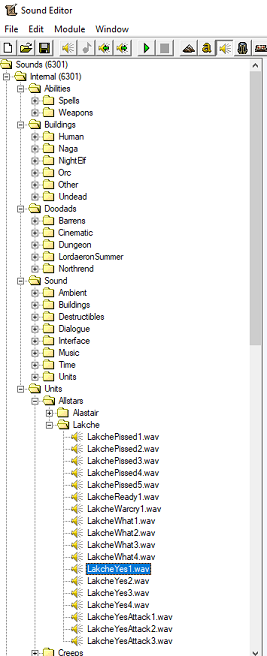
aaaaaand this new one in action

Congrats! You now have more soundsets to play with! Potentially. It's probably a bit limited since you can't actually just import it into a map and do it all that way, but hopefully someone is able to find this useful.
 
Last edited:
Needs a visual update.

Title/subtitles, sprinkle in some color.
The images are also linked in a weird way. I don't think a link to each one should be present. Same for the information tabs. Just use standard
 
When I try to select Warcraft 3 1.26 folder, I see the error:

View attachment 413650

Is 1.26 doesn't support?

And another question. Can I add new soundset to individual map?
1.26 still uses the old format (MPQ). You are going to need MPQ Editor instead, then open the "War3x.mpq" file. Now do the correct steps as Whitewolf did and you'll be fine.
 
Hello!

This works perfectly (1.27b) as long as I put my files (modified .slk and audiofiles) in the .mpq (let's say War3Patch.mpq) using correct paths.
But when I try to use local files (which works in general - with models, for instance, I checked it) - new soundset works only in the editor, but not in the game (just no sounds for soundset at all).
Can anyone help me with this, please? Any ideas would be helpful.
 
This method doesn't work for me, as the "unitacksounds.slk" file I have there doesn't contain the "DirectoryBase" line, so I can't enter path for the unit sound groups like @Whitewolf8 did. :cry: If anyone has a solution, I'm interested.
 
Hello!

This works perfectly (1.27b) as long as I put my files (modified .slk and audiofiles) in the .mpq (let's say War3Patch.mpq) using correct paths.
But when I try to use local files (which works in general - with models, for instance, I checked it) - new soundset works only in the editor, but not in the game (just no sounds for soundset at all).
Can anyone help me with this, please? Any ideas would be helpful.
Replying to myself, if anyone is still interested - it is pretty easy to add your custom soundset in the game. For this you just edit UI/SoundInfo/UnitAckSounds.slk and replace it in War3Patch.mpq (otherwise it will be overriden by this one, still no workaround found, but it’s also not needed that much). You can use any convenient tool to edit .slk-file (MS Excel, for instance) - just look at how any other soundset is described there. And there is no need in these strange actions, described in the first post - literally, using some custom program, and nonetheless after that editing some .txt file by hand. I used local files mode and so after editing .mpq I just put my .wav's into the game folder.

Of course, always consider making a backup of your files, before any edits. This was tested on 1.26a, cannot say anything about latest versions. Theoretically there would be no problems as long as you can edit War3Patch.mpq (or, what fullfills its functions now) via ,say, Ladik's CASC viewer/editor or whatever else exists for this purpose.
 
This isn't showing up in Sound Editor, but is as an option to pick in Object Editor? I-...I earnestly have no idea whats happening.

I was putting together a Shivarran unit soundset and it just seems to only exist as a selectable option for Object Editor with no achknowledgement it ever existed in the Sound Editor... No idea why.
 
This isn't showing up in Sound Editor, but is as an option to pick in Object Editor? I-...I earnestly have no idea whats happening.

I was putting together a Shivarran unit soundset and it just seems to only exist as a selectable option for Object Editor with no achknowledgement it ever existed in the Sound Editor... No idea why.
1. You must allow local files (!! Allow Local Files - General Discussion).
2. You must edit unitacksounds.slk using War3Slk Edit version 1.05. After that you must add unitacksounds.slk file to the Warcraft III\-retail-\UI\SoundInfo folder.
3. You must add the sound files to the Warcraft III\-retail-\Units\"Your custom faction (for example Terran)"\"Your custom unit (for example Marine)"
 
This isn't showing up in Sound Editor, but is as an option to pick in Object Editor? I-...I earnestly have no idea whats happening.

I was putting together a Shivarran unit soundset and it just seems to only exist as a selectable option for Object Editor with no achknowledgement it ever existed in the Sound Editor... No idea why.
Hello! If you want some help you can provide us additional information:

1. What version of WC3 do you use.
2. What exactly do you want to achieve.
3. What exactly have you done for this purpose (i.e. "placed specific files in a specific path" and so on).
4. Sometimes one screenshot is worth a wall of text.

and maybe someone can help.

Personally, I haven't encountered the issue you described — if I understand it correctly (I'm on 1.26a). Maybe you're just searching for your soundset in the wrong path in the Sound Editor?
 
Hello! If you want some help you can provide us additional information:

1. What version of WC3 do you use.
2. What exactly do you want to achieve.
3. What exactly have you done for this purpose (i.e. "placed specific files in a specific path" and so on).
4. Sometimes one screenshot is worth a wall of text.

and maybe someone can help.

Personally, I haven't encountered the issue you described — if I understand it correctly (I'm on 1.26a). Maybe you're just searching for your soundset in the wrong path in the Sound Editor?
So, I forgot to update before I needed to go, but I already use an MPQ. I am on version 1.30.4.11274 But- I suspect that the problem is the soundfiles are too large, as there is only one sound that seems to work, that being the death sound, all other sounds seem to just not show up whatsoever.

I am adding a patched-together Shivarran soundset, because nobody else has, and used Wowhead for the source of it all, converted ogg into wav, but concerned about how to downsize the wav filesize without losing too much quality.

In MPQs I have primarily added models and textures, this is my first attempt at adding sounds, this mod was semi-scrapped together from a greater mod and still has a leftovers from people who DID successfully make a custom set of soundsets for varying units. I never bothered to ask how they did it until recently, and while they didnt exactly help fully I found this post by happenstance and it showed me what they failed to communicate.

As for a screenshot, how exactly do I... screenshot a lack of existance? I have used the search function and proven it reliable when I look for anything else, but this particularly is not showing up in it. That and a lack of audio, not visual
1. You must allow local files (!! Allow Local Files - General Discussion).
2. You must edit unitacksounds.slk using War3Slk Edit version 1.05. After that you must add unitacksounds.slk file to the Warcraft III\-retail-\UI\SoundInfo folder.
3. You must add the sound files to the Warcraft III\-retail-\Units\"Your custom faction (for example Terran)"\"Your custom unit (for example Marine)"

I followed the steps here, and I have much experience adding models and files to an MPQ, I also did everything in the slk stuff correctly from my understanding. However, let me post the soundfiles just to see if I made any errors. I actually made the filepath Units\Demon\Shivan\ and put every .wav file in.

I copied to a zip for the upload, I imagine the filesize is the issue, or the length of the quotes. I do not know anything about audio editing, so I can only hope for a solution to come about or me to happen upon one.
 

Attachments

Hello! If you want some help you can provide us additional information:

1. What version of WC3 do you use.
2. What exactly do you want to achieve.
3. What exactly have you done for this purpose (i.e. "placed specific files in a specific path" and so on).
4. Sometimes one screenshot is worth a wall of text.
-im using the archived one here, version 1.30
-creating hero unit lines
-creating = done, only the saving and reimport of said file i didnt

Hello...I just tried this, so i already edited the skl, but instead of directly edited the original one, i created a clone away from the gamepackfiles and i edited there, but it doesnt show where i will save it (i meant tool use for it) i tried using the casc and it doesnt detect the skl file, also tried using war3mpq and same cases, i tried renaming the file type just to 'reset' doesnt work either


111.png


222.png


what did i do wrong?

231231.png
 
Last edited:
-im using the archived one here, version 1.30
-creating hero unit lines
-creating = done, only the saving and reimport of said file i didnt

Hello...I just tried this, so i already edited the skl, but instead of directly edited the original one, i created a clone away from the gamepackfiles and i edited there, but it doesnt show where i will save it (i meant tool use for it) i tried using the casc and it doesnt detect the skl file, also tried using war3mpq and same cases, i tried renaming the file type just to 'reset' doesnt work either


View attachment 562814

View attachment 562815

what did i do wrong?

View attachment 562817
The name of the file must be unitcacksounds.slk, not unitacksounds.skl.

1. You must allow local files (!! Allow Local Files - General Discussion).

2. You must edit unitacksounds.slk using War3Slk Edit version 1.05. After that you must add unitacksounds.slk file to the Warcraft III\-retail-\UI\SoundInfo folder.

3. You must add the sound files to the Warcraft III\-retail-\Units\"Your custom faction (for example Terran)"\"Your custom unit (for example Marine)"
All steps listed here above must be completed.
 
Last edited:
The name of the file must be unitcacksounds.slk, not unitacksounds.skl.
ohhh i deadass didn't notice lmaooo, thank you~
aaand i dont have the legit warcraft from battlenet for this "allow local files" i dont know where to put the reg file and its not even installed, a pre-installed rather and so as for the reg file i simply put on the HKEY_CURRENT_USER instead.

3. You must add the sound files to the Warcraft III\-retail-\Units\"Your custom faction (for example Terran)"\"Your custom unit (for example Marine)"
also im confused, what do you mean by must add sound files to Warcraft? If you mean that text edit on the said custom soundset then yes otherwise i don't know what you mean
 
ohhh i deadass didn't notice lmaooo, thank you~
aaand i dont have the legit warcraft from battlenet for this "allow local files" i dont know where to put the reg file and its not even installed, a pre-installed rather and so as for the reg file i simply put on the HKEY_CURRENT_USER instead.


also im confused, what do you mean by must add sound files to Warcraft? If you mean that text edit on the said custom soundset then yes otherwise i don't know what you mean
The custom sound files must also in the folder with allowing local files. By allowing local files, the game uses custom sound files in the folder.
 
aaand i dont have the legit warcraft from battlenet for this "allow local files" i dont know where to put the reg file and its not even installed, a pre-installed rather and so as for the reg file i simply put on the HKEY_CURRENT_USER instead.
What Kotol said.

With Reforged, the "Warcraft III" key from "HKEY_CURRENT_USER\Software\Blizzard Entertainment" needs to be added manually through Registry Editor as it's missing by default. Nevertheless, the procedure is still same. You need to enable Allow Local Files so that your custom soundset can be used in-game.

Also, don't use the "war3.mpq/UI/SoundInfo/UnitAckSounds.slk" if you have Local Files enabled. It should be just "UI/SoundInfo/UnitAckSounds.slk".
 
With Reforged, the "Warcraft III" key from "HKEY_CURRENT_USER\Software\Blizzard Entertainment" needs to be added manually through Registry Editor as it's missing by default. Nevertheless, the procedure is still same. You need to enable Allow Local Files so that your custom soundset can be used in-game.
i had to find hard in my regedit, i have like 2 hkey current user lol, so i found it, tho i already checked the site regarding this step but i want to make sure if im right since i dont own the game...

213213.png
 
i had to find hard in my regedit, i have like 2 hkey current user lol, so i found it, tho i already checked the site regarding this step but i want to make sure if im right since i dont own the game...

View attachment 562841
You have already enabled the required feature (Local Files).

Have you ever placed the "UI/SoundInfo/UnitAckSounds.slk" into the game root? In the 3rd picture of your previous post (not that straight one), you put that folder in "Downloads", and there's also "war3.mpq" folder. Skip that "war3.mpq" stuff and just place "UI/SoundInfo/UnitAckSounds.slk" into the game root, usually in "C:\Program Files (x86)\Warcraft III".

Also, as Kotol mentioned, your file name must be "UnitAckSounds.slk". You are using the wrong file format.
 
Have you ever placed the "UI/SoundInfo/UnitAckSounds.slk" into the game root? usually in "C:\Program Files (x86)\Warcraft III".
welp, it seems i really need to own the game for this to work
Also, as Kotol mentioned, your file name must be "UnitAckSounds.slk". You are using the wrong file format.
yea, ive already renamed it after Kotol mentioned it, no wonder the slk and casc doesn't detect it lol

anyways thank you both, it seems i need to buy the game to actually access the installed root file (not the local save file since its a pre-installed game)
 
welp, it seems i really need to own the game for this to work
yea, ive already renamed it after Kotol mentioned it, no wonder the slk and casc doesn't detect it lol

anyways thank you both, it seems i need to buy the game to actually access the installed root file (not the local save file since its a pre-installed game)
If you already have the Battle.net account bound with legacy Warcraft 3 key before November, you can simply get the latest patch with Classic graphics.
Otherwise, buying Reforged (which unlocks the Classic key) is the only option as of this writing.
 
So the only option is to replace it? Have you successfully added?
No, But thats because I don't make models. But what I mean is that the model itself references it. I imagine it's either INSIDE OF the model, and/or referenced by code in the model. So if you want to alter death sounds, modify the model itself? Im just guessing, because it never has worked to assign a death sound, and noticed death sounds change with model and not soundset.
 
So the only option is to replace it? Have you successfully added?
Quick answer from me:

I'm planning to do this (add new custom sounds for death/movement/etc. to a model — "effect sounds"), but I don't have time right now. You can try the following:

1. Learn how to compile/decompile Warcraft III models (convert between .mdx and .mdl) — there are tools for that.
2. If you open a .mdl file as text, you'll see the paths to sounds attached to the model — you can change them.
3. If you open the model with, for example, Magos War3ModelEditor, you'll see that sound files attached to sequences are described as codes (like ABCD).
4. You can find these codes mapped in some .slk file (not the one for unit quotes) inside the Warcraft III .mpq archives — I don't remember its name.
5. Then do the same steps you use for adding new unit soundsets:
5a. Create an entry in the appropriate .slk file for the new custom effect sounds.
5b. Place the audio files in the correct directory (or inside the archive), as you did for soundsets.
5c. Edit the model accordingly (change the paths in the model file or use those ABCD codes) until it works. I haven't tried this myself.

When I try it, I'll post the results here. (I'll be using it for 1.26a, if you're interested.)
 
Quick answer from me:

I'm planning to do this (add new custom sounds for death/movement/etc. to a model — "effect sounds"), but I don't have time right now. You can try the following:

1. Learn how to compile/decompile Warcraft III models (convert between .mdx and .mdl) — there are tools for that.
2. If you open a .mdl file as text, you'll see the paths to sounds attached to the model — you can change them.
3. If you open the model with, for example, Magos War3ModelEditor, you'll see that sound files attached to sequences are described as codes (like ABCD).
4. You can find these codes mapped in some .slk file (not the one for unit quotes) inside the Warcraft III .mpq archives — I don't remember its name.
5. Then do the same steps you use for adding new unit soundsets:
5a. Create an entry in the appropriate .slk file for the new custom effect sounds.
5b. Place the audio files in the correct directory (or inside the archive), as you did for soundsets.
5c. Edit the model accordingly (change the paths in the model file or use those ABCD codes) until it works. I haven't tried this myself.

When I try it, I'll post the results here. (I'll be using it for 1.26a, if you're interested.)
Thanks alot, man! It works, I'm using it on Reforged. It requires a bit of work, imagine if i added dozens of custom models. I think i can sleep well tonight.
 
Back
Top