• Listen to a special audio message from Bill Roper to the Hive Workshop community (Bill is a former Vice President of Blizzard Entertainment, Producer, Designer, Musician, Voice Actor) 🔗Click here to hear his message!
  • Read Evilhog's interview with Gregory Alper, the original composer of the music for WarCraft: Orcs & Humans 🔗Click here to read the full interview.
  • The Hive's 22nd Icon Contest: Creep Abilities is now concluded, time to vote for your favourite set of icons! Click here to vote!
  • ✅ The POLL for Hive's Texturing Contest #34 is OPEN! Vote for the TOP 3 SKINS! 🔗Click here to cast your vote!
  • ✅ The POLL for Hive's Techtree Contest #20 is OPEN! Vote for the TOP 3 FACTIONS! 🔗Click here to cast your vote!

What path do I use for my skin to work on my model?

Status
Not open for further replies.
Level 11
Joined
Jan 23, 2015
Messages
788
Hey, I'm bad at modelling, actually, I'm bad at importing models.. I've imported this model of mine and it's new skin into my map. But the skin does not work and the model is invisible. My models are under their default paths:

war3imported\IceCrystal.mdx
war3imported\IceCrystal.blp

How do I make this work?
 
If that doesn't work, then probably : "Textures\IceCrystal.blp"

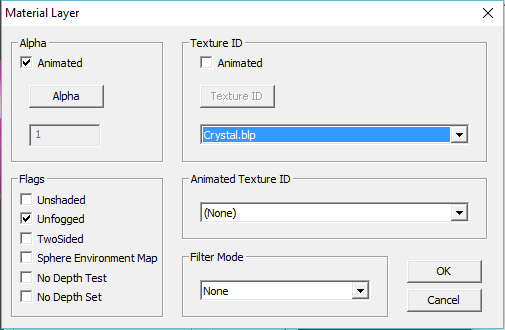
EDIT : Didn't notice that you said the texture path is the same as model's texture path? Then I would think that it is the model problem, did your material layer using the IceCrystal texture?
 
If that doesn't work, then probably : "Textures\IceCrystal.blp"

EDIT : Didn't notice that you said the texture path is the same as model's texture path? Then I would think that it is the model problem, did your material layer using the IceCrystal texture?

I've also tried this Textures\IceCrystal.blp, but does not work... Yes, the material is using the IceCrystal texture, and the texture is visible in the model editor.

Go to Model Editor--->Open this model--->Go to textures sequence--->You'll see the correct path over there.

Edit : Do you have a link to this model?

There is no 'Texture Sequence" in my Magos' Model editor. :/

What link? I've just modified one of Blizzard's models..
 
aRYUX24.png


I've changed that IceCrystal to Crystal only, don't get confused by that.
 
The model I used as a base is originally a buff, in WE it appears as a green box, and in-game it's invisible, while in model editor everything's perfectly fine..

I'm wondering: Am I supposed to change the path when importing a custom model with a custom texture, or it should work under the default 'war3imported\'?
 
Then why doesn't my texture work? I've edited the model's original texture by just changing it's color, and then added it back again...

Everytime you export and edit a texture it's path change. While re-importing it to your model means that you will have to change the Material layer in order to set the geosets to the correct texture.
Now, As I see in that picture you've uploaded, the texture name became Crystal.blp
So, let try this, import your model and his texture
Change only the texture path to "Crystal.blp" that should work.

P.S. I wonder what firmat does your texture have? (Blp. Tga...)
 
It's not just one model, all models that I changed their skin cause this problem. They load in game, and I can use them, but they are invisible (with no texture).
I used BLPLab to convert the texture from BLP1 to BLP1 and it didn't do anything. Then I tried to convert it from my TGA version of the texture to BLP1 again, and still it didn't do anything..
 
It's not just one model, all models that I changed their skin cause this problem. They load in game, and I can use them, but they are invisible (with no texture).
I used BLPLab to convert the texture from BLP1 to BLP1 and it didn't do anything. Then I tried to convert it from my TGA version of the texture to BLP1 again, and still it didn't do anything..

I already told you, if you want us to help you, you're gonna need to upload the model here as an attachment. Unless you work out the solution yourself, we can't help you.

Your information is useless since you can't even properly provide details.
 
Hmm, take a look at this model for example. The texture is custom (There's a slight difference between the original one) and it causes the model to be invisible in-game.

Yes, the model will not work. Because it's missing texture named Amelia.blp. Also what's the point of Ranger.blp? It's already in .mpq files. Night Elf > Shandris.

The materials are set to use texture called Amelia.blp, but it's missing. That's why it doesn't show up.
 
Status
Not open for further replies.
Back
Top