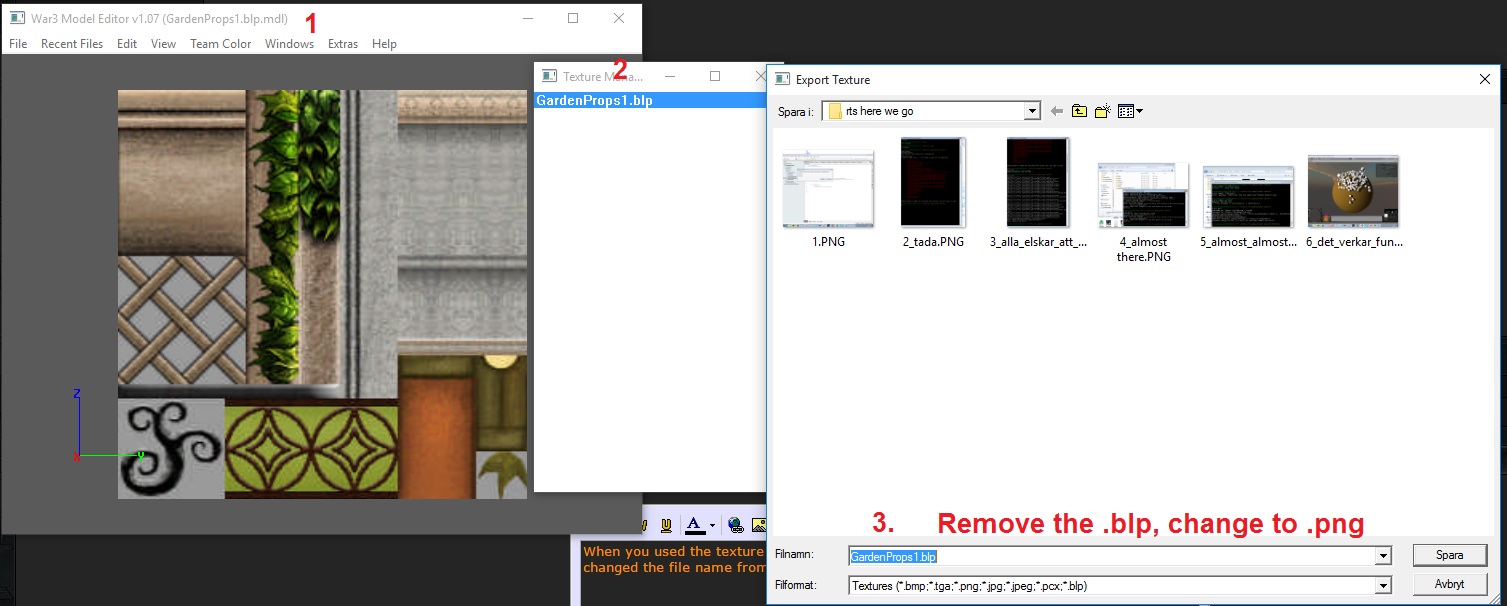
im sorry i'm very confused, here is what I did
1. I went to the editor, opened the "germanyflag.blp"
2. then I went to the windows-->texture manager and exported the file there and renamed it "germanyflag.png" then I opened with paint for example and there I copy pasted the flag image I want there
3. saved and imported into the warcraft 3 model editor
now what confuses me is, do I delete the other file there? the "germanflag.blp" the one that was exported in the beggining?
also when I export the image as .png when I go to paint of photoshop it appears no image there, just everything white, am I doing this right?
nevermind I got it, this confusion has been clarified xD
thank you very much for your help

Listen to a special audio message from Bill Roper to the Hive Workshop community (Bill is a former Vice President of Blizzard Entertainment, Producer, Designer, Musician, Voice Actor) 🔗Click here to hear his message!
Read Evilhog's interview with Gregory Alper, the original composer of the music for WarCraft: Orcs & Humans 🔗Click here to read the full interview.
The Hive's 22nd Icon Contest: Creep Abilities is now concluded, time to vote for your favourite set of icons! Click here to vote!
✅ The POLL for Hive's Texturing Contest #34 is OPEN! Vote for the TOP 3 SKINS! 🔗Click here to cast your vote!
✅ The POLL for Hive's Techtree Contest #20 is OPEN! Vote for the TOP 3 FACTIONS! 🔗Click here to cast your vote!