• Check out the results of the Techtree Contest #19!
  • Listen to a special audio message from Bill Roper to the Hive Workshop community (Bill is a former Vice President of Blizzard Entertainment, Producer, Designer, Musician, Voice Actor) 🔗Click here to hear his message!
  • Read Evilhog's interview with Gregory Alper, the original composer of the music for WarCraft: Orcs & Humans 🔗Click here to read the full interview.
  • Create a void inspired texture for Warcraft 3 and enter Hive's 34th Texturing Contest: Void! Click here to enter!
  • The Hive's 22nd Icon Contest: Creep Abilities is now concluded, time to vote for your favourite set of icons! Click here to vote!

[Crash] Map Crash!

Status
Not open for further replies.
Level 6
Joined
Apr 3, 2015
Messages
108
Weak mortals, i request your assistance. Well i was making a custom map with custom models, doodads, etc.
everything working perectly at that point. But when i decided to test the map, its crash! with a error message.
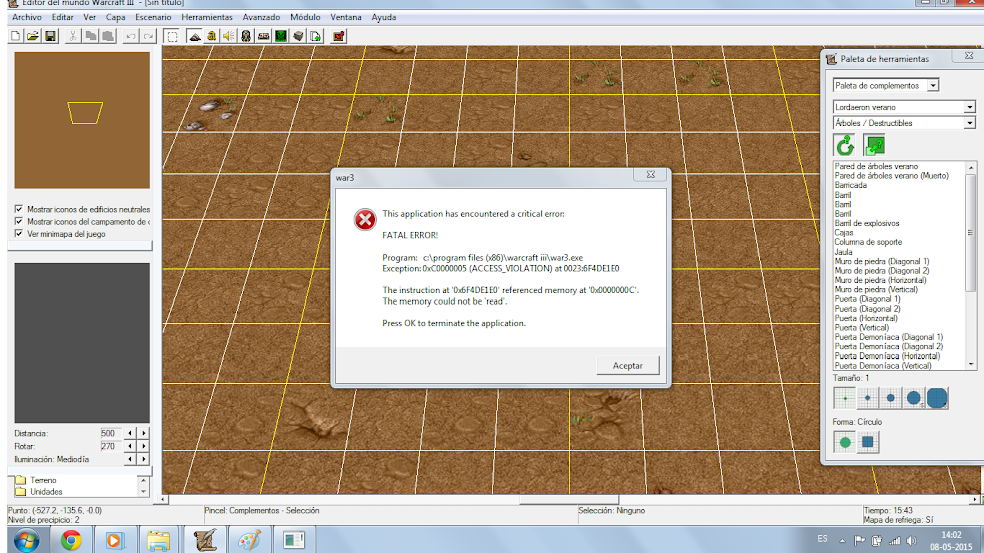
Sin%2Bt%25C3%25ADtulonx.png

Pic of the error.

I tried to restart the world edit to fix it (dumb idea :c), but that only made it worse....i can't even load the map in the world edit to "attemp" to fix it. :goblin_jawdrop:
 
Last edited:
Ah that. No problem then.
I was in chat and one guy told me ,,if he calls people disguisting, does he expect them to help him?" which means that at first sign its hardly to know if you are joking or not, cause you have 9 posts and one month of being here registered, so nobody knows you very well to determine that. Its all good then...
 
Since Bribe's topic is closed, I might as well write down here?

13-Trying to create a quest object at map initialization will cause a crash during load sequence.

This is either wrong or there is some missing information or it happens under specific conditions.(maybe in global block instead of map initialization?)
 
Ok....the thing now is, I downloaded MPQ editor, but the icon map is with a lock. That means i can't open it with MPQ :CCCCC

Edit: the computer can't find the file :o but in the world editor it is exist
Permission problem. Make sure your user account has read/write permission for the map file.

Running the MPQ editor as an administrator should also work.
 
Status
Not open for further replies.
Back
Top