

- Joined
- May 16, 2020
- Messages
- 663
Hi guys,
I'm trying to use the following recipe system to combine items: Item Fuse/Disassemble 2.1 (GUI & vJass)
The system has a part where you can change the sound upon combining the items. The problem is that the sound I want to use does not play. Here a pic of the path of sound I want:
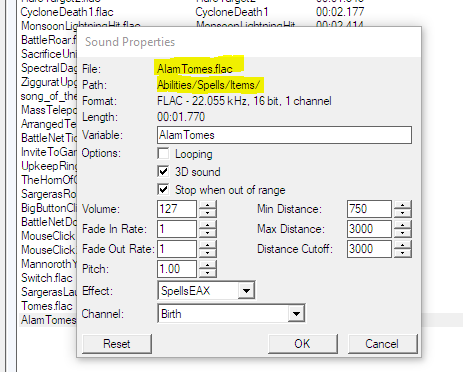
And here I entered this path:
No sound though... some more experimentation showed me that some sounds work and others don't. For example:
Abilities\\Spells\\Items\\AlamTomes.wav --> does NOT play a sound in-game.
Abilities\\Spells\\Other\\CrushingWave\\CrushingWaveCaster1.wav --> DOES play a sound in-game.
Is this some kind of internal bug with Reforged?
I'm trying to use the following recipe system to combine items: Item Fuse/Disassemble 2.1 (GUI & vJass)
The system has a part where you can change the sound upon combining the items. The problem is that the sound I want to use does not play. Here a pic of the path of sound I want:
And here I entered this path:
JASS:
    // * If you want to use custom sound, setup it below
    // * "Sound path", "time in second to play sound after combine is done", "volume" and "pitch" of sound
    constant boolean        USE_CUSTOM_SOUND        = true;
    constant real           SOUND_MAX_DISTANCE        = 3500.;
    constant string         SOUND_FILE            = "Abilities\\Spells\\Items\\AlamTomes.wav";
    constant real           SOUND_VOL            = 90.;
constant real SOUND_PITCH = 1.2;Abilities\\Spells\\Items\\AlamTomes.wav --> does NOT play a sound in-game.
Abilities\\Spells\\Other\\CrushingWave\\CrushingWaveCaster1.wav --> DOES play a sound in-game.
Is this some kind of internal bug with Reforged?


