- Joined
- Jul 29, 2006
- Messages
- 155
Yes so my question is when u got in the left corner icon of worker and numbers how much of workers u have i want to remove both but i dont know how. Is any way to do this?
Follow along with the video below to see how to install our site as a web app on your home screen.
Note: This feature may not be available in some browsers.


but i need to have this clasification and i dont want this icon and the number
 Unit - Add classification of A peon-type unit to (Triggering unit)

I know, this Kind of offtpoic, but which files I have to replace if I want change the Icon/use a custom one?
Well i guess a simple icon will sufice.You can change it in `Gameplay Interface` .There will be a path pointing for the worker icon.Change that to your imported icon.
 Classify as worker init

 Events


 Time - Elapsed game time is 0.00 seconds

 Conditions

 Actions

 Custom script: set bj_wantDestroyGroup = true
 Unit Group - Pick every unit in (Units in (Entire map)) and do (Actions)
Loop - Actions
Custom script: local boolean paused
Unit Group - Pick every unit in (Units in (Entire map)) and do (Actions)
Loop - Actions
Custom script: local boolean paused
 Set unit = (Picked unit)
 If (All Conditions are True) then do (Then Actions) else do (Else Actions)
If - Conditions
(Level of Worker for unit) Greater than 0
Then - Actions
Unit - Add classification of A peon-type unit to unit
Custom script: if GetUnitCurrentOrder(udg_unit) == 0 then
Custom script: set paused = IsUnitPaused(udg_unit)
Custom script: call PauseUnit(udg_unit, true)
Custom script: if not paused then
Custom script: call PauseUnit(udg_unit, false)
Custom script: endif
Custom script: endif
Else - Actions
Classify as worker spawn
Events
Unit - A unit enters (Entire map)
Conditions
Actions
Custom script: local boolean paused
Set unit = (Triggering unit)
If (All Conditions are True) then do (Then Actions) else do (Else Actions)
If - Conditions
(Level of Worker for unit) Greater than 0
Then - Actions
Unit - Add classification of A peon-type unit to unit
Custom script: if GetUnitCurrentOrder(udg_unit) == 0 then
Custom script: set paused = IsUnitPaused(udg_unit)
Custom script: call PauseUnit(udg_unit, true)
Custom script: if not paused then
Custom script: call PauseUnit(udg_unit, false)
Custom script: endif
Custom script: endif
Else - Actions
If (All Conditions are True) then do (Then Actions) else do (Else Actions)
If - Conditions
(Level of Worker for unit) Greater than 0
Then - Actions
Unit - Add classification of A peon-type unit to unit
Custom script: if GetUnitCurrentOrder(udg_unit) == 0 then
Custom script: set paused = IsUnitPaused(udg_unit)
Custom script: call PauseUnit(udg_unit, true)
Custom script: if not paused then
Custom script: call PauseUnit(udg_unit, false)
Custom script: endif
Custom script: endif
Else - Actions
Classify as worker spawn
Events
Unit - A unit enters (Entire map)
Conditions
Actions
Custom script: local boolean paused
Set unit = (Triggering unit)
If (All Conditions are True) then do (Then Actions) else do (Else Actions)
If - Conditions
(Level of Worker for unit) Greater than 0
Then - Actions
Unit - Add classification of A peon-type unit to unit
Custom script: if GetUnitCurrentOrder(udg_unit) == 0 then
Custom script: set paused = IsUnitPaused(udg_unit)
Custom script: call PauseUnit(udg_unit, true)
Custom script: if not paused then
Custom script: call PauseUnit(udg_unit, false)
Custom script: endif
Custom script: endif
Else - Actions
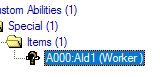
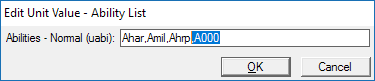
,A000.