Follow along with the video below to see how to install our site as a web app on your home screen.
Note: This feature may not be available in some browsers.
Listen to a special audio message from Bill Roper to the Hive Workshop community (Bill is a former Vice President of Blizzard Entertainment, Producer, Designer, Musician, Voice Actor) 🔗Click here to hear his message!
Goodevening all of Azeroth, i am Yakonshus, a devilsh necromancer raising death maps and hosting them on battlenet to spread fear and death!
There is only one proplem, i cant host! (Gasp!) Are anyone able to help me? (And no, its NOT the firewall!)
Well there are multiple ports incase you want a bunch of computers in your house to have hosting capabilities. That guy above you just doesn't know what he is talking about.
Ok if you want to do it correctly, although it may not work for some other routers(?):
- Get to know your IP, just google ''what is my IP'' and you get a couple of sites who'll tell you what you got. Remember or copy the IP.
Optional: I recommend that you use your network IP, comes in handy later on.
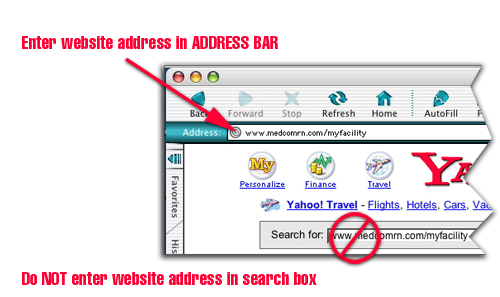
- Type or paste your IP in the address bar of your browser.
- Now it'll ask you an username and a password, the standard name and password is ''admin'' ''admin''.
Note: The following steps may not look the same as your settings and/or is not working out for you.
- Now go to the tab that is similiar or is ''Applications and Gaming''.
- Go then to ''Port Range Forwarding''.
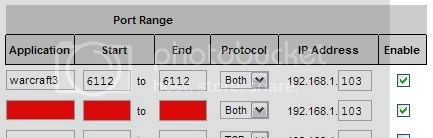
- You will probally see a list that is either empty or has some things in it, probally your dad tinkered with it.
Example
- Now as displayed, enter in the empty tabs on order:
- Type or paste your IP in the address bar of your browser.
- Now it'll ask you an username and a password, the standard name and password is ''admin'' ''admin''.
Note: The following steps may not look the same as your settings and/or is not working out for you.
- Now go to the tab that is similiar or is ''Applications and Gaming''.
Got it that far and found my IP, but because i only use my com to work and warcraft i dont know much bout such things, so where is that address bar you speak of?
Whatever i know what to do and it worked and i can host.
@Divine
You know all those things are ALL different? And some of them are VERY different, i tried to set it so for a friend so that he could host but the whole thing where you log into was so freaking weird and totally different from mine...
I would've gave it another try though but he wouldn't let me or something =p
This site uses cookies to help personalise content, tailor your experience and to keep you logged in if you register.
By continuing to use this site, you are consenting to our use of cookies.