
Community
Projects
Maps
Tutorials
Gallery
Support Us
Install the app
How to install the app on iOS
Follow along with the video below to see how to install our site as a web app on your home screen.
Note: This feature may not be available in some browsers.
-
Listen to a special audio message from Bill Roper to the Hive Workshop community (Bill is a former Vice President of Blizzard Entertainment, Producer, Designer, Musician, Voice Actor) 🔗Click here to hear his message!
-
Read Evilhog's interview with Gregory Alper, the original composer of the music for WarCraft: Orcs & Humans 🔗Click here to read the full interview.
-
The Hive's 22nd Icon Contest: Creep Abilities is now concluded, time to vote for your favourite set of icons! Click here to vote!
-
✅ The POLL for Hive's Texturing Contest #34 is OPEN! Vote for the TOP 3 SKINS! 🔗Click here to cast your vote!
-
✅ The POLL for Hive's Techtree Contest #20 is OPEN! Vote for the TOP 3 FACTIONS! 🔗Click here to cast your vote!
You are using an out of date browser. It may not display this or other websites correctly.
You should upgrade or use an alternative browser.
You should upgrade or use an alternative browser.
Determining Highest Value
- Status
- Not open for further replies.


- Joined
- Oct 24, 2012
- Messages
- 6,545
Use a high to low sorter. I can't post one as I'm not on pc.

- Joined
- Sep 14, 2012
- Messages
- 3,413
Don't remember how to make proper quick sort :/
Search on the web~
Search on the web~
Use a high to low sorter.
I'm not sure what a sorter is. I know under "Math" there is a min and max value, but I'm not entirely sure how they work or how to sort a group of numbers.
Also, if anybody could tell me how to sort them, that would be great. That is, do I sort the highest custom value as 1 in an variable array? Or is there some other way? Not sure how to go about it.
- Joined
- Sep 14, 2012
- Messages
- 3,413
- Joined
- Oct 24, 2012
- Messages
- 6,545
- Joined
- Oct 24, 2012
- Messages
- 6,545
Ill see if I can make something for you to use in GUI. The one I posted also needs updating I believe. Ill check it when I can.

This is an incredibly crude way to do it:
Maybe someone can improve this? I only wrote it because I thought it could be done in GUI, which apparently it can, just not to any degree near perfect or even good. Obviously, it wouldn't work if you had a lot of units as the amount of trials required might make the game lag. It has the small chance of error, too, I guess.
-
 Sort
Sort
-

 Events
-


 Time - Elapsed game time is 1.00 seconds
-
-

 Conditions
-

 Actions
-

 Unit Group - Pick every unit in (Random 1 units from (Units in (Playable map area))) and do (Actions)
-
Loop - Actions
-
 Set FirstUnit = (Picked unit)
-
Set FirstUnitCustomValue = (Custom value of FirstUnit)
-
-
-
Unit Group - Pick every unit in (Random 1 units from (Units in (Playable map area))) and do (Actions)
-
Loop - Actions
-
Set SecondUnit = (Picked unit)
-
Set SecondUnitCustomValue = (Custom value of SecondUnit)
-
-
-
 If (All Conditions are True) then do (Then Actions) else do (Else Actions)
-
If - Conditions
-
SecondUnit Equal to FirstUnit
-
-
Then - Actions
-
 Trigger - Run (This trigger) (ignoring conditions)
-
Skip remaining actions
-
-
Else - Actions
-
-
Set CurrentHighestCustomValue = (Max(FirstUnitCustomValue, SecondUnitCustomValue))
-
Set LowestCustomValue = (Min(FirstUnitCustomValue, SecondUnitCustomValue))
-
Set X = (100.00 x (Real(CurrentHighestCustomValue)))
-
 Unit - Move (Random unit from (Units in (Playable map area) matching ((Custom value of (Matching unit)) Equal to CurrentHighestCustomValue))) instantly to (Point(X, 0.00))
-
Unit - Move (Random unit from (Units in (Playable map area) matching ((Custom value of (Matching unit)) Equal to LowestCustomValue))) instantly to (Point((100.00 x (Real(LowestCustomValue))), 0.00))
-
If (All Conditions are True) then do (Then Actions) else do (Else Actions)
-
If - Conditions
-
(Execution count of (This trigger)) Less than or equal to 100
-
-
Then - Actions
-
Trigger - Run (This trigger) (ignoring conditions)
-
-
Else - Actions
-
-
-

- Joined
- Oct 24, 2012
- Messages
- 6,545
That is not very good to use.
@TO
how many unit are you trying to sort ?
Edit: I will try to make a template to be posted on hive that you can use. Give me about an hr or so.
Edit 2: It will be in jass but it is GUI friendly meaning that how you use it is easy in GUI and how to install it to your map is easy.
Edit3: Will take longer than expected i just got back on pc.
Edit4: Here is the link to the template. There is examples on how to use. And an explanation on how to use.
https://www.hiveworkshop.com/forums/spells-569/high-low-sorter-v-1-0-0-0-a-240626/
@TO
how many unit are you trying to sort ?
Edit: I will try to make a template to be posted on hive that you can use. Give me about an hr or so.
Edit 2: It will be in jass but it is GUI friendly meaning that how you use it is easy in GUI and how to install it to your map is easy.
Edit3: Will take longer than expected i just got back on pc.
Edit4: Here is the link to the template. There is examples on how to use. And an explanation on how to use.
https://www.hiveworkshop.com/forums/spells-569/high-low-sorter-v-1-0-0-0-a-240626/
Last edited:

- Joined
- Nov 20, 2007
- Messages
- 660
You take the first value and set it as the Highest then you take the next value. If the value is higher then your Highest value you set Highest to the higher value.
Example:
You have the next numbers : 1 3 2 and the variable var_highest.
In the first step you set var_highest to 1.
Step 2, you compare var_highest to the next value (3).
3 is higher then var_highest (1) and you set var_highest to 3.
Next step you take number 2.
Compare to var_highest (3) and it's lower then it so it results that 3 is the highest value.
If you don't understand feel free to replay me.
Example:
You have the next numbers : 1 3 2 and the variable var_highest.
In the first step you set var_highest to 1.
Step 2, you compare var_highest to the next value (3).
3 is higher then var_highest (1) and you set var_highest to 3.
Next step you take number 2.
Compare to var_highest (3) and it's lower then it so it results that 3 is the highest value.
If you don't understand feel free to replay me.
- Joined
- Oct 24, 2012
- Messages
- 6,545
I posted my system above for him to use. It use a bubble sort algorithm. Currently going to update it to use a better algorithm when i get the time.
- Joined
- Sep 14, 2012
- Messages
- 3,413
You can use quick sort or fusion but fusion is boring when you got nb_units != 2^x :/
- Joined
- Oct 24, 2012
- Messages
- 6,545
You can use quick sort or fusion but fusion is boring when you got nb_units != 2^x :/
Ya I'm going to try to do quick sort when i get a chance. I've never done any algorithms on here besides the bubble sort one.
Sorry I haven't replied. Believe it or not, I've actually been scratching my head trying to implement your system. I know your system works because it ordered my units correctly in the "Demo Code".
Here is a modified Demo Code in which I set the units up.
It returns a blank space. What am I Doing wrong?
Here is a modified Demo Code in which I set the units up.
-
DemoCode
-
Events
-
Conditions
-
Actions
-
Set F = 1
-
Unit - Set the custom value of Ryu 0000 <gen> to 5
-
Unit - Set the custom value of Rand 0008 <gen> to 4
-
Unit - Set the custom value of Bow 0005 <gen> to 3
-
Unit - Set the custom value of Nina 0007 <gen> to 6
-
Unit Group - Pick every unit in Figh_All_Units_Group and do (Actions)
-
Loop - Actions
-
Set h2LSorterUnitArray[F] = (Picked unit)
-
Set F = (F + 1)
-
-
-
Set F = 1
-
 -------- The minimum value is the lowest key value that you use in the array. Example: I used tempInt from 1 to 10. The minimum value is 1. --------
-
Set h2LMinValue = 1
-
-------- The maximum value is the highest key value that you use in the array. Example: I used tempInt from 1 to 10. The maximum value is 1. --------
-
Set h2LMaxValue = h2LMaxValue
-
-------- Then you call the sorter function --------
-
Custom script: call H2LCustomValueSorter()
-
-------- After that is called you can use the data. The array for high to low is sorted in here. --------
-
-------- It is keyed to the units custom value and it stores the placement number in the integer array. Example: If h2LReturnedPlacementH2L[ 5] == 1 then it is in first. If h2LReturnedPlacementH2L[ 200] is 1 it is in first. --------
-
For each (Integer A) from 1 to 5, do (Actions)
-
Loop - Actions
-
-------- You can display which unit is in first second and so on using this. --------
-
 Game - Display to (All players) for 30.00 seconds the text: (Name of h2LSorterUnitArray[(Integer A)])
-
Game - Display to (All players) for 30.00 seconds the text: (String(h2LReturnedPlacementH2L[(Custom value of h2LSorterUnitArray[(Integer A)])]))
-
-
-
-
-
Commence Fight 2
-
Events
-
Conditions
-
Actions
-
Game - Display to (All players) for 5.00 seconds the text: (Fighting Unit: + (Name of h2LSorterUnitArray[h2LReturnedPlacementH2L[(Custom value of h2LSorterUnitArray[F])]]))
-
If (All Conditions are True) then do (Then Actions) else do (Else Actions)
-
If - Conditions
-
(Number of units in Fight_Enemy_Group) Greater than or equal to 1
-
(Number of units in Party_Group) Greater than or equal to 1
-
(Fight_Source_Unit[F] is alive) Equal to True
-
(Fight_Targeted_Enemy[F] is alive) Equal to True
-
-
Then - Actions
-
Game - Display to (All players) for 5.00 seconds the text: Conditions Passed.....
-
 Animation - Play h2LSorterUnitArray[h2LReturnedPlacementH2L[(Custom value of h2LSorterUnitArray[F])]]'s attack animation
-
Animation - Queue h2LSorterUnitArray[h2LReturnedPlacementH2L[(Custom value of h2LSorterUnitArray[F])]]'s stand animation
-
Unit - Cause h2LSorterUnitArray[h2LReturnedPlacementH2L[(Custom value of h2LSorterUnitArray[F])]] to damage Fight_Targeted_Enemy[F], dealing 100.00 damage of attack type Normal and damage type Normal
-
Special Effect - Create a special effect attached to the origin of Fight_Targeted_Enemy[F] using Abilities\Spells\Undead\AnimateDead\AnimateDeadTarget.mdl
-
Special Effect - Destroy (Last created special effect)
-
Set F = (F + 1)
-
 Wait 3.00 seconds
-
Trigger - Run Commence Fight 2 <gen> (checking conditions)
-
-
Else - Actions
-
-
-
It returns a blank space. What am I Doing wrong?
- Joined
- Oct 24, 2012
- Messages
- 6,545
you are never setting the h2LMaxValue to the max amount of units being sorted.
Also don't use integer A/B they are slower than your own custom integer and they can bug.
Are the units added to the group ?
Use a group loop at the end to display the values rather than the integer loop you have.
Also don't use integer A/B they are slower than your own custom integer and they can bug.
Are the units added to the group ?
Use a group loop at the end to display the values rather than the integer loop you have.
Lol oops. But still not working. I don't know if you can be bothered, but I'm going to post my whole system and see if anybody is interested in helping. Its simply not working for me 
I am creating a turn based fighting system. I'm basically replicating a game called "Breath of Fire", I doubt anyone has played it though.
The problem is, the unit's don't take their turns in the correct order. One unit doesn't even display a name on message? Maybe this turn based system is not possible. Maybe I should give up
Note: The system hasn't been coded past Commence Fight 2.
I am creating a turn based fighting system. I'm basically replicating a game called "Breath of Fire", I doubt anyone has played it though.
The problem is, the unit's don't take their turns in the correct order. One unit doesn't even display a name on message? Maybe this turn based system is not possible. Maybe I should give up
-
Count Distance
-
Events
-
Time - Every 0.10 seconds of game time
-
-
Conditions
-
Actions
-
Set WalkPoint1 = WalkPoint2
-
Set WalkPoint2 = (Position of Party_Order[1])
-
Set WalkAmount = (WalkAmount + (Distance between WalkPoint1 and WalkPoint2))
-
Custom script: call RemoveLocation (udg_WalkPoint1)
-
Custom script: set udg_WalkPoint1=null
-
-
-
Encounter
-
Events
-
Game - WalkAmount becomes Greater than or equal to 900.00
-
-
Conditions
-
Actions
-
If (All Conditions are True) then do (Then Actions) else do (Else Actions)
-
If - Conditions
-
WalkAmount Greater than or equal to WalkAmountRandomReal
-
-
Then - Actions
-
Game - Display to (All players) for 5.00 seconds the text: (String(WalkAmount))
-
Set WalkAmount = 0.00
-
Set WalkAmountRandomReal = (Random real number between 900.00 and 1900.00)
-
 Sound - Play Enemy_Encountered <gen>
-
 Cinematic - Fade out and back in over 2.10 seconds using texture Black Mask and color (0.00%, 0.00%, 0.00%) with 0.00% transparency
-
Trigger - Run Fight Setup <gen> (checking conditions)
-
Trigger - Turn off Count Distance <gen>
-
-
Else - Actions
-
-
-
-
Fight Setup
-
Events
-
Conditions
-
Actions
-
Set Fight_Unit_Pending = Party_Order[1]
-
Set F = 1
-
 Selection - Select Fight_Unit_Pending for Player 1 (Red)
-
Unit Group - Pick every unit in Party_Group and do (Actions)
-
Loop - Actions
-
Unit - Move (Picked unit) instantly to (Center of Battle 1 Alliance <gen>), facing (Center of Battle 1 Enemies <gen>)
-
Unit - Set (Picked unit) movement speed to 0.00
-
-
-
Camera - Apply BattleScene1 <gen> for Player 1 (Red) over 0.00 seconds
-
Camera - Lock camera target for Player 1 (Red) to Fight_Camera_Unit[1], offset by (0.00, 0.00) using Default rotation
-
Unit - Create 1 Furbolg Ursa Warrior for Player 12 (Brown) at (Center of Battle 1 Enemies <gen>) facing (Center X of Battle 1 Alliance <gen>) degrees
-
Unit Group - Add (Last created unit) to Fight_Enemy_Group
-
Unit Group - Add all units of Fight_Enemy_Group to Figh_All_Units_Group
-
Unit Group - Add all units of Party_Group to Figh_All_Units_Group
-
Unit Group - Add (Last created unit) to Fight_Enemy_Group
-
Unit - Set the custom value of (Last created unit) to 2
-
Unit - Set (Last created unit) movement speed to 0.00
-
-------- -------------- --------
-
-------- Start Sort Code --------
-
-------- -------------- --------
-
Trigger - Run DemoCode <gen> (checking conditions)
-
-------- -------------- --------
-
-------- End Sort Code --------
-
-------- -------------- --------
-
Wait 1.00 seconds
-
Sound - Play Breath_of_Fire_II_SNES_OST_Cross_Counter <gen>
-
-
-
DemoCode
-
Events
-
Conditions
-
Actions
-
Set F = 1
-
Unit - Set the custom value of Ryu 0000 <gen> to 5
-
Unit - Set the custom value of Rand 0008 <gen> to 4
-
Unit - Set the custom value of Bow 0005 <gen> to 3
-
Unit - Set the custom value of Nina 0007 <gen> to 6
-
Unit Group - Pick every unit in Figh_All_Units_Group and do (Actions)
-
Loop - Actions
-
Set h2LSorterUnitArray[F] = (Picked unit)
-
Set F = (F + 1)
-
-
-
Set F = 1
-
-------- The minimum value is the lowest key value that you use in the array. Example: I used tempInt from 1 to 10. The minimum value is 1. --------
-
Set h2LMinValue = 1
-
-------- The maximum value is the highest key value that you use in the array. Example: I used tempInt from 1 to 10. The maximum value is 1. --------
-
Set h2LMaxValue = (Number of units in Figh_All_Units_Group)
-
-------- Then you call the sorter function --------
-
Custom script: call H2LCustomValueSorter()
-
-------- After that is called you can use the data. The array for high to low is sorted in here. --------
-
-------- It is keyed to the units custom value and it stores the placement number in the integer array. Example: If h2LReturnedPlacementH2L[ 5] == 1 then it is in first. If h2LReturnedPlacementH2L[ 200] is 1 it is in first. --------
-
For each (Integer A) from 1 to h2LMaxValue, do (Actions)
-
Loop - Actions
-
-------- You can display which unit is in first second and so on using this. --------
-
Game - Display to (All players) for 30.00 seconds the text: (Name of h2LSorterUnitArray[(Integer A)])
-
Game - Display to (All players) for 30.00 seconds the text: (String(h2LReturnedPlacementH2L[(Custom value of h2LSorterUnitArray[(Integer A)])]))
-
-
-
-
-
Que Orders
-
Events
-
Unit - A unit Is issued an order targeting an object
-
-
Conditions
-
(Triggering unit) Equal to Fight_Unit_Pending
-
-
Actions
-
Game - Display to (All players) for 5.00 seconds the text: (((Name of Fight_Unit_Pending) + (Ordered Unit): ) + (String(F)))
-
Unit - Order (Triggering unit) to Stop
-
Set Fight_Targeted_Enemy[F] = (Target unit of issued order)
-
Set Fight_Source_Unit[F] = (Triggering unit)
-
If (All Conditions are True) then do (Then Actions) else do (Else Actions)
-
If - Conditions
-
(Issued order) Equal to (Order(attack))
-
-
Then - Actions
-
Set Fight_Basic_Attack[F] = True
-
-
Else - Actions
-
-
Unit - Change ownership of Fight_Unit_Pending to Player 9 (Gray) and Change color
-
Set F = (F + 1)
-
If (All Conditions are True) then do (Then Actions) else do (Else Actions)
-
If - Conditions
-
F Less than or equal to 4
-
-
Then - Actions
-
Set Fight_Unit_Pending = Party_Order[F]
-
Unit - Change ownership of Fight_Unit_Pending to Player 1 (Red) and Change color
-
Selection - Select Fight_Unit_Pending for Player 1 (Red)
-
-
Else - Actions
-
-
If (All Conditions are True) then do (Then Actions) else do (Else Actions)
-
If - Conditions
-
F Equal to 5
-
-
Then - Actions
-
Set F = 1
-
Game - Display to (All players) for 5.00 seconds the text: (Fighting Unit: + (Name of h2LSorterUnitArray[h2LReturnedPlacementH2L[1]]))
-
Wait 2.00 seconds
-
Trigger - Run Commence Fight 2 <gen> (checking conditions)
-
Trigger - Turn off (This trigger)
-
-
Else - Actions
-
-
-
-
Commence Fight 2
-
Events
-
Conditions
-
Actions
-
Game - Display to (All players) for 30.00 seconds the text: (Fighting Unit: + (Name of h2LSorterUnitArray[h2LReturnedPlacementH2L[(Custom value of h2LSorterUnitArray[F])]]))
-
If (All Conditions are True) then do (Then Actions) else do (Else Actions)
-
If - Conditions
-
(Number of units in Fight_Enemy_Group) Greater than or equal to 1
-
(Number of units in Party_Group) Greater than or equal to 1
-
(Fight_Source_Unit[F] is alive) Equal to True
-
(Fight_Targeted_Enemy[F] is alive) Equal to True
-
-
Then - Actions
-
Game - Display to (All players) for 30.00 seconds the text: Conditions Passed.....
-
Animation - Play h2LSorterUnitArray[h2LReturnedPlacementH2L[(Custom value of h2LSorterUnitArray[F])]]'s attack animation
-
Animation - Queue h2LSorterUnitArray[h2LReturnedPlacementH2L[(Custom value of h2LSorterUnitArray[F])]]'s stand animation
-
Unit - Cause h2LSorterUnitArray[h2LReturnedPlacementH2L[(Custom value of h2LSorterUnitArray[F])]] to damage Fight_Targeted_Enemy[F], dealing 100.00 damage of attack type Normal and damage type Normal
-
Special Effect - Create a special effect attached to the origin of Fight_Targeted_Enemy[F] using Abilities\Spells\Undead\AnimateDead\AnimateDeadTarget.mdl
-
Special Effect - Destroy (Last created special effect)
-
Set F = (F + 1)
-
Wait 3.00 seconds
-
Trigger - Run Commence Fight 2 <gen> (checking conditions)
-
-
Else - Actions
-
-
-
- Joined
- Oct 24, 2012
- Messages
- 6,545
-
DemoCode
-
Events
-
Conditions
-
Actions
-
Set F = 1
-
Unit - Set the custom value of Ryu 0000 <gen> to 5
-
Unit - Set the custom value of Rand 0008 <gen> to 4
-
Unit - Set the custom value of Bow 0005 <gen> to 3
-
Unit - Set the custom value of Nina 0007 <gen> to 6
-
Unit Group - Pick every unit in Figh_All_Units_Group and do (Actions)
-
Loop - Actions
-
Set h2LSorterUnitArray[F] = (Picked unit)
-
Set F = (F + 1)
-
-
-
Set F = 1
-
-------- The minimum value is the lowest key value that you use in the array. Example: I used tempInt from 1 to 10. The minimum value is 1. --------
-
Set h2LMinValue = 1
-
-------- The maximum value is the highest key value that you use in the array. Example: I used tempInt from 1 to 10. The maximum value is 1. --------
-
Set h2LMaxValue = (Number of units in Figh_All_Units_Group)
-
-------- Then you call the sorter function --------
-
Custom script: call H2LCustomValueSorter()
-
-------- After that is called you can use the data. The array for high to low is sorted in here. --------
-
-------- It is keyed to the units custom value and it stores the placement number in the integer array. Example: If h2LReturnedPlacementH2L[ 5] == 1 then it is in first. If h2LReturnedPlacementH2L[ 200] is 1 it is in first. --------
-
For each (Integer A) from 1 to h2LMaxValue, do (Actions)
-
Loop - Actions
-
-------- You can display which unit is in first second and so on using this. --------
-
Game - Display to (All players) for 30.00 seconds the text: (Name of h2LSorterUnitArray[(Integer A)])
-
Game - Display to (All players) for 30.00 seconds the text: (String(h2LReturnedPlacementH2L[(Custom value of h2LSorterUnitArray[(Integer A)])]))
-
-
-
-
-
DemoCode
-
Events
-
Conditions
-
Actions
-
Set F = 1
-
Unit - Set the custom value of Ryu 0000 <gen> to 5
-
Unit - Set the custom value of Rand 0008 <gen> to 4
-
Unit - Set the custom value of Bow 0005 <gen> to 3
-
Unit - Set the custom value of Nina 0007 <gen> to 6
-
-------- Are these units above added to the group ??????? --------
-
Unit Group - Pick every unit in Figh_All_Units_Group and do (Actions)
-
Loop - Actions
-
Set h2LSorterUnitArray[F] = (Picked unit)
-
Set F = (F + 1)
-
-
-
-------- The minimum value is the lowest key value that you use in the array. Example: I used tempInt from 1 to 10. The minimum value is 1. --------
-
Set h2LMinValue = 1
-
-------- The maximum value is the highest key value that you use in the array. Example: I used tempInt from 1 to 10. The maximum value is 1. --------
-
Set h2LMaxValue = F
-
-------- Set f to one again. --------
-
Set F = 1
-
-------- Then you call the sorter function --------
-
Custom script: call H2LCustomValueSorter()
-
-------- After that is called you can use the data. The array for high to low is sorted in here. --------
-
-------- It is keyed to the units custom value and it stores the placement number in the integer array. Example: If h2LReturnedPlacementH2L[ 5] == 1 then it is in first. If h2LReturnedPlacementH2L[ 200] is 1 it is in first. --------
-
Unit Group - Pick every unit in Figh_All_Units_Group and do (Actions)
-
Loop - Actions
-
Set F = custom value of picked unit
-
-------- You can display which unit is in first second and so on using this. --------
-
Game - Display to (All players) for 30.00 seconds the text: (Name of h2LSorterUnitArray[F])
-
Game - Display to (All players) for 30.00 seconds the text: (String(h2LReturnedPlacementH2L[F]))
-
-
-
-
According to this image, the order of which the units should move appears to be reversed. However, if this is true, why is the Furbolg last? It has the lowest custom value. If it were reversed, he should be first.
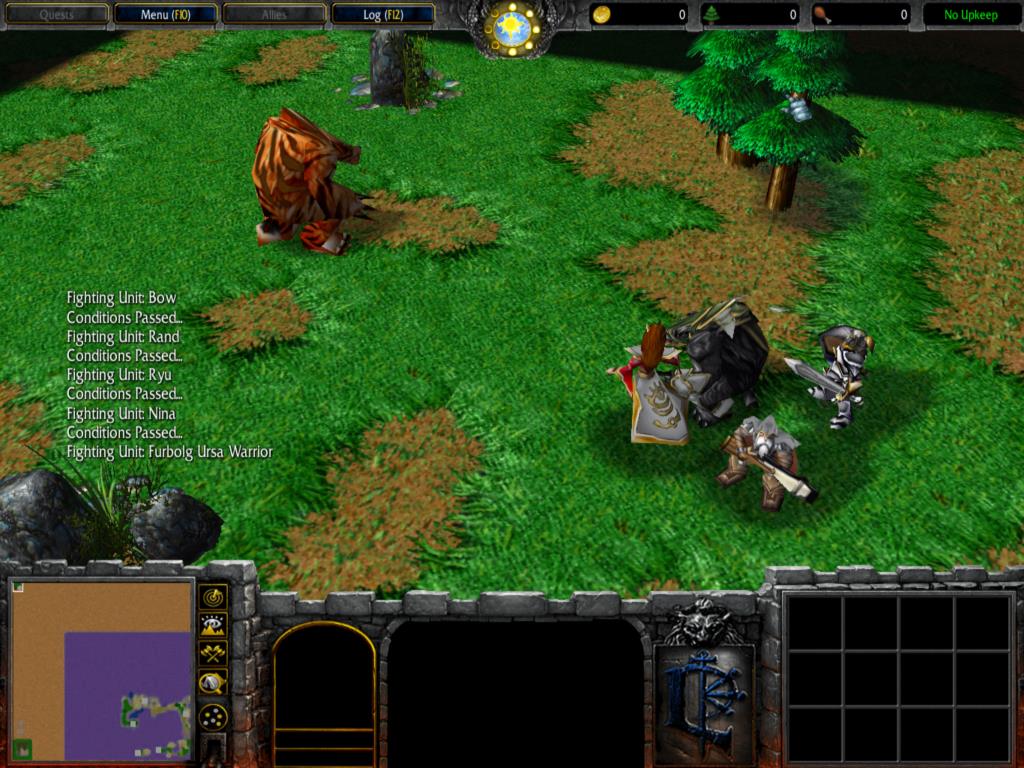
Custom Values:
Nina: 6
Ryu: 5
Rand: 4
Bow: 3
Furbolg Warrior: 2
Custom Values:
Nina: 6
Ryu: 5
Rand: 4
Bow: 3
Furbolg Warrior: 2
Attachments

- Joined
- Oct 24, 2012
- Messages
- 6,545
This is a high to low sorter. So the unit with the highest custom value will be first.
- Status
- Not open for further replies.
Similar threads


- Replies
- 10
- Views
- 2K

- Replies
- 3
- Views
- 1K

