• Check out the results of the Techtree Contest #19!
  • Listen to a special audio message from Bill Roper to the Hive Workshop community (Bill is a former Vice President of Blizzard Entertainment, Producer, Designer, Musician, Voice Actor) 🔗Click here to hear his message!
  • Read Evilhog's interview with Gregory Alper, the original composer of the music for WarCraft: Orcs & Humans 🔗Click here to read the full interview.
  • Create a void inspired texture for Warcraft 3 and enter Hive's 34th Texturing Contest: Void! Click here to enter!
  • The Hive's 22nd Icon Contest: Creep Abilities is now concluded, time to vote for your favourite set of icons! Click here to vote!

Codeless Save and Load (Multiplayer) - v3.0.1

This bundle is marked as high quality. It exceeds standards and is highly desirable.
Information

If you've ever wanted to transfer progress between multiplayer maps, you probably needed to type in a long code.

That is no longer needed with this system. This will allow you to read save data from your WC3 folder and sync it to all other players in the map.

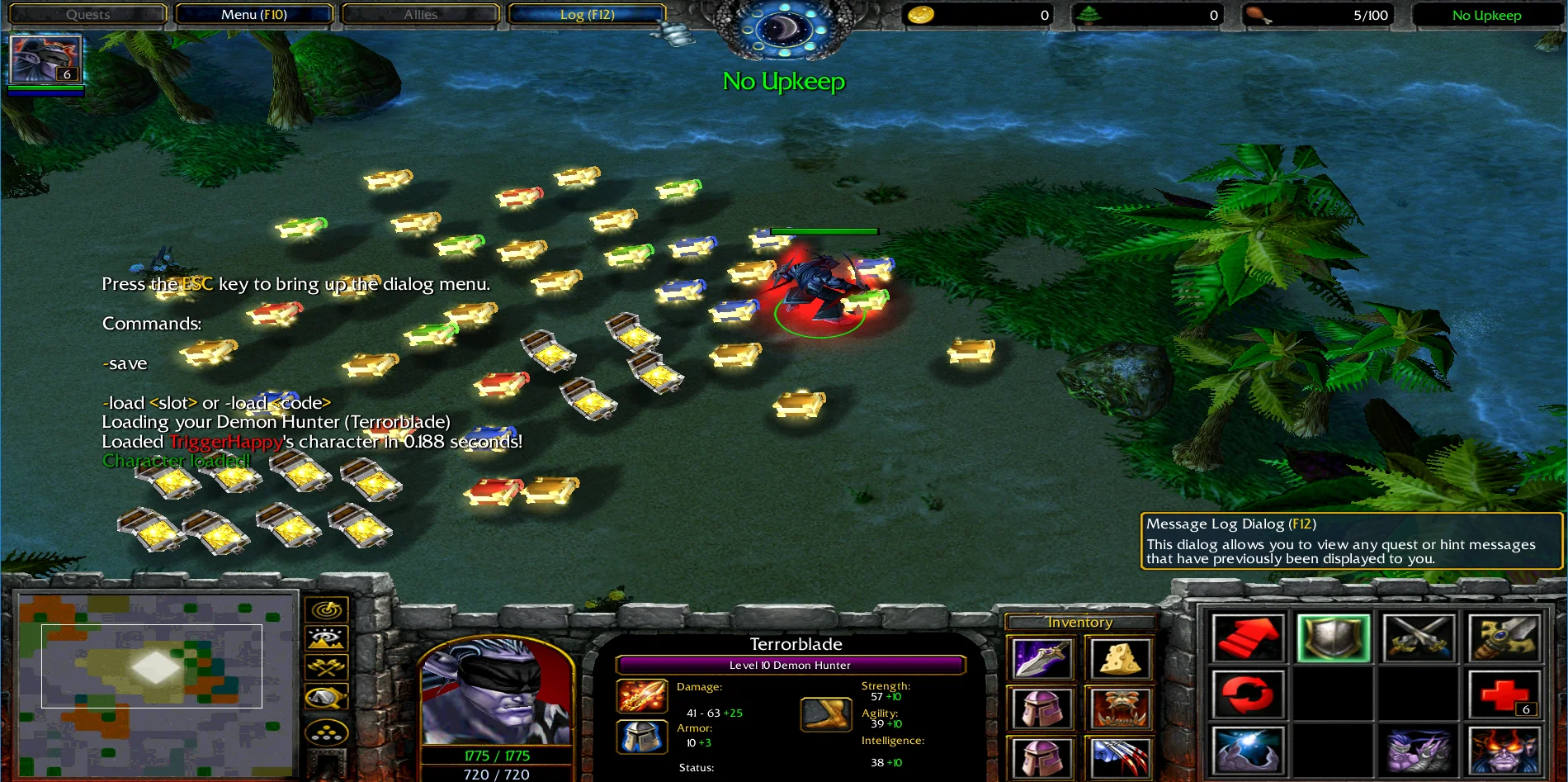
The demo map features:
  1. Load without typing anything
  2. Save Hero
    • Level/XP
    • Items
    • Abilities
    • Hero Name

  3. 5 Save Slots
* Everything is customizable and you can make the system save & load anything you want.

* This system is intended for GUI users.

Installation

To import the system, all you have to do is copy the trigger folders over to your map and save it.

Screenshots


untitled5-png.241496

untitled3-png.241494

untitled4-png.241495

113935-e93452e811711563d54338c7daa46f36.webp


Credits

Pipedream (optimal save system)
Previews
Contents

Codeless Save & Load v1.3.9 (Map)

Codeless Save & Load v3.0.1 (Map)

Reviews
Awaiting further review
Antares
Promoted to HQ because it would have gotten it if it were a thing back then :psmile: High Quality
Sorry, I forgot to mention that along with the "config" section of the map script where you can define some stuff.

It's wise to check the Object Editor after downloading a system like this, there's almost always some missing link in there.
It works like it is supposed to after testing it, showing the messages like it was supposed to. Now all that remains is to just to test it online.
 
Sorry, I forgot to mention that, along with the "config" section of the map script where you can define some stuff.

It's wise to check the Object Editor after downloading a system like this, there's almost always some missing link in there.
So the problem now is the sync failure, this is what the players get. I saw the preload worked with someone else once they saved so I guess that failed load message may be just a first time thing? Meanwhile in single player it seems to load normally...showing me the save code and loaded value messages.
 

Attachments

  • Untitled.png
    Untitled.png
    4.2 MB · Views: 34
Last edited:
So the problem now is the sync failure, this is what the players get. I saw the preload worked with someone else once they saved so I guess that failed load message may be just a first time thing? Meanwhile in single player it seems to load normally...showing me the save code and loaded value messages.
I suggest using Maxou's GUI implementation instead of my own.

But since I spent some good hours on this I might as well try to fix what I made. Here's a new version with some important fixes, but not thoroughly tested, use if you dare! I'm tapping out now, best of luck!
 

Attachments

@TacticalTilting I've released the updated version there: Maxou NSL (New Save Load)

Would you care to test it out (if you're using GUI it has GUI support) and give me feedback: how easy-hard is it to use-integrate or any issue you get along the way ?
Thank you for the system! I have a question about the abilities. What are they used for? I assume each is used for every saved stat right? So do I have to copy all of them? Or can I edit the FileIO script and delete most of them?
I suggest using Maxou's GUI implementation instead of my own.

But since I spent some good hours on this I might as well try to fix what I made. Here's a new version with some important fixes, but not thoroughly tested, use if you dare! I'm tapping out now, best of luck!
Thanks for the help! I will test this further!
 
Last edited:
Thank you for the system! I have a question about the abilities. What are they used for? I assume each is used for every saved stat right? So do I have to copy all of them? Or can I edit the FileIO script and delete most of them?

Thanks for the help! I will test this further!
The abilities are used to load up the file and have a codeless implementation.

The system edits the abilities tooltips and read from it to retrieve the code.

You just need to copy them (this is important as it requires the correct ability ids).
 
The abilities are used to load up the file and have a codeless implementation.

The system edits the abilities tooltips and read from it to retrieve the code.

You just need to copy them (this is important as it requires the correct ability ids).
Might I suggest having it so users only need to copy ~5 for now. I imagine in 90% of use cases people simply want to store Wins/Losses/Draws, and not an RPG's worth of character data. I imagine even one ability would be enough half of the time.
 
Last edited:
Might I just suggest having it so users only need to copy ~5 for now. I imagine in 90% of use cases people simply want to store Wins/Losses/Draws, and not an RPG's worth of character data. I imagine even one ability would be enough half of the time.
Probably, tho’ the updated system was made with the intention of not breaking over random things to avoid users to care about certain things, like data size or encoding size.

Maybe 55 abilities is too much for a majority of use cases but then it’s not really an issue in itself to copy those abilities and forget about it afterward.
 
Probably, tho’ the updated system was made with the intention of not breaking over random things to avoid users to care about certain things, like data size or encoding size.

Maybe 55 abilities is too much for a majority of use cases but then it’s not really an issue in itself to copy those abilities and forget about it afterward.
True, it's just that copying 55 abilities is annoying as hell, lol. That's why it'd be a setting, "if you know what you're doing then you can copy what you need and inform the system of this".

Maybe we'll get batch copy + paste in Reforged 2. :peasant-grin:
 
Last edited:
True, it's just that copying 55 abilities is annoying as hell, lol. That's why it'd be a setting, "if you know what you're doing then you can copy what you need and inform the system of this".

Maybe we'll get batch copy + paste in Reforged 2. :peasant-grin:

Tho' I'm wondering if a single ability could work properly with original tooltip being replaced, I'll try that locally and see.
 
True, it's just that copying 55 abilities is annoying as hell, lol. That's why it'd be a setting, "if you know what you're doing then you can copy what you need and inform the system of this".

Maybe we'll get batch copy + paste in Reforged 2. :peasant-grin:
After further testing your new version it seems to get better, it syncs now but the problem is that the preload code only loads successfully for the host. I tried letting the other guy host and then the preloading failed for me but was successful for him. I was thinking...Shouldn't the sync/save create the file of the other player in my (and every other player's) computer too? Because it dosen't. I only have my save file but not his in my computer. (Maybe that is the problem I guess)

About what you said up there, yea that is very annoying and discouraging. Maxou should definitely do something about that.
 

Attachments

  • untitled.png
    untitled.png
    718 KB · Views: 25
Last edited:
After further testing your new version it seems to get better, it syncs now but the problem is that the preload code only loads successfully for the host. I tried letting the other guy host and then the preloading failed for me but was successful for him.
Okay, I think I spotted the issue. I attached an updated map, all I changed was the SaveLoad script, so just copy and replace that file.

Shouldn't the sync/save create the file of the other player in my (and every other player's) computer too? Because it dosen't. I only have my save file but not his in my computer. (Maybe that is the problem I guess)
Nope, you each get your own local save file tied to your BNET username. So everyone saves their own file locally, and everyone loads their own file locally. Upon successfully loading your own file, you send the contents of that file to everyone else. In other words, you share your save code with everyone else. Once everyone has received each other's save codes it SHOULD proceed to the next step where it decrypts those codes back into usable data -> Gold, Lumber, Heroes, etc.

I think the issue you were experiencing was that it was proceeding too early, meaning the Host had received the other player's save code and was good to go - but the other player had not received the Host's save code yet and was not ready. So the Host was fully synced but the other Player was not, and due to errors in my code it gave the green light to proceed even though it needed to wait a bit longer.

(Again, Maxou's implementation is likely better, but I appreciate you testing this out)
 

Attachments

Last edited:
After further testing your new version it seems to get better, it syncs now but the problem is that the preload code only loads successfully for the host. I tried letting the other guy host and then the preloading failed for me but was successful for him. I was thinking...Shouldn't the sync/save create the file of the other player in my (and every other player's) computer too? Because it dosen't. I only have my save file but not his in my computer. (Maybe that is the problem I guess)

About what you said up there, yea that is very annoying and discouraging. Maxou should definitely do something about that.

I'll update my integration with using a single ability with multiple levels -- it's working so far as long as the ability has unique values for the tooltip fields inside it.

Not trying to undermine @Uncle efforts into providing something that did not exist (until I finally committed into finishing the update), but you should test out my implementation as supporting a fork version will get more and more complicated over time while I'll most likely still update (if required) my own version.
 
Okay, I think I spotted the issue. I attached an updated map, all I changed was the SaveLoad script, so just copy and replace that file.


Nope, you each get your own local save file tied to your BNET username. So everyone saves their own file locally, and everyone loads their own file locally. Upon successfully loading your own file, you send the contents of that file to everyone else. In other words, you share your save code with everyone else. Once everyone has received each other's save codes it SHOULD proceed to the next step where it decrypts those codes back into usable data -> Gold, Lumber, Heroes, etc.

I think the issue you were experiencing was that it was proceeding too early, meaning the Host had received the other player's save code and was good to go - but the other player had not received the Host's save code yet and was not ready. So the Host was fully synced but the other Player was not, and due to errors in my code it gave the green light to proceed even though it needed to wait a bit longer.

(Again, Maxou's implementation is likely better, but I appreciate you testing this out)
Now the save trigger dosen't seem to trigger when its event takes place.
Edit: Oh wait sorry, it works. I said that because I just tried to edit the scipt to make a custom folder for my map when saving/loading like: call Preloader("mapname/" + GetPlayerName(p) + SAVELOAD_PATH) . It worked before but now after I copied your new saveload idk what im doing wrong. This is a small problem anyway I think I can fix it myself. Thank you! I will try to test it online.

Edit2: Tested it online and...pretty much the same thing is happening, even worse, the sync is not happening, forcing the game to score screen.
 

Attachments

  • untitled.png
    untitled.png
    895.5 KB · Views: 26
Last edited:
I'll update my integration with using a single ability with multiple levels -- it's working so far as long as the ability has unique values for the tooltip fields inside it.

Not trying to undermine @Uncle efforts into providing something that did not exist (until I finally committed into finishing the update), but you should test out my implementation as supporting a fork version will get more and more complicated over time while I'll most likely still update (if required) my own version.
Waiting to try the single ability update. Coming anytime soon?
 
Hi! This seems to be an awesome resource. Thank you so much!
I'm trying to get this implemented in my map but I have 2 open questions:

  1. I'm getting the "Local Files" error, (I'm on the latest patch) on my map, although when testing your map, save/load works perfectly. So, is there something I need to enable in my map options as well?
  2. How do you know which hero you need to save? In my map, players pick heros through a tavern (Only 1 hero, it's a Roguelike/RPG), which then this is stored in a variable "udg_PlayerHero[1-6]", in my case, do I need to do something special? Cause I'm noticing "-save" doesn't do anything, but "-load" just throws me the error above, so I'm just curious.


    Appreciate any help given. Thanks again!
 
Back
Top