• Check out the results of the Techtree Contest #19!
  • Listen to a special audio message from Bill Roper to the Hive Workshop community (Bill is a former Vice President of Blizzard Entertainment, Producer, Designer, Musician, Voice Actor) 🔗Click here to hear his message!
  • Read Evilhog's interview with Gregory Alper, the original composer of the music for WarCraft: Orcs & Humans 🔗Click here to read the full interview.
  • Create a void inspired texture for Warcraft 3 and enter Hive's 34th Texturing Contest: Void! Click here to enter!
  • The Hive's 22nd Icon Contest: Creep Abilities is now concluded, time to vote for your favourite set of icons! Click here to vote!

Button Placement in game.

Status
Not open for further replies.
Did you set the numbers correctly in the object editor?

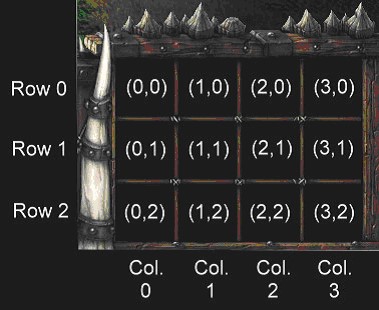
[0,0] [1,0] [2,0] [3,0] - typically learn ability placement

[0,1] [1,1] [2,2] [3,1] - typically bonus/sub ability placement.

[0,2] [1,2] [2,2] [3,2] - typically ability placement
 
Last edited:
I don't know where those are.
Art - Button Position - Normal (X,Y)
Art - Button Position - Research (X,Y)
Art - Button Position - Turn Off (X,Y)
uniteditor1.jpg

For more information about these fields read this.
 
Art - Button Position - Normal (X,Y)
Art - Button Position - Research (X,Y)
Art - Button Position - Turn Off (X,Y)
uniteditor1.jpg

For more information about these fields read this.
Thanks Hermit, this will help me much in my current maps and future ones. Again Thank you very much :)

Edit-Thank you too pOke, I forgot to add you so here it is :)
 
Last edited:
Status
Not open for further replies.
Back
Top