library CustomImageChat initializer Init

globals
    private constant real CHAT_X          = 0.020
    private constant real CHAT_BOTTOM_Y   = 0.220
    private constant real CHAT_LINE_H     = 0.0145
    private constant real CHAT_TEXT_W     = 0.430
    private constant real CHAT_TEXT_H     = 0.018
    private constant real CHAT_FONT_SIZE  = 0.011

    private constant integer CHAT_MAX_LINES   = 24
    private constant integer CHAT_MAX_ENTRIES = 40

    private constant real CHAT_IMAGE_W = CHAT_LINE_H * 3.00
    private constant real CHAT_IMAGE_H = CHAT_LINE_H * 3.00

    //Sprite/model emoji scale. Lower this if .mdl/.mdx emotes appear too large.
    private constant real CHAT_MODEL_SCALE = 0.600

    //Sprite/model emoji position tuning.
    //Use these if .mdl/.mdx emotes appear slightly off compared to .blp emojis.
    private constant real CHAT_MODEL_OFFSET_X = 0.020
    private constant real CHAT_MODEL_OFFSET_Y = 0.006

    private constant real CHAT_DURATION = 15.00
    private constant real CHAT_FADE_TIME = 2.00


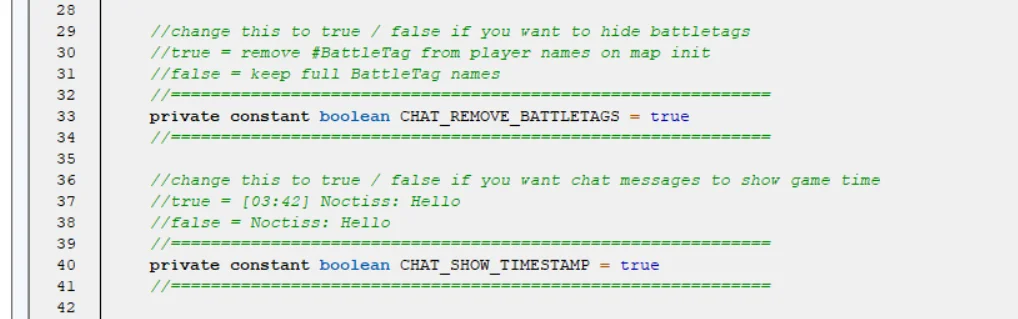
    //change this to true / false if you want to hide battletags
    //true = remove #BattleTag from player names on map init
    //false = keep full BattleTag names
    //============================================================
    private constant boolean CHAT_REMOVE_BATTLETAGS = true
    //============================================================

    //change this to true / false if you want chat messages to show game time
    //true = [03:42] Noctiss: Hello
    //false = Noctiss: Hello
    //============================================================
    private constant boolean CHAT_SHOW_TIMESTAMP = true
    //============================================================


    constant integer CHAT_MAX_IMAGE_TYPES = 20

    private framehandle array ChatText
    private framehandle array ChatBackdrop
    private framehandle array ChatSprite

    private string array EntryText
    private string array EntryImagePath
    private real array EntryAge
    private boolean array EntryIsImage
    private boolean array EntryImageIsModel
    private integer array EntryLines
    private integer EntryCount = 0

    private string array ImagePath
    private boolean array ImageIsModel
    string array ChatImageCommand
    integer ChatImageCommandCount = 0

    private boolean array PlayerAllChat

    private trigger ChatTrig = null
    private trigger ChatModeTrig = null
    private trigger SyncTrig = null
    private timer ChatTimer = null

    private real ChatGameTime = 0.00
endglobals


private function StringIndexOf takes string s, string char returns integer
    local integer i = 0
    local integer len = StringLength(s)

    loop
        exitwhen i >= len

        if SubString(s, i, i + 1) == char then
            return i
        endif

        set i = i + 1
    endloop

    return -1
endfunction

private function RemoveAllPlayerBattleTags takes nothing returns nothing
    local integer i = 0
    local player p
    local string name
    local integer pos

    loop
        exitwhen i >= bj_MAX_PLAYERS

        set p = Player(i)

        if GetPlayerSlotState(p) == PLAYER_SLOT_STATE_PLAYING then
            set name = GetPlayerName(p)
            set pos = StringIndexOf(name, "#")

            if pos >= 0 then
                call SetPlayerName(p, SubString(name, 0, pos))
            endif
        endif

        set i = i + 1
    endloop

    set p = null
endfunction

//settting up colors and sizes
//the colors are based on native player colors
//sourced from this thread: https://www.hiveworkshop.com/threads/24-1-player-color-codes.322502/
private function GetColoredPlayerName takes player p returns string
    local integer id = GetPlayerId(p)

    if id == 0 then
        return "|cffff0303" + GetPlayerName(p)
    elseif id == 1 then
        return "|cff0042ff" + GetPlayerName(p)
    elseif id == 2 then
        return "|cff1be7ba" + GetPlayerName(p)
    elseif id == 3 then
        return "|cff550081" + GetPlayerName(p)
    elseif id == 4 then
        return "|cfffefc00" + GetPlayerName(p)
    elseif id == 5 then
        return "|cfffe890d" + GetPlayerName(p)
    elseif id == 6 then
        return "|cff21bf00" + GetPlayerName(p)
    elseif id == 7 then
        return "|cffe45caf" + GetPlayerName(p)
    elseif id == 8 then
        return "|cff939596" + GetPlayerName(p)
    elseif id == 9 then
        return "|cff7ebff1" + GetPlayerName(p)
    elseif id == 10 then
        return "|cff106247" + GetPlayerName(p)
    elseif id == 11 then
        return "|cff4f2b05" + GetPlayerName(p)
    elseif id == 12 then
        return "|cff9c0000" + GetPlayerName(p)
    elseif id == 13 then
        return "|cff0000c3" + GetPlayerName(p)
    elseif id == 14 then
        return "|cff00ebff" + GetPlayerName(p)
    elseif id == 15 then
        return "|cffbd00ff" + GetPlayerName(p)
    elseif id == 16 then
        return "|cffecce87" + GetPlayerName(p)
    elseif id == 17 then
        return "|cfff7a58b" + GetPlayerName(p)
    elseif id == 18 then
        return "|cffbfff81" + GetPlayerName(p)
    elseif id == 19 then
        return "|cffdbb8eb" + GetPlayerName(p)
    elseif id == 20 then
        return "|cff4f5055" + GetPlayerName(p)
    elseif id == 21 then
        return "|cffecf0ff" + GetPlayerName(p)
    elseif id == 22 then
        return "|cff00781e" + GetPlayerName(p)
    elseif id == 23 then
        return "|cffa56f34" + GetPlayerName(p)
    endif

    return "|cffffffff" + GetPlayerName(p)
endfunction

private function CharWidth takes string c returns real
    if c == "i" or c == "l" or c == "." or c == ":" or c == "'" or c == " " or c == "!" then
        return 0.0022
    endif
    if c == "m" or c == "w" or c == "M" or c == "W" then
        return 0.0058
    endif
    return 0.0041
endfunction

private function TextWidth takes string s returns real
    local integer i = 0
    local real w = 0.000
    local string c

    loop
        exitwhen i >= StringLength(s)

        set c = SubString(s, i, i + 1)

        if c == "|" and SubString(s, i + 1, i + 2) == "c" then
            set i = i + 10
        elseif c == "|" and SubString(s, i + 1, i + 2) == "r" then
            set i = i + 2
        else
            set w = w + CharWidth(c)
            set i = i + 1
        endif
    endloop

    return w
endfunction

private function EstimateTextLines takes string s returns integer
    local real width = TextWidth(s) * 1.45
    local real maxWidth = 0.390
    local integer lines = R2I(width / maxWidth) + 1

    if lines < 1 then
        return 1
    endif

    return lines
endfunction

private function TwoDigits takes integer n returns string
    if n < 10 then
        return "0" + I2S(n)
    endif

    return I2S(n)
endfunction

private function GetChatTimestamp takes nothing returns string
    local integer total = R2I(ChatGameTime)
    local integer mins = total / 60
    local integer secs = total - mins * 60

    return "|cffaaaaaa[" + TwoDigits(mins) + ":" + TwoDigits(secs) + "]|r "
endfunction

private function GetPrefix takes player p returns string
    local string prefix = ""

    if CHAT_SHOW_TIMESTAMP then
        set prefix = GetChatTimestamp()
    endif

    if PlayerAllChat[GetConvertedPlayerId(p)] then
        return prefix + "|cffffffff[All] |r" + GetColoredPlayerName(p) + ":|r "
    endif

    return prefix + GetColoredPlayerName(p) + ":|r "
endfunction

private function GetEntryAlpha takes integer entryIndex returns integer
    local real fadeAge
    local integer alpha

    if EntryAge[entryIndex] < CHAT_DURATION - CHAT_FADE_TIME then
        return 255
    endif

    set fadeAge = EntryAge[entryIndex] - (CHAT_DURATION - CHAT_FADE_TIME)
    set alpha = 255 - R2I((fadeAge / CHAT_FADE_TIME) * 255.00)

    if alpha < 0 then
        return 0
    endif

    if alpha > 255 then
        return 255
    endif

    return alpha
endfunction

private function LocalPlayerShouldSee takes player sender returns boolean
    local player localPlayer = GetLocalPlayer()
    local integer senderPid = GetConvertedPlayerId(sender)

    if PlayerAllChat[senderPid] then
        set localPlayer = null
        return true
    endif

    if localPlayer == sender then
        set localPlayer = null
        return true
    endif

    if IsPlayerAlly(localPlayer, sender) then
        set localPlayer = null
        return true
    endif

    set localPlayer = null
    return false
endfunction

private function IsEmojiCommand takes string s returns boolean
    local integer i = 1

    loop
        exitwhen i > ChatImageCommandCount

        if s == ChatImageCommand[i] then
            return true
        endif

        set i = i + 1
    endloop

    return false
endfunction

private function HideAllFrames takes nothing returns nothing
    local integer i = 1

    loop
        exitwhen i > CHAT_MAX_ENTRIES
        call BlzFrameSetVisible(ChatText[i], false)
        call BlzFrameSetVisible(ChatBackdrop[i], false)
        call BlzFrameSetVisible(ChatSprite[i], false)
        set i = i + 1
    endloop
endfunction

//chat renderer, frames move upwards to replicate native chat
//Image frames (emojis) use 3 |n lines worth of space and get moved respectively
//delete frames when they move too high as in natural chat function
private function RenderChat takes nothing returns nothing
    local integer i
    local integer usedLines = 0
    local real y
    local real imgX

    call HideAllFrames()

    set i = EntryCount

    loop
        exitwhen i <= 0
        exitwhen usedLines >= CHAT_MAX_LINES

        if usedLines + EntryLines[i] <= CHAT_MAX_LINES then
            set y = CHAT_BOTTOM_Y + I2R(usedLines) * CHAT_LINE_H

            if EntryIsImage[i] then
                set y = y + (CHAT_LINE_H * 2.00)
            else
                set y = y + ((CHAT_LINE_H - 0.0005) * I2R(EntryLines[i] - 1))
            endif

            call BlzFrameClearAllPoints(ChatText[i])
            call BlzFrameSetAbsPoint(ChatText[i], FRAMEPOINT_TOPLEFT, CHAT_X, y)
            call BlzFrameSetSize(ChatText[i], CHAT_TEXT_W, CHAT_TEXT_H * I2R(EntryLines[i]))
            call BlzFrameSetText(ChatText[i], EntryText[i])
            call BlzFrameSetAlpha(ChatText[i], GetEntryAlpha(i))
            call BlzFrameSetVisible(ChatText[i], true)

            if EntryIsImage[i] then
                set imgX = CHAT_X + (TextWidth(EntryText[i]) * 1.45) - 0.004

                if EntryImageIsModel[i] then
                    call BlzFrameClearAllPoints(ChatSprite[i])
                    call BlzFrameSetAbsPoint(ChatSprite[i], FRAMEPOINT_TOPLEFT, imgX + CHAT_MODEL_OFFSET_X, y + CHAT_MODEL_OFFSET_Y)
                    call BlzFrameSetSize(ChatSprite[i], CHAT_IMAGE_W, CHAT_IMAGE_H)
                    call BlzFrameSetScale(ChatSprite[i], CHAT_MODEL_SCALE)
                    call BlzFrameSetAlpha(ChatSprite[i], GetEntryAlpha(i))
                    call BlzFrameSetVisible(ChatSprite[i], true)
                else
                    call BlzFrameClearAllPoints(ChatBackdrop[i])
                    call BlzFrameSetAbsPoint(ChatBackdrop[i], FRAMEPOINT_TOPLEFT, imgX, y)
                    call BlzFrameSetSize(ChatBackdrop[i], CHAT_IMAGE_W, CHAT_IMAGE_H)
                    call BlzFrameSetTexture(ChatBackdrop[i], EntryImagePath[i], 0, true)
                    call BlzFrameSetAlpha(ChatBackdrop[i], GetEntryAlpha(i))
                    call BlzFrameSetVisible(ChatBackdrop[i], true)
                endif
            endif

            set usedLines = usedLines + EntryLines[i]
        endif

        set i = i - 1
    endloop
endfunction

private function ShiftLeft takes nothing returns nothing
    local integer i = 1

    loop
        exitwhen i >= EntryCount

        set EntryText[i] = EntryText[i + 1]
        set EntryImagePath[i] = EntryImagePath[i + 1]
        set EntryAge[i] = EntryAge[i + 1]
        set EntryIsImage[i] = EntryIsImage[i + 1]
        set EntryImageIsModel[i] = EntryImageIsModel[i + 1]
        set EntryLines[i] = EntryLines[i + 1]

        if EntryImageIsModel[i] then
            call BlzFrameSetModel(ChatSprite[i], EntryImagePath[i], 0)
            call BlzFrameSetSpriteAnimate(ChatSprite[i], 0, 0)
            call BlzFrameSetScale(ChatSprite[i], CHAT_MODEL_SCALE)
        endif

        set i = i + 1
    endloop

    set EntryText[EntryCount] = ""
    set EntryImagePath[EntryCount] = ""
    set EntryAge[EntryCount] = 0.00
    set EntryIsImage[EntryCount] = false
    set EntryImageIsModel[EntryCount] = false
    set EntryLines[EntryCount] = 0

    set EntryCount = EntryCount - 1
endfunction

private function AddTextEntry takes player sender, string msg returns nothing
    if not LocalPlayerShouldSee(sender) then
        return
    endif

    if EntryCount >= CHAT_MAX_ENTRIES then
        call ShiftLeft()
    endif

    set EntryCount = EntryCount + 1
    set EntryText[EntryCount] = GetPrefix(sender) + msg
    set EntryImagePath[EntryCount] = ""
    set EntryAge[EntryCount] = 0.00
    set EntryIsImage[EntryCount] = false
    set EntryLines[EntryCount] = EstimateTextLines(EntryText[EntryCount])

    call RenderChat()
endfunction

private function AddImageEntry takes player sender, string path, boolean isModel returns nothing
    if not LocalPlayerShouldSee(sender) then
        return
    endif

    if EntryCount >= CHAT_MAX_ENTRIES then
        call ShiftLeft()
    endif

    set EntryCount = EntryCount + 1
    set EntryText[EntryCount] = GetPrefix(sender)
    set EntryImagePath[EntryCount] = path
    set EntryAge[EntryCount] = 0.00
    set EntryIsImage[EntryCount] = true
    set EntryImageIsModel[EntryCount] = isModel
    set EntryLines[EntryCount] = 3

    if isModel then
        call BlzFrameSetModel(ChatSprite[EntryCount], path, 0)
        call BlzFrameSetSpriteAnimate(ChatSprite[EntryCount], 0, 0)
        call BlzFrameSetScale(ChatSprite[EntryCount], CHAT_MODEL_SCALE)
    endif

    call RenderChat()
endfunction

private function ChatPeriodic takes nothing returns nothing
    local integer i = 1

    set ChatGameTime = ChatGameTime + 0.10

    loop
        exitwhen i > EntryCount

        set EntryAge[i] = EntryAge[i] + 0.10

        if EntryAge[i] >= CHAT_DURATION then
            call ShiftLeft()
            set i = i - 1
        endif

        set i = i + 1
    endloop

    call RenderChat()
endfunction

//commands that dont display a message when they are written
private function ChatConditions takes nothing returns boolean
    local string s = GetEventPlayerChatString()

    if s == "-allchat" then
        return false
    endif

    if s == "-allychat" then
        return false
    endif

    if IsEmojiCommand(s) then
        return false
    endif

    return true
endfunction

private function ChatActions takes nothing returns nothing
    call AddTextEntry(GetTriggerPlayer(), GetEventPlayerChatString())
endfunction

private function ChatModeActions takes nothing returns nothing
    local player p = GetTriggerPlayer()
    local string s = GetEventPlayerChatString()
    local integer pid = GetConvertedPlayerId(p)

    if s == "-allchat" then
        set PlayerAllChat[pid] = true
    elseif s == "-allychat" then
        set PlayerAllChat[pid] = false
    endif

    set p = null
endfunction

private function OnImageSync takes nothing returns nothing
    local integer id = S2I(BlzGetTriggerSyncData())

    if id > 0 and id <= CHAT_MAX_IMAGE_TYPES then
        call AddImageEntry(GetTriggerPlayer(), ImagePath[id], ImageIsModel[id])
    endif
endfunction

//variable setup for image/model paths
function CustomChat_RegisterImage takes integer id, string path returns nothing
    set ImagePath[id] = path
    set ImageIsModel[id] = false
endfunction

function CustomChat_RegisterModel takes integer id, string path returns nothing
    set ImagePath[id] = path
    set ImageIsModel[id] = true
endfunction

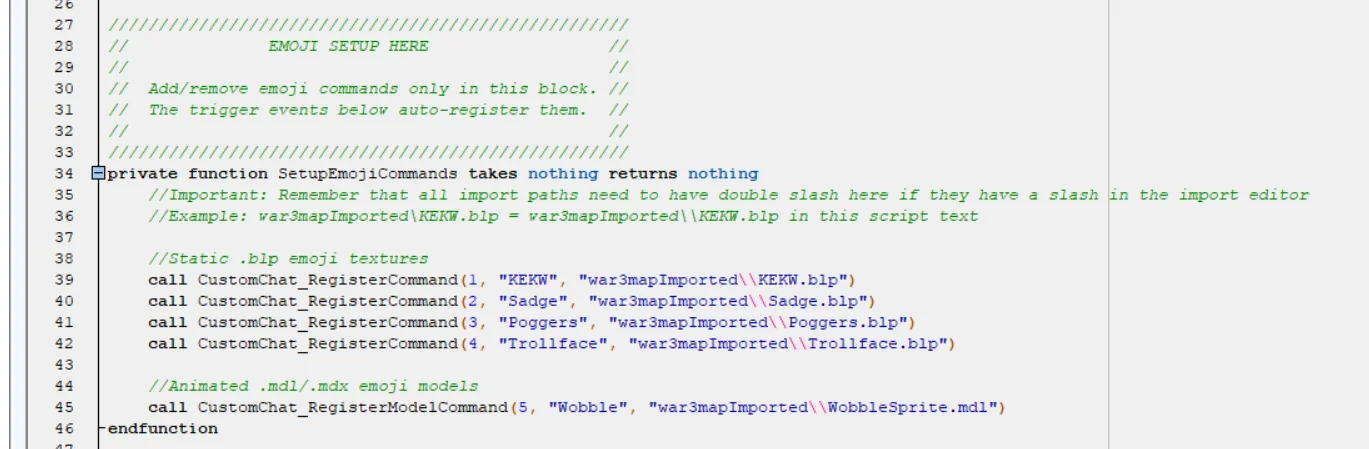
//register caller for normal .blp emoji textures
function CustomChat_RegisterCommand takes integer id, string command, string texture returns nothing
    set ChatImageCommand[id] = command
    call CustomChat_RegisterImage(id, texture)

    if id > ChatImageCommandCount then
        set ChatImageCommandCount = id
    endif
endfunction

//register caller for animated .mdl/.mdx emoji models
function CustomChat_RegisterModelCommand takes integer id, string command, string model returns nothing
    set ChatImageCommand[id] = command
    call CustomChat_RegisterModel(id, model)

    if id > ChatImageCommandCount then
        set ChatImageCommandCount = id
    endif
endfunction

//caller for entries
function CustomChat_SendImage takes player sender, integer imageId returns nothing
    if imageId > 0 and imageId <= CHAT_MAX_IMAGE_TYPES then
        call AddImageEntry(sender, ImagePath[imageId], ImageIsModel[imageId])
    endif
endfunction

//caller for sender
function ChatImageSend takes player sender, integer imageId returns nothing
    call CustomChat_SendImage(sender, imageId)
endfunction

//Creates the actual Frames that are used as chat system
//the chat system does not use native chat or game message
//the entire chat is made from Text frames to put in the images
private function Init takes nothing returns nothing
    local integer i = 0

    if CHAT_REMOVE_BATTLETAGS then
        call RemoveAllPlayerBattleTags()
    endif

    set ChatTrig = CreateTrigger()
    set ChatModeTrig = CreateTrigger()
    set SyncTrig = CreateTrigger()
    set ChatTimer = CreateTimer()

    set i = 1
    loop
        exitwhen i > CHAT_MAX_ENTRIES

        set ChatText[i] = BlzCreateFrameByType("TEXT", "CustomChatText", BlzGetOriginFrame(ORIGIN_FRAME_GAME_UI, 0), "", 0)
        call BlzFrameSetSize(ChatText[i], CHAT_TEXT_W, CHAT_TEXT_H)
        call BlzFrameSetFont(ChatText[i], "Fonts\\FRIZQT__.TTF", CHAT_FONT_SIZE, 0)
        call BlzFrameSetTextAlignment(ChatText[i], TEXT_JUSTIFY_LEFT, TEXT_JUSTIFY_TOP)
        call BlzFrameSetAlpha(ChatText[i], 255)
        call BlzFrameSetVisible(ChatText[i], false)

        set ChatBackdrop[i] = BlzCreateFrameByType("BACKDROP", "CustomChatBackdrop", BlzGetOriginFrame(ORIGIN_FRAME_GAME_UI, 0), "", 0)
        call BlzFrameSetAlpha(ChatBackdrop[i], 255)
        call BlzFrameSetVisible(ChatBackdrop[i], false)

        set ChatSprite[i] = BlzCreateFrameByType("SPRITE", "CustomChatSprite", BlzGetOriginFrame(ORIGIN_FRAME_GAME_UI, 0), "", 0)
        call BlzFrameSetAlpha(ChatSprite[i], 255)
        call BlzFrameSetVisible(ChatSprite[i], false)

        set i = i + 1
    endloop

    set i = 0
    loop
        exitwhen i >= bj_MAX_PLAYERS

        call TriggerRegisterPlayerChatEvent(ChatTrig, Player(i), "", false)

        call TriggerRegisterPlayerChatEvent(ChatModeTrig, Player(i), "-allchat", true)
        call TriggerRegisterPlayerChatEvent(ChatModeTrig, Player(i), "-allychat", true)

        call BlzTriggerRegisterPlayerSyncEvent(SyncTrig, Player(i), "CIMG", false)

        set i = i + 1
    endloop

    call TriggerAddCondition(ChatTrig, Condition(function ChatConditions))
    call TriggerAddAction(ChatTrig, function ChatActions)

    call TriggerAddAction(ChatModeTrig, function ChatModeActions)

    call TriggerAddAction(SyncTrig, function OnImageSync)

    call TimerStart(ChatTimer, 0.10, true, function ChatPeriodic)
endfunction

endlibrary


 Pending

 THE EMOJI CHAT SYSTEM