


YDWE PK (World Editor)

This bundle is marked as pending. It has not been reviewed by a staff member yet.
I present to you the best map editor for WC3

Allows make map in 1.26 or Reforged mode, but only if you have never saved your map in the Reforged Editor before.
Regardless of whether you make a map with features from Reforged or not, you must have Warcraft 1.26 or 1.27. This is required for YDWE to work.
You can use my pure Warcraft 3 1.26 from Eurobattle

Compatibility of maps created in YDWE PK: 1.26 - Reforged same as JNGP
Supported languages: JASS, vJASS, Zinc (no cJass)
YDWE PK
will not launch you have previously run the reforged world editor. First you need to run Fix after reforged editor.reg in ydwe folder

Features:
  • Dark Mode
    378956-108397106511c42d96a6422c9f454c54.webp


    [*]
  • SLK - optimization before map test (can greatly reduce loading speed of large maps) comparison of speed on the old version of my RPG
  • Map Save Accelerator
  • Supports multi-opening (you can open several YDWE or YDWE + JNGP)
  • Allow warcraft 3 multi-launch
  • Additional multi-window map test mode
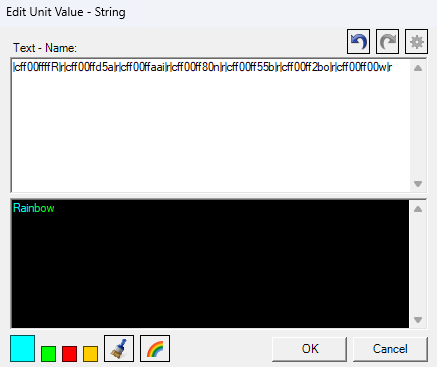
  • Best built-in text coloring plugin
    268810-b51dc1e3d78a1ee019ad9c773642306c.png
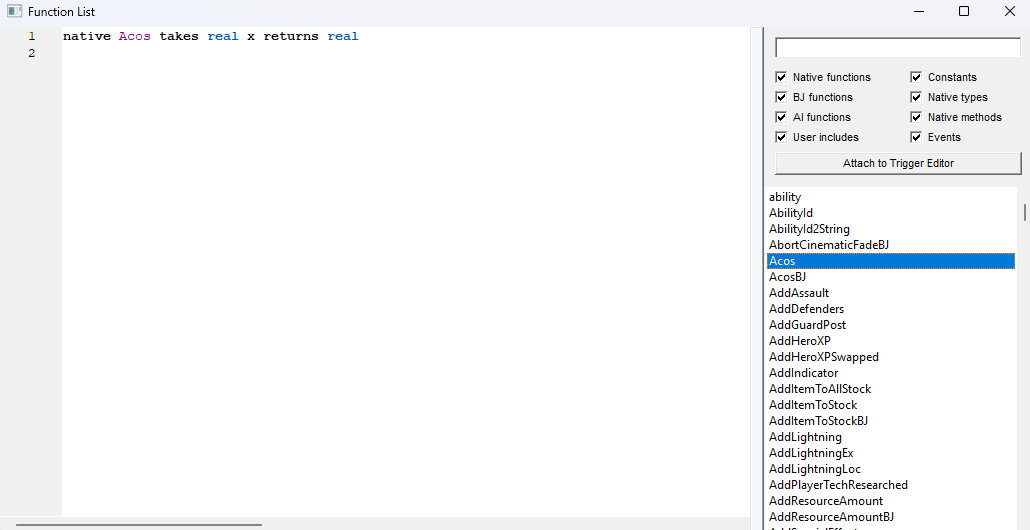
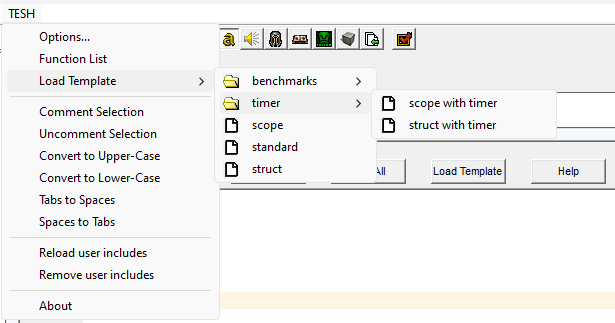
  • Includes latest pjass and TESH (newer than in JNGP but older than the latest TESH for Reforged Editor)


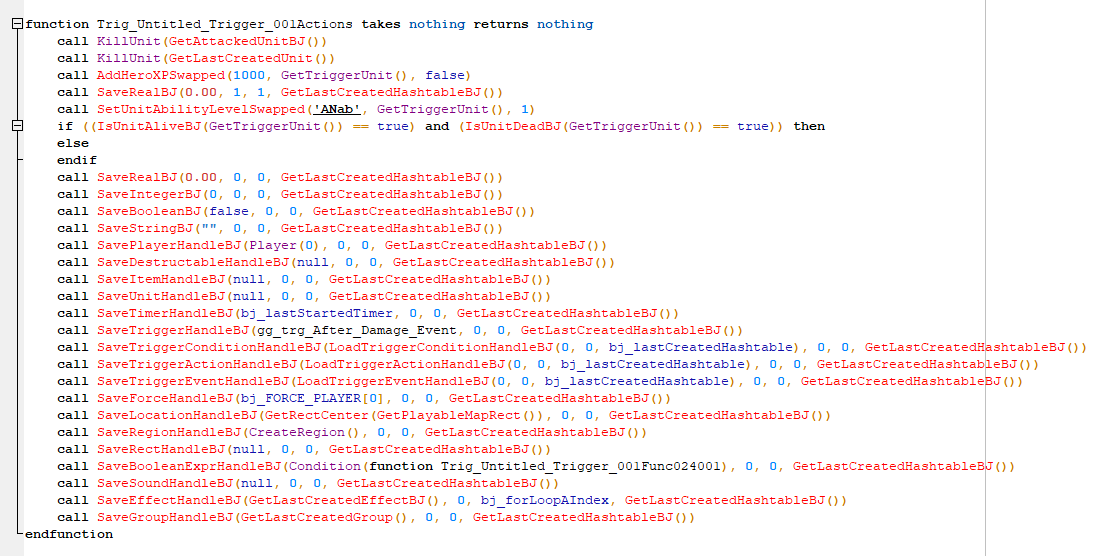
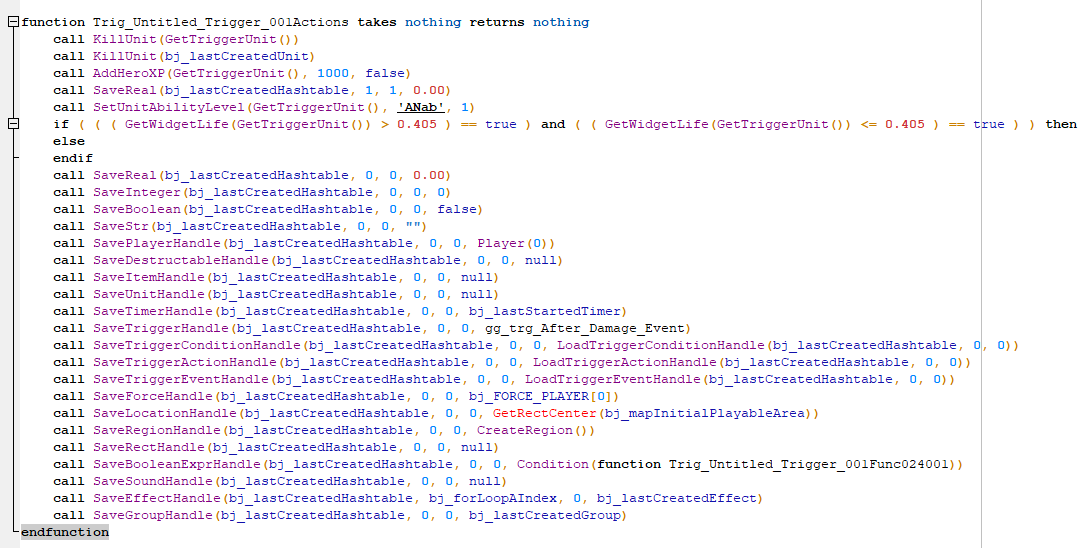
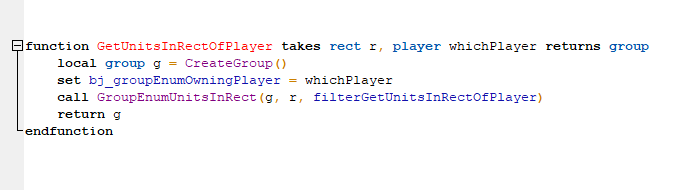
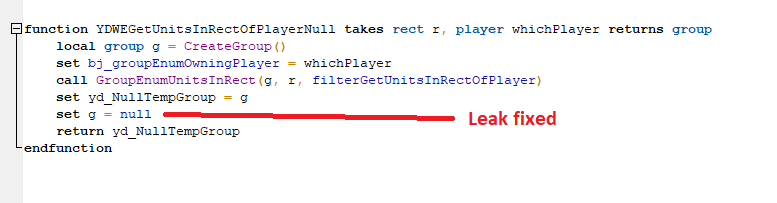
  • Optimization and anti-leaks for default GUI function like BJ and Swapped. Note: Many standard bj functions have built-in leaks that you cannot fix if you simply use these GUI/JASS functions in other editors.
    Before

    After

    Before

    After
  • Parsing unknown GUI functions, thanks to which you can open maps with unknown for YDWE functions.
  • Powerful custom GUI.
    • [Jass Category]
      Allows you use:
      • True jass local and global variables
      • Arrays and 2d arrays
      • Create own functions with/without arguments
      • Run any functions (Any jass natives, even if they are not in the YDWE PK GUI/any own functions) with/without arguments
      Here you can forget about any crutches with run triggers instead of calling functions, etc.
      You can import any Jass system and then conveniently call functions through the gui.
      • Use functions like "Timer Start" with specify function
      • Custom jass loop with own condition
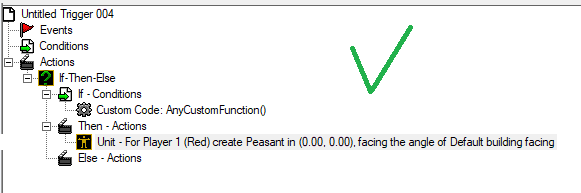
      • Totally custom if/then/else with "else if" and without "else" if you need it
    • [Unbelievable category]
      - Local variables that do not need to be declared at the top of the code and cleared at the end of the function
      - Local timers: Which do not force you to specify another trigger, and also automatically transfer [Unbelievable] Local Variables through a hash table.
      - Local triggers: Same capabilities as local triggers.
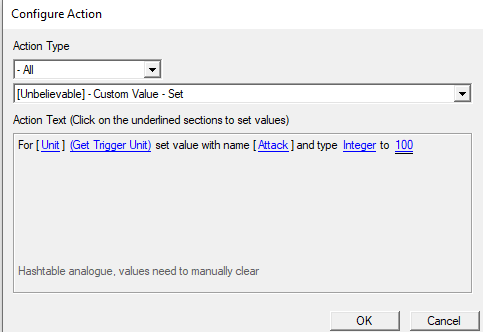
      - Comfortable Hashtable analogue "Custom Value" which does not require an integer id, you can specify the object itself, and allows you to specify a string as a key, which is then automatically converted to an integer, but unlike StringHash there will never be collisions.

      - Selection units in AoE without new function (Unit loop from jass)
    • Additional functions from Jass. (Ability to create objects in X/Y coordinates and much more)
    • Advanced custom GUI
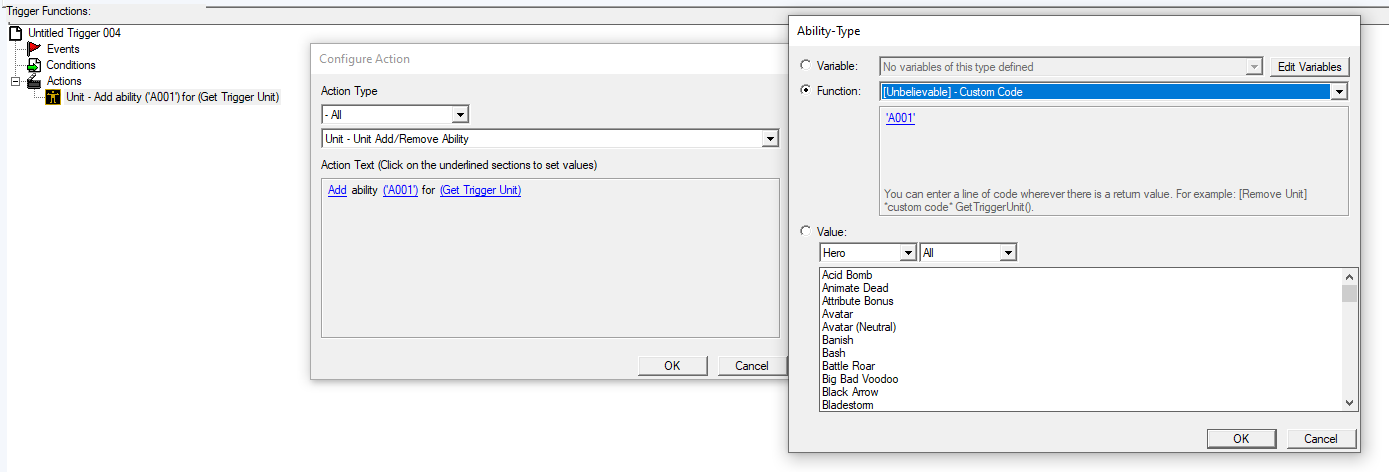
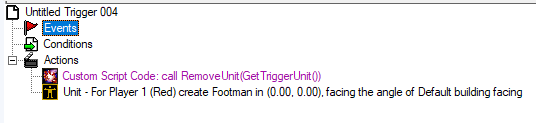
      - Ability to insert Jass code anywhere in the GUI function. You don't need to break the function's GUI wrapper if you need to use Jass code.

      - Comment box (for ease of sorting)
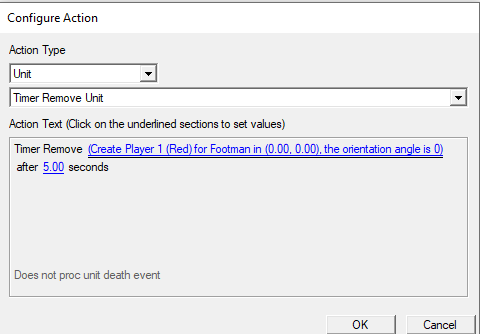
      - Functions to delete objects after some time without having to create a timer manually.
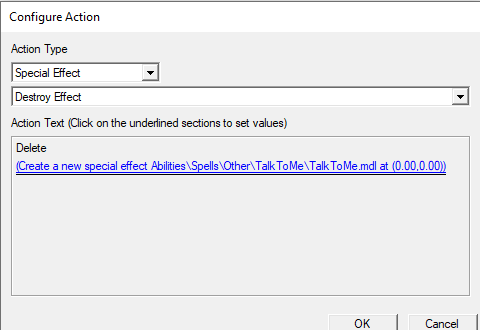
      - Creating objects in "Сalls" Which allows you to immediately set variables and place objects in them. It also allows you to do handy things like this:

      - "Multi-functions" that allow you to do some actions faster. Allows you to quickly copy and paste a function to change 1 parameter and not re-specify all the others
      - "Hashtable By Code" Which have functions for save/load/checking if there is saved data/remove, for each data type. In addition, these functions allow you to specify any keys (integer/StringHash/jass code/use #defines)
      - Custom script code is highlighted in a separate color.

      - Rect/Region/Location types are properly named (no more Points)
    • Complete systems with automatic creation of objects and removal if you no longer use this functions. Additionally, these systems don't put their many global variables into your GUI global variables section, creating unnecessary clutter there.
      - Damage Engine
      - Custom Stats Systems
      - Test Commands Activate
      - Debuff Duration System
      - Additional Item Slots
      - Movement System
      - Save System
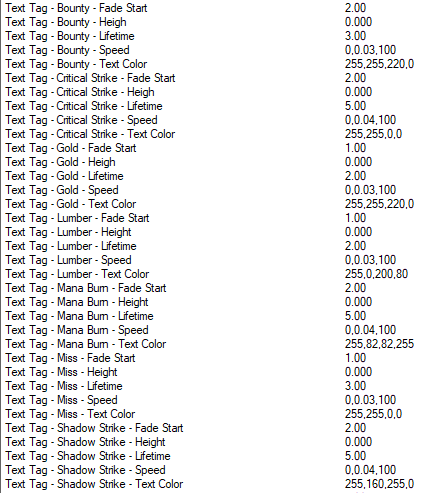
  • Unlocked 76 hidden game constants
    268809-d2dfffcfcd5ee50923e821845694b5e7.png

    List:
    Color of Lava Spawn
    Point Order Indicator Color(Attack)
    Point Order Indicator Color(Common)
    Info Panel - Attack Speed - Very Slow
    Info Panel - Attack Speed - Fast
    Info Panel - Attack Speed - Medium
    Info Panel - Attack Speed - Slow
    Info Panel - Buff Icon Fade Point
    Info Panel - Buff Icon Fade Alpha Minimum
    Info Panel - Buff Icon Fade Alpha Maximum
    Info Panel - Max Melee Attack Range
    Info Panel - Quest Indicator Duration
    Info Panel - Move Speed - Fast
    Info Panel - Move Speed - Medium
    Info Panel - Move Speed - Slow
    Info Panel - Move Speed - Very Slow
    Item - Item Shadow
    Item - Item Shadow Offset
    Item - Item Shadow Size
    Selection Circle Z Offset When Passing Destructable
    Floating Text - Bonus - Text Color
    Floating Text - Bonus - Fade Point
    Floating Text - Bonus - Font Size
    Floating Text - Bonus - Life Span
    Floating Text - Bonus - Move Speed
    Floating Text - Critical Strike - Text Color
    Floating Text - Critical Strike - Fade Point
    Floating Text - Critical Strike - Font Size
    Floating Text - Critical Strike - Life Span
    Floating Text - Critical Strike - Move Speed
    Floating Text - Gold - Text Color
    Floating Text - Gold - Fade Point
    Floating Text - Gold - Font Size
    Floating Text - Gold - Life Span
    Floating Text - Gold - Velocity
    Floating Text - Lumber - Text Color
    Floating Text - Lumber - Fade Point
    Floating Text - Lumber - Font Size
    Floating Text - Lumber - Life Span
    Floating Text - Lumber - Velocity
    Floating Text - Mana Burn - Text Color
    Floating Text - Mana Burn - Fade Point
    Floating Text - Mana Burn - Font Size
    Floating Text - Mana Burn - Life Span
    Floating Text - Mana Burn - Velocity
    Floating Text - Attack Miss - Text Color
    Floating Text - Attack Miss - Fade Point
    Floating Text - Attack Miss - Font Size
    Floating Text - Attack Miss - Life Span
    Floating Text - Attack Miss - Velocity
    Floating Text - Shadow Strike - Text Color
    Floating Text - Shadow Strike - Fade Point
    Floating Text - Shadow Strike - Font Size
    Floating Text - Shadow Strike - Life Span
    Floating Text - Shadow Strike - Velocity
    Minimap Signal - Attacked Signal Color
    Minimap Signal - Completed Signal Color
    Minimap Signal - Waypoint Signal Color
    Minimap Signal - Suggested Signal Color
    Font Size - Inventory Title
    Font Size - Icon Corner Number
    Font Size - Chat Input Font Size
    Font Size - Leaderboard And Multiboard
    Font Size - Life And Mana
    Font Size - Score Screen - Large Font
    Font Size - Score Screen - Normal Font
    Font Size - Score Screen - Player Name
    Font Size - Toolbar - Cost
    Font Size - Toolbar - Description
    Font Size - Toolbar - Name
    Font Size - Floating Window - Description
    Font Size - Floating Window - Name
    Font Size - Chat Message
    Font Size - Game Message
    Font Size - Upkeep Message
    Font Size - Trigger Message
  • Allows easily add almost any systems in GUI interface.
  • Jass Runtime Debug
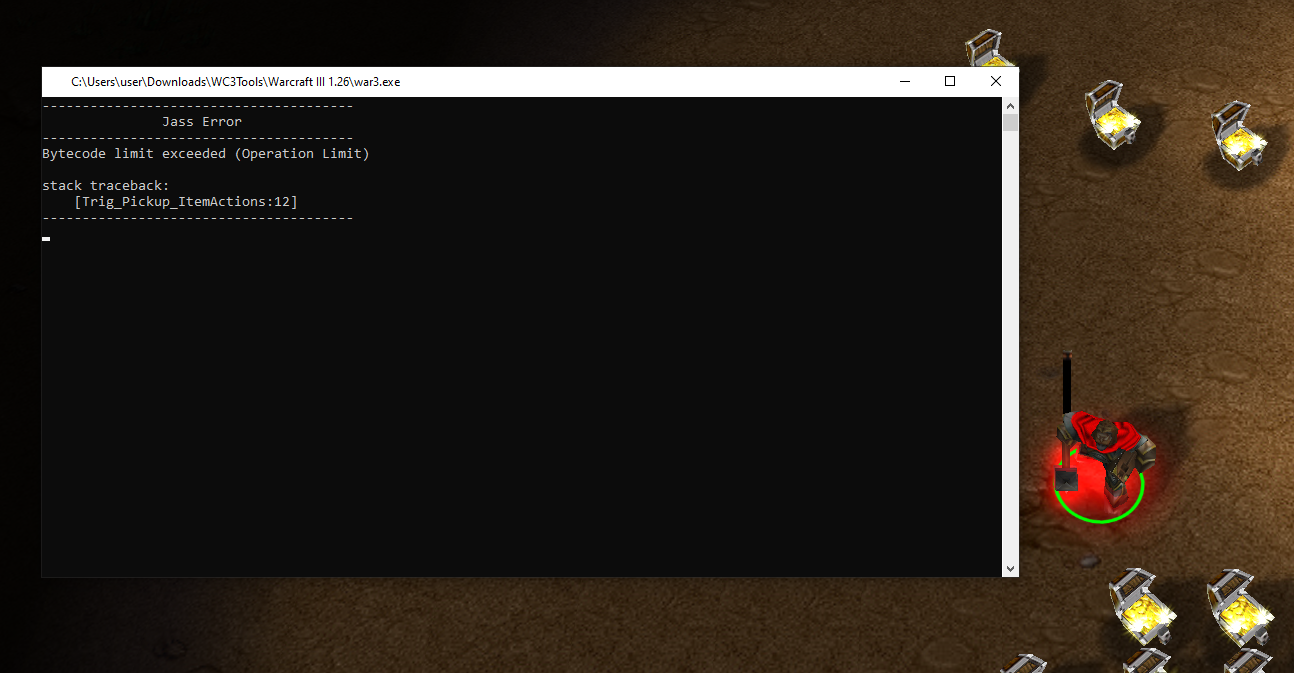
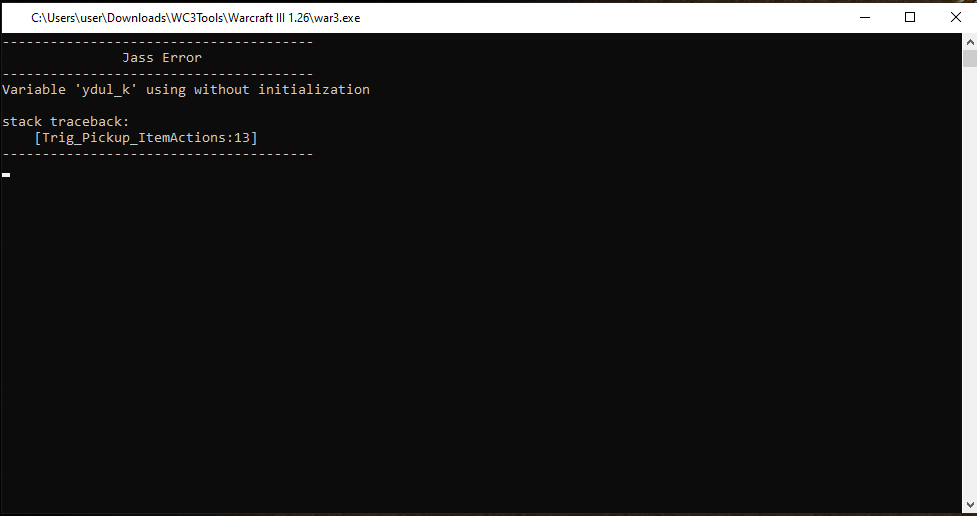
    Every time you launch wc3 1.26-1.27 via YDWE in any way, the game will report some errors that are usually not detected when saving the map.
    For example:
    [Operation Limit]

    [An attempt to use a variable that does not yet have any (even null) value]

    You will find not only bugs of your map during testing, but also bugs from other maps that you decide to play by launching wc3 through the YDWE (Launch Warcraft 3) config menu. This also works when watching replays, or if the map was slk optimized.
    When a bug is found, a windows window will be created with a description of the error and a pointer to the name of the function in which the error occurred.
    If you close this window, your wc3 will also close, be careful.
    As a rule, the discovery of such bugs means that all subsequent actions in this function, starting from the place where the bug is located, simply will not work, the function will end here.
  • Boost Preprocessor
    More information here
    You can use some directives like: #define #endif #else #if #ifdef #ifndef #include /etc
    #define is a macros, example of using: use this anywhere in code #define print(s) call DisplayTimedTextToPlayer(GetLocalPlayer(), 0, 0, 10, s)
    Now you can use print("any text") for fast debug message to all players in 10 seconds, even without using "call"
    Green part will convert into red part after map saving.
    Some other examples for using:

    #define Skill_Invul 'Avul' skill id
    #define Order_Move 851986 order id
    #define Hash_Dmg_Taken 10 hashtable key
    Also you can make constructions like this:
    JASS:
    // This is just my defines
    #define Max_Players 9
    #define print(s) call DisplayTimedTextToPlayer(GetLocalPlayer(), 0, 0, 10, s)
    function AfterStart takes nothing returns nothing
        local integer i = 0
        local integer count = 0
        #ifdef TestMode
            globals
                integer Control = 0
                integer GTU = 0
                integer FogTestInt = 0
                fogmodifier FogTest
                trigger TriggerSelectUnit = CreateTrigger()
                unit SelectedUnit = null
                group TestUnits = CreateGroup()
            endglobals
            call TriggerRegisterPlayerUnitEvent(TriggerSelectUnit, P[0], EVENT_PLAYER_UNIT_SELECTED, null)
            call TriggerAddAction(TriggerSelectUnit, function SelectUnitAct)
            set FogTest = CreateFogModifierRect(P[0], FOG_OF_WAR_VISIBLE, bj_mapInitialPlayableArea, true, false)
            call FogModifierStart(FogTest)
            set FogTestInt = 1
            call InitTrig_Select()
            call GroupEnumUnitsInRect(TestUnits, gg_rct_All_Heroes, function TestUnits_Filter)
            print("Test Mode")
        #else
            // Check solo game
            loop
                exitwhen i > Max_Players
                if GetPlayerSlotState(Player(i)) == PLAYER_SLOT_STATE_PLAYING and GetPlayerController(Player(i)) == MAP_CONTROL_USER then
                    set count = count + 1
                endif
                set i = i + 1
            endloop
            if count < 2 then
                set i = 0
                loop
                    exitwhen i > Max_Players
                    call CustomDefeatBJ(Player(i), "No solo game")
                    set i = i + 1
                endloop
            endif
        #endif
    endfunction
    If you have #define TestMode in your code, will created some test feathures, but if not, instead of test stuff will created classic condition for RPG - no solo game.
    For #if need red value, like "#define TestMode 1" but for #ifdef #ifndef - no.
    Also you can import your code from external files with using #include
    Exapmle: #include "C:\Users\user\Desktop\Jass for vs\Glory\Events\Chat Event.j"
    All directives will work for code inside YDWE and from import files
    Current best way to work with code outside of YDWE is vscode plugin
  • Lua Preprocessor
    More information here
    You can not only create objects but also perform various operations with future jass-code, but this does not work in game runtime, only before map save.


    You can create and change objects from object editor by using lua code.
    Start block: <?
    End block: ?>
    Example:
    JASS:
    <?
        local slk = require 'slk'
        local o = slk.ability.AIbk:new('PA00')
        o.DataA1 = 9999999.0
        o.DataB1 = 1.0
        o.Rng1 = 9999999.0
        o.Hotkey = "B"
        --o.Buttonpos_1 = 3
        --o.Buttonpos_2 = 1
        o.Cool1 = 0.0
        o.Name = 'YDWE - Test Blink'
    ?>
    This code will create skill based on 'AIbk' with new rawcode 'PA00'
    This is a blink with 9999999.0 range and 0.0 sec cd.
    All parameters taked from object editor fields with ctrl + D
    Changed parameters will updating/rewrite after map save.
    "ability" can be changed to unit/etc.
    This is a very good way to easy changing stats for balancing units/etc.
    Also, without lags with editing some fields/creating new objects in object editor.
    When you specify a new ravcode for units, depending on the register first case, will created hero or normal unit.
    local o = slk.unit.Hpal:new('pA06') = unit based on paladin
    local o = slk.unit.Hpal:new('PA06') = hero based on paladn
    This way you can quickly copy, for example, the appearance and voice of a unit in order to make it a hero.
    When converting a hero into a unit and vice versa, unnecessary fields from the object editor will be deleted, that is, you will not be able to make a hero without basic stats, etc.
    Here you can also use #define to make reading/writing more easier
    JASS:
    #define _Lua_Base local slk = require 'slk'
    #define _Lua_Unit_Damage o.dmgplus1
    #define _Lua_Unit_Name o.Name
    <?
        _Lua_Base
        local o = slk.unit.hfoo:new('PU00')
        _Lua_Unit_Damage = 999
        _Lua_Unit_Name = 'YDWE - Test Footman'
    ?>
  • Can use functions from Reforged
    You can not:
    • Use any reforged objects from object editor (new abilities/etc).
    • Use reforged Lua as main programming language, only Jass.
    • Edit map with hd models mode.
    • Add more player slots than 12. But you can use additional slots from Reforged through functions, for example to give a unit to computer player.
    • What are you getting:

    - Taking advantage of all the other benefits of YDWE:
    • Advanced GUI
      • Additional functions from jass.
      • Core-YDWE functions like (local variables, hashtable analugues, automatic local timers/triggers, etc.
      • Advanced GUI features (you can insert Jass code anywhere in gui function/etc).
      • Embedded systems with automatic creation of the necessary objects (Damage engine/Custom Stats System/etc)
      • Literally all functions from Reforged, even those that were not added to reforged as gui (frames/etc).
    • Bullit-in slk-optimization.
    • BJ functions optimization.
    • Anti leak optimization.
    • Boost preprocessor.
    • Pseudo lua.
    • All Jass functions are highlighted by TESH.
    - Map remains in compatibility mode based on version 1.26 but can use functions from reforged.
    This means that you can transfer map to any editor without problems. Unlike reforged editor, which binds the map to new (reforged) versions.
    You can also use any old programs without problems, for example w3x2lni or other slk optimizers.
[About PK edition]
This is more smoothest version compared to the classic YDWE.
PK edition aims to optimize and reveal full, or atleast more YDWE potential.
I tried to reduce gap between GUI and JASS users, by adding new GUI functions/capabilities, as well by optimization of final code and remove leaks.
JASS is still the best method for create map, however situation now looks like this: [JASS] > [YDWE PK GUI] > [YDWE GUI] > [GUI]
Even just re-save map in YDWE PK edition will make your map more optimized than after JNGP or other editor with default GUI

Discord server

[Difference between YDWE 1.32.15 En 1.1 and YDWE PK Edition 1.0]
  • YDWE now insert into the map only those additional functions/variables/other stuff, that you use.
  • Removed DZAPI and JAPI functions
  • Improved GUI translation
  • Returned and translated additional game constants (like Critical Strike tag text duration/color/etc)
  • Fixed missing we strings
  • Removed all languages exept English
  • Removed/changed a lot of functions and systems from classic YDWE.
Some functions will return in future.
  • Some functions has been marked as [Not Recomended]
  • Added preprocessor keywords for TESH: #define,#ifdef,#ifndef,#elif,#include
  • Fixed bj optimization and bj anti-leak optimization bugs
  • Removed all old and added new [Demo Maps] to demonstrate GUI functions, and preprocessor commands/pseudo lua
  • Added option to supporting reforged functions, what does it mean:
You can save a map that uses functions from reforged.
However, you cannot test map using YDWE, you will have to do it manually via wc3 reforged.
Also, at the moment in YDWE no reforged GUI functions and JASS highlighted functions in TESH.
Also, map will be saved as classic 1.26, this means that objects from object editor will be from version 1.26.
But you get the opportunity to make a map using reforged functions as well as YDWE functionality such as its own functions and systems, as well as preprocessor and pseudo-lua commands, which is very important if you can understand this.

New GUI functions:
  • Create Special Effect (XY) [R]
  • Create Spell Effect By Id (XY) [R]
  • Create Spell Effect By Id (Location)
  • Create Spell Effect By Id (Unit) [R]
  • Hashtable save and load by code/integer/string
  • Get Distance Between (units/items/destructables/locations/rects/coordinates)
  • Get Angle Between (units/items/destructables/locations/rects/coordinates)
New systems:
  • Debuff Duration System (by Enemy1PK)
  • Activate Test Commands (by Enemy1PK)
  • Damage Engine (by Bribe)
[YDWE PK Edition 1.1]
  • DDS:
    Fixed bug with UnitAlive function.
    Added abilities for immunity to debuffs.
    Added test ability with clear all debuffs effect
  • Minor changes config description about map saving as 1.26/1.36
[YDWE PK Edition 1.2]
  • Added missing text of some YDWE trigger errors
[YDWE PK Edition 1.3]
  • Fixed a bug when some object parameters in the object editor were not displayed (like skill tech/sounds/text/stats)
  • Added some missing text (like description when open map with unknown GUI for YDWE
[YDWE PK Edition 1.4]
  • Added preprocessor keywords for TESH: #undef
  • Deleted old TESH functions and added new
  • Changed visual color for GUI categories [Not Recomended] / [Unknown UI] / Custom Code
  • Added new GUI category [Has Better Analogues]
  • GUI categories [Not Recommended] and [Has Better Analogues] is sorted to the bottom
  • Added "Null" GUI presets for (Timer/Region/Location/Fogmodifier/Ubersplat/Group/Trigger/Quest/Player Group/Player/Leaderboard/Image/Hashtable/Multiboard/Unit Pool/Item Pool/Dialog/Text Tag/Lightning/Effect/Timer Dialog/Multiboard Item/Trackable/Quest Item/Terrain Deformation/Weather Effect/Button)
  • GUI Function Get Angle Between [PK] added to degree category same as real
  • Fixed bugs in [Systems] - Custom Stats System
  • Fixed bugs in [Systems] - Test Commands Activate
  • New Demo Map - How avoid dialog problem
  • New System: Additional Item Slots (By Enemy1PK)

Added defines as default:
  • #define print(s) call DisplayTimedTextToPlayer(GetLocalPlayer(), 0, 0, 10, s)
  • #define prints(s, t) call DisplayTimedTextToPlayer(GetLocalPlayer(), 0, 0, t, s)
  • #define break exitwhen true
Also added in TESH

Added new multi-functional functions:
  • Unit Add/Remove Ability
  • Unit Add/Remove Category
  • Set Unit X/Y
These functions do not require additional functions like bj
They use native functions depending on your choice
Old functions marked as [Has Better Analogues]

Added new GUI functions which now set varriables like "last created unit" for replace this functions:
  • Create Special Effect (XY) [R]
  • Create Unit (Location)
  • Create Unit (XY)
  • Create Item (XY)
Old functions marked as [Has Better Analogues]

New GUI functions:
Actions
  • Timer Remove (unit/effect/text tag/lighting/destructable/item)
  • End Game
  • Create Lightning Effect (XY)
  • Create Lightning Effect (XYZ)
  • Create Destructible (XY)
  • Create Dead Destructible (XY)
  • Create Text Tag (XY)
Calls
  • Create Lightning Effect (Location)
  • Create Item (Location)
  • Create Destructable (XY)
  • Create Destructable (Location)
  • Create DeadDestructable (XY)
  • Create DeadDestructable (Location)
  • Have Saved Integer By Code
  • Have Saved Real By Code
  • Have Saved String By Code
  • Have Saved Boolean By Code
  • Have Saved Handle By Code
  • Get Destructable Type Id
  • Get Player By Player Id
[YDWE PK Edition 1.5]
  • Fixed conflicts between core YDWE systems and Reforged mode.
  • Literally all functions from Reforged added to GUI, even those that are not in the Reforged world editor in GUI form.
    • All new types for variables and other related things have also been added.
    • If you don’t see functions for creating objects (for example CreateFrame), then they are located not in “Actions” but in “Calls”
    • To use you need to create a variable and then set it as "CreateFrame/etc"
    • This is done specifically because some native functions have no bj analogues which can set global varriables like "last created unit".
    • Also note that new types currently cannot be used for core YDWE functions like [Unbelievable Local Variable].
  • The [R] mark has been removed from all old functions/constants.
    • Now the [R] mark means functions that are only available for Reforged.
  • YDWE PK config option "Allow Reforged Functions" Now adds Reforged GUI Functions, adds all Reforged functions in TESH (Jass syntax highlighting) and allows you to run the map for testing through Warcraft 3 reforged. Requires restarting YDWE PK.
    • Because some names are too long, the following constants are placed in TESH under abbreviated names.
    • You can use both short and long versions in your code, however TESH will only highlight the short versions.
    • List:
    • Short Name [ABILITY_RLF_MANA_REGEN_BONUS_AS_FRACTION_OFNORMAL] Original Name [ABILITY_RLF_MANA_REGENERATION_BONUS_AS_FRACTION_OF_NORMAL]
    • Short Name [UNIT_WEAPON_RF_ATTACK_AREA_OF_EFFECT_MEDIUM_DAMAG] Original Name [UNIT_WEAPON_RF_ATTACK_AREA_OF_EFFECT_MEDIUM_DAMAGE]
  • Launching Warcraft 3 from the config menu via the "Lauch Warcraft 3" button will now launch the Reforged version if the appropriate mode is selected
  • Added file "ReforgedPath.txt"
    • If you are going to test the map in Reforged mode, you need to specify the path to Warcraft III.exe in it.
    • In the future I plan to add the path to Warcraft 3 Reforged to the config menu.
  • Added "null" GUI preset for String (because "empty string" and "null" are not the same thing)
  • Added GUI preset JASS_MAX_ARRAY_SIZE for integer.
  • Fixed leak in reforged function "CreateBuildCommandButtonEffectBJ"
  • 3 Reforged bj functions has been optimized.
  • Added hidden extra icons and models. 112 icons/130 models. In fact, this is a fix for an error that was made during translation; this stuff was originally supposed to be in YDWE
  • Changed GUI functions:
    • [Unbelievable] Local Timer - Clear. Added "PauseTimer" before "DestroyTimer"
    • As some people have noticed, if you don't pause the timer before destroying, sometimes bugs can happen.
    • [Systems] Activate Test Commads - Added commands:
    • -ci Create item by rawcode
    • -cu Create unit by rawcode
    • -aa Add ability by rawcode
    • -ra Remove ability by rawcode
  • Added Saves counter on World Editor screen. Explanation:
    • All editors created on the basis of World Editor crash after several saves, which is why you lose the progress of the last save.
    • The number of possible saves differs from map to map and depends on its "size" (objects, triggers, etc)
    • This counter will help you understand when it is time to restart YDWE PK.
[YDWE PK Edition 1.5.1]
  • Fixed bug with map testing in Reforged mode.
  • YDWE PK on startup now will create empty map.
  • Define changed name: break > breakJassLoop
  • Fixed some gui functions not from "Reforged" which still used the [R] flag.
  • Gui Function "get frame handle id" now available only in Reforged mode.
  • Changed GUI functions:
- [Systems] Custom stats system:
- Added boolean call "Custom Stat System - Last Stat Change Was Successful"
- Added integer call "Custom Stat System - Get Bonus Limit"
- System has been rewritten.
- For "clear" functions has been added boolean parameter "removeAbilities" which determines whether abilities need to be removed from unit or just cleared the hash table.
(If you remove a unit from the game, it will lose all abilities in any case, for this you do not need to force the cleanup function to recalculate the parameters once again)
- Fixed bug when stats were calculated incorrectly when using negative values. At the moment this is the only existing version of CSS that correctly counts negative and positive stats.
- No longer creates abilities that are greater than the limit.
- New stats limits:
Attack speed: -8.192 +8.191
Sight Range: -8.192 +8.191
Attack: -1.073.741.824 +1.073.741.823
Armor: -8.388.608 +8.388.607
Str: -524.288 +8.388.607
Int: -524.288 +8.388.607
Agi: -524.288 +8.388.607
Mana regen: -4.194.304 +4.194.303
Health regen: -8.388.608 +33.554.431
Health max: -8.388.608 +67.108.863
Mana max: -8.388.608 +67.108.863
This is the maximum limit for wc3 to avoid bugs with stats.

[YDWE PK Edition 1.6]

  • Fixes:
    • Fixed another bug with map test from YDWE PK while Reforged mode. (was specified Incorrect path to YDWE PK directory)
    • Gui function [Activate Test Commands] Added crit-safe mechanism for cases when the specified player id is lower than 1
    • Tesh: Fixed wrong parameters with Custom Stats System functions
  • System "Additional Item Slots" max bags amount 10 > 100
  • For GUI call "Triggered Event Is [YDWE]" added missing Reforged events.
  • For GUI functions with coordinates like "Distance Between" "Angle Between" added new presets:
    • Spell Target
    • Order Point
    • Portal Destination
    • Camera Target
    • Camera Eye
It's more convenient and faster than specify XY coordinates each time.
  • Added new GUI Systems:
    • Movement System
      • Designed for smooth movement of units (Like Mirana's jump from Dota)
      • This is not just a set of presets like functions from the old YDWE, this system is more like a set of tools to implement as many different user needs as possible.
    • Save System
      • This is a save/load system that uses a loading code which is created in the game folder and that must be entered into the chat.
      • Works on any version of warcraft 3
      • Parameters:
        • Can save only integer values
        • Requires manually adding each item and unit to the save list
        • Up to 8192 different items and 8192 units can be added to the save list
        • If length of the code is greater than the limit for entering into the chat, creates additional codes
        • Supports up to 5 total sub-systems
          • For example, u can use system #1 to save hero/gold/wood/whatever else. And use an additional system #2 for saving the player achievements/unlocked heroes/rank/etc.
          • You'll essentially be using the same system, but you can give them different alphabets, which will make them different and the code from system #1 won't work on system #2.
        • Max length of saved value is 9 (example: 999999999)
        • Max saved values for each sub-system: 999
        • Up to 30 additional codes
        • Adding new parameters to save does not invalidate old codes
          • You must use the same order when saving and loading values
          • You can load new codes into old versions of map and vice versa
  • Added new GUI functions:
    • Presets:
      • [Systems] Move System - Move Unit Reached Final Point
      • [Systems] Move System - Get Last Unit Ended Movement
      • [Systems] Move System - Get Last Detected Unit
      • [Systems] Move System - Get Last Unit Which Detect
      • [Systems] Move System - Get Last Unit Proc Timer Period
      • [Systems] Save System - Event System Number
      • [Systems] Save System - Total Save Codes Count
      • [Systems] Save System - Event Player
    • Actions:
      • [Game] Preload Gen Clear
      • [Game] Preload Gen Start
      • [Game] Preload Gen End
      • [Game] Preload Refresh
      • [Game] Preload Start
      • [Game] Preload End Ex
      • [Item] Add Ability To Item
      • [Unit] Fly Enable
      • [Systems] Additional Item Slots - Get Current Bag Number
      • [Systems] Move System - Range
      • [Systems] Move System - Target
      • [Systems] Move System - Homing
      • [Systems] Move System - Stop
      • [Systems] Move System - Set Unit Homing Target
      • [Systems] Move System - Set Unit Start X
      • [Systems] Move System - Set Unit Start Y
      • [Systems] Move System - Set Unit Final X
      • [Systems] Move System - Set Unit Final Y
      • [Systems] Move System - Set Unit Move Speed
      • [Systems] Move System - Set Unit Timer Period
      • [Systems] Save System - Init System
      • [Systems] Save System - Add Unit Type To Save List
      • [Systems] Save System - Add Item Type To Save List
      • [Systems] Save System - Add Ability Type To Save List
      • [Systems] Save System - Save Type of Unit
      • [Systems] Save System - Save Type of Item
      • [Systems] Save System - Save Type of Ability
      • [Systems] Save System - Save Value
      • [Systems] Save System - Set Errors Text
      • [Systems] Save System - Start Saving
      • [Systems] Save System - Start Loading
    • Calls:
      • Remove Color Codes
      • [Systems] Is XY Walkable
      • [Systems] Move System - Is Unit In Movement
      • [Systems] Move System - Get Unit Homing Target
      • [Systems] Move System - Get Move Type From Unit
      • [Systems] Move System - Get Unit Start X
      • [Systems] Move System - Get Unit Start Y
      • [Systems] Move System - Get Unit Final X
      • [Systems] Move System - Get Unit Final Y
      • [Systems] Move System - Get Unit Move Speed
      • [Systems] Move System - Get Unit Timer Period
      • [Systems] Save System - Load Unit Type
      • [Systems] Save System - Load Item Type
      • [Systems] Save System - Load Ability Type
      • [Systems] Save System - Load Value
      • [Systems] Save System - Get Save Code
    • Events:
      • [Systems] Move System - Any Unit End Movement
      • [Systems] Move System - Moving Unit Detect Unit
      • [Systems] Move System - Timer Period Proc
      • [Systems] Save System - Save 1
      • [Systems] Save System - Save 2
      • [Systems] Save System - Save 3
      • [Systems] Save System - Save 4
      • [Systems] Save System - Save 5
      • [Systems] Save System - Load 1
      • [Systems] Save System - Load 2
      • [Systems] Save System - Load 3
      • [Systems] Save System - Load 4
      • [Systems] Save System - Load 5
      • [Systems] Save System - Successful Save 1
      • [Systems] Save System - Successful Save 2
      • [Systems] Save System - Successful Save 3
      • [Systems] Save System - Successful Save 4
      • [Systems] Save System - Successful Save 5
  • Added new GUI demo maps:
    • Add Ability To Item
    • Movement System
    • Save System
  • Added new GUI lessons:
    • Get Local Player
[YDWE PK Edition 1.7]
  • Plugin [Jass Runtime Debug] error text translated into English
  • Fixed memory leak of reading and writing objects
  • Fixed compatibility with wrust
  • Fixed Blizzard functions "TriggerRegisterEnterRectSimple" and "TriggerRegisterLeaveRectSimple" Which incorrectly affected coordinate checking such functions as: RectContainsUnit / -RectContainsCoords / etc
    • It looks like this: Event "unit enters Rect" If you enter from the left or from below, the functions that determine that the unit is inside the Rect assume that you are already inside, but if you enter from above or from the right, they assume that you are not yet inside.
      In fact, the problem is in native function "RegionAddRect" which Makes the Region larger than the initially specified Rect, to the right and top sides (Max X, Max Y)
      To these two problematic functions, added solution where Region becomes the same size as Rect.
  • [Unbelievable] "Local Varriables" and "Custom Values" now supports setting the value to "null"
  • GUI function "Pick Every Unit In Unit Group And Do Multiple Actions" no longer creates special YDWE local variables that are not needed for this function
  • GUI function "Exit From Loop" no longer inserts the stub function "DoNothing" before itself
  • Added GUI triggers category [Will Be Removed]
    • Which will contain old YDWE functions for which analogues have appeared. These functions will be removed in the following patches, so if you use them, you should replace them before switching to new versions of YDWE so that the map opens and save without errors.
      Added file "Will Be Removed.txt" in main ydwe folder, it contains the names of jass functions that will be removed in next patches.
  • Now almost all GUI functions which create objects like "Create Unit" do not use bj functions for set bj variables like "bj_lastCreatedUnit"
    • Instead, they immediately set the variable like this: set bj_lastCreatedUnit = CreateUnit()
      Old functions marked as [Will Be Removed]
  • System [Damage Engine] changes:
    • Function "Damage Engine - Damage Target" boolean parameter "anti-recursion" has been changed.
      Recursion is when you decide to deal new damage in a damage event, resulting in an infinite loop (unit takes damage - deal damage - unit takes damage)
      Classic Damage Engine allowed only disable damage event for the next damage dealt.
      Now damage event is not disabled for the next damage, but next damage cant launch another next damage in damage event, and despite the fact that next damage will work before old damage completely completes its actions, old damage parameters (damage type/damage) are now saved.
      Which allows for correct damage calculations and damage types for the first and second damage dealt.
  • Some names of GUI functions that were the same or similar have been slightly changed
  • Added new GUI functions:
    • Events
      • [Unit] Unit Enters or Leaves Rect
        Each time you use the "Enters/Leaves. Rect" event, you create a new Region for which the specified Rect will be used
        So if you need both events for the same Rect, you can use this function and save on creating one Region. It is also faster than specifying the same region twice
      • [Unit] Any Unit Moves Item In Inventory
    • Actions:
      • [Unbelievable] Select All Units In Rect
    • Calls:
      • Create Sound
      • Create Sound Filename With Label
      • Create Sound From Label
    • Presets:
      • [Integer] Item Moved In Inventory - Start Slot Number
      • [Integer] Item Moved In Inventory - Target Slot Number
      • [Item] Last Item Moved In The Inventory
  • Added new GUI lessons:
    • Stack & Unstack Items
  • Demo map "Damage Engine" has been updated
  • Added null gui presets:
    • No Fog State
  • Added categories for conditions
    • Sound
    • Item Pool
    • Unit Pool
    • Player Group
    • Special Effect
    • Timer Dialog
    • Unit Group
    • Leaderboard
    • Multiboard
    • Text Tag
    • Lightning
    • Image
    • Fog State
    • For Modifier
    • Quest
    • Quest Item
I think it's cringe if you can't even determine "group == null" or not


[YDWE PK Edition 1.8+ versions]

I'm tired of this ridiculous design on the site, so you can find all the other changelogs in the file "Changelog.txt" or here in the comments


  1. Items created in JNGP have "EditorSuffix" parameter, which is not in YDWE and Reforged editor.
    Therefore, when using pseudo lua to create objects, an error will be thrown until you delete the object and recreate it in YDWE.
  2. Sometimes some icons stop displaying until YDWE is restarted.
  3. Under some conditions the built-in slk-optimization may not work.
  4. Under some conditions, a message about creating/modifying/deleting objects via pseudo lua may appear every time the map is saved.
Contents

YDWE PK Edition (Binary)

Thanks to one person, were able to compile the original YDWE and gain access to all the functionality and some changes from the old author that we did not have.

[YDWE PK Edition 1.7]
  • Plugin [Jass Runtime Debug] error text translated into English
  • Fixed memory leak of reading and writing objects
  • Fixed compatibility with wurst
  • Fixed Blizzard functions "TriggerRegisterEnterRectSimple" and "TriggerRegisterLeaveRectSimple" Which incorrectly affected coordinate checking such functions as: RectContainsUnit / -RectContainsCoords / etc
    • It looks like this: Event "unit enters Rect" If you enter from the left or from below, the functions that determine that the unit is inside the Rect assume that you are already inside, but if you enter from above or from the right, they assume that you are not yet inside.
      In fact, the problem is in native function "RegionAddRect" which Makes the Region larger than the initially specified Rect, to the right and top sides (Max X, Max Y)
      To these two problematic functions, added solution where Region becomes the same size as Rect.
  • [Unbelievable] "Local Varriables" and "Custom Values" now supports setting the value to "null"
  • GUI function "Pick Every Unit In Unit Group And Do Multiple Actions" no longer creates special YDWE local variables that are not needed for this function
  • GUI function "Exit From Loop" no longer inserts the stub function "DoNothing" before itself
  • Added GUI triggers category [Will Be Removed]
    • Which will contain old YDWE functions for which analogues have appeared. These functions will be removed in the following patches, so if you use them, you should replace them before switching to new versions of YDWE so that the map opens and save without errors.
      Added file "Will Be Removed.txt" in main ydwe folder, it contains the names of jass functions that will be removed in next patches.
  • Now almost all GUI functions which create objects like "Create Unit" do not use bj functions for set bj variables like "bj_lastCreatedUnit"
    • Instead, they immediately set the variable like this: set bj_lastCreatedUnit = CreateUnit()
      Old functions marked as [Will Be Removed]
  • System [Damage Engine] changes:
    • Function "Damage Engine - Damage Target" boolean parameter "anti-recursion" has been changed.
      Recursion is when you decide to deal new damage in a damage event, resulting in an infinite loop (unit takes damage - deal damage - unit takes damage)
      Classic Damage Engine allowed only disable damage event for the next damage dealt.
      Now damage event is not disabled for the next damage, but next damage cant launch another next damage in damage event, and despite the fact that next damage will work before old damage completely completes its actions, old damage parameters (damage type/damage) are now saved.
      Which allows for correct damage calculations and damage types for the first and second damage dealt.
  • Some names of GUI functions that were the same or similar have been slightly changed
  • Added new GUI functions:
    • Events
      • [Unit] Unit Enters or Leaves Rect
        Each time you use the "Enters/Leaves. Rect" event, you create a new Region for which the specified Rect will be used
        So if you need both events for the same Rect, you can use this function and save on creating one Region. It is also faster than specifying the same region twice
      • [Unit] Any Unit Moves Item In Inventory
    • Actions:
      • [Unbelievable] Select All Units In Rect
    • Calls:
      • Create Sound
      • Create Sound Filename With Label
      • Create Sound From Label
    • Presets:
      • [Integer] Item Moved In Inventory - Start Slot Number
      • [Integer] Item Moved In Inventory - Target Slot Number
      • [Item] Last Item Moved In The Inventory
  • Added new GUI lessons:
    • Stack & Unstack Items
  • Demo map "Damage Engine" has been updated
  • Added null gui presets:
    • No Fog State
  • Added categories for conditions
    • Sound
    • Item Pool
    • Unit Pool
    • Player Group
    • Special Effect
    • Timer Dialog
    • Unit Group
    • Leaderboard
    • Multiboard
    • Text Tag
    • Lightning
    • Image
    • Fog State
    • For Modifier
    • Quest
    • Quest Item
I think it's cringe if you can't even determine "group == null" or not
 
Is it normal that when saving a map with YDWE 3 YDWE windows open? or is it just me?
This is a bug that I encountered once, unfortunately I don’t remember what the reason was.
Perhaps the fact is that you renamed the main YDWE folder or YDWE.exe
Anyway u can try new version 1.7
Trying the test map ''Damage engine'' I could notice that the critical strike condition has no effect, is there any error there? or as it should go in the condition ''(Get Event Damage Type) not equal to Crit''
Damage changed to x2. but missing setting the damage type as "Crit" itself. Updated.
When reviewing new events I saw one that makes reference to the trackable, is there a Gui action that allows you to create a trackable? or should I create it as in Jass?
If the necessary functions for creating objects are not in "Actions", they can still be in "Calls"
You can create such objects by setting global/local variables as "Create Object"
trackable.png
This is due to the fact that for Jass functions that are not on the default GUI there are no variables like "bj_lastCreatedUnit"
Accordingly, if you create an object without setting it to a variable, you will not be able to reference it in any way.
This can be changed, but it makes too little sense to waste time.
If the functions you need are not available anywhere, you can report this.
 
This is a bug that I encountered once, unfortunately I don’t remember what the reason was.
Perhaps the fact is that you renamed the main YDWE folder or YDWE.exe
Anyway u can try new version 1.7

Damage changed to x2. but missing setting the damage type as "Crit" itself. Updated.

If the necessary functions for creating objects are not in "Actions", they can still be in "Calls"
You can create such objects by setting global/local variables as "Create Object"
View attachment 512803
This is due to the fact that for Jass functions that are not on the default GUI there are no variables like "bj_lastCreatedUnit"
Accordingly, if you create an object without setting it to a variable, you will not be able to reference it in any way.
This can be changed, but it makes too little sense to waste time.
If the functions you need are not available anywhere, you can report this.
Thank you for your response, I would like to continue using your editor, although some unknown errors still appear.
  • The 3 tabs still open when saving, I extracted YDWE as is without modifying anything, but that's the least of it.
  • The actions that refer to the movement system does not work, the map is saved normally but I can not test it or open it in the game until I remove the use of the system, I did as it is in the demo even copied it and nothing. Or is it only available for reforged?
 
The actions that refer to the movement system does not work, the map is saved normally but I can not test it or open it in the game until I remove the use of the system, I did as it is in the demo even copied it and nothing. Or is it only available for reforged?
I was testing something and forgot to return it. Currently you should get an error even when you try to save a map with functions from this system.
Reuploaded with fix.
The 3 tabs still open when saving, I extracted YDWE as is without modifying anything, but that's the least of it.
Need a video and more information.
Version wc3, windows/path into wc3 and ydwe/settings from config/everything that can be related to wc3.
And send files from "log" folder. After bug appear
war3.log
ydwe.log
 
Last edited:
In version 1.7 I already fixed the different size for Rect and Region, but I found a new problem: sometimes If you move a unit using SetUnit X/Y via a Rect, it will trigger the event but the Unit will not be in that Rect at that moment.
In the end it turned out that the most reliable way to determine which Rect triggered the Enter/Leave event is function "GetTriggeredRegion"
YDWE has this function in gui, but it is still too difficult for gui users to use regions, so events unit enter/leave Rect now save Region in Rect handle id. Also added gui function "Get Region From Rect"

This is just a solution to a small problem, if it bothers you, you can download these files and move them to the YDWE folder with replacement.
 

Attachments

I tried to open my map saved with 1.31 World Editor but it gave me "Level info data missing or invalid". So, I assume this tool doesn't work with 1.31 and beyond? Honestly, I could see some people switching from Reforged to this if their map that were already saved with Reforged editor work with this tool.
 
I tried to open my map saved with 1.31 World Editor but it gave me "Level info data missing or invalid". So, I assume this tool doesn't work with 1.31 and beyond? Honestly, I could see some people switching from Reforged to this if their map that were already saved with Reforged editor work with this tool.
If you saved your map using the vanilla WE that comes with Reforged copy, you can't. That's why you should read this notice before using this WE:
Screenshot 2025-03-20 160443.png
 
Tooltip colorizer is not translated, though it is easy enough to understand with some testing but I think it is best translated.

From some quick look, this looks promising. I think I'll put this as my go to editor for maps I worked with pre-1.31 patch.
I already tried to translate this text, for some reason the text does not change even though I checked the Chinese characters and it was definitely the right text. It is probably hardcoded somewhere inside the .dll or something like that.

I tried to open my map saved with 1.31 World Editor but it gave me "Level info data missing or invalid". So, I assume this tool doesn't work with 1.31 and beyond? Honestly, I could see some people switching from Reforged to this if their map that were already saved with Reforged editor work with this tool.
Unfortunately Blizzard changed the data type in new versions of the Reforged editor, so maps saved in it cannot be opened by editors that use old data types (JNGP/YDWE/etc)
I asked @Drake53 if he could improve/fix his Map Adapter so that Reforged maps could be reverted back to 1.26 compatibility mode. Currently it works but requires deleting the .wtg which contains all the triggers, which is simply unacceptable, especially for gui users.
If he can do this, then I, for my part, can recreate the entire Reforged gui in any "correct" form, so that the map after the Map Adapter could open in YDWE.

I am on the verge of leaving wc3 and am thinking about whether to leave information and guides on YDWE while I still remember something.
Although I think it doesn't make sense, the community is dead and rotten, it's impossible to even find new authors for my finished twilight's eve resurrection map.
 
I already tried to translate this text, for some reason the text does not change even though I checked the Chinese characters and it was definitely the right text. It is probably hardcoded somewhere inside the .dll or something like that.
Ouch, so it is hardcoded then... It is probably the best colorizer I have used, better than JNGP and Reforged colorizers.
I asked @Drake53 if he could improve/fix his Map Adapter so that Reforged maps could be reverted back to 1.26 compatibility mode. Currently it works but requires deleting the .wtg which contains all the triggers, which is simply unacceptable, especially for gui users.
perhaps ask the creator of Better Triggers? Maybe there's a way by WTG<>JSON conversion method used by Better Triggers.
 
It is probably the best colorizer I have used, better than JNGP and Reforged colorizers.
Agree, i always talk about this.

Ouch, so it is hardcoded then... It is probably the best colorizer I have used, better than JNGP and Reforged colorizers.

perhaps ask the creator of Better Triggers? Maybe there's a way by WTG<>JSON conversion method used by Better Triggers.
I doubt anything will want to help. Anyone who wants to help in any way can write to me at any time.
YDWE is an underrated and little-known outsider, if you look in the help section for beginners, the helpers like @Uncle there will gladly help find the custom code crutch, but they will never mention YDWE as alternative variant.
Because no one tries it or recommends it to others, people don't even realize how big the difference is between YDWE and other editors.
If we hold a competition between two gui users of the same level, the one who uses YDWE will win, always, in speed, quality, optimization, in everything.
This is such a big advantage that even if the mapmaker decides to abandon the Reforged editor and manually recreate the finished map in YDWE, it will still be much faster and more profitable than just continuing to make the map in the Reforged editor.

However, there is no point in talking about this, all that will happen is another like from deepstrasz who does not even read messages.
I alone cannot change anything here, people should start helping and not treat with disdain just because they are used to old tools.
 
Would you consider creating a Chinese version, or allowing players to translate it themselves?
It's quite difficult to obtain YDWE in Asia.
Thank you very much!
 
Would you consider creating a Chinese version, or allowing players to translate it themselves?
It's quite difficult to obtain YDWE in Asia.
Thank you very much!
There is no way I can make a Chinese version, Europeans have neither a Chinese keyboard layout, nor support for the Chinese language in Windows. nor even an understanding of how to use these symbols.
Even the English version is very far from ideal, because it is not my native language.
As for my consent - you don't have to worry, I don't mind if someone wants to help me or even continue developing it on their own instead of me.
To make really important improvements and fix current problems, YDWE needs people who really understand Lua/C++/etc, I only understand Jass well and the best I can do is add new gui functions/systems. For most mapmakers this is the most important thing.

And just in case, I'll say, this YDWE no longer supports old wc3 versions, for example 1.20. Only those that already have Hashtable are supported, I'm not sure, but I think it's 1.24+ or 1.26+
 
Last edited:
YDWE PK 1.8
Summary: added japi/dzapi mode, lots of fixes/improvements, new cool stuff from Jass to GUI users.
3.png
4.png
5.png
6.png

It was planned to make compatibility with older versions before YDWE PK, but I'm too lazy. I also don't know the current situation regarding Chinese APIs, whether all functions from the KK platform are used or not, so only the old functionality was added.

Fuck this markup.
[YDWE PK Edition 1.8]
  • In YDWE Config added new mode - Japi/Dzapi. Included all these GUI function from old/original YDWE.
  • Regions have been renamed to Rects inside editor. Now these objects have the correct names not only in triggers.
  • Item which check pathability for GUI function "Is XY Walkable" now has invisible model instead of setting invisibility. And now for this function will be created new item instead of default from campain.
  • Reforged GUI functions like "Queue orders" now use the same parameters as other orders, instead of entering an integer number.
  • Now in GUI functions of orders you can use not only presets but also manual input of Integer/String (and inside them Jass code too)
  • GUI functions for Save and Load ability handle now using ability instead abilitycode/integer.
  • GUI function "Timer Start (function)" no longer requires entering "function " before name of function.
  • GUI function "Do Nothing" is no longer written into the map code.
Technically this doesn't make much sense because this function and all Single Functions like "If/then/else" have been removed from the main lists, but if anyone still has triggers like this, it adds a bit of optimization.
Now this function really does nothing.
  • The "By Code" mark has been removed from the all "Hashtable by code" functions.
  • All orders id has been added as defines. To use them anywhere in your code, you just need to add "Order" before the order name.
Example: call IssueImmediateOrder(GetTriggerUnit(), _Order_stop)
It looks like this: #define _Order_stop 851972
- These GUI functions:
- Events:
- Unit Enters Rect
- Unit Leaves Rect
- Unit Enters or Leaves Rect
Now saves Region in Rect handle id, so that it can be easily used later by new function "Get Region From Rect".
Also, now a new Region will not be created if the selected Rect already has one.
About this:
In update 1.7 I already fixed the different size for Rect and Region, but I found a new problem: If you move a unit using SetUnit X/Y via a Rect, it will trigger the event but the Unit will not be in that Rect at that moment.
In the end it turned out that the most reliable option is to determine the Region the unit entered, instead of checking that the unit's coordinates are in Rect.
- Added new GUI category [Jass]
This category contains stuff from Jass that may be useful to more advanced GUI users who are not yet ready to use Jass.
- Create function/Run function
Finally you can create own functions without new triggers, and call this functions instead of execute trigger.
At the moment I think it is better to use global variables than to pass arguments to the function, I can do it but in GUI form it will be very inconvenient.
- If then Else
You can create your own "If/Then/Else" block, without "else" or using any number of "elseif"
It doesn't look perfect and requires using "Endif" manually, but unlike "Custom Code" you can use GUI conditions here.
- Local Variables
Unlike the [Unbelievable] category, these local variables are true, they are not automatic and use standard Jass rules.
If you want more optimization, you can use them.
- Global Variables:
Use jass global variables without the udg_ prefix and without placing them in the general list of GUI global variables.
- "Hashtable" type has been added for [Unbelievable] and [Jass] categories.
In fact, this was added for global variables, don't create a local hashtable, it's absurd.
- Added new GUI Functions:
- Actions:
- [Jass] Local Variable - Init / Set
- [Jass] Global Variable - Init / Set
- [Jass] Global Variable - Init Block
- [Jass] Create Function (Nothing - Nothing)
- [Jass] Create Function (Nothing - Arg)
- [Jass] Run Function (Nothing)
- [Jass] If / Else If
- [Jass] Else
- [Jass] Endif
- [Jass] Return Value From Function
- [Jass] Return
- Calls:
- [Region] Get Region From Rect
- [Ability] Get Spell Ability
- [Jass] Local/Global Variable - Get
- [Jass] No Value
- [Jass] Run Function (Nothing - Arg)
- [Integer] Get Hashtable Handle Id
- [Integer] Get Sound Handle Id
- [Integer] Get Unit Pool Handle Id
- [Integer] Get Item Pool Handle Id
- [Integer] Get Quest Handle Id
- [Integer] Get Quest Item Handle Id
- [Integer] Get Defeat Condition Handle Id
- [Integer] Get Timer Dialog Handle Id
- [Integer] Get Trackable Handle Id
- [Integer] Get Dialog Handle Id
- [Integer] Get Dialog Button Handle Id
- [Integer] Get Image Handle Id
- [Integer] Get Ubersplat Handle Id
- [Integer] Get Fog State Handle Id
- [Integer] Get Fog Modifier Handle Id
- [Integer] Get Ability Handle Id
- Conditions:
- Ubersplat
- Ability // Old category renamed to "Ability Type"
- Added new demo maps:
- GUI/Lessons/Unit enter or leaves rect
- GUI/Jass/Jass functional
- Now the "ui/Removed" folder will store GUI functions that were removed, all functions are in folders that are signed by the version in which the functions were removed.
This gives information about which functions should be stopped before switching to a new version, and also gives the opportunity to return them so that you can open the map and then delete them.
Text in square brackets = Jass name.
title = GUI name.
1.png
2.png

I am opening access to all the versions that I have saved, including pseudo rus versions, and 1.8 too.
If you have problems, Mr. "Rollback" will help you. Maybe.
 
YDWE PK Edition 1.8.1

Some fixes for Movement System and Additional Slots System and demo maps.
About Group Recycle:
As known, deleting groups cannot delete all data and leaves something like a leak, "Group Recycle" helps not to create unnecessary new groups but to clean up existing ones and then use them again.
GUI changes:
- [Unbelievable] Select Units In AoE
- [Unbelievable] Select Units In Rect
Now do not create own local variables, intstead of this, uses globals, also works in custom functions from [Jass] category, always uses "Group Recycle".
New GUI functions:
- Actions:
- [Group] Group Recycle - Clear Group
- [Group] For Group (function)
- Trigger Add Trigger Actions (function)
- [Item] Enum Items In Rect (function)
- [Destructible] Enum Destructables In Rect (function)
- [Player Group] For Force (function)
- [Jass] Select All Units In AoE (Own Vars)
- [Jass] Select All Units In Rect (Own Vars)
In fact, this functions without "Group Recycle" parameter, are almost the same as the old ones from [Unbelievable] with the only difference being that here you should specify your own Unit and Group variables.
And of course, for actions with a unit you must use your own Unit variable and not "Picked Unit/Matching Unit"
- [Jass] Group Enum Units In AoE (function)
- [Jass] Group Enum Units In Rect (function)
Analogues for unit selection, but without loop.
Can be used to add units into a group (if the function returns boolean) or to act on them in a separate function (if it returns nothing)
- [Jass] Local Loop (Condition)
Can be used to do anything with a loop (while other loops can only add +1 to an integer variable and can't even subtract -1.
But this requires understanding how the loop works to prevent an infinite loop. There are no automatic actions like "set i = 0" before loop and set i = i + 1 at the end of loop actions.
- Calls:
- [Group] Group Recycle - Create Group
 
Last edited:
I have a question 🤔. I think there are things that versions 1.26 and 1.27 don't allow in the classic version, such as creating certain things, like hosting a map larger than 8 MB, 24 players, or 480x480 size maps. All of this exists in a Chinese Warcraft 3 mod. Isn't this version available in the European community? Because I was testing this version of the editor and it works fine :cool:2. I think it could go hand in hand with the CE version.
 
but it’s a shame it still can’t remove the terrain height limit.
These things don't depend on editors; they must be supported by the game itself. For example, Blizzard recently decided to increase the tileset limit to 64.
480x480 size maps
480.png
hosting a map larger than 8 MB
It depends on the game, not the editor. Default 1.26/1.27 can't run maps larger than 8MB, but there's a DLL to remove this limit. Many platforms use it, such as Irinabot. WFE as app and YDWE as editor also has built in 8mb limit remover.
24 players
What editor are you talking about? Even KKWE doesn't have that feature.
In any case, for most maps, you don't need more than 12 player slots.
The main problem is that sometimes you don't have enough empty slots to avoid them being controlled by the default AI, which prevents you from setting up your own AI.
But in reforged mode, you can use additional slots in triggers, which helps solve this problem.

Many people don't realize this, but 64 tilesets or 24 players aren't as important as they seem.
Whether you make a good map or not depends not on how many terrain textures you can use in the map, but on whether you have enough trigger options and how comfortable it.
I'm sure if I were offered to use something like "Unit indexer" and create units in a location every time and then use custom code for remove this location, I would have simply said "OK, bye." and never made a single map.
But I was lucky, I found YDWE and immediately started using hashtable and other stuff.
 
These things don't depend on editors; they must be supported by the game itself. For example, Blizzard recently decided to increase the tileset limit to 64.

View attachment 549882

It depends on the game, not the editor. Default 1.26/1.27 can't run maps larger than 8MB, but there's a DLL to remove this limit. Many platforms use it, such as Irinabot. WFE as app and YDWE as editor also has built in 8mb limit remover.

What editor are you talking about? Even KKWE doesn't have that feature.
In any case, for most maps, you don't need more than 12 player slots.
The main problem is that sometimes you don't have enough empty slots to avoid them being controlled by the default AI, which prevents you from setting up your own AI.
But in reforged mode, you can use additional slots in triggers, which helps solve this problem.

Many people don't realize this, but 64 tilesets or 24 players aren't as important as they seem.
Whether you make a good map or not depends not on how many terrain textures you can use in the map, but on whether you have enough trigger options and how comfortable it.
I'm sure if I were offered to use something like "Unit indexer" and create units in a location every time and then use custom code for remove this location, I would have simply said "OK, bye." and never made a single map.
But I was lucky, I found YDWE and immediately started using hashtable and other stuff.
Nahh, all those questions I asked are out of curiosity, if many of those things I mentioned obviously an editor doesn't do it effectively, well not entirely xD. The important thing is the functionality it has especially in the GUI range, compatibility with reforged and lua which in this case is what I was testing and that works well for me. (The 24 player thing was a question about a bug I had between the classic and reforged because I had certain problems when having player 13 and 14 lol, and to avoid it I used player 17 and 18 for a 7vs7 map). And of course no classic version can handle 24 players except *the one from Netease xD. Anyway I will continue testing some reforged maps with the editor. Greetings... Thanks for answering more well 👍
 
I know, I mean that the blogger's version does not support Chinese, and I want to know what is the difference between his update and the Chinese version of YDWE
The best way is download YDWE PK and read Changelog.txt
All changes were made based on the classic YDWE 1.32.15 from the original author.
Most of the changes are optimizations, expanding the capabilities of the GUI/Jass, fixing bugs in both YDWE and WC3 itself, and improving comfort.

Basic:
  • BJ function optimizations were fixed and enabled.
  • Much optimization of the final JASS code for the saved map.
  • Supporting for Reforged functions, which includes all functions in the form of a Gui, unlike the original Reforged Editor.
  • Multiple changes/removals of old GUI functions.
  • New GUI functions and systems, all of which are the best on Hive or created by me.
  • Experimental GUI section "Jass" that allows you to do things previously unavailable to GUI users, such as using your own functions instead of triggers or Jass local/gloval variables without the "udg" prefix.
  • Updated Tesh which includes almost all functions (Classic/Reforged/YDWE systems/Boost preprocessor directives/etc)

Do you support Chinese?
No, i won't be able to translate into Chinese.
Also, our community isn't as developed as the Chinese one; you could say WC3 is already dead for us.
That's why I've completely abandoned everything related to WC3.
If there are interested people in your community, I can explain to them how to make a translation or how most things are arranged in YDWE, but keep in mind that the more time passes, the more I forget.
I can consider any proposal, cooperation with KKWE/etc., creating guides/systems, providing my finished and unfinished RPGs, anything, if it makes sense.
But you must understand that in any other case, in a couple of months I will completely leave wc3 and possibly delete all the sources, because now it’s just garbage for me.

May I know, why don't you have any condition in the AI editor?
As far as I remember, YDWE doesn't support any scripts from the AI Editor.
Objectively, they're useless because you can do more in the Trigger Editor, for which a lot of stuff has been added to YDWE.
Also, any such scripts (including those imported in "Import Manager (F12)") can cause various errors when saving.
call DestroyEffect(bj_lastCreatedEffect): what's wrong with it?
TESH doesn't always highlight the problem area correctly, you need to read the error message at the top.
The problem is that the map uses Reforged functions like "Blz," but they're not available in the editor itself.
Either you haven't enabled Reforged mode in YDWE Config, or your AI scripts are interfering.
 
I have a few questions, nothing too complicated or anything like that XD

- By chance, as you mentioned regarding saving unit data, can ODE be implemented in YDWE? It could be useful; I have an older version of the tool that's functional, but it only implements unit saving and only works in JNPG. I can send it to you if you'd like.

- One question: when you transform a GUI trigger to its JASS version in YDWE, for example, "Test," the names of its functions, like "Trig_Test_Actions," become "Trig_TestActions" without the underscore between "Actions." What would you modify so that the "_Actions" isn't removed, allowing the use of Function Triggers in MUI? for Classic WE

- Another question: I've run into an issue with the naming conventions for the default GUI functions in Warcraft 3's YDWE. Everything is well-organized, but if you use a YDWE-specific function and share it with other users without the program, they obviously won't be able to use it. This is easily solved by using a default WE function, but perhaps it would be possible to add "[Default]" before all the default WE functions? For example, GUI Line: "[Default] Wait 2.0 seconds". What part could I modify to add this to each custom function?.

- Oh, and I forgot to mention, when I save a map using SLK optimization mode, when testing a map just before launching the game, I get the message "Error: 0, Warnings: 10, OK". I was looking for the log of these warnings to fix it and prevent this message from appearing, but I can't find anything or a log that specifies the warnings. Why does it prevent War3.exe from launching if I don't click OK.

PS: I've always wondered why the editor takes so long to save when it has a lot of custom objects. Is there a way to speed this up, or do I absolutely need another tool like Widgetizer 1.9?

Greetings... (I was looking at those things; if I see anything else, I'll let you know. Thanks for the great tool; it's very useful in every way. It's missing a Dark Mode, maybe with Ujapi Inject, but it doesn't work. Perhaps I missed something, and it can be done by modifying something I didn't see XD.)
 
Last edited:
By chance, as you mentioned regarding saving unit data, can ODE be implemented in YDWE? It could be useful; I have an older version of the tool that's functional, but it only implements unit saving and only works in JNPG. I can send it to you if you'd like
I don't know anything about this.
All data can be imported/extracted by W3x2Lni v2.7.2
One question: when you transform a GUI trigger to its JASS version in YDWE, for example, "Test," the names of its functions, like "Trig_Test_Actions," become "Trig_TestActions" without the underscore between "Actions." What would you modify so that the "_Actions" isn't removed, allowing the use of Function Triggers in MUI? for Classic WE
In uncompiled YDWE source
Development\Plugin\WE\YDTrigger\Core\CC_PutTrigger_Hook.cpp

But do you need a simple solution?
Then download this YDTrigger.dll and put in "plugin" folder of YDWE
Another question: I've run into an issue with the naming conventions for the default GUI functions in Warcraft 3's YDWE. Everything is well-organized, but if you use a YDWE-specific function and share it with other users without the program, they obviously won't be able to use it. This is easily solved by using a default WE function, but perhaps it would be possible to add "[Default]" before all the default WE functions? For example, GUI Line: "[Default] Wait 2.0 seconds". What part could I modify to add this to each custom function?.
All GUI in "ui" folder.
cat_hba = Category Has Better Analogues
cat_nr = Category Not Recommended
dzapi = Chinese stuff
japi = Chinese stuff
ydtrigger = Only YDWE Special stuff
ydwe = All classic and YDWE Special stuff too. Yeah, no one sorted it, sad.
You need parameters "title" and "description"
If you're not careful and remove a quote or something like that, the triggers will stop loading in the editor.
Oh, and I forgot to mention, when I save a map using SLK optimization mode, when testing a map just before launching the game, I get the message "Error: 0, Warnings: 10, OK". I was looking for the log of these warnings to fix it and prevent this message from appearing, but I can't find anything or a log that specifies the warnings. Why does it prevent War3.exe from launching if I don't click OK.
Without "ydwe.log" and "war3.log" I can't say anything.
PS: I've always wondered why the editor takes so long to save when it has a lot of custom objects. Is there a way to speed this up, or do I absolutely need another tool like Widgetizer 1.9?
We're talking about saving, what does Widgetizer 1.9 have to do with it, which performs the slk optimization function to speed up map loading?
Saving and loading are different things and the methods for solving problems differ.
GUI Triggers significantly slow down saving speed, so it's best to reduce their number. For example, don't create 1 for each player who writes -save, but fit it all into one trigger, using conditions, etc.
Also, if I remember correctly, the number of custom objects really slows down saving speed and even causes lag and long loading times in the object editor.
There are several ways to avoid this:
1) Don't create too many objects.
2) Use the YDWE lua preprocessor for object creation.
3) Use the Reforged Editor, which is better optimized in this regard.
Greetings... (I was looking at those things; if I see anything else, I'll let you know. Thanks for the great tool; it's very useful in every way. It's missing a Dark Mode, maybe with Ujapi Inject, but it doesn't work. Perhaps I missed something, and it can be done by modifying something I didn't see XD.)
Typical for wc3, I'm not sure Ujapi's dark theme works well, as almost no one uses it.
If you need a dark theme, you can simply switch to Jass and write code in a third-party editor, like vscode.
 

Attachments

Thanks for the replies; they helped me a lot in solving some errors like OP limit and especially the object IDs. I didn't notice that some raw code had non-alphanumeric characters like $, &, or @, and the w3lni report log helped me identify and remove them from the map. :thumbs_up:

I don't know anything about this.
All data can be imported/extracted by W3x2Lni v2.7.2
ODE It's an external tool for the editor that works in JNPG. When saving a map, it internally generates JASS code, such as functions and hash tables, which automatically stores all the data of the object editor unit within that hash table variable. You simply invoke the functions to retrieve the data of any type of unit (such as attack value 1 or 2, dice attack, MDX model, BLP icon unit, food cost, red, blue, and green colors, skill list, hero skill list, wood cost, gold cost, etc.). This has already been implemented in Reforged with some workarounds and other methods, such as skill tooltips, or in JAPI with memory, to obtain data from a unit or elements of the object editor itself. I mention it out of pure curiosity, as it could be useful for YDWE, since having that JASS library provided by the tool in your map code is compatible with any version of Warcraft 3.

All GUI in "ui" folder.
....

I was able to change the names and everything works correctly. While you could implement an option to show only the classic functions of the original WE editor, this could be useful when using another editor like Reforged to avoid problems when opening a map and getting an error message about an undeclared or unknown GUI function.

Greetings... (There's also night mode, but it doesn't help much; inverting the colors of Windows filters might help too, XD)

:cool:2
 
Last edited:
ODE It's an external tool for the editor that works in JNPG. When saving a map, it internally generates JASS code, such as functions and hash tables, which automatically stores all the data of the object editor unit within that hash table variable. You simply invoke the functions to retrieve the data of any type of unit (such as attack value 1 or 2, dice attack, MDX model, BLP icon unit, food cost, red, blue, and green colors, skill list, hero skill list, wood cost, gold cost, etc.). This has already been implemented in Reforged with some workarounds and other methods, such as skill tooltips, or in JAPI with memory, to obtain data from a unit or elements of the object editor itself. I mention it out of pure curiosity, as it could be useful for YDWE, since having that JASS library provided by the tool in your map code is compatible with any version of Warcraft 3.
This can be done semi-automatically if you create objects using the lua preprocessor.
Yes, it is not easy.
I was able to change the names and everything works correctly. While you could implement an option to show only the classic functions of the original WE editor, this could be useful when using another editor like Reforged to avoid problems when opening a map and getting an error message about an undeclared or unknown GUI function.
To achieve this, all default and custom functions would need to be separated into different files, just like Reforged/etc. functions, but no one has ever done this.
In this case, you also need to understand how sorting works, otherwise these functions will be located separately, just like the functions from Reforged now, which is much less convenient than, for example, Both CreateUnit (Loc/XY) Under Each Other.

But as I said, I won't be adding anything more, wc3 community is officially dead.
I think I'll quit completely after the end of this year, and even in the last days I don’t plan to be very active.
 
This can be done semi-automatically if you create objects using the lua preprocessor.
Yes, it is not easy.
I was just looking at the topic of creating objects with the Lua tool from ydwe; there's a tutorial you posted on how to use these commands. Regarding ode, it's simply a matter of copying and pasting the code generated by that tool and putting it into a detonator sheet.

But as I said, I won't be adding anything more, wc3 community is officially dead.
Personally, I think this is much better because, from what I've seen, many people are currently ignoring Reforged, and this was the reason why Warcraft 3 was dying. Now, people are going back to using the classic versions again, which helps the community a lot since it was very divided between these two very different versions. And now, if they focus again on just one, like version 1.26, 1.28f (memory) or 1.29 (w3ce), they can practically make their own maps without Blizzard banning them or taking away their ideas. I've even seen that other communities and servers are being created again for these classic versions, and perhaps 24-player servers will be implemented. 😎

I think I'll quit completely after the end of this year, and even in the last days I don’t plan to be very active.

Thank you for contributing your tool to the WE community. It's one of the most comprehensive tools for working with large maps and multiplayer testing across all versions, including Classic, W3CE, and Reforged. :infl_thumbs_up:

Greetings...
 
Personally, I think this is much better because, from what I've seen, many people are currently ignoring Reforged, and this was the reason why Warcraft 3 was dying. Now, people are going back to using the classic versions again, which helps the community a lot since it was very divided between these two very different versions. And now, if they focus again on just one, like version 1.26, 1.28f (memory) or 1.29 (w3ce), they can practically make their own maps without Blizzard banning them or taking away their ideas. I've even seen that other communities and servers are being created again for these classic versions, and perhaps 24-player servers will be implemented. 😎
It is a father's right to dream, isn't it? Ⓒ

In reality, nothing good will happen, and I can guarantee this simply because I have been observing the situation for 4 years in a row.
Wc3 died not because of Reforged, the problem is that all communities except the Chinese one don't know how to unite.
People can't even decide which version of wc3 is best to use, let alone map creation methods and so on.You might not know, but in the ru community there have always been huge holy wars even over the use of Jass vs. GUI.
On Hive, you just ask a question, and someone will suggest a workaround, even if it's absurdly bad.
On xgm, they'll simply tell you the GUI is garbage and you should switch to Jass because it's much better and easier (yeah, very easy for newbie).
All the people from the projects you mentioned (w3ce/ujapi/etc) will never work together, they will all blindly continue to believe that their path is the right one.
But in reality, they're all wrong. The only true path is to learn from the most successful community in the history of wc3.
But instead, everyone is trying to do their own thing, and in doing so, they're dividing the already tiny community into several parts.

You just need to understand that nothing can be changed here.
What about the guys from unirpg who tried to create a European equivalent of the Chinese gaming platform? No one showed any interest in them either, despite me talking about them and even starting to develop YDWE, in part so people could make maps for that platform.
You dream that people will become disillusioned with Reforged and switch to classic patches, but this will not happen. People will always play Reforged simply because it is an official product from Blizzard. No one left even when they removed host bots and various hotkey software, despite the fact that Blizzard did not even provide their own hotkey equivalent.
But okay, let's say a miracle does happen, what then? How will people determine which patch between 1.26 and 1.29 is the best?
Or what map creation method should they use? (1.26/ujapi/memory hack/Japi/KKAPI/etc.)
Or what editor should they use?
Diversity is good, but in the case of wc3, it's simply cancer for the community.
As you can see, I tried very hard to help people make maps with a good GUI, which is a very important thing, but even I couldn’t achieve anything, do you really think that the situation will get better after I leave? Just think about it.

I can come back in a year and ask you if your hopes were fulfilled? And you'll say no, almost nothing has changed.
So I recommend you forget about wc3 and switch to Roblox or Genshin Impact (haha).
Currently, wc3 is like a girl from a brothel, you can have fun a couple of times, but it’s useless to count on anything more.

Thank you for contributing your tool to the WE community. It's one of the most comprehensive tools for working with large maps and multiplayer testing across all versions, including Classic, W3CE, and Reforged. :infl_thumbs_up:

Greetings...
I'm glad that this was useful to someone, just as it was once useful to me.
But honestly, this could have been a much better project if users had shown more interest and if there had been help in development.
 
Thanks for the info. I didn't know much about the xgm.ru community or others like the Asian one, and from what you're saying, the situation is really complicated to resolve.
Since I'm part of English and Spanish-speaking communities, which are small and not as large as the Russian or Asian ones, there were some problems with Reforged. It was because players were given the choice between Reforged and the classic version, which split the communities in two for years, and unfortunately, that was a problem.

But since there's a solution in versions 1.26 to 1.29 that uses memory functions to replicate Reforged's own features, any map will work in the latest versions, including aspects like UI-Mania and other additional features.

In my opinion, perhaps the only thing that could change this is if Blizzard decides to create a classic reforged version along with its editor that makes all maps from 1.24 to 2.00 compatible. This is possible, because using tools like those in 1.26, such as Japi, Jnpg, Ydwe, memory, or dll, they are already compatible with reforged without all the HD/SD graphics stuff that causes desyncs and other problems. (Anyway, it all depends on Blizzard or Microsoft. )

Greetings... (The good thing about xgm.ru is that they have very good content and their community is still active).
 
Last edited:
The good thing about xgm.ru is that they have very good content and their community is still active
And bad thing is that I've been banned there for over four years.
The reason is that I posted my "Twilight's Eve Resurrection" map to find a new author, but some people in that thread started nitpicking and belittling my work, calling it a "minor rework."
In short: I can be insulted and my achievements can be diminished, but when I start to defend myself, it is a violation of the rules and insults.
As I've already said, the wc3 community is in no position to throw away people who know how to do something and want to do it, but the xgm administration was more interested in trying to humiliate me, even if it would cause enormous damage to an already dying community.
You're lucky you don't know Russian and can't understand how toxic this community is.

I'm not a pessimist at all, and I'd like wc3 to be in better conditions than it is now, but frankly, I just don't see any chance of that.
The only improvement in recent years is that deepstrasz has stopped spamming my comments with reactions.

I recently considered publishing my save-load system because I don't have any use for it anymore, and besides, it's better than TriggerHappy's codeless one.
However, when I tried to implement it on a classic GUI, I cursed the idea.
Yes, I'm spoiled by the YDWE editor, but I just don't want to create a unit in three actions to avoid location leaks, and there are a lot of such problems.
People who've always built maps with the default GUI don't understand my pain; they've never seen a better life.
They don't know that in YDWE, anyone can make any embedded system vastly more user-friendly, regardless of the JASS/GUI implementation method.
It's even worth recreating the Reforged map from zero in YDWE, it's worth any effort and losses.
But well, this is the world we missed, one person is not capable of changing everything, there was no domino effect, no one understood YDWE.
Ultimately, while I wouldn't mind giving away any of my maps/systems, I know no one wants them because they're based on YDWE, and because people don't even understand how the boost preprocessor works and therefore won't be able to replace it with global variables and other crutches.
It's both very funny and very stupid. People brought to their knees by programmer sugar.

All we can do now is create own separate community in which there will be no empty judgments and in which only the right decisions will be made, but you yourself understand that no one will join it.
This is yet another attempt to divide a community, of which there have already been hundreds.And who would do that anyway?
Now I can no longer afford to waste time trying to explain to monkeys that they can develop and not throw poop into each other.
And it is impossible to find others who want to do this, if I am the only one talking about this, then no one else is capable of understanding it.
That's why I'm telling you not to harbor naive hopes for a better future, wc3 is officially dead.
Online will survive for at least another 5-10 years, but if active and really skilled people leave the community, that's true death.
 
I thought the community would be alive until 2016, but in the end, that wasn't the case.

But WE might be active for about 5 years. Unless new things are found that help or improve the game, like Memory (very popular in Asia), or literally the internal code of Warcraft 3, which many want to obtain (I think the inner workings of the game were most exposed on Hive or Xgm.ru).

Regarding the tools used, they have improved a lot. In your case, we now have YDWE as a complete tool for different versions of the game, or in others, like HiveWE, specifically for Reforged. Previously, it was Wurts or Sharpcraft, which facilitates map creation but took up space outside the original WC3 editor.

And yet, the community wasn't divided between these two tools; each had its advantages and disadvantages. With YDWE, I don't think a division or anything like that will occur, and not because of disadvantages, since it focuses primarily on managing the editor in a single, powerful tool. Furthermore, being classic in style, many will find it easy to learn its advantages.

In my opinion, sticking with an original WC3 editor helps a lot, and currently people are making maps quickly using generated code. From what I've seen, it's easier for them to implement this using just copy and paste XD. And from what I've seen, they're using classic editors more and not many heavyweight tools.

I don't know what will happen in the coming years, but people always come back to WE, even though many stopped using it years ago, lol. I have no idea why, but oh well, they'll find new tools and I'm sure they'll use them too, like others who already find it very useful. For example, it solved many problems I wasn't even aware of, and by refactoring a lot of code, in several maps I'm working on, including improving and optimizing them.

Greetings and Happy New Year.
 
Last edited:
A nasty bug was discovered, so we had to release a small version.

YDWE PK Edition 1.8.2

Fixed bug when "[Unbelievable] Select All Units In AoE" didn't work correctly with other [Unbelievable] stuff which using pseudo local variables.
Parameter "Editor Suffix" in object editor, section "Units" now has the correct name.
The naming of the GUI triggers after conversion to JASS was changed.
Old - Trig_Untitled_Trigger_001Actions
New - Trig_Untitled_Trigger_001_Actions
YDWE config option "Launch Warcraft 3" now will launch not reforged wc3 in any mode, because launching Reforged without Blizzard's launcher doesn't make big sense.
Returned GUI action "Activate Trigger"
The operating principle of the GUI function "Disable Trigger Register [YDWE]" has been changed.
Old:
Creates a copy of the specific trigger's registration function with the "_Orig" prefix.
Also creates an empty function that is then called in "InitCustomTriggers."
New:
Creates a copy of the specific trigger's registration function with the "_Orig" prefix.
Empty function is not created, but still tries to be called in "InitCustomTriggers" which causes an error and the function turns into a comment.
It's crutch, but after numerous tests, no bugs were found.
Why do you need to disable trigger registration?
As practice has shown, if you have a lot of triggers, you can reach the operation limit even during map initialization, which will lead to the fact that all next triggers after this error will not be initialized and therefore they will not work.
I know of at least two maps that have this error. They have 1090 and 1188 triggers.
But this error can occur not only with a large number of triggers, but also with a large number of actions in a row.
For example, if you're iterating through all the creeps on the map to record their spawn coordinates and other hashtable values.
Using the Default GUI you can't avoid this except through careful management.
However, in YDWE you can use the "Disable Trigger Register [YDWE]" function to disable the simultaneous registration of triggers and then activate them using "Activate Trigger"
for example via 0 second timers, because the timer creates a new thread, which help avoids the oplimit.
Added new GUI functions:
Actions:
- Activate Trigger
- Create Function (Args - Nothing)
- Create Function (Args - Arg)
- Run Function (Args)
Calls:
- Argument (For Run Func)
- Argument (For Run Func) Lv 2
- Argument (For Run Func) Lv 3
- Run Function (Args - Arg)
Yes, some unreleased stuff related to functions.
Unfortunately, I understand very little C++, so I couldn't create functions with arguments via the GUI, like I do with function calls.
This means that the arguments a function accepts will have to be written something like "unit caster, integer i"
It's better than nothing, anyway. YDWE PK was and remains the only we-based editor that allows users to create/run features through a GUI.
Besides, YDWE is almost anyone no need, so no one will use this stuff anyway.
RunFunc.png
 
A nasty bug was discovered, so we had to release a small version.

YDWE PK Edition 1.8.2

Fixed bug when "[Unbelievable] Select All Units In AoE" didn't work correctly with other [Unbelievable] stuff which using pseudo local variables.
Parameter "Editor Suffix" in object editor, section "Units" now has the correct name.
The naming of the GUI triggers after conversion to JASS was changed.
Old - Trig_Untitled_Trigger_001Actions
New - Trig_Untitled_Trigger_001_Actions
YDWE config option "Launch Warcraft 3" now will launch not reforged wc3 in any mode, because launching Reforged without Blizzard's launcher doesn't make big sense.
Returned GUI action "Activate Trigger"
The operating principle of the GUI function "Disable Trigger Register [YDWE]" has been changed.
Old:
Creates a copy of the specific trigger's registration function with the "_Orig" prefix.
Also creates an empty function that is then called in "InitCustomTriggers."
New:
Creates a copy of the specific trigger's registration function with the "_Orig" prefix.
Empty function is not created, but still tries to be called in "InitCustomTriggers" which causes an error and the function turns into a comment.
It's crutch, but after numerous tests, no bugs were found.
Why do you need to disable trigger registration?
As practice has shown, if you have a lot of triggers, you can reach the operation limit even during map initialization, which will lead to the fact that all next triggers after this error will not be initialized and therefore they will not work.
I know of at least two maps that have this error. They have 1090 and 1188 triggers.
But this error can occur not only with a large number of triggers, but also with a large number of actions in a row.
For example, if you're iterating through all the creeps on the map to record their spawn coordinates and other hashtable values.
Using the Default GUI you can't avoid this except through careful management.
However, in YDWE you can use the "Disable Trigger Register [YDWE]" function to disable the simultaneous registration of triggers and then activate them using "Activate Trigger"
for example via 0 second timers, because the timer creates a new thread, which help avoids the oplimit.
Added new GUI functions:
Actions:
- Activate Trigger
- Create Function (Args - Nothing)
- Create Function (Args - Arg)
- Run Function (Args)
Calls:
- Argument (For Run Func)
- Argument (For Run Func) Lv 2
- Argument (For Run Func) Lv 3
- Run Function (Args - Arg)
Yes, some unreleased stuff related to functions.
Unfortunately, I understand very little C++, so I couldn't create functions with arguments via the GUI, like I do with function calls.
This means that the arguments a function accepts will have to be written something like "unit caster, integer i"
It's better than nothing, anyway. YDWE PK was and remains the only we-based editor that allows users to create/run features through a GUI.
Besides, YDWE is almost anyone no need, so no one will use this stuff anyway.
View attachment 567845

It's unfortunate that you'll be leaving the WC3 community soon.

This advanced tool, YDWE PK, made me want to restart an old project I had. The possibility of making the triggers clean and easy to understand for both novice and experienced users fascinated me.

Apparently, all that's left is to enjoy this latest update while it lasts.
 
It's unfortunate that you'll be leaving the WC3 community soon.

This advanced tool, YDWE PK, made me want to restart an old project I had. The possibility of making the triggers clean and easy to understand for both novice and experienced users fascinated me.

Apparently, all that's left is to enjoy this latest update while it lasts.
You have nothing to be sad about, currently YDWE PK has much more functionality than any other editor, even KKWE can only boast of its DZAPI/KKAPI/JAPI natives, but it does not have such an advanced GUI, it is just an old version of YDWE with some cool stuff.
I think the current functionality is more than sufficient, most users won't be use even 50% of these features.
Most of the improvements were made because I couldn't implement something using GUI, but most users not are that sophisticated.
And I might release some guides for YDWE, so theoretically you will have a chance to get help from the community (no).

Besides, you don't really need my help anymore, you probably just don't understand what a breakthrough I made in the last mini-patch.
Now you can make almost any existing system more convenient, here is an example from Custom Stat System
css.png
This also means that you can use any function, even if it is not added to the GUI.
potencial.png
In theory, you don't even need my built-in systems anymore, because you can use any other ones with almost the same convenience, and you won't have to use JASS custom code.

In fact, these are not the best times for me now, I need to focus on earning money and making plans for the near future.
In a dead community, you can't even count on donations.
Furthermore, I've become very disillusioned with the wc3 community over the past couple of years.
Such indifference and statements
dsd.png
just destroyed all motivation.
I might release some fixes if any serious bugs are found, at least until I not delete all sources.
But in reality, I was the one finding most of the bugs and coming up with new features, so could say development is dead.

The only thing I'm still thinking about is whether to finish my ORPG or give up on it.
For now, I'm more inclined to the second option because 0 responses in 2 years only confirms my words that this community is dead.
And here too, just pathetic.

Anyway, good luck with your project, I hope you can reach new heights with YDWE PK.
I recommend trying new options rather than sticking to your old methods.
You might find some useful ideas in the "Demo Maps" folder.
 

Attachments

  • css.png
    css.png
    50 KB · Views: 27
Last edited:
You have nothing to be sad about, currently YDWE PK has much more functionality than any other editor, even KKWE can only boast of its DZAPI/KKAPI/JAPI natives, but it does not have such an advanced GUI, it is just an old version of YDWE with some cool stuff.
I think the current functionality is more than sufficient, most users won't be use even 50% of these features.
Most of the improvements were made because I couldn't implement something using GUI, but most users not are that sophisticated.

I looked for more information on how to best utilize the features of YDWE PK based on what you published about the maps you invited others to participate in creating.

I even had doubts about what actually changed according to the first note of the mini-patch:

"Fixed bug when "[Unbelievable] Select All Units In AoE" didn't work correctly with other [Unbelievable] stuff which using pseudo local variables."

This [Unbelievable] function worked properly for me in the previous version [1.8.1] (and continues to work in the current version 1.8.2) for what I wanted to do: give the order to the CPU to attack a unit within a specified range under certain conditions.

And I might release some guides for YDWE, so theoretically you will have a chance to get help from the community (no).

Besides, you don't really need my help anymore, you probably just don't understand what a breakthrough I made in the last mini-patch.
Now you can make almost any existing system more convenient, here is an example from Custom Stat System
css.png
This also means that you can use any function, even if it is not added to the GUI.
potencial.png
In theory, you don't even need my built-in systems anymore, because you can use any other ones with almost the same convenience, and you won't have to use JASS custom code.

If it's within your capabilities, I would appreciate more guides on using YDWE PK. It doesn't need to be anything sophisticated. Giving some practical guidance on the existing functionalities, as you did in your previous comment, would be very helpful.

In fact, these are not the best times for me now, I need to focus on earning money and making plans for the near future.
In a dead community, you can't even count on donations.
Furthermore, I've become very disillusioned with the wc3 community over the past couple of years.
Such indifference and statements
dsd.png
just destroyed all motivation.
I might release some fixes if any serious bugs are found, at least until I not delete all sources.
But in reality, I was the one finding most of the bugs and coming up with new features, so could say development is dead.

The only thing I'm still thinking about is whether to finish my ORPG or give up on it.
For now, I'm more inclined to the second option because 0 responses in 2 years only confirms my words that this community is dead.
And here too, just pathetic.

I completely agree that the WC3 community is becoming more toxic every day. That was one of the reasons why I interacted practically not at all here. I saw many extremely harsh reviews for simple issues or issues with small practical relevance.

Anyway, good luck with your project, I hope you can reach new heights with YDWE PK.
I recommend trying new options rather than sticking to your old methods.
You might find some useful ideas in the "Demo Maps" folder.

Regarding the map I'm working on, I've been striving to create my own systems. Sometimes I consult the tutorials section for inspiration, not simply copy-paste what others have done.

Thank you very much for the clarifications and for your willingness to reply.
 
"Fixed bug when "[Unbelievable] Select All Units In AoE" didn't work correctly with other [Unbelievable] stuff which using pseudo local variables."

This [Unbelievable] function worked properly for me in the previous version [1.8.1] (and continues to work in the current version 1.8.2) for what I wanted to do: give the order to the CPU to attack a unit within a specified range under certain conditions.
The bug occurred at least when using the combination of "Select Units" + "Local Timer."
This can be used, for example, to select allies to buff and create a timer for each unit to remove this buff after N seconds.
I accidentally disabled one important thing when I changed the Unit Loop principle from creating local variables to using global ones.
As you can see on the screenshot, local variable for timer "ydl_timer" was not created.
sss3.png

If it's within your capabilities, I would appreciate more guides on using YDWE PK. It doesn't need to be anything sophisticated. Giving some practical guidance on the existing functionalities, as you did in your previous comment, would be very help
In fact, I've always felt like I wasn't explaining things well enough and that I had too few examples.
When you're no longer a beginner, you start to forget that things that are obvious to you might be incomprehensible to others.
Need to think about this.

I completely agree that the WC3 community is becoming more toxic every day. That was one of the reasons why I interacted practically not at all here. I saw many extremely harsh reviews for simple issues or issues with small practical relevance.
It's funny that most of the toxicity comes from programmers. They're too cool to calmly watch methods of newbies, but not cool enough to forget about wc3 and just do their job.
At one point, I was laughed at in the ujapi community because I was trying to promote YDWE. They would post screenshots of my posts and discuss it along the lines of, "We're making a revolution here, and this Enemy1PK is offering a Chinese editor with a technological marvel - preprocessors, hahaha."
Honestly, I still don't understand the problem. A preprocessor isn't gods technology, but it's convenient and better than nothing.
And i worked on the editor because I know most mapmakers make maps using a GUI, so it makes sense to help them.
Programmers don't make maps, they're too busy insulting you for not being good enough at coding in 20-year-old game.
The most they create are systems that no one will be able to use except the same people who, as I already said, don't make maps.
Regarding the map I'm working on, I've been striving to create my own systems. Sometimes I consult the tutorials section for inspiration, not simply copy-paste what others have done.
Own systems are better than ready-made ones, if you're skilled enough to create good systems.
But my advice not about use YDWE PK's built-in systems.
What I meant was not to use the old methods you're accustomed to when using the default GUI.
Create objects in coordinates, not locations.
Use Hashtables or Custom Values. "[Unbelievable] Custom Value" is the Hashtables analogue, but more convenient.
Use timers instead of "Wait."
Don't use If/Then/Else with a single action, etc.
Use constructions like: set unit variable = CreateUnit. Instead of Create unit and after set variable = last created unit.
The two most important things in triggers are Timers and Hashtables. If you can understand these well, you'll have virtually no limitations.
 
The bug occurred at least when using the combination of "Select Units" + "Local Timer."
This can be used, for example, to select allies to buff and create a timer for each unit to remove this buff after N seconds.
I accidentally disabled one important thing when I changed the Unit Loop principle from creating local variables to using global ones.
As you can see on the screenshot, local variable for timer "ydl_timer" was not created.

I hadn't noticed that, as I rarely use timers.

In fact, I've always felt like I wasn't explaining things well enough and that I had too few examples.
When you're no longer a beginner, you start to forget that things that are obvious to you might be incomprehensible to others.
Need to think about this.

I'm glad to know you considered that possibility.

It's funny that most of the toxicity comes from programmers. They're too cool to calmly watch methods of newbies, but not cool enough to forget about wc3 and just do their job.
At one point, I was laughed at in the ujapi community because I was trying to promote YDWE. They would post screenshots of my posts and discuss it along the lines of, "We're making a revolution here, and this Enemy1PK is offering a Chinese editor with a technological marvel - preprocessors, hahaha."
Honestly, I still don't understand the problem. A preprocessor isn't gods technology, but it's convenient and better than nothing.
And i worked on the editor because I know most mapmakers make maps using a GUI, so it makes sense to help them.
Programmers don't make maps, they're too busy insulting you for not being good enough at coding in 20-year-old game.
The most they create are systems that no one will be able to use except the same people who, as I already said, don't make maps.

Exactly. I'd also like to see more maps designed by programmers. I have a hunch that maybe this doesn't happen because they're not good at terrain art :xxd:.

Own systems are better than ready-made ones, if you're skilled enough to create good systems.
But my advice not about use YDWE PK's built-in systems.
What I meant was not to use the old methods you're accustomed to when using the default GUI.
Create objects in coordinates, not locations.
Use Hashtables or Custom Values. "[Unbelievable] Custom Value" is the Hashtables analogue, but more convenient.
Use timers instead of "Wait."
Don't use If/Then/Else with a single action, etc.
Use constructions like: set unit variable = CreateUnit. Instead of Create unit and after set variable = last created unit.
The two most important things in triggers are Timers and Hashtables. If you can understand these well, you'll have virtually no limitations.

For sure I need to study more about timers, hashtables, and custom values. That's why I rarely use them.

Fortunately, I already have a reasonable understanding of coordinates, set variables, "if/then/else" blocks, and basic memory leaks.

Regarding the memory leaks, I would like to ask you if there would be a memory leak for the trigger I created for the CPU to attack a nearby enemy unit if I set a pseudo local variable for the Picked Unit in the function to Select All Units in AoE without setting a limit (boolean bool_limit) as I did, for example.

question about local pseudo-variable (picked unit).png
 
Regarding the memory leaks, I would like to ask you if there would be a memory leak for the trigger I created for the CPU to attack a nearby enemy unit if I set a pseudo local variable for the Picked Unit in the function to Select All Units in AoE without setting a limit (boolean bool_limit) as I did, for example
Stuff from the [Unbelievable] category is practically impossible to break.
There's even a safe mechanism for using "Skip remaining actions (return)"
fdsf.png


Any true local variables that [Unbelievable] creates, such as for a local timer, will also be cleared before "Skip remaining actions"

dvds.png


However, if you use "returm" from the [Jass] category or via "Custom Code," you can skip the variable cleanup function.
So, unless you do anything special, the likelihood of problems is minimal.

Jass - the category was created for more complex things and maximum optimization if someone needs it, so these categories have small compatibility with each other.
If you use [Unbelievable] in specific trigger, will better to forget about [Jass] local variables, and as I already said, do not use "return" from [Jass] to stop the trigger's actions.
The thing is that according to Jass rules, local variables must be declared at the very top of the function before any actions.
But the [Unbelievable] category also creates true local variables for some manipulations, and after that inserts a couple of actions, so local variables from [Jass] cannot in any way be higher than actions and this will lead to an error.
Even leaks built into default functions have been fixed here. You can only allow a leak if, for example, you use a function that creates a location, but do not initially place this location in a variable for later cleanup.
The only thing that needs to be cleared manually in [Unbelievable] is "Custom Value", before I didn't know that this was a real Hashtable and didn't clear these values, and then this led to the fact that strong monsters from other locations could spawn in the coordinates of the initial creeps.
Great times, nothing was more fun than watching mini-bosses kill newbies in one hit.
Thanks to YDWE, the only issues I encountered were due to my own mistakes.
We could play a single session for 5 hours without any FPS drops or critical errors, most maps made with GUI usually cannot boast of such results.

By the way, this is an unusual way to select the closest unit, I usually did it like this:
zxxxx.png

I also think that in your case you don't need to use the "bool_limit" variable, instead you can use the "Exit From Loop" action which will simply stop the loop of iterating over units. Both of [Unbelievable] unit selections are loop-based and follow its rules.
 

Attachments

  • zxxxx.png
    zxxxx.png
    24.3 KB · Views: 18
Last edited:
Stuff from the [Unbelievable] category is practically impossible to break.
There's even a safe mechanism for using "Skip remaining actions (return)"
fdsf.png


Any true local variables that [Unbelievable] creates, such as for a local timer, will also be cleared before "Skip remaining actions"

dvds.png

Perfect. It's good to know that.

However, if you use "returm" from the [Jass] category or via "Custom Code," you can skip the variable cleanup function.
So, unless you do anything special, the likelihood of problems is minimal.

I will be careful to not make that mistake.

Jass - the category was created for more complex things and maximum optimization if someone needs it, so these categories have small compatibility with each other.
If you use [Unbelievable] in specific trigger, will better to forget about [Jass] local variables, and as I already said, do not use "return" from [Jass] to stop the trigger's actions.
The thing is that according to Jass rules, local variables must be declared at the very top of the function before any actions.
But the [Unbelievable] category also creates true local variables for some manipulations, and after that inserts a couple of actions, so local variables from [Jass] cannot in any way be higher than actions and this will lead to an error.

I was realized these details previously.
In this case, I believe it's secure to say that [Unbelievable] local variables are better than the traditional variables used in Jass because they don't have this limitation.

Even leaks built into default functions have been fixed here. You can only allow a leak if, for example, you use a function that creates a location, but do not initially place this location in a variable for later cleanup.

That would be a silly mistake :grin:. Thank you for pointing it out anyway.

The only thing that needs to be cleared manually in [Unbelievable] is "Custom Value", before I didn't know that this was a real Hashtable and didn't clear these values, and then this led to the fact that strong monsters from other locations could spawn in the coordinates of the initial creeps.

Then this is a question that requires a lot of attention from anyone who is going to use custom values.
I noted this in my notepad of observations.

Great times, nothing was more fun than watching mini-bosses kill newbies in one hit.
Thanks to YDWE, the only issues I encountered were due to my own mistakes.
We could play a single session for 5 hours without any FPS drops or critical errors, most maps made with GUI usually cannot boast of such results.

Several recent maps I've played had desync issues.
At first, I thought it was my internet.
Then I realized the internet wasn't the problem.

By the way, this is an unusual way to select the closest unit, I usually did it like this:
zxxxx.png

I also think that in your case you don't need to use the "bool_limit" variable, instead you can use the "Exit From Loop" action which will simply stop the loop of iterating over units. Both of [Unbelievable] unit selections are loop-based and follow its rules.

The initial purpose of the trigger wasn't to order an attack to the nearest enemy unit. Rather, it was to order an attack to a single valid, priority enemy unit at a distance X. A certain quantity of randomness is important for my map.
Regardless, I did several improvements to the trigger based on what you told me, thx.
 
Today, we're sending another hello to Reforged Editor fans.
Since we've already maximum humilated the default GUI as much as possible, this time we'll be destroy another "advantage" of the Reforged Editor: fast map saving.
Brave pirates, let's raise our rum glasses to the great "Custom".
Everyone knows that any pirate can beat up any Blizzard employee any day of the week (c).
I also want to express my gratitude to all Chinese people for their work for the benefit of wc3.


However, I can't win a fight against idiots, so in the end, it doesn't change anything. I just have to admit that, unfortunately, I ended up in the wrong community.
If this small patch helps any of the remaining survivors, enjoy.

[YDWE PK Edition 1.8.3]
  • Added a plugin to speed up map saving.
    The slower your map saves, the more this plugin will help you.
    For example: The Blood Way 2 has been sped up from 1 min 27 sec to 10 seconds.
    Using any function from the [Jass] category will cause this trigger to be ignored by the plugin.
    This only applies to triggers that are in the GUI state.
    Some maps may have compatibility issues with this plugin.
    For example, Damage Engine 3.8.0.0 (for 1.26) has issues in the "Unit Indexer" trigger that prevent the plugin from saving the map correctly.
    The easiest way to fix this is to use any action from the [Jass] category in those triggers that have problems saving with the plugin enabled.
    If the problematic trigger has already been converted to Jass, you will have to fix the issues manually.
    Also, some specific YDWE PK functions may be slightly modified when using this plugin.
    Reporting any issues you find is your responsibility.
  • Fixed wrong optimization of function "GetLastCreatedGroup" which caused problems when using old classic functions like "CreateNUnitsAtLoc"
  • GUI function "Local/Global Variable - Get" renamed to "Variable - Get"
  • Improved example maps from the "Demo Maps" folder. Also, new ones have been added.
  • Added new GUI functions:
Actions:
- Local Variable Array - Init
- Local Variable Array - Set
- Global Variable Array - Init
- Global Variable Array - Set
- Global Variable Array 2D - Init
- Global Variable Array 2D - Set
Calls:
- Variable Array - Get
- Variable Array 2D - Get
 
I was just testing the quick save feature, and it's a bit strange because initially, it was saving some large maps rather slowly. I changed some things in the directory. But it seems that after copying some files from YDWE version 1.8.1 (specifically from the YDWE\compiler\jasshelper folder) and other data (which I copied because I needed to rename those functions in the .txt file) to YDWE version 1.8.3, it suddenly started saving every 10 to 12 seconds. Before, with the recent version you shared, it saved the map every 15 to 20 seconds. Perhaps the game's save speed is significantly affected by clijasshelper.exe and jasshelper.exe, and this action seems faster in version 1.8.1, in my opinion.
As a curiosity, another thing I noticed is that when the Fast Map Save option is active in YDWE's plugins section, this option also appears in JNPG, allowing you to quickly save the file. However, JNPG throws an error if you have GUI triggers defined in your map, as it gives you the following debug errors:# debug if....YDWESaveTriggerName( ....# debug endif...It seems the plugins positively affect other editors; I think it might even work for Fast Load SLK or multiplayer in JNPG. But I'm just mentioning it in case.

So far, I haven't had any problems saving. It's a very good implementation. Perhaps the saving time could be reduced if the JASS helper in YDWE version 1.8.1 actually affected saving, or maybe this quirk is just on my laptop XD.

Greetings.
 
Reuploaded for fix Fast Map Save issues with using gui functions from [Jass] category.
The name of the second option has been changed.

Thank you for your continued effort in updating YDWE PK.
For some reason I don't know, this issue persists while I saving my map (I've already downloaded the updated version).
For now, I will keep Fast Save Disabled, as my project is still small and the gui functions from [Jass] category are proving useful for my learning.
 
Thank you for your continued effort in updating YDWE PK.
For some reason I don't know, this issue persists while I saving my map (I've already downloaded the updated version).
For now, I will keep Fast Save Disabled, as my project is still small and the gui functions from [Jass] category are proving useful for my learning.
You need to disable this setting and then run YDWE without it.
dsad.png

After that, you can enable it and run YDWE again.
it's just that the implementation isn't perfect.
 
Back
Top