
Pre-Existing Icon without DISPASBTN.

Status
Not open for further replies.
Level 10
Joined
Oct 22, 2006
Messages
599
I've edited this value in Game Interface [Icon - Idle Worker: Multiple Units], but the specific Icon I want doesn't have DISPASBTN (I think that's the one). So, is there any way to fix it or do I have to pick another icon?

My first thouht was to export the icon, modify it by adding the DISPASBTN layer and then import it. I didn't do it because I am not familiar with this procedure and I'm 100% sure I'd screw up, plus I'm not sure if it'll work.

...and a screenie...
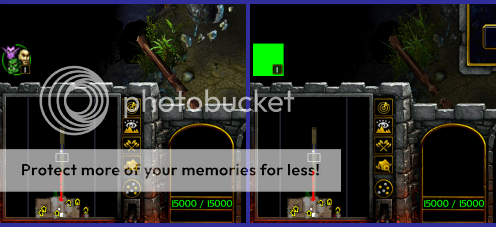
GreenIcon-1.png

- Thank you in advance!

:thumbs_up:
 
- Could you specify what to rename it into?

Here's what I know I did...

1. Using Wc3 Viewer extracted the icon -"Multiple Units" following this route "Replaceable Textures/WorldEditUI/Editor-MultipleUnits.blp"- in .bmp format.

2. Added the Disabled Layer to the icon and saved as .bmp .

{EDIT}
2.5 I thought that saving as .bmp was wrong, so I saved as .tga but still didn't work.


3. Renamed it by Adding the prefix DISPAS to the already existing name.

4. Converted it into .BLP using Wc3 Viewer.

5. Imported it in my map via Import Manager.

6. Set custom path into this "ReplaceableTextures\CommandButtonsDisabled\DISPASEditor-MultipleUnits.blp".


- What have I done wrong?
 
OK, try those.

• Paths:

BTN_Test.blp:
ReplaceableTextures\CommandButtons\BTN_Test.blp
DISBTN_Test.blp:
ReplaceableTextures\CommandButtonsDisabled\DISBTN_Test.blp

It works perfectly for me. (I've tested, yes. Alpha channel works too)
 

Attachments

Status
Not open for further replies.
Back
Top