• Listen to a special audio message from Bill Roper to the Hive Workshop community (Bill is a former Vice President of Blizzard Entertainment, Producer, Designer, Musician, Voice Actor) 🔗Click here to hear his message!
  • Read Evilhog's interview with Gregory Alper, the original composer of the music for WarCraft: Orcs & Humans 🔗Click here to read the full interview.
  • The Hive's 22nd Icon Contest: Creep Abilities is now concluded, time to vote for your favourite set of icons! Click here to vote!
  • ✅ The POLL for Hive's Texturing Contest #34 is OPEN! Vote for the TOP 3 SKINS! 🔗Click here to cast your vote!
  • ✅ The POLL for Hive's Techtree Contest #20 is OPEN! Vote for the TOP 3 FACTIONS! 🔗Click here to cast your vote!

Need help and/or feedback on my first skin.

Status
Not open for further replies.
Level 3
Joined
Jan 16, 2005
Messages
43
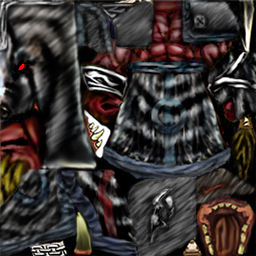
I decided to try out skinning when I got PS7.0, so of course...I made this. The only parts that are recolor are the: Hood, Hands, Arms, Mouth. Everything else was redrawn, some using the stamp tool, but I would smudge it together and redraw it anyway. This is supposed to be a Chaos/Fel Orc Shaman:
kenak_ChaosShaman.jpg


First I request feedback on the skin :D I know it's not great and still has room to improve, which is why I'm posting it here (and not in the DL section like half of the other people out there).

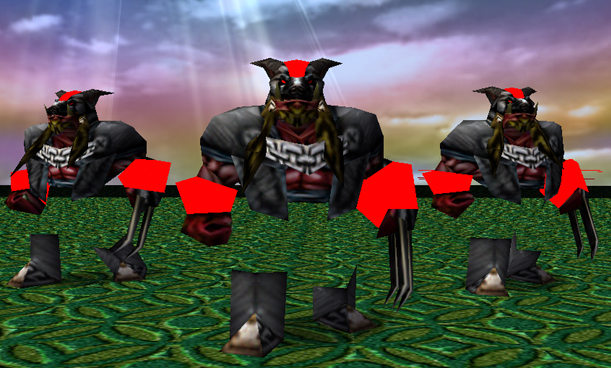
The second problem is for some reason, when the skin goes over the model, it doesn't look like the shaman model. It's missing it's ears and every part that has team color turns completely 1 shade of that color:
kenak_ShamanPics.jpg


As you can see, the team colors are screwd up and the model does not look as it should.

Any help and/or feedback will be greatly appreciated!
 
they look cool. what things did u download and where did u download the thins to make the skins? Then i could prob figure it out?
 
I'm not sure what you mean exactly?

I used Photoshop 7.0, and downloaded Warcraft 3 Image Extractor II to get the skins and convert them from .blp to .tga, and vice versa. I downloaded WC3IE2 from the Tools section of this website, and I own Photoshop 7.0, but you can download Photoshop CS2 at the Adobe website.

No comments on how to fix the skin?
 
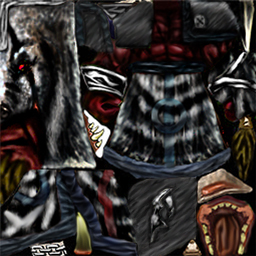
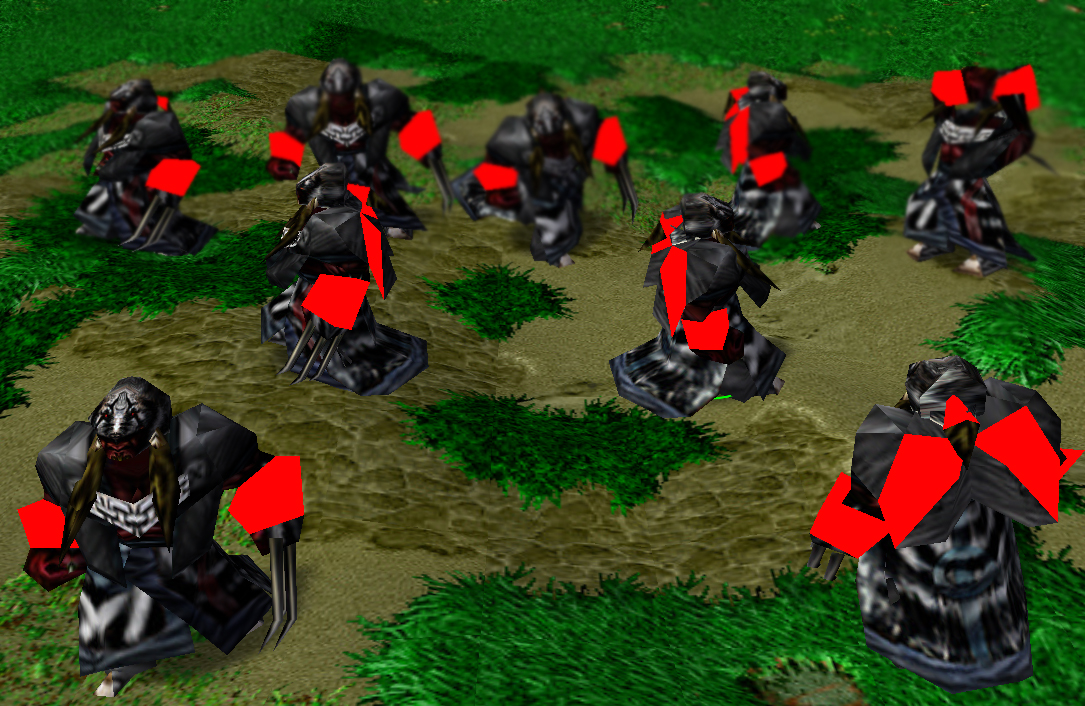
I updated the skin and made it lighter. I also redid the Wolf Mask so it's not freehand instead of recolor. I also redid the cloak and fixed some other parts (as well as fixing the ears). Alpha channels are still screwd up:

Skin in Photoshop
kenak_ShamanSkin.jpg


Skin on the Model
kenak_ShamanWrap.jpg


Ignoring how the Alpha channels are screwd up, any suggestions on the skin?[/b]
 
Haha, I made a typo. I meant to say the Wolf Mask is now freehand, not w/e I said before. The first version of the skin did not have a freehand hood, but now it does.

I will fix the blurriness of the skin, and I will change the color from the red/maroon color to a more orange/orange-red color.
 
Yes, I did smudge together the mask, but then I used the dodge/burn tool to make it look more like hair/fur. If I left it smudged it would look like a silver/white mask without any "texture". I do not see the reason to completely white out the mask and then redraw it when the desired effect can be made by smudeging it together then making fur. In fact, I did the same thing for the shoulders and other parts. It's just the style of the skin I chose to do...

And I didn't use any filers, I think it's stupid to filter a skin and then claim it as your own.
 
Status
Not open for further replies.
Back
Top