• Check out the results of the Techtree Contest #19!
  • Listen to a special audio message from Bill Roper to the Hive Workshop community (Bill is a former Vice President of Blizzard Entertainment, Producer, Designer, Musician, Voice Actor) 🔗Click here to hear his message!
  • Read Evilhog's interview with Gregory Alper, the original composer of the music for WarCraft: Orcs & Humans 🔗Click here to read the full interview.
  • Create a void inspired texture for Warcraft 3 and enter Hive's 34th Texturing Contest: Void! Click here to enter!
  • The Hive's 22nd Icon Contest: Creep Abilities is now concluded, time to vote for your favourite set of icons! Click here to vote!

Modify Loading Screen

Status
Not open for further replies.
Level 8
Joined
Dec 16, 2007
Messages
252
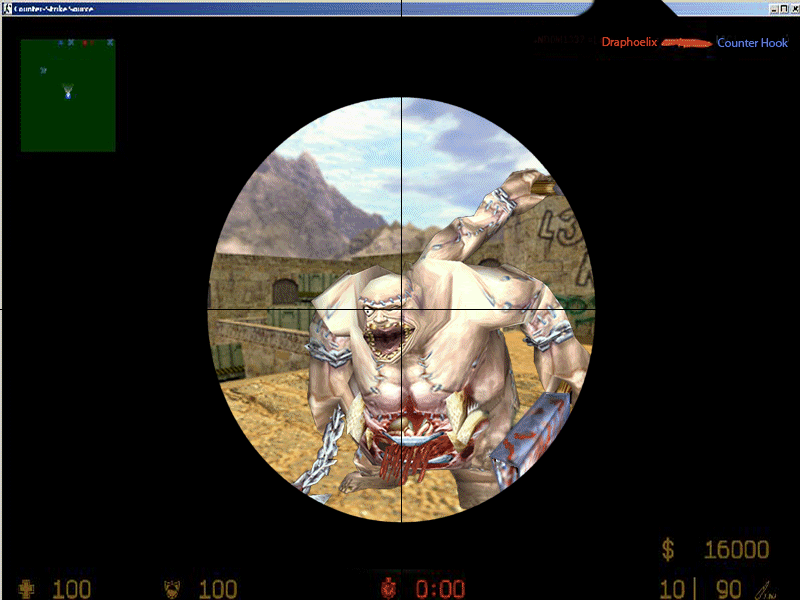
I've requested a loading screen but I got some cons which I really want to be modified.

I want to remove the gun
The scope is too sloppy
I want to have the required files for Loading Screen and Map Prewiew Picture

Anyone mind to do that for me?

Here's the loading screen btw.
 

Attachments

Dude, the gun is nearly imposible to remove... Please send another pic without the gun...
The only thing i could produce is this-> I used the normal WcIII Abomination...
 

Attachments

  • Abomination.jpg
    Abomination.jpg
    305.1 KB · Views: 210
Sorry for double posting but since it's another problem I think it's better not to edit.

Well I imported the FullScreen.blp, and I edited the custom path to FullScreen.blp, then I imported the loading screen.mdx, went to the Loading Screen and used the loading screen.mdx. But it's all black, and I changed the custom path on the war3mapPrewiew too, and it was all white.
 
the image I posted has no alpha atm, so open the .blp and see if thats all black. You can do this by either going to doodads -> doodad texture and selecting it from there
(it should show a thumbnail preview) or using warcraft III model editor to open the file and see if its black or textured correctly.

Also, did you delete the old version and re-import the new version of the loading screen and restart WE before viewing the loading screen, WE is quite funny about imports.

Regards,
MadCD:infl_thumbs_up:
 
I think the skin is alright, I could view it when I select icon and such. But the MDX is all black when I try to select it as model file etc.

And did you edit the prewiew on your first post? Cause it looks the same, still white when I imported it.
 
Status
Not open for further replies.
Back
Top