• Check out the results of the Techtree Contest #19!
  • Listen to a special audio message from Bill Roper to the Hive Workshop community (Bill is a former Vice President of Blizzard Entertainment, Producer, Designer, Musician, Voice Actor) 🔗Click here to hear his message!
  • Read Evilhog's interview with Gregory Alper, the original composer of the music for WarCraft: Orcs & Humans 🔗Click here to read the full interview.
  • Create a void inspired texture for Warcraft 3 and enter Hive's 34th Texturing Contest: Void! Click here to enter!
  • The Hive's 22nd Icon Contest: Creep Abilities is now concluded, time to vote for your favourite set of icons! Click here to vote!

jetpack

  • Like
Reactions: A]mun and Barade
Keywords:
jet pack jetpack
Contents

jetpack (Model)

Reviews
» Wolverabid « Date: 28th of September, 2007 Approval status: Approved Rating: (6) Great Main points: [x] The model is stable and functions properly in Warcraft III. [x] The model displays properly in Warcraft3 Viewer.
» Wolverabid «

Date: 28th of September, 2007
Approval status: Approved
Rating: (6) Great

Main points:
[x] The model is stable and functions properly in Warcraft III.
[x] The model displays properly in Warcraft3 Viewer.
 
its a cool modle it would be fun on goblins and could well use darky's jet pack spell.

heh heh i got the first down load. :)
 
...
i did it, it works perfectly.
i also used the minecart texture to save the space the other two skins take.
get optimized jetpack here.

Some tips for effective use of this model:
1. Use the storm crew form ability for landing and take off.
2. Use an aura instead of attaching with triggers, simply remove all effects and change the target model to the jetpack model.
3. set Art - Animation - Unit walk speed and run speed to 10000
this will not effect actual moving speed just the animation
4. set Art - Death time to 0.10, this will still cause some units to release blood though.
 
I’ve tried this a numerous amount of times and have tried all sorts of things when trying to get this model to work. I was able to do the jet pack off model, and I have been fiddling with this model for a while now in the editor, but I can’t get anything to work. I have tried importing/not importing/ and the renaming of the flame4 skin, but I still didn’t find a way to make it work. I’d appreciate it if someone could find out what the hell I am doing wrong. Also if nobody knows, could someone that got it to work send me the map so I can try to figure out what I am doing wrong.
 
now.. i have all of it imported etc etc.. my question is this: how the hell do i get it to appear on the back of the unit? i cant find anyway to do it.. please help!!
 
WOw i was looking for a jetpack and i found it burried here. Pretty nice, but if they had wings would be perfect. 4.6/5 for not having wings.

LOL just use sphere remove all sphere effects, use 1 atatchment, target - 'chest' and it works. however i wanna use it for a model based on villager. And for war3 units at least those i tested it works but for my custom model based on villager - not - not, the jetpack is at his right hand lol...
 
This Is A Awsome Model Up Up And Away Guys

Poor Blood Mage Wants A Jet Pack Like The Rifle Man And FootMan Hahahahaha Rofl Mate Nice Joke And Nice Model 10/10:fp::infl_thumbs_up:
 
umm listen up here for those who dont know how to make its pretty simple i am a new map maker my self it was very hard to find out i had to edit like 50 maps of som1 else its kinda funny and wierd of wat i did to those maps and that i had to download it again well wat ever just keep making maps there are some maps with attachments u will find and u will play once in awhile edit those find out just go to spells and stuff well good luck :infl_thumbs_up:
 
well guys good luck at making maps and 5/5 and i saw some wings they not that easy to find :D :infl_thumbs_up:
 
Great work works fine :)
I just needed this for a jetpack jump spell :)

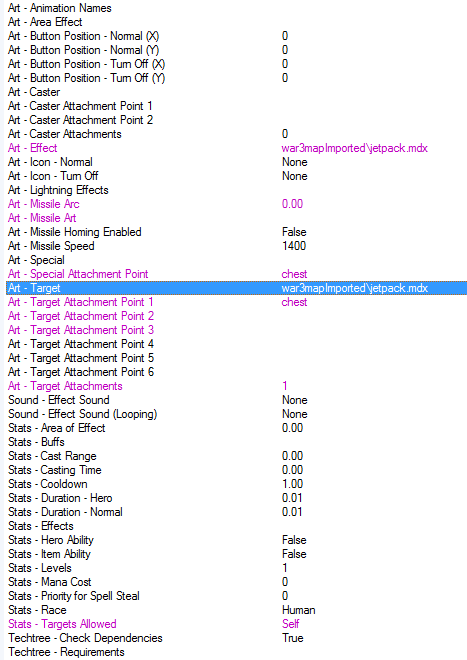
Search at Object editor for the -> Ability: Sphere, Copy this ability and paste it give it a name then make it like this below and it should work:
BrEJF.png

Make sure u imported everything and that the paths are correct

Good luck and thanks for the jetpack! 5/5
 
Back
Top