• Check out the results of the Techtree Contest #19!
  • Listen to a special audio message from Bill Roper to the Hive Workshop community (Bill is a former Vice President of Blizzard Entertainment, Producer, Designer, Musician, Voice Actor) 🔗Click here to hear his message!
  • Read Evilhog's interview with Gregory Alper, the original composer of the music for WarCraft: Orcs & Humans 🔗Click here to read the full interview.
  • Create a void inspired texture for Warcraft 3 and enter Hive's 34th Texturing Contest: Void! Click here to enter!
  • The Hive's 22nd Icon Contest: Creep Abilities is now concluded, time to vote for your favourite set of icons! Click here to vote!

Issues with Cooldown Indicator model?

Level 8
Joined
Aug 11, 2010
Messages
273
Hello!

I've been having some weird issues with the Cooldown Indicator I used to use prior to Reforged (shown below; issue highlighted in red) and for whatever reason it doesn't actually seem like post-Reforge the cooldown indicator overlays correctly (this wasn't an issue prior to Reforged, everything was properly covered).

I'm a huge fan of this Cooldown Indicator so any help on the matter would be greatly appreciated -- as it stands -- it's far too difficult to overlook for me to use the indicator as-is.

Image of Issue:
image.png
 

Attachments

I don't know the answer but I'm interested in this topic, can you show me how to replace it in WE
Yeah -- if you mean just importing the (or an) cooldown indicator into your custom map. You'll just import the model (.mdx file) in the Import Manager and set the filepath to "UI\Feedback\Cooldown\UI-Cooldown-Indicator.mdx"

In this instance, the Cooldown Indicator also has a texture (.blp file) which you'll import as "UI\Feedback\Cooldown\cooldown.blp".

I cannot recommend using this particular cooldown indicator right now due to the issues I laid out on this thread, but, this one and this one also exist. I can confirm the Clock UI works properly and covers everything even post-Reforged.

I just prefer the one I'm using here so I'm hoping someone could assist me in fixing it.
 
Yeah -- if you mean just importing the (or an) cooldown indicator into your custom map. You'll just import the model (.mdx file) in the Import Manager and set the filepath to "UI\Feedback\Cooldown\UI-Cooldown-Indicator.mdx"

In this instance, the Cooldown Indicator also has a texture (.blp file) which you'll import as "UI\Feedback\Cooldown\cooldown.blp".

I cannot recommend using this particular cooldown indicator right now due to the issues I laid out on this thread, but, this one and this one also exist. I can confirm the Clock UI works properly and covers everything even post-Reforged.

I just prefer the one I'm using here so I'm hoping someone could assist me in fixing it.
I am also using old versions of warcraft so it will be fine. I would love to answer your question but unfortunately I am also a newbie, my level of understanding here is much lower. Thank you for the useful information
 
I suspect Blizzard make changes to accommodate HD that renders these issues to appear. Is there a pre-Reforged image to help with comparison?
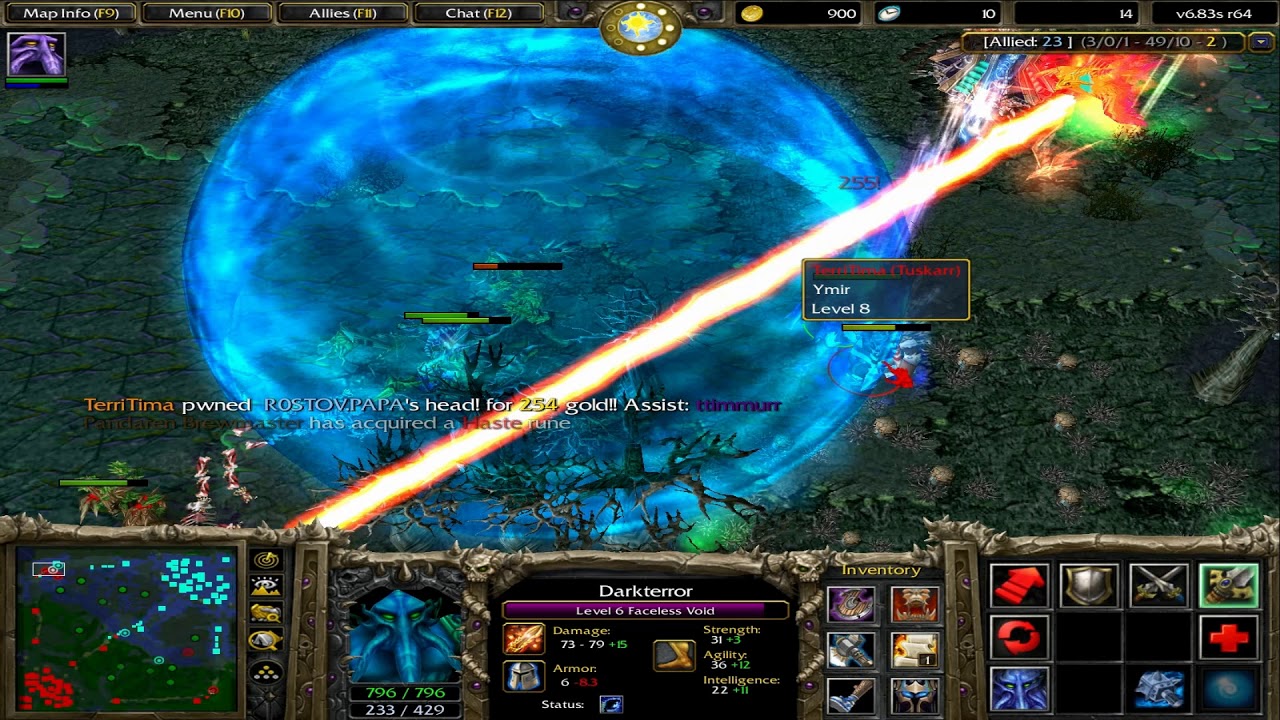
Alas, I'm afraid I didn't have that kind of foresight. I was hoping that I could find something that was specifically related to my map(s) but I don't have much. I'm pretty certain that DotA uses the same cooldown indicator, though...? As a result, I was able to find examples of how it SHOULD look.

Dota2HeroesClash-IngamePreview-Lina000.jpg

hq720.jpg

maxresdefault.jpg

Furthermore, the resource Faerie Dragon Spellpack v1.1 appears to also be using the exact same cooldown indicator (and the image shows correctly the before, which looks completely different with how it does now).
 
Back
Top