• Listen to a special audio message from Bill Roper to the Hive Workshop community (Bill is a former Vice President of Blizzard Entertainment, Producer, Designer, Musician, Voice Actor) 🔗Click here to hear his message!
  • Read Evilhog's interview with Gregory Alper, the original composer of the music for WarCraft: Orcs & Humans 🔗Click here to read the full interview.
  • The Hive's 22nd Icon Contest: Creep Abilities is now concluded, time to vote for your favourite set of icons! Click here to vote!
  • ✅ The POLL for Hive's Texturing Contest #34 is OPEN! Vote for the TOP 3 SKINS! 🔗Click here to cast your vote!
  • ✅ The POLL for Hive's Techtree Contest #20 is OPEN! Vote for the TOP 3 FACTIONS! 🔗Click here to cast your vote!

Importing Files on my Map from my other map

Status
Not open for further replies.
Level 9
Joined
Apr 22, 2020
Messages
431
Hello guys, i'm a little confused on importing the files of my previous maps to my new one. I want to import the files of my 2 previous maps to my new one i already know to use the export all object data in the object editor same goes for the import manager and triggers but, when i import the files on my second map and select import all object data again for the files on my second map it says it will replace the existing files inside the object editor same goes in the import manager and triggers. Is thier a way to import both the files of my 2 maps to my new one?
 
Download and MPQ editor that supports wc3 maps, open the map and extract your files of choice, you can then use ethe same program to insert files into your other map without removing existing files.
MPQ Editor? Huh, never heard of this program before. Can you tell me how to use it exactly? Like where should i put the MPQ Editor and should i import it from my map or something? Also can you give me a link for me to download it. Thanks!
 
MPQ Archives - Downloads

1. Download the editor
2. Start the program, might need to press ok on a few popups (make sure you remember the extract folder)
3. Right click files/folders>extract OR drag and drop files into a folder of choice
4. Open up another map with the MPQ editor and drag and drop the extracted files into it

Overall you should be able to transfer all imports in 5 minutes most likely.
 
MPQ Archives - Downloads

1. Download the editor
2. Start the program, might need to press ok on a few popups (make sure you remember the extract folder)
3. Right click files/folders>extract OR drag and drop files into a folder of choice
4. Open up another map with the MPQ editor and drag and drop the extracted files into it

Overall you should be able to transfer all imports in 5 minutes most likely.
Forgive me but i'm still confused, what do you mean of the 3rd part? I open up Ladik's MPQ Editor and there is only the Open MPQ and New MPQ Button. Can you make it alittle detailed for a newbie like me.
 
Exactly, you use the open MPQ option and then select your map.

upload_2020-9-18_15-36-4.png
 
See step 3 and 4
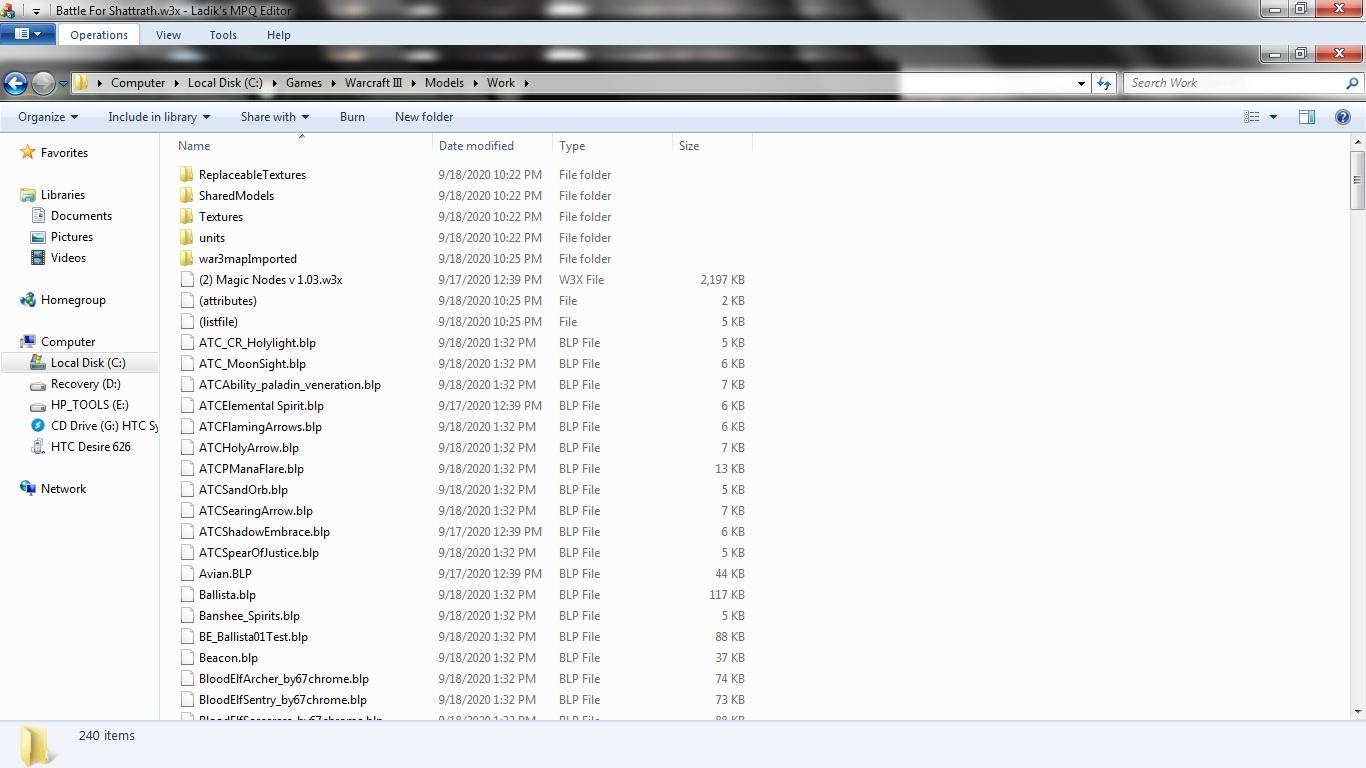
Well, i did what you said i have right clicked on the map file and selected extract and it moved into a Folder named "Work" and i opened my second map in the MPQ Editor again and Extracted the the Map File and moved it to same place as the first map that i have extracted. So what is next?
 
You only extract from the first map. You then take the files in the work folder and shove them into the other map after opening the second map.
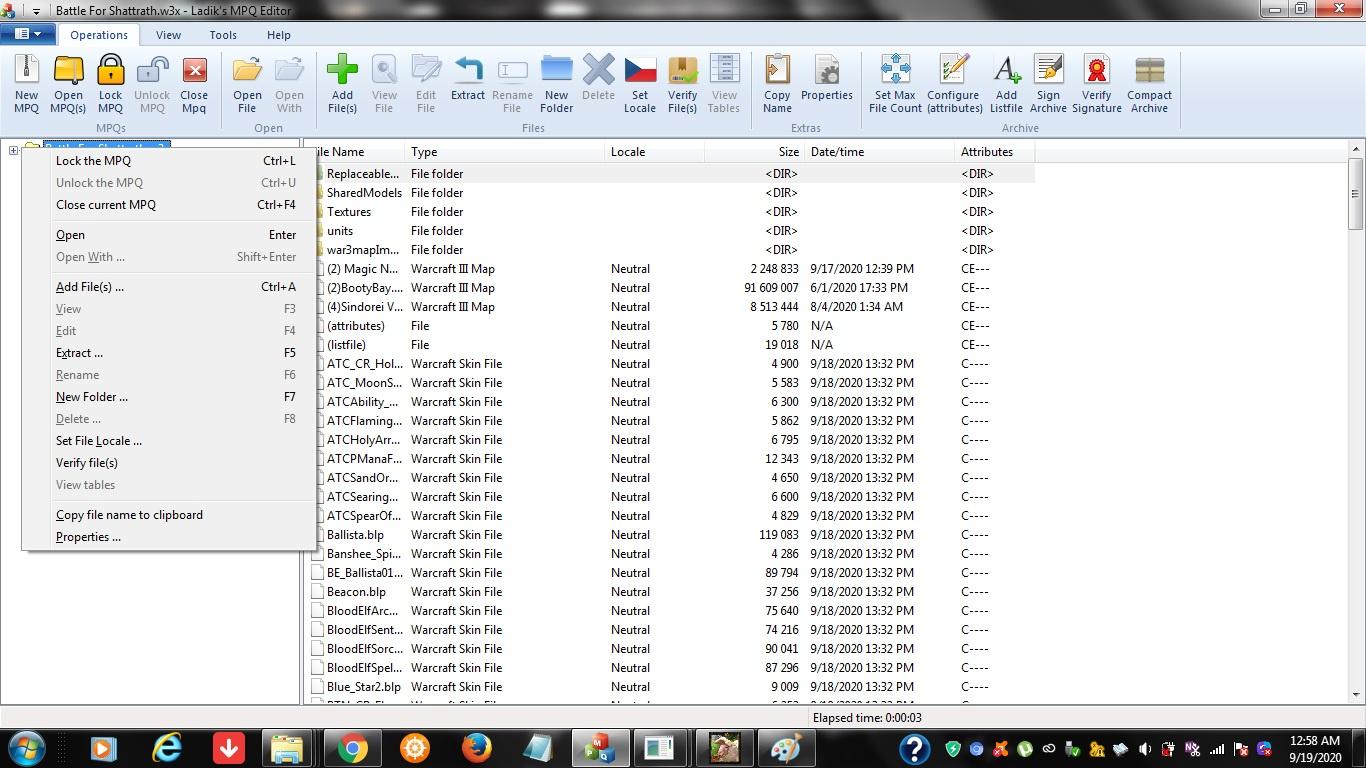
Just want to make sure though am i doing this right?
95IkVBC.jpg

I right clicked the map file and selected extract.
js0fYxq.jpg

And that is what popped up, i also did the same for my second map and saved it in the same folder.
 
Okay then, let me guess this straight, I open my first map in the MPQ Editor and extract all of the files that are inside that map saving it to another folder which is the "Work" Folder and after that i will take all the files in the "Work" Folder and save them to another map? after opening the second map? so what should i do with the second map before i save the "Work" files from another map? You know Screenshots and Precise Explanation will help me better of understanding this kind crap. LOL.

Edit: Or you could do it for me since you know how to can you do it for me? i can just send you the maps. Well if you want to of course i won't force you.
 
Last edited:
Status
Not open for further replies.
Back
Top