• Check out the results of the Techtree Contest #19!
  • Listen to a special audio message from Bill Roper to the Hive Workshop community (Bill is a former Vice President of Blizzard Entertainment, Producer, Designer, Musician, Voice Actor) 🔗Click here to hear his message!
  • Read Evilhog's interview with Gregory Alper, the original composer of the music for WarCraft: Orcs & Humans 🔗Click here to read the full interview.
  • Create a void inspired texture for Warcraft 3 and enter Hive's 34th Texturing Contest: Void! Click here to enter!
  • The Hive's 22nd Icon Contest: Creep Abilities is now concluded, time to vote for your favourite set of icons! Click here to vote!

How can I hide parts of a mesh during specific animations using 3ds max and neodex?

Status
Not open for further replies.
Level 3
Joined
Feb 25, 2018
Messages
15
Hi guys, I'm working on a building model. I'd like to have construction and upgrade animations which require me to hide part of the mesh depending on what part of an animation the model is. What's the best way to go about this?
 
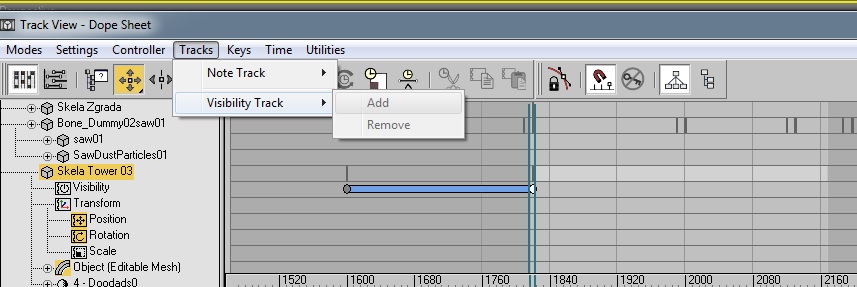
The way I done it in 3Ds max 5 is by opening Track View - Dope Sheet.
Visible.jpg
Select your mesh and click Tracks and add Visibility track on it. Now you right click on the Visibility and in Assign Controller choose On/Off. Now you can add keys and adjust visibility to whatever key frame range you wish. I have a building in max file so you can download and take a look if you have version 5. Modeling Contest 23: POLL
 
Status
Not open for further replies.
Back
Top