• Check out the results of the Techtree Contest #19!
  • Listen to a special audio message from Bill Roper to the Hive Workshop community (Bill is a former Vice President of Blizzard Entertainment, Producer, Designer, Musician, Voice Actor) 🔗Click here to hear his message!
  • Read Evilhog's interview with Gregory Alper, the original composer of the music for WarCraft: Orcs & Humans 🔗Click here to read the full interview.
  • Create a void inspired texture for Warcraft 3 and enter Hive's 34th Texturing Contest: Void! Click here to enter!
  • The Hive's 22nd Icon Contest: Creep Abilities is now concluded, time to vote for your favourite set of icons! Click here to vote!

Hive's Simple Edit Resources Thread

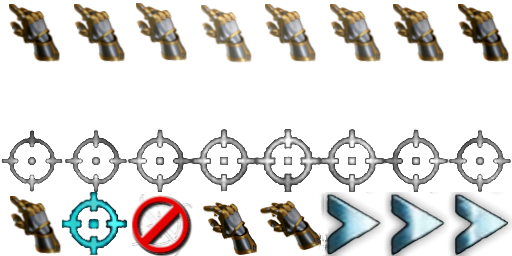
[TD] --BLUE COMMAND ICONS--

82f7fa6f1fb2e5fdccbc2b35fc30fb5d_90914.png

161fb5fcc325a056eb1c6b34687e9cd8_91045.gif
891869a958e489f791ff29fd9702d278_91044.png
192b3d19fd47aa29c2a06b8ecfd7ad74_90917.png
c22ca31634fe6fa1183996f2aadda379_90915.png


6c3f302fc83e98956eb349fb034cf4d6_90916.png

d4bbda39383cb9f3b5679bf1df360476_90913.png


Download Instructions
Right-Click on the icon you want and select 'save image as...'
then get Button Manager to convert to BLP file and format into
BTN and DISBTN versions.

CREDITS: Hold position and attack not mine and I am not sure where they all came from.
The rest are blizzard's. I simply did the recolor.

Crap! Where's the "Move" one? xD
Good Catch! I got it! Thanks.
 

Attachments

  • move.png
    move.png
    3.7 KB · Views: 190
Last edited:
[TD]
Recolors, Screenshots and Other Possibly Useful Icons
[/TD]

Warden Evasion
2c01a359367590280a9c492fc1a85ac6_102499.png
35bd12a214ddd43fa6ba3f790dd87d4e_102501.png
f13708b2e921d1fddcfbc4c84630f277_102500.png

Demon Hunter Mirror Image
a34ed22c1e7bf560679ac7d6d58f946e_102417.png

Kael Evil
7284895890b296c2548d9934617887b5_89323.png
397fd9245f606335e5d026dc767011a5_89324.png

Shadowsong Glaive

0915de4af82e154072715905b9cc51d3_72613.png
b16eac24c57a83db2081ee89fd929378_102433.png
bb384888c2bba2f31ca1ccd5384fc1e6_102434.png

Archimond's Spells
Dust2Dust Immolation Charm Resurrection
630d57086adffc788c9cb39458aca1f9_87749.png
12ee2417776286970a6c9b7fe0509e4f_87747.png
a3527d9c10646926e1723690299389bb_87746.png
431d6827e1dbb2a54186a027bfa6954e_87734.jpg

Draenei/Unbroken/whatever

b9a79d3a58191c11b246ace9fe09888f_73187.jpg

Frost Pact
b20830d1ef95b0ed91144af4751d9736_73193.jpg

Blood Elf Recolors
d46c01842cff4435575e9b21069f84e4_72614.png
7eaee2ec56b8f9d2216f50bd3998a04e_72606.png
00f7ffe50ac6a6e5e2cce2aa4b5d7a29_72615.bmp
BTNBloodWarden.png
Buildings in Red
ce7199c548a440c2df0e4567f1dd782b_72605.jpg
5e4ceb334ff115c806d678dda4fcd6b8_73194.png
8f61758cb898da12a84229a58ddfa146_73188.png
45988397e42b318cf34ba37fb61cc7de_73189.png
efcb0291a5326b78920a460e13168c15_73190.png
c6ed3ab3faa75023842552097e8b6c6e_73196.jpg

Wood Elf Warden
23769ac553f434ed1c839e70370a60cd_73182.png
12f81b73f32443e38ddcd0ae36ffb911_72610.png

Tropical Hut
f939b576dd2f593e9bfe1b648454e038_73181.jpg

Akama / Draenei
ddc9ba44ce48c100c52d6f6a6260ff95_72721.jpg

Templar
b89f3fbb88346cc4142ce92055b4c4de_72604.png

Passive Slow
e0434e55d4a76136107c6a604050c3b8_102381.png

Mounted Archer
e07fd2eb1407bd913b69478d1a1b86b0_72607.png
[tr]

Download Instructions
Right-Click on the icon you want and select 'save image as...'
then get Button Manager to convert to BLP file and format into
BTN and DISBTN versions.
 
Last edited:
Last edited:
[TD]
The U.S. Marine
226052-albums6645-picture73496.png
DOWNLOAD LINK

[TD]
Royal Highness
226052-albums6645-picture72621.jpg

[TD]
Astromancer
226052-albums6645-picture73203.jpg
decacf0773c2538d727203b4289de600_73495.png
import
Import the skin to the following path:
TexturesPeasant.blp
[/TD]
3b2b2a64c56772ac1a54ca578197008d_72617.jpg

import
Import the skin to the following path:
Units\Human\Sorceress\BloodElfSorceress.blp
[/TD]
import
Import the skin to the following path:
units\Human\Jaina\Jaina.blp
[/TD]

[TD]Wood Elf Recolor Skins


Custom Selection Circles

with a nice fade from the edge to the center.
[/TD]
 
Last edited:
It would probably be best if your merge them into one post,since they are taking up quite a bit of space

Edit:You would probably hit the character limit,true
 
Use a pastebin for example, just fellow the site rule.
I am using pastebin.

This thread is a little different than other threads because it is for posting resources, not just discussion. Each resource might stand on it's own if it was worthy of a forum. Therefore, it seems sensible that resources could get a post if they seemed worth it. Obviously a single Icon should not take a post if it is followed by another. That's why I put the Icons all in one post. But the UIs seem worth having their own post. I am also grouping the Skins together. I don't think this violates the rules because it is in the spirit of the law. This thread isn't used for the same purpose as other threads. What I am doing is serving the purpose in the best way I can. I don't see how that could be failing to follow the rules. Also, please note that there is a character limit as whitefang mentioned. It wouldn't all fit.
 
Last edited:
Guys, the reason the double-post rule exists is to stop people from spamming forums and/or self-bumping. Ignoring the latter, "spamming" can be defined as "uselessly posting to annoy/antagonize/etc"... And LegalEase is doing none of those things. He's posting useful resources of his own creation in a thread about useful resource posting.

It's an obvious exception. The rules are not meant to be followed blindly, but understood & followed judiciously.
 
[TD] --BLUE COMMAND ICONS--

c22ca31634fe6fa1183996f2aadda379_90915.png
161fb5fcc325a056eb1c6b34687e9cd8_91045.gif
891869a958e489f791ff29fd9702d278_91044.png
192b3d19fd47aa29c2a06b8ecfd7ad74_90917.png

6c3f302fc83e98956eb349fb034cf4d6_90916.png

d4bbda39383cb9f3b5679bf1df360476_90913.png


Download Instructions
Right-Click on the icon you want and select 'save image as...'
then get Button Manager to convert to BLP file and format into
BTN and DISBTN versions.

CREDITS: Hold position and attack not mine and I am not sure where they all came from.
The rest are blizzard's. I simply did the recolor.

Crap! Where's the "Move" one? xD
 

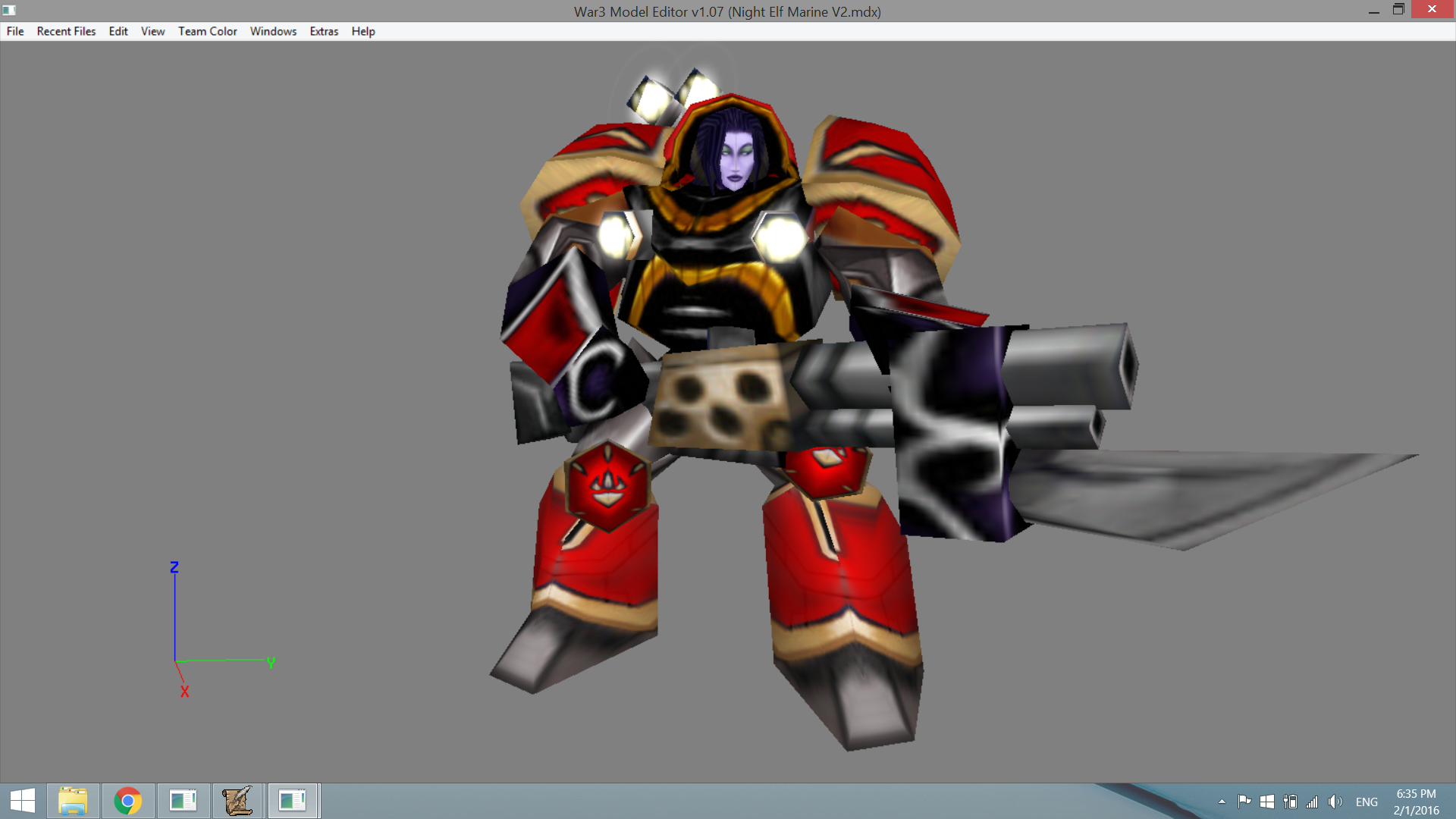
Night Elf Marine

Screenshot


Night Elf Marine

Description: I got bored today, so why not.
----------
As the Night Elves lose their immortality, many became disillusioned.
But for some, this was also an opportunity to explore beyond their existence.
When a Sentinel leaves behind her livelihood and heed the call of Koprulu Sector's own, this is the result.

Resource Type: Model
Filesize: 130 KB
Credits: Blizzard Entertainment
Path: Uses native textures.
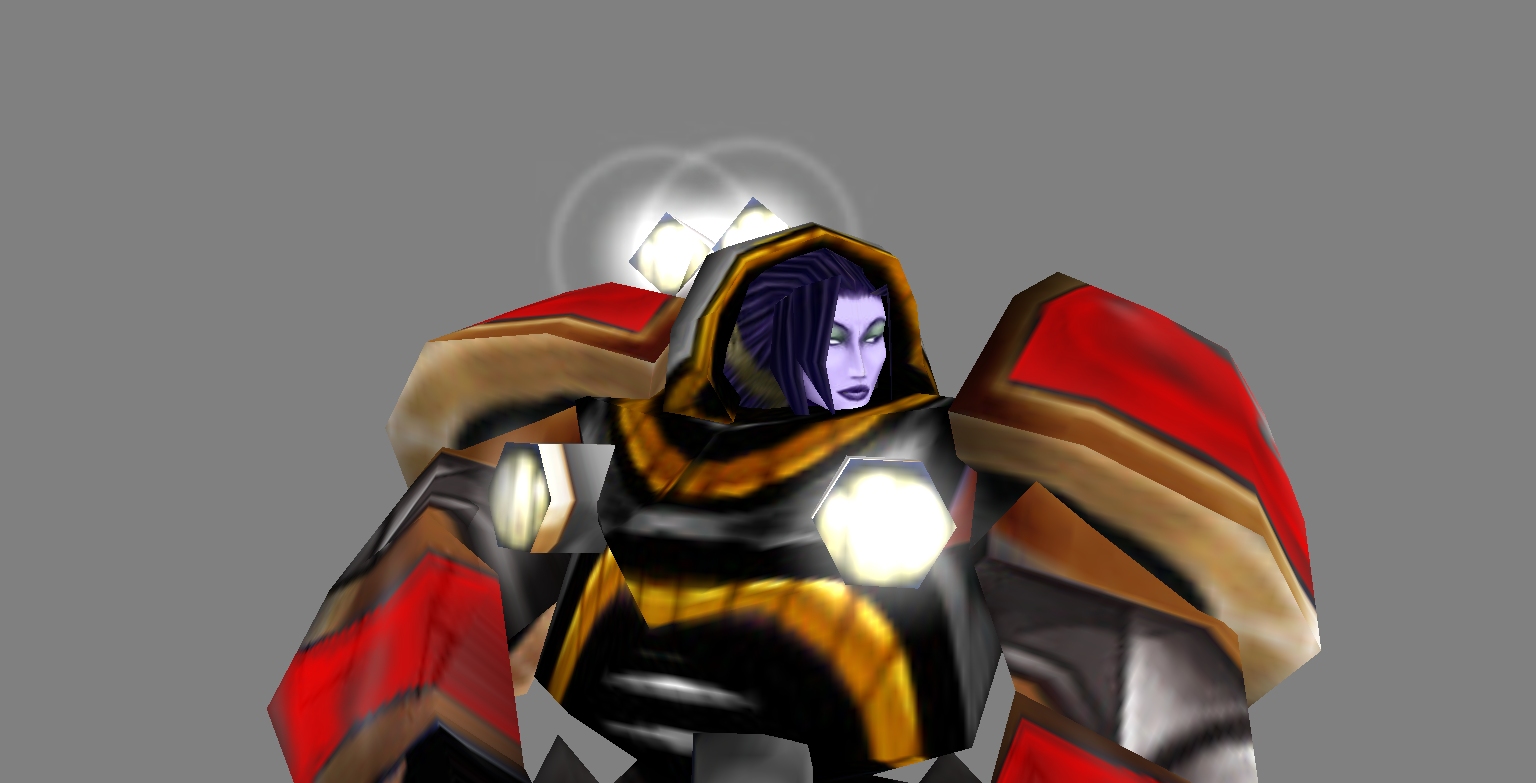

attachment.php
 

Attachments

Night Elf Marine

Screenshot


Night Elf Marine

Description: I got bored today, so why not.
----------
As the Night Elves lose their immortality, many became disillusioned.
But for some, this was also an opportunity to explore beyond their existence.
When a Sentinel leaves behind her livelihood and heed the call of Koprulu Sector's own, this is the result.

Resource Type: Model
Filesize: 130 KB
Credits: Blizzard Entertainment
Path: Uses native textures.


attachment.php

It looks good but:
You could improve it by adding new things and then you could post it at the models section.
 
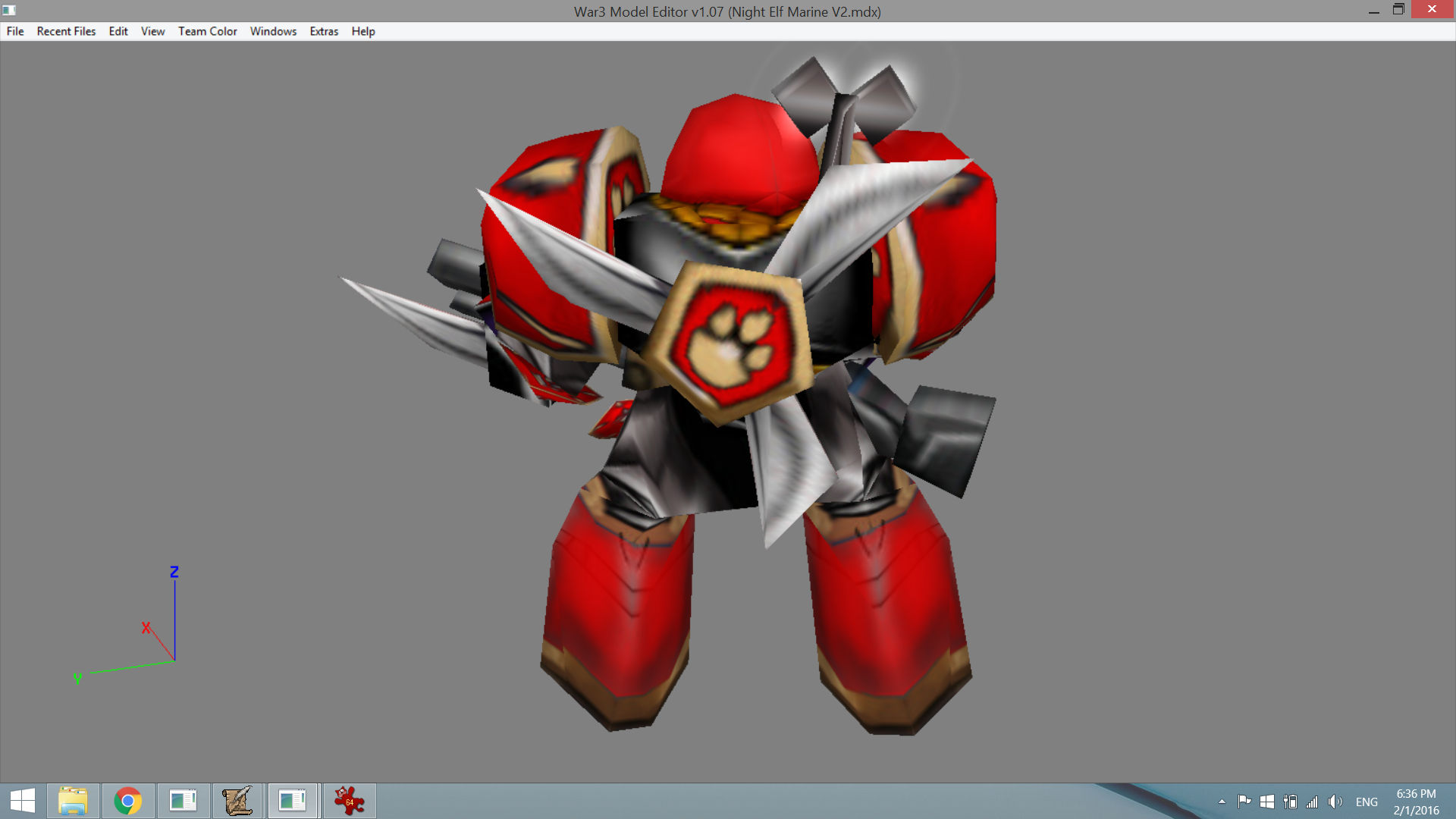
Updated the Night Elf Marine model, now features an additional texture (Huntress) and a new attack animation that utilizes the bayonet.

6ae61048f6.png


224e9d8be4.png
 

Attachments

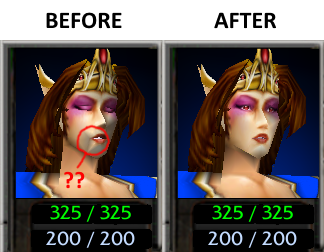
Small fix to the vanilla Sorceress models, no geometry change involved. Put them in Units\Human\Sorceress\
attachment.php
 

Attachments

so I found a dark elf skin 67chrome had made for a demoness model, but the demoness model doesnt looks elvish at all so I changed a few things in demoness model
1-removed the wings
2-made ears look elvish
3-removed weapon since it didnt fit
the path for skin is Darkelf.blp

NOTE:the skin is not mine, its 67chromes

NOTE2:the animations are still demonesses animations, since I dont know how to edit animations and its so hard me and Ill screw it up

NOTE3:the model doesnt have any weapons since the demoness model weapon didnt fit, and I dont know how to attach weapons to models

LastNOTE:it would be pretty cool if someone changed the animations to be more fitting for an elf, and It would be pretty cool if someone attached two fittig blades(or a blade and sheild) to the hands
 

Attachments

Attachments

Last edited:
I claim this 300th post for RACC!

Anyway,thank you Legal Ease,you just did me a huge favor.If you are interested in knowing why,vm me.
 
Back
Top