• Check out the results of the Techtree Contest #19!
  • Listen to a special audio message from Bill Roper to the Hive Workshop community (Bill is a former Vice President of Blizzard Entertainment, Producer, Designer, Musician, Voice Actor) 🔗Click here to hear his message!
  • Read Evilhog's interview with Gregory Alper, the original composer of the music for WarCraft: Orcs & Humans 🔗Click here to read the full interview.
  • Create a void inspired texture for Warcraft 3 and enter Hive's 34th Texturing Contest: Void! Click here to enter!
  • The Hive's 22nd Icon Contest: Creep Abilities is now concluded, time to vote for your favourite set of icons! Click here to vote!

Hero Button Position Tavern

Status
Not open for further replies.
Level 12
Joined
May 28, 2015
Messages
382
Help! I've been having this weird problem in my wc3. Whenever I assign a specific coordinate to my hero in a tavern, it doesn't show in the desired coordinates..


For Example:

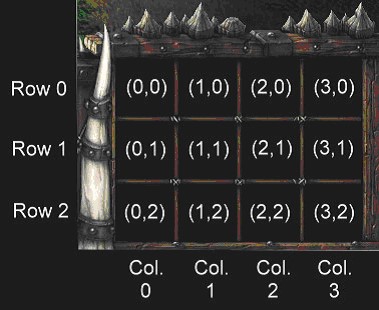
I assigned the hero in Y=3 X=2 but whenever I test the map it goes Y=3 X=1 sort of like that.
 
Have you tried other coordinates? Y=3 is definitely not a valid spot to put any icons, so it may cause trouble.

If two icons overlap, it will choose the first one in the list of abilities / etc and the rest will be shifted to fit into an empty slot.

I don't know what exactly is your problem. Can you show a screenshot of your object editor data and the icon in-game?
 
Click 'Go Advanced'

Scroll Down

'Manage Attachments'

A new window will open
Click 'Choose File' --> Navigate to your image.
Hit Ok
Scroll Over --> Hit 'upload'.
Once uploaded you will see it added to the Attached Files under your post (Where you Clicked 'Manage Attachments')
Close the Window and hit 'submit reply'.
 
uniteditor1.jpg
 
Based on the screenshot, regardless of where the icon is supposed to be, X=2 and Y=0 should not put it where it is in the in-game screenshot. That's really weird. Maybe try putting the unit in other buildings? See where it ends up in those.
 
wtf none of those match any of their coordinates.

In your list, is the first number per pair Y or X?
 
I don't think that is how it works in my editor. X is the column (horizontal coordinate) and Y is the row (vertical coordinate). Try making them all X=0, Y=0, and see where they end up. Then move them one at a time from there. My only guess is that the one with Y=3 is somehow breaking it, because that is invalid for me in my editor.

Other than that, maybe your editor is messed up or something. I don't know what would cause it to do that lol.
 
When I input "3" in the "Art- Button Position X" it errors. But if I input "2" in the same Art-Button Position, the editor accepts it.

Also all of my heroes except the four heroes which are in my screenshot functions normally in taverns.

One of the four heroes that I input coordinates 0,0 in it places the hero in another button position and not the one that i input to the hero.
 
Did you try setting them all to 0,0? Are they broken when you only have one hero in the tavern? Try putting in just one at a time. Pretty much have to brute force random things to figure out what is causing the problem. I have never run into a problem like this.

On everyone else's editor, X and Y seem to be the other way around. I don't know what made it different for you. If you hold shift when you go to edit the field, you can put in any number you want. Maybe try that and switch all the X and Y values just to see what happens.
 
I found something.. There are some specific coordinates which works in those heroes.

I changed one of my hero's coordinates from 2,0 to 3,0 and it placed accordingly.. the only problem is it doesn't place when i set it to 1,0.. its like there's a button blocking but there's not

I also found something while tweaking my triggers for hero pick... I accidentally placed "Add (Unit) to selection" and whenever I pick a hero, it selects the hero and the tavern at the same time. After that the tavern show a Stop Command right in the button position 1,0 but whenever i deselect the tavern and select it again the button disappears.

The building doesn't have movement to begin with and I solely based the building to the unit "Tavern" in the Neutral Passive category.
 
Status
Not open for further replies.
Back
Top