

Ralle
Owner
- Joined
- Oct 6, 2004
- Messages
- 10,387

Warhammer 40,000 TD
Introduction
All messages in Warcraft are stored in the Gameplay Interface. In there you will also find paths to different icons used on the screen which you are also able to change.
But in this tutorial we are going to change some of the text.
In some maps it says info instead of quest.
In Warhammer 40,000 TD I renamed the upkeep bar to WH40k TD.
Changing Gameplay Interface
First bring up the Terrain editor, then click Advanced, then Gameplay Interface and find the things you want to change.
Remember to tick on "Use Custom Game Interface"
Often Changed Constants:
Text - General - 'Optional Quests'
Text - General - 'Quests'
Text - General - 'No Upkeep'
Text - General - 'Low Upkeep'
Text - General - 'High Upkeep'
Screenshot
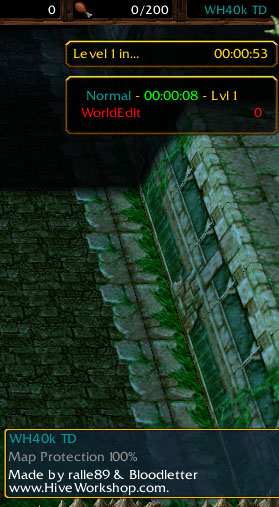
All messages in Warcraft are stored in the Gameplay Interface. In there you will also find paths to different icons used on the screen which you are also able to change.
But in this tutorial we are going to change some of the text.
In some maps it says info instead of quest.
In Warhammer 40,000 TD I renamed the upkeep bar to WH40k TD.
Changing Gameplay Interface
First bring up the Terrain editor, then click Advanced, then Gameplay Interface and find the things you want to change.
Remember to tick on "Use Custom Game Interface"
Often Changed Constants:
Text - General - 'Optional Quests'
Text - General - 'Quests'
Text - General - 'No Upkeep'
Text - General - 'Low Upkeep'
Text - General - 'High Upkeep'
Screenshot


