• Check out the results of the Techtree Contest #19!
  • Listen to a special audio message from Bill Roper to the Hive Workshop community (Bill is a former Vice President of Blizzard Entertainment, Producer, Designer, Musician, Voice Actor) 🔗Click here to hear his message!
  • Read Evilhog's interview with Gregory Alper, the original composer of the music for WarCraft: Orcs & Humans 🔗Click here to read the full interview.
  • Create a void inspired texture for Warcraft 3 and enter Hive's 34th Texturing Contest: Void! Click here to enter!
  • The Hive's 22nd Icon Contest: Creep Abilities is now concluded, time to vote for your favourite set of icons! Click here to vote!

Extremely odd bug with button position

Status
Not open for further replies.
Level 1
Joined
Jun 13, 2008
Messages
132
Hi there, well I was wondering why my hero button's positions are not following the rules, yes, the buttons do not work well for some reason...
For example if I use x=0, y=0, when I go in the game the button is at x=1, y=0. I don't really understand why this happens, I have tried x=1, y=0 to see if it goes to x=2, y=0, but it stays at x=1 and y=0, finally I tried x=2, y=0, and it works well, so the problem is x=0, y=0. I am really confused, why this is happening, is some trigger I made capable of crash the system like this or what is happening?
 
Hi there, well I was wondering why my hero button's positions are not following the rules, yes, the buttons do not work well for some reason...
For example if I use x=0, y=0, when I go in the game the button is at x=1, y=0. I don't really understand why this happens, I have tried x=1, y=0 to see if it goes to x=2, y=0, but it stays at x=1 and y=0, finally I tried x=2, y=0, and it works well, so the problem is x=0, y=0. I am really confused, why this is happening, is some trigger I made capable of crash the system like this or what is happening?

its just the position of the unit.. the rotation thingy. :ogre_hurrhurr:
 
Yeah, the only reason I can think of for this is that there's already a button in that position. Can you post a screenshot of the ability you're giving to the unit?
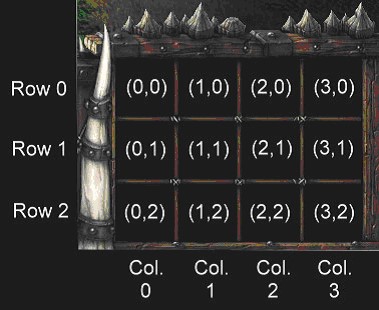
Just in case there's any confusion about the ability button coordinates, here's a picture you can find on Google images:
uniteditor1.jpg
 
The unit that has the buttons incorrectly is a neutral passive unit that sells heros, the buttons of the heros are in the incorrect position, the neutral passive unit does not have attack, does not have move, does not have hold neither patrol, just the buttons of the hero, as it sells the heros, but the buttons of all the x0 heros are in the position x1, if you see the picture above this post, for example in row0 (0,0) gives the same position as (1,0), and (1,0) works well, then (2,0) works well and (3,0) works fine, the problem is (0,0), I dont understand why it works bad if the selling unit does not have anything in that slot...
 
The unit that has the buttons incorrectly is a neutral passive unit that sells heros, the buttons of the heros are in the incorrect position, the neutral passive unit does not have attack, does not have move, does not have hold neither patrol, just the buttons of the hero, as it sells the heros, but the buttons of all the x0 heros are in the position x1, if you see the picture above this post, for example in row0 (0,0) gives the same position as (1,0), and (1,0) works well, then (2,0) works well and (3,0) works fine, the problem is (0,0), I dont understand why it works bad if the selling unit does not have anything in that slot...

I Think there's a bug ability on that position.
or sphere ability.. try to fix the unit first. :ogre_haosis:
 
It must be some strange problem with the heros, because if I add an item to the spot 0,0, the item is in the position 0,0, but if I add a hero in the same spot 0,0, it appears in the position 1,0. It also occurs in the position 0,1 and in 0,2.
I found a strange solution to my problem, I need to create items to replace the hero icons so when the item is bought, the hero is created... So weird... Someone knows what is happening? I think I am the only one who has this problem.
 
That's weird... On my tests, the button position that you cannot use on shops was actually 3,2 (like it seems to be reserved for select unit ability or something)... though those are Item shops...
This reminds me of custom hotkeys in WC3 and how they have the tendency to invert the command card. It may be possible he has Custom Hotkeys enabled which will mess up button positioning.
 
This reminds me of custom hotkeys in WC3 and how they have the tendency to invert the command card. It may be possible he has Custom Hotkeys enabled which will mess up button positioning.

You are correct! it is the custom key that is making the problem. For those who are having this trouble you now know the solution! disable your custom keys and the buttons will be correct!
 
Status
Not open for further replies.
Back
Top