• Check out the results of the Techtree Contest #19!
  • Listen to a special audio message from Bill Roper to the Hive Workshop community (Bill is a former Vice President of Blizzard Entertainment, Producer, Designer, Musician, Voice Actor) 🔗Click here to hear his message!
  • Read Evilhog's interview with Gregory Alper, the original composer of the music for WarCraft: Orcs & Humans 🔗Click here to read the full interview.
  • Create a void inspired texture for Warcraft 3 and enter Hive's 34th Texturing Contest: Void! Click here to enter!
  • The Hive's 22nd Icon Contest: Creep Abilities is now concluded, time to vote for your favourite set of icons! Click here to vote!

copy and paste units

Status
Not open for further replies.
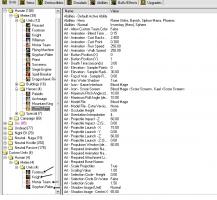
I mean this. as I can copy these 4 units at once and paste?

thump_8672611wa.jpg
 
Or using Import All Object Editor Data at Object Editor.
This will overwrite the custom data starts from 0000.

If you copy paste 1 by 1, it won't overwrite the custom data.

These are pros and cons.

I heard you can Import All Data at once by using LUA Scripts, this is how they manage to do the Bonus Stats system without forcing the user to either copy paste 1 by 1 OR Import All Data using the default feature - this will overwrite Custom Data inside your imported map.
 
I heard you can Import All Data at once by using LUA Scripts, this is how they manage to do the Bonus Stats system without forcing the user to either copy paste 1 by 1 OR Import All Data using the default feature - this will overwrite Custom Data inside your imported map.
Add notes that users needs JNGP for this, and it's broken on one of windows latest patch (Windows 64 Bits?).
 
Status
Not open for further replies.
Back
Top