Follow along with the video below to see how to install our site as a web app on your home screen.
Note: This feature may not be available in some browsers.
Listen to a special audio message from Bill Roper to the Hive Workshop community (Bill is a former Vice President of Blizzard Entertainment, Producer, Designer, Musician, Voice Actor) 🔗Click here to hear his message!
I'm using the model Ligaroo which is insanely huge.
So i set up the scaling value to 0.70 yet the health bar is flying a 100 feet in the air above the unit.
Is there a way to lower the height of the health bar of the unit in the Object Editor?
That will mess up the positioning of the bones therefore the animations. It'll be a huge pain in the ass to go through properly adjusting the size of the model and no one will take that as a request. That's why i asked if there's a solution using the Object Editor.
It's ok bro
I found this Warcraft model health Bar Height.
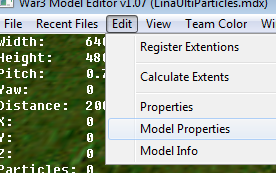
I tried lowering the Maximun Extent Z of the stand animation as Wisdom said but i didn't work.
So i lowered X,Y and Z and it worked.
This site uses cookies to help personalise content, tailor your experience and to keep you logged in if you register.
By continuing to use this site, you are consenting to our use of cookies.