• Listen to a special audio message from Bill Roper to the Hive Workshop community (Bill is a former Vice President of Blizzard Entertainment, Producer, Designer, Musician, Voice Actor) 🔗Click here to hear his message!
  • Read Evilhog's interview with Gregory Alper, the original composer of the music for WarCraft: Orcs & Humans 🔗Click here to read the full interview.
  • The Hive's 22nd Icon Contest: Creep Abilities is now concluded, time to vote for your favourite set of icons! Click here to vote!
  • ✅ The POLL for Hive's Texturing Contest #34 is OPEN! Vote for the TOP 3 SKINS! 🔗Click here to cast your vote!
  • ✅ The POLL for Hive's Techtree Contest #20 is OPEN! Vote for the TOP 3 FACTIONS! 🔗Click here to cast your vote!

A strange stupid problem that happens during animation.

Status
Not open for further replies.
Level 8
Joined
Dec 9, 2005
Messages
520
Ok so I don't know how this came to be.

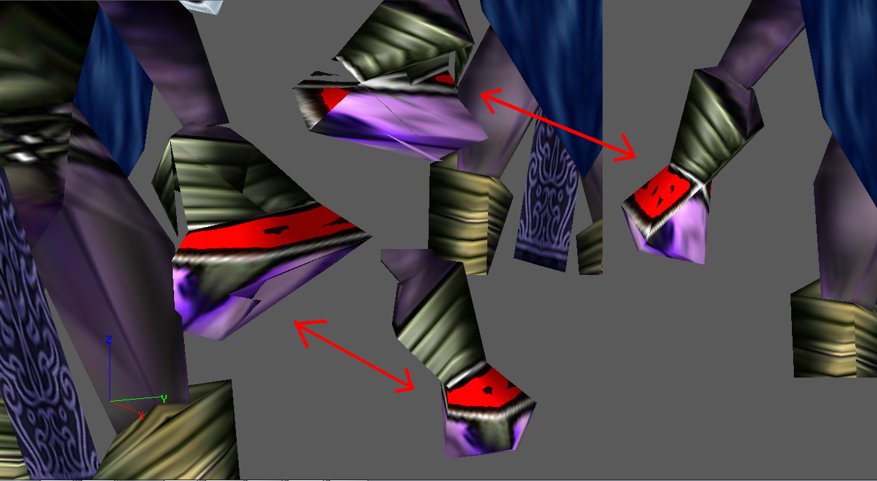
I played around with the Jaina model and reskinned it etc. Everything is fine. It works, no problem, when suddenly after replacing a few skins (using MDLVIS) suddenly I noticed something stupid. Its hand gets distorted like a piece of shit when it's animated.

I attached this picture so you can see (or laugh at it/me if you wish):
attachment.php


See, when it's unanimated, it's fine. But as soon as an animation plays (stand, move, etc) it gets an elephant hand. ONLY on its left non-staff wielding hand.

Anyone know why? Thanks.

I used: Magos Model Editor for material selection from MPQ and MDLVIS for skinning/mapping.
 

Attachments

  • Model Error.jpg
    Model Error.jpg
    66 KB · Views: 1,209
Last edited:
Okay, here it goes:

As I already told you, the vertexes of your hand got somehow assigned to other bones. Here is an easy way to fix that.

save1.jpg

Go to MDLIVS, open your model and click on the modules.

save2.jpg

Select the sequence editor and switch to the bones field (the grey buttons).
Now select the vertexes that are assigned to the false bones. In the bottom left corner the assigned bones will appear.

save3.jpg

Double-Click on the right bone, in our case Bone_Arm2_LArchDruid. Now the bone in the viewer will change it's colour, so you see you selected it. Now click on the grey window button (you see it in the picture). It will reattach all selected vertexes ONLY to this bone. The vertexes are attached to the right bone again now.

save4.jpg


I don't know why exactly it happened, but it might be that you used the uncopple function in the UVW-Mapper in MDLVIS, as it usually reassignes the vertexes to. But I'm not shure.
 

Attachments

Holy shit... You saved me a few hours of tedious hard work ha ha ha. And taught me a new knowledge, which in my tradition means you're entitled to marry my firstborn. I'll be sure to tell my son he'll marry the Great PROXY of Hiveworkshop one day.

Also: You must spread some Reputation around before giving it to PROXY again.
 
Status
Not open for further replies.
Back
Top