

This can be used to visualize some items with a specific UI. You can try a large number of icons in a short amount of time to visualize them see how they would look with the UI on your map. Or you can just try how the icons would look in the default game interface. The script works by taking images from the folders and adding them to the screenshot image; it will always take the most recent one (copy and paste any image, do not cut and paste). So you don't need to remove the old image from the folder; the new copy will load in to the final image. It supports BLP, TGA files as well as many other formats.
The Script:
Paste in a text editor and save as uivis.bat or any name but with the .bat extension
everything is equivalent as in the windows version, save as uivis.sh or any name but with the .sh extension
open terminal in nconvert folder and run:
chmod +x ./uivis.sh && ./uivis.sh
in the folder uivis it would be created a desktop file(~ shorcut)
Some info
The first time the script is run, it will download a screenshot template (default human UI). If you want to try your own screenshot of your map(SD ~ not reforged) with a custom UI and see how it would look, you have to take the screenshot in 1024x768 resolution (configured in the game's video options), you can get it by pressing 'Print Scr' in your keyboard. In your warcraft main folder there is a subfolder of 'Screenshots' copy(not cut) and paste in the folder Screenshot inside the folder called uivis (where you put the images you want in their respective folders). If the script doesn't find any images in the folders icons, it won't display anything.
If you combine items from Hive, you can post images of your visualization in this thread, as many of us want to see how it would look in-game.
- Download nconvert: XnView Software · NConvert and extract it, open the folder and paste the file with the script(uivis.bat) into it.
- Open the file with the script(uivis.bat); it will create a folder called uivis. Go into it and put the images you want in their respective folders.
- Open the script(also called uivis.bat it's like a shortcut) from that same folder (uivis) and it will process the images(all you have pasted) and open the result.
The Script:
Code:
@rem uivis by khopesh
@echo off
setlocal EnableDelayedExpansion
set "SCRIPT_PATH=%~f0"
set "DIR=%~dp0"
if "%DIR:~-1%"=="\" set "DIR=%DIR:~0,-1%"
set /A n=0
for %%a in ("Screenshot" "Hero Icon" "Move" "Stop" "Hold Position" "Attack" "Patrol" "New Skills" "Hero Attribute" "Damage" "Armor" "Gold" "Lumber" "Food" "Item 1" "Item 2" "Item 3" "Item 4" "Item 5" "Item 6" "Idle Peon" "Ability 1" "Ability 2" "Ability 3" "Ability 4" "Ability 5" "Ability 6") do (
    set "sfolders[!n!]=%%~a"
    set /A n+=1
)
set /A n=0
for %%a in ("Screenshot" "49 49" "48 48" "48 48" "49 49" "49 49" "48 48" "49 49" "41 41" "41 41" "41 41" "21 21" "21 21" "21 21" "40 40" "40 40" "40 40" "40 40" "40 40" "40 40" "49 49" "49 49" "49 49" "49 49" "49 49" "48 48" "49 49") do (
    set "isize[!n!]=%%~a"
    set /A n+=1
)
set /A n=0
for %%a in ("Screenshot" "5 34" "792 601" "848 601" "903 601" "959 601" "792 656" "959 656" "522 682" "402 664" "402 704" "591 4" "701 4" "812 4" "661 625" "712 625" "661 674" "712 674" "661 723" "712 723" "5 502" "792 711" "848 711" "903 711" "959 711" "848 656" "903 656") do (
    set "ipos[!n!]=%%~a"
    set /A n+=1
)
set "SCREENSHOT=sc"
set "SCREENSHOT2=sc"
set /A count1=1
cd "%DIR%"
if exist "%DIR%\plugins\" if exist "%DIR%\nconvert.exe" (
    if not exist "%DIR%\uivis\" mkdir "%DIR%\uivis"
    if not exist "%DIR%\uivis\uivis.bat" (
        (
          echo @echo off
          echo "%SCRIPT_PATH%"
        ) > "%DIR%\uivis\uivis.bat"
    )
    if not exist "%DIR%\scriptdepot\" mkdir "%DIR%\scriptdepot"
    if exist "%DIR%\scriptdepot\config.txt" (
        set /A k=0
        for /f "usebackq tokens=*" %%a in ("%DIR%\scriptdepot\config.txt") do (
            set "sconfig_!k!=%%a"
            set /A k+=1
        )
        set /A k-=1
        set "sconfigfile=TRUE"
    )
    if not exist "%DIR%\scriptdepot\config.txt" (
        set /A k=29
        set "sconfigfile=FALSE"
        set "sconfig_0=create once"
        set "sconfig_1=template once"
        set "sconfig_2=is sd or hd"
    )
    FOR /L %%i IN (0, 1, 26) DO (
        set /A "ii=%%i"
        set "nombre_var=sfolders[!ii!]"
        for /f "delims=" %%u in ("!nombre_var!") do set "bc=!%%u!"
        set "tempd=!DIR!\uivis\!bc!"
        if exist "!tempd!\" (
                set "fsiexist=FALSE"
                dir /A-d /b "!tempd!\*" >nul 2>nul && ( set "fsiexist=TRUE" )
                IF "!fsiexist!"=="TRUE" (
                    set "TopBirth="
                    for /f "skip=4 tokens=* usebackq" %%f in (`dir "!tempd!" /A:-D /T:C /O:-D`) do if not defined TopBirth set "TopBirth=%%f"
                    IF "!sconfigfile!"=="TRUE" (
                        set /A h=!ii!
                        set /A h+=3
                        set "savedBirth=sconfig_!h!"
                        if not "!TopBirth!" == "!savedBirth!" (
                            set "sconfig_!h!=!TopBirth!"
                        )
                    )
                    IF "!sconfigfile!"=="FALSE" (
                        set /A w=!ii!
                        set /A w+=3
                        set "sconfig_!w!=!TopBirth!"
                    )
                    set "ab="
                    for /f "tokens=* usebackq" %%g in (`dir "!tempd!" /b /A:-D /T:C /O:-D`) do if not defined ab set "ab=%%g"
                    set "actualFile=!tempd!\!ab!"
                    set "cort=FALSE"
                    if !ii! EQU 0 (
                        set "SCREENSHOT=!actualFile!"
                        set "SCREENSHOT2=!DIR!\scriptdepot\tmp2.png"
                        set "cort=TRUE"
                    )
                    if "!SCREENSHOT2!"=="!DIR!\scriptdepot\tmp2.png" if "!cort!"=="FALSE" (
                        set "size=isize[!ii!]"
                        for /f "delims=" %%o in ("!size!") do set "actualsize=!%%o!"
                        set "pos=ipos[!ii!]"
                        for /f "delims=" %%p in ("!pos!") do set "actualpos=!%%p!"
                        .\nconvert.exe -resize !actualsize! -overwrite -out png -o "!DIR!\scriptdepot\tmp1.png" "!actualFile!" && .\nconvert.exe -overwrite -wmpos !actualpos! -wmfile "!DIR!\scriptdepot\tmp1.png" -out png -o "!SCREENSHOT2!" "!SCREENSHOT!"
                        set "SCREENSHOT=!DIR!\scriptdepot\tmp2.png"
                        set "SCREENSHOT2=!DIR!\scriptdepot\tmp3.png"
                        set "cort=TRUE"
                    )
                    if "!SCREENSHOT2!"=="!DIR!\scriptdepot\tmp3.png" if "!cort!"=="FALSE" (
                        set "size=isize[!ii!]"
                        for /f "delims=" %%d in ("!size!") do set "actualsize=!%%d!"
                        set "pos=ipos[!ii!]"
                        for /f "delims=" %%l in ("!pos!") do set "actualpos=!%%l!"
                        .\nconvert.exe -resize !actualsize! -overwrite -out png -o "!DIR!\scriptdepot\tmp1.png" "!actualFile!" && .\nconvert.exe -overwrite -wmpos !actualpos! -wmfile "!DIR!\scriptdepot\tmp1.png" -out png -o "!SCREENSHOT2!" "!SCREENSHOT!"
                        set "SCREENSHOT=!DIR!\scriptdepot\tmp3.png"
                        set "SCREENSHOT2=!DIR!\scriptdepot\tmp2.png"
                        set "cort=TRUE"
                    )
                )
        )
        if not exist "!tempd!\" (
            mkdir "!tempd!"
            if !ii! EQU 0 (
                set "template=!tempd!\template.png"
                powershell -Command "(New-Object Net.WebClient).DownloadFile('https://i.postimg.cc/s21PSP2L/uihuman.png', '!template!')"
            )
            set /A u=!ii!
            set /A u+=3
            set "sconfig_!u!=data_temp"
        )
    )
    echo !sconfig_0!> "!DIR!\scriptdepot\config.txt"
    for /L %%j in (1,1,!k!) do (
            echo !sconfig_%%j!>> "!DIR!\scriptdepot\config.txt"
    )
    if "!SCREENSHOT!"=="!DIR!\scriptdepot\tmp2.png" goto :lup
    if "!SCREENSHOT!"=="!DIR!\scriptdepot\tmp3.png" goto :lup
    goto :eof
    :lup
    set "fout=!DIR!\uivis\Visualization-!count1!.png"
    if exist "!fout!" (
        set /A count1+=1
        goto :lup
    )
    copy "!SCREENSHOT!" "!fout!"
    start "" "!fout!"
)
Code:
#!/bin/bash
# uivis by khopesh
SOURCE="${BASH_SOURCE[0]}"
while [ -L "$SOURCE" ]; do
    DIR="$( cd -P "$( dirname "$SOURCE" )" && pwd )"
    SOURCE="$(readlink "$SOURCE")"
    [[ $SOURCE != /* ]] && SOURCE="$DIR/$SOURCE"
done
DIR="$( cd -P "$( dirname "$SOURCE" )" && pwd )"
SCRIPT_PATH="$DIR/$(basename "$SOURCE")"
declare -a sfolders=("Screenshot" "Hero Icon" "Move" "Stop" "Hold Position" "Attack" "Patrol" "New Skills" "Hero Attribute" "Damage" "Armor" "Gold" "Lumber" "Food" "Item 1" "Item 2" "Item 3" "Item 4" "Item 5" "Item 6" "Idle Peon" "Ability 1" "Ability 2" "Ability 3" "Ability 4" "Ability 5" "Ability 6")
declare -a isize=("Screenshot" "49 49" "48 48" "48 48" "49 49" "49 49" "48 48" "49 49" "41 41" "41 41" "41 41" "21 21" "21 21" "21 21" "40 40" "40 40" "40 40" "40 40" "40 40" "40 40" "49 49" "49 49" "49 49" "49 49" "49 49" "48 48" "49 49")
declare -a ipos=("Screenshot" "5 34" "792 601" "848 601" "903 601" "959 601" "792 656" "959 656" "522 682" "402 664" "402 704" "591 4" "701 4" "812 4" "661 625" "712 625" "661 674" "712 674" "661 723" "712 723" "5 502" "792 711" "848 711" "903 711" "959 711" "848 656" "903 656")
SCREENSHOT=""
SCREENSHOT2=""
count1=1
if [[ -d "$DIR/Plugins" ]] && [ -f "$DIR/nconvert" ]; then
    mkdir -p "$DIR/uivis"
    t="$DIR/uivis/uivis.desktop"
    if [ ! -f "$t" ]; then
        wget -q -N -P "$HOME/.local/share/icons" https://www.hiveworkshop.com/data/assets/reactions/like2x.png
        printf '[Desktop Entry]\nType=Application\nName=uivis\nExec=bash -c "exec %s"\nTerminal=false\nIcon=%s/.local/share/icons/like2x.png\nCategories=Application;\n' "$SCRIPT_PATH" "$HOME" > "$t"
        chmod +x "$t"
        gio set "$t" metadata::trusted true
    fi
    declare -a sconfig
    mkdir -p "$DIR/scriptdepot"
    if [ -f "$DIR/scriptdepot/config.txt" ]; then
        mapfile -n 30 -t sconfig < "$DIR/scriptdepot/config.txt"
        sconfigfile=true
    else
        sconfig=("create once" "template once" "is sd or hd")
    fi
    sfolderslength=${#sfolders[@]}
    for (( i=0; i<${sfolderslength}; i++ )); do
        tempd="$DIR/uivis/${sfolders[$i]}"
        mkdir -p "${tempd}"
        if [ -n "$(find "${tempd}" -maxdepth 1 -type f -print -quit)" ]; then
            TopBirth=$(stat -c "%W %n" "${tempd}/"*.* | sort -nrk 1,1 | head -n 1)
            actualBirth=$(echo "${TopBirth}" | cut -d " " -f 1)
            if $sconfigfile; then
                savedBirth=$(echo "${sconfig[$i+3]}" | cut -d " " -f 1)
                winBirth=$(printf "%s\\n%s\\n" "$savedBirth" "$actualBirth" | sort -nrk 1,1 | head -n 1)
                if [ "$winBirth" = "$actualBirth" ]; then
                    sconfig[$i+3]=$TopBirth
                fi
            else
                sconfig[$i+3]=$TopBirth
            fi
            actualFile=$(echo "${sconfig[$i+3]}" | cut -d " " -f2-)
            if [ "$i" -eq 0 ]; then
                SCREENSHOT="$actualFile"
                SCREENSHOT2="$DIR/scriptdepot/tmp2.png"
            elif [[ "$SCREENSHOT2" == "$DIR/scriptdepot/tmp2.png" ]]; then
                "$DIR/nconvert" -resize ${isize[$i]} -overwrite -out png -o "$DIR/scriptdepot/tmp1.png" "$actualFile" && "$DIR/nconvert" -overwrite -wmpos ${ipos[$i]} -wmfile "$DIR/scriptdepot/tmp1.png" -out png -o "$SCREENSHOT2" "$SCREENSHOT"
                SCREENSHOT="$DIR/scriptdepot/tmp2.png"
                SCREENSHOT2="$DIR/scriptdepot/tmp3.png"
            elif [[ "$SCREENSHOT2" == "$DIR/scriptdepot/tmp3.png" ]]; then
                "$DIR/nconvert" -resize ${isize[$i]} -overwrite -out png -o "$DIR/scriptdepot/tmp1.png" "$actualFile" && "$DIR/nconvert" -overwrite -wmpos ${ipos[$i]} -wmfile "$DIR/scriptdepot/tmp1.png" -out png -o "$SCREENSHOT2" "$SCREENSHOT"
                SCREENSHOT="$DIR/scriptdepot/tmp3.png"
                SCREENSHOT2="$DIR/scriptdepot/tmp2.png"
            fi
        else
            sconfig[$i+3]=""
            if [ "$i" -eq 0 ]; then
                wget -q -N -O "${tempd}/template.png" https://i.postimg.cc/s21PSP2L/uihuman.png
            fi
        fi
    done
    printf "%s\\n" "${sconfig[@]}" > "${DIR}/scriptdepot/config.txt"
    if [[ "$SCREENSHOT" == "$DIR/scriptdepot/tmp2.png" || "$SCREENSHOT" == "$DIR/scriptdepot/tmp3.png" ]]; then
        fout="${DIR}/uivis/Visualization-${count1}.png"
        while [ -f "$fout" ]; do
            ((count1++))
            fout="${DIR}/uivis/Visualization-${count1}.png"
        done
        cp "$SCREENSHOT" "$fout"
        xdg-open "$fout"
    fi
fiopen terminal in nconvert folder and run:
chmod +x ./uivis.sh && ./uivis.sh
in the folder uivis it would be created a desktop file(~ shorcut)
The first time the script is run, it will download a screenshot template (default human UI). If you want to try your own screenshot of your map(SD ~ not reforged) with a custom UI and see how it would look, you have to take the screenshot in 1024x768 resolution (configured in the game's video options), you can get it by pressing 'Print Scr' in your keyboard. In your warcraft main folder there is a subfolder of 'Screenshots' copy(not cut) and paste in the folder Screenshot inside the folder called uivis (where you put the images you want in their respective folders). If the script doesn't find any images in the folders icons, it won't display anything.
If you combine items from Hive, you can post images of your visualization in this thread, as many of us want to see how it would look in-game.
Copy(not cut) and paste in the folder Screenshot inside the folder called uivis (where you put the images you want in their respective folders).
Dungeonmaster UI
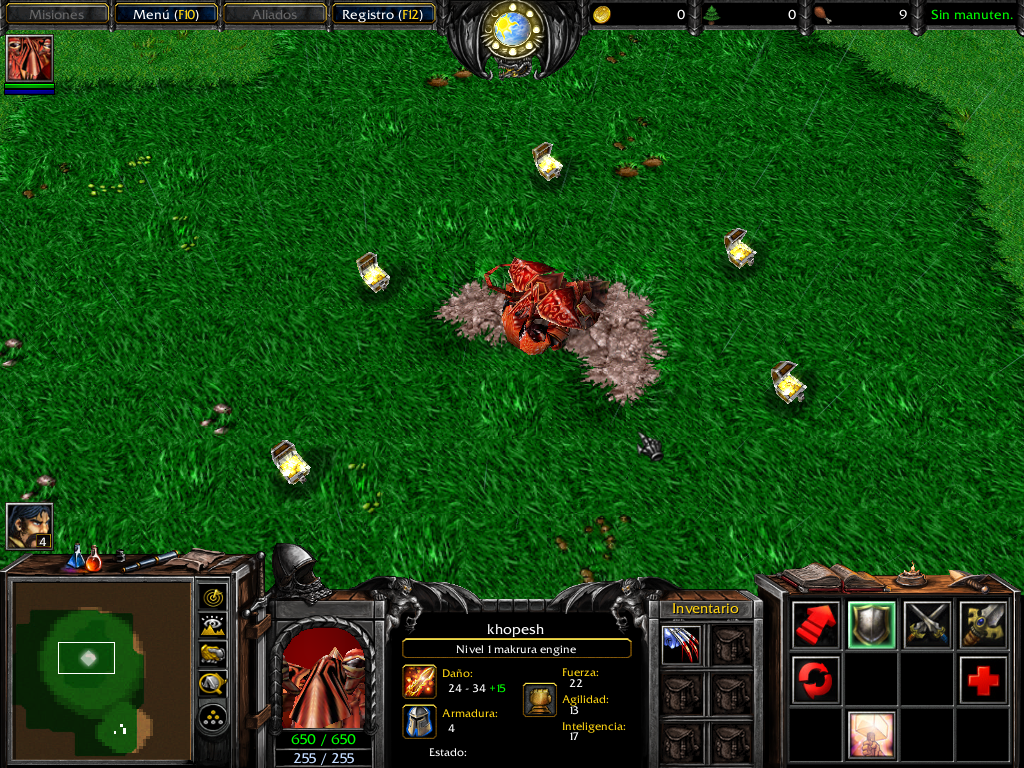
Kul Tiran Custom UI
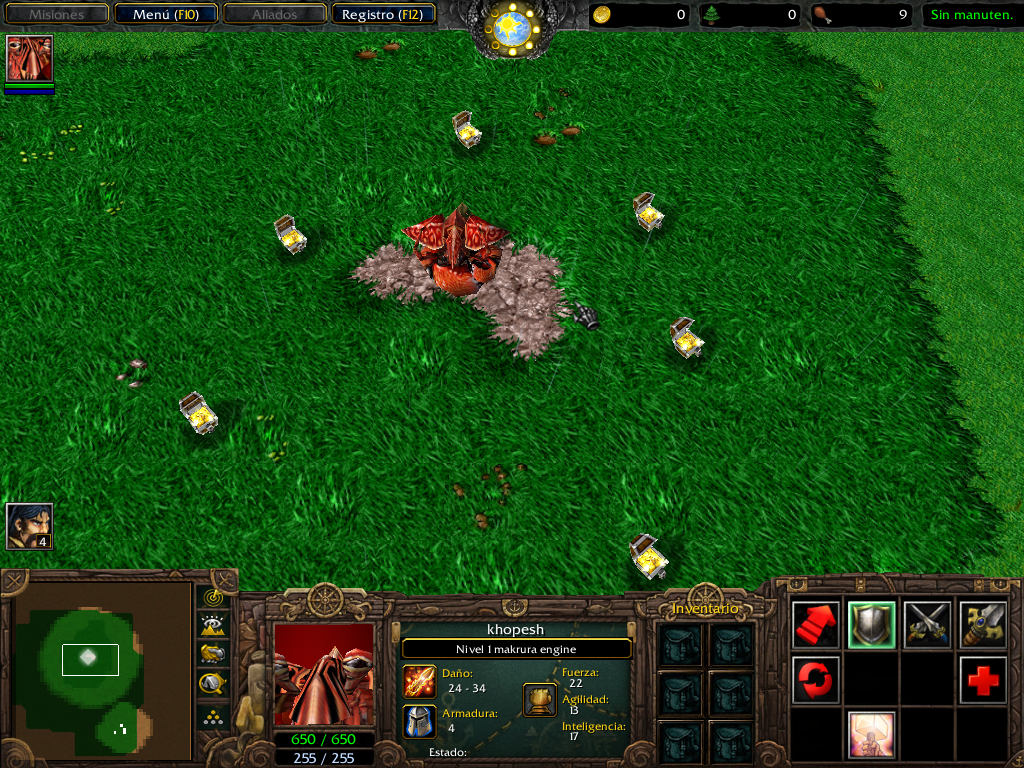
Dungeonmaster UI
Kul Tiran Custom UI
Last edited:

